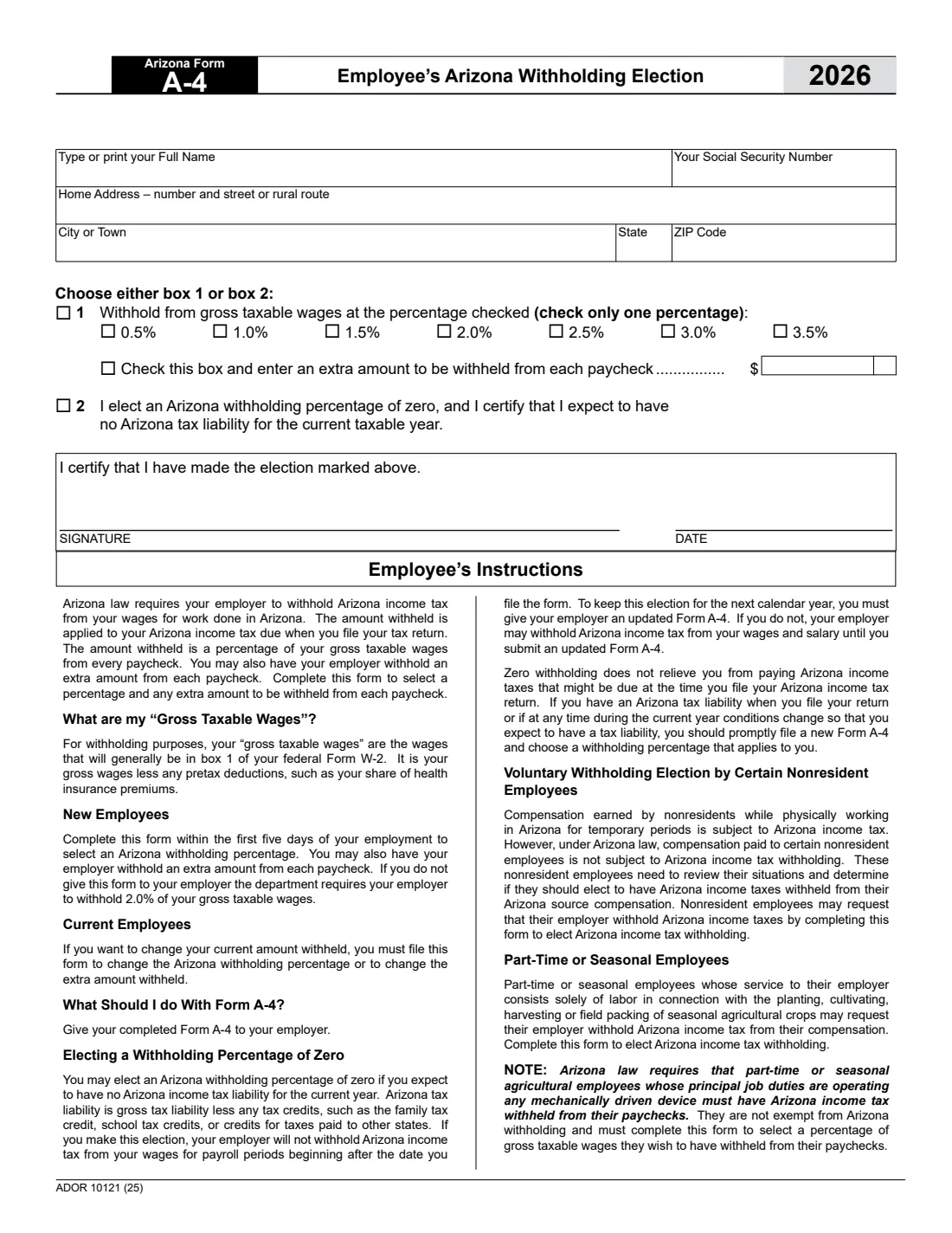
What is Arizona Form A-4?
Arizona Form A-4, the Employee's Arizona Withholding Election, works differently from most state withholding certificates. Instead of counting allowances or exemptions, you simply pick a percentage of your gross taxable wages to be withheld for Arizona income tax — from 0.5% up to 3.5% on the 2026 form — and, if you like, an extra dollar amount from each paycheck. If you expect to owe no Arizona tax at all, you can elect a withholding percentage of zero instead.
The A-4 is issued by the Arizona Department of Revenue (ADOR). The form says that new employees should complete it within the first five days of employment, and that if you don't give it to your employer, the department requires your employer to withhold 2.0% of your gross taxable wages. Choosing a percentage that matches your expected tax helps you avoid a large bill, or a large refund, when you file.
With FileIt you can fill out the A-4 online in a guided form. FileIt pre-fills your name from the People records in your vault, makes sure you choose box 1 or box 2 and only one percentage, and prints your answers — including the signing date — into ADOR's own fillable PDF. The finished form is saved in your vault folder and can be sent for e-signature. FileIt never submits it anywhere: you give the completed A-4 to your employer yourself.
- Who fills it
- The employee.
- Given to
- Your employer. The form says: give your completed Form A-4 to your employer.
- When
- Within the first five days of a new job, whenever you want to change your percentage or extra amount, and each year to keep a zero election.
- Signatures
- The employee signs and dates it, certifying the election marked.
- Choices
- 0.5%, 1.0%, 1.5%, 2.0%, 2.5%, 3.0% or 3.5% of gross taxable wages, plus an optional extra amount — or zero.
- Cost
- Free to fill out on any FileIt account.
Who needs to fill out Arizona Form A-4?
- New employees working in Arizona, whose employer withholds Arizona income tax from wages for work done in the state.
- Current employees who want to change their Arizona withholding percentage or the extra amount withheld.
- Employees who expect to have no Arizona income tax liability for the year and want to elect a withholding percentage of zero.
- Certain nonresident employees working in Arizona temporarily whose pay isn't automatically subject to Arizona withholding, who can use the A-4 to elect it.
- Part-time or seasonal agricultural workers who want Arizona tax withheld — and those whose main duties involve operating mechanically driven devices, who the form says must choose a percentage.
When to use Arizona Form A-4
- Within the first five days of starting a job in Arizona.
- Whenever your income or tax situation changes and your current percentage no longer fits — a raise, a second job, a spouse starting work or new credits.
- Every year if you want to keep a zero election. The form says you must give your employer an updated A-4 to keep it for the next calendar year.
- Promptly, if you elected zero but now expect to owe Arizona tax for the year.
- When you reach the end of a year with a large balance due or a large refund and want next year's withholding to be closer.
What you need before you start
- Your full name and Social Security number.
- Your home address, city or town, state and ZIP code.
- A rough idea of your expected Arizona income tax for the year, to choose a sensible percentage.
- Your gross taxable wages per paycheck — generally what ends up in box 1 of your federal Form W-2, meaning gross pay less pretax deductions such as your share of health insurance premiums.
- Any extra dollar amount you want withheld from each paycheck.
- Last year's Arizona return, if you are considering the zero election and want to check your liability after credits.
What’s on Arizona Form A-4
The 2026 edition has 1 page. FileIt asks for it in 2 parts, and it is signed by Employee:
- Your detailsEmployee
- Choose either box 1 or box 2Employee
How to fill out Arizona Form A-4, step by step
1 Your name, Social Security number and home address
Type or print your full name, your Social Security number, and your home address — number and street or rural route, city or town, state and ZIP code. These let your employer match the election to your payroll record.
2 Box 1 — Withhold at a percentage
Tick box 1 and choose exactly one percentage: 0.5%, 1.0%, 1.5%, 2.0%, 2.5%, 3.0% or 3.5%. Your employer withholds that share of your gross taxable wages from every paycheck. "Gross taxable wages" are the wages that will generally be in box 1 of your federal Form W-2: gross wages less pretax deductions such as your share of health insurance premiums.
The form doesn't include a table for choosing, so compare the percentage against your expected Arizona tax. Remember that 2.0% is what your employer must withhold if you don't hand in an A-4 at all.
3 Extra amount from each paycheck
Still under box 1, you can tick the box and enter an extra dollar amount to be withheld from each paycheck on top of the percentage. This is handy if you have other income with no withholding. FileIt prints the dollars and cents in the form's two boxes.
4 Box 2 — Elect a withholding percentage of zero
Tick box 2 instead of box 1 only if you expect to have no Arizona tax liability for the current year. The form defines Arizona tax liability as gross tax liability less tax credits, such as the family tax credit, school tax credits, or credits for taxes paid to other states. Your employer then stops withholding for payroll periods beginning after the date you file the form.
Zero withholding doesn't relieve you from paying any Arizona tax due when you file. If your situation changes during the year so that you expect a liability, the form says to promptly file a new A-4 and choose a percentage.
5 Nonresident and seasonal employees
Some nonresident employees working in Arizona temporarily are not subject to Arizona withholding under state law, even though their pay may still be subject to Arizona income tax. The form suggests they review their situation and, if they want tax withheld, use the A-4 to elect it.
Part-time or seasonal workers whose work is solely planting, cultivating, harvesting or field packing seasonal crops may also ask for withholding with the A-4. Those whose principal duties involve operating any mechanically driven device must have Arizona tax withheld and must choose a percentage.
6 Signature and date
Sign and date the form to certify that you have made the election marked. FileIt prints the date on the DATE line, and you can sign by hand or by e-signature.
Common mistakes to avoid
- Ticking both box 1 and box 2. The form says choose either box 1 or box 2.
- Choosing more than one percentage — check only one.
- Electing zero because last year's refund was large, even though you expect to owe tax this year. Zero is only for no expected Arizona tax liability.
- Forgetting that a zero election must be renewed with an updated A-4 for each new calendar year.
- Ticking the extra-amount box without entering an amount, or entering an amount without ticking the box.
- Missing the first-five-days window as a new employee and ending up at the default 2.0% without meaning to.
- Assuming gross taxable wages means your full salary. Pretax deductions come off first.
After you fill it out
Sign and date the A-4 and give it to your employer. You don't send it to the Department of Revenue. FileIt keeps a copy in the person's vault folder, and you can send the PDF for e-signature if your employer accepts that.
Your employer applies the percentage to each paycheck. If you elected zero, withholding stops for payroll periods beginning after the date you file the form.
Check your election each year, and file a new A-4 whenever you want a different percentage or extra amount. FileIt keeps your answers, so a new election takes a minute.
Fill out Arizona Form A-4 online with FileIt
- Pick the person. Choose someone from People and FileIt fills in their name, date of birth, address and other details it already knows.
- Answer plain-language questions. One part of the form at a time, with the official help text beside each question — 13 fields in all. Your answers save as you go.
- Check the live preview. Watch your answers land on the real Arizona Department of Revenue (ADOR) form, and let FileIt do any worksheet arithmetic.
- Generate the official PDF. FileIt prints your answers into the agency’s own PDF and files it in that person’s folder in your vault. Sign it, or send it for e-signature.
FileIt fills the form — it never files or submits anything for you. Deliver the finished form to whoever asked for it, the way the form’s instructions say.
Start Arizona Form A-4 now — it’s freeArizona Form A-4: frequently asked questions
What percentage should I choose on the Arizona A-4?
Pick the percentage closest to your expected Arizona income tax as a share of your gross taxable wages. The 2026 form offers 0.5% to 3.5%. If you have other income or want extra, add an amount per paycheck. The form itself doesn't recommend a percentage for you.
What happens if I don't fill out an A-4?
The form says the department requires your employer to withhold 2.0% of your gross taxable wages if you don't give it an A-4.
Can I have zero Arizona tax withheld?
Yes, if you expect no Arizona tax liability for the year (gross tax less credits). Tick box 2. You must give your employer an updated A-4 to keep the zero election for the next calendar year.
Is the A-4 the same as the federal W-4?
No. The W-4 sets federal income tax withholding; the A-4 sets Arizona withholding, and it uses a percentage of wages rather than dependents and deductions. New employees in Arizona usually fill out both.
What are gross taxable wages?
For withholding purposes, the form says they are the wages that will generally be in box 1 of your federal Form W-2 — gross wages less pretax deductions such as your share of health insurance premiums.
Can I fill out Form A-4 online?
Yes. FileIt guides you through the A-4, checks that you've chosen one box and one percentage, and prints your answers into ADOR's official PDF, ready to sign and hand to your employer.
Where do I send Form A-4?
Give it to your employer. The form doesn't ask you to send it to the Department of Revenue.
How often can I change my A-4?
The form says current employees who want to change the percentage or extra amount must file a new A-4. There's no limit printed on how often you may do that.
Official sources
- Blank form (PDF), published by Arizona Department of Revenue (ADOR): https://azdor.gov/sites/default/files/document/FORMS_WITHHOLDING_2026_A-4_f.pdf
- Official instructions and guidance: https://azdor.gov/forms/withholding-forms/arizona-withholding-percentage-election
- Edition shown on this page: 2026 (ADOR 10121 (25)) (checked 2026-09-26).
FileIt is not affiliated with or endorsed by Arizona Department of Revenue (ADOR) or any government. This page explains the form in general terms and is not legal, tax or immigration advice. Always read the official instructions, and check that you are using the edition the recipient accepts. Page last reviewed 2026-09-26.