What is KS10 KiwiSaver opt-out request?
When you start a new job in New Zealand and you're aged 18 to 65, your employer must usually enrol you in KiwiSaver automatically. If you don't want to be a member, the KS10 opt-out request lets you leave. You can't opt out in the first 13 days: you opt out on or after day 14 and on or before day 56 of starting the job, and every time you start a new job you need to opt out again.
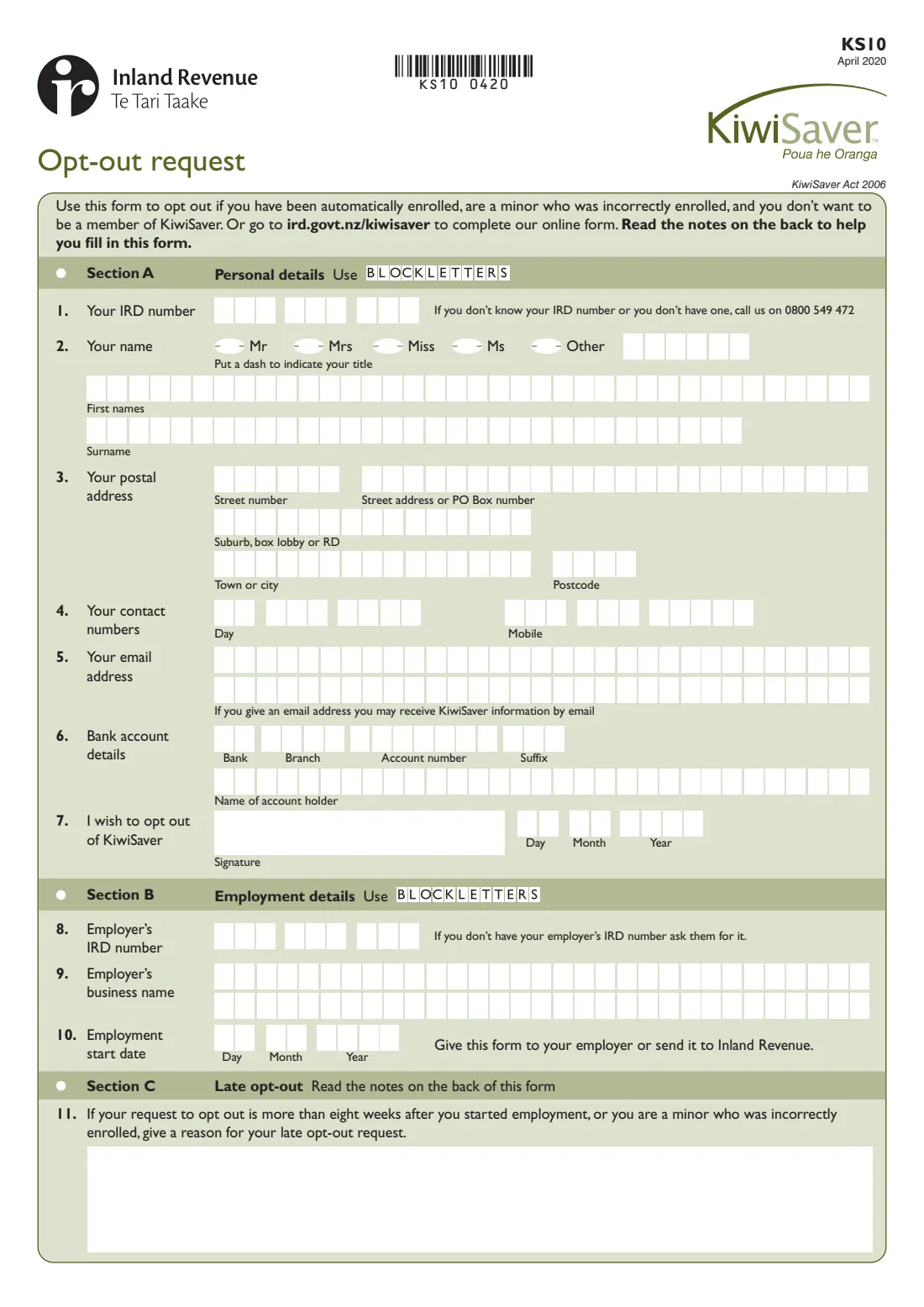
The form has three sections: your personal details (including a bank account so Inland Revenue can direct credit any KiwiSaver money it holds for you), your employment details, and a late opt-out section for requests made more than eight weeks after you started or by minors who were incorrectly enrolled. You can give it to your employer, who can stop deductions straight away, or send it to Inland Revenue. Inland Revenue also has an online opt-out.
FileIt fills in Inland Revenue's own KS10 PDF from a guided form. It places 8-digit IRD numbers from the second box, prints names with macrons or accents correctly, checks your dates against the day 14 and eight-week rules, and saves the completed form to your FileIt vault.
- Who fills it
- The employee who was automatically enrolled (or a minor incorrectly enrolled)
- Given to
- Your employer, or Inland Revenue
- When
- On or after day 14 and on or before day 56 of starting a new job
- Late opt-out
- Possible in set cases — Section C, received within three months of Inland Revenue getting your first contribution
- Signatures
- The employee signs and dates question 7
- Edition
- KS10 April 2020
Who needs to fill out KS10 KiwiSaver opt-out request?
- New employees who were automatically enrolled in KiwiSaver by their employer and don't want to be members.
- People who were enrolled in KiwiSaver under 18 without the consent they needed — under-16s need a parent's or legal guardian's consent to opt out.
- It isn't for people who chose to opt in, or who joined directly with a KiwiSaver provider — they can't opt out, but may be able to take a savings suspension.
- It isn't for members who have reached 65 and want to stop deductions — that's the KS51 non-deduction notice.
When to use KS10 KiwiSaver opt-out request
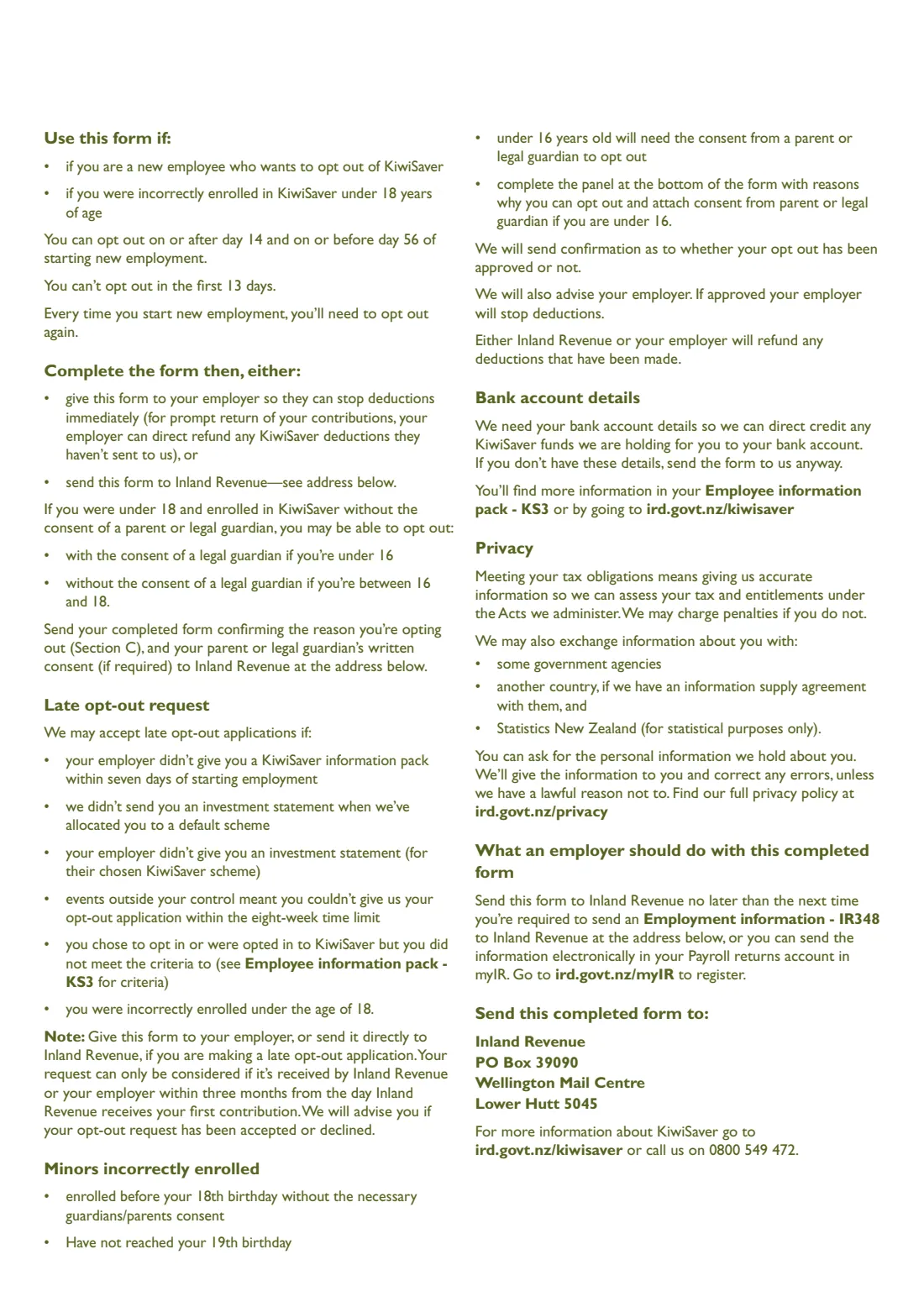
- Between the end of week 2 and week 8 of a new job: on or after day 14, and on or before day 56. You can't opt out in the first 13 days.
- Every time you start new employment and are automatically enrolled again.
- After eight weeks only if a late opt-out reason applies: your employer didn't give you the KiwiSaver information pack (KS3) within seven days, you weren't given an investment statement, events outside your control stopped you, you opted in without meeting the criteria, or you were incorrectly enrolled under 18.
What you need before you start
- Your IRD number (8 or 9 digits). If you don't know it, the form gives Inland Revenue's number, 0800 549 472.
- Your title, full first names, surname and postal address.
- Daytime and mobile phone numbers, and an email address if you'd like KiwiSaver information by email.
- Your bank account number and the account holder's name, so any KiwiSaver funds can be direct credited to you (send the form anyway if you don't have them).
- Your employer's IRD number and business name — ask your employer if you don't have the IRD number.
- Your employment start date.
- For a late opt-out: the reason, and for under-16s, a parent's or legal guardian's written consent.
What’s on KS10 KiwiSaver opt-out request
The 2020 edition has 2 pages. FileIt asks for it in 3 parts, and it is signed by Employee:
- Section A: Personal detailsEmployee
- Section B: Employment detailsEmployee
- Section C: Late opt-outEmployee
How to fill out KS10 KiwiSaver opt-out request, step by step
1 Section A: Personal details
Enter your IRD number, title, first names and surname, postal address, contact numbers and optional email address in block letters. Add your bank account (bank, branch, account number and suffix) and the account holder's name so Inland Revenue can direct credit any KiwiSaver funds it holds for you. Question 7 is where you sign and date the request to opt out.
2 Section B: Employment details
Give your employer's IRD number, their business name and the date you started the job. The start date is what the day 14 to day 56 opt-out window is counted from.
3 Section C: Late opt-out
Only if your request is more than eight weeks after you started, or you're a minor who was incorrectly enrolled. Explain which late opt-out reason applies. Inland Revenue can only consider a late request received within three months from the day it receives your first contribution, and will tell you whether it's accepted or declined.
Common mistakes to avoid
- Opting out too early. You can't opt out in the first 13 days of a job.
- Leaving it past day 56 without a reason. After eight weeks you need a late opt-out reason in Section C.
- Assuming one opt-out covers future jobs. Every time you start new employment you need to opt out again.
- Using the KS10 after choosing to opt in or joining directly with a provider — you can't opt out in those cases.
- Leaving out the bank account. Without it, refunds can't be direct credited — though the form says to send it anyway if you don't have the details.
- Forgetting parental consent for an under-16 opting out after being incorrectly enrolled.
After you fill it out
Sign and date question 7, by hand or with FileIt's optional e-signature. Give the form to your employer so they can stop deductions immediately, or send it to Inland Revenue, PO Box 39090, Wellington Mail Centre, Lower Hutt 5045.
Your employer sends the form on to Inland Revenue. Either Inland Revenue or your employer refunds any deductions that have been made; Inland Revenue confirms whether a late or minor's opt-out has been approved and tells your employer.
FileIt keeps the completed PDF in your vault, so you have proof of when you opted out if you ever need to show it.
Fill out KS10 KiwiSaver opt-out request online with FileIt
- Pick the person. Choose someone from People and FileIt fills in their name, date of birth, address and other details it already knows.
- Answer plain-language questions. One part of the form at a time, with the official help text beside each question — 25 fields in all. Your answers save as you go.
- Check the live preview. Watch your answers land on the real Inland Revenue (Te Tari Taake) form, and let FileIt do any worksheet arithmetic.
- Generate the official PDF. FileIt prints your answers into the agency’s own PDF and files it in that person’s folder in your vault. Sign it, or send it for e-signature.
FileIt fills the form — it never files or submits anything for you. Deliver the finished form to whoever asked for it, the way the form’s instructions say.
Start KS10 KiwiSaver opt-out request now — it’s freeKS10 KiwiSaver opt-out request: frequently asked questions
What is the KS10 form?
The KS10 is Inland Revenue's KiwiSaver opt-out request. You use it to leave KiwiSaver after being automatically enrolled when you started a new job, or if you were incorrectly enrolled as a minor.
When can I opt out of KiwiSaver?
On or after day 14 and on or before day 56 of starting new employment. You can't opt out in the first 13 days.
Can I opt out after eight weeks?
Only in set cases — for example if your employer didn't give you the KiwiSaver information pack within seven days, or events outside your control stopped you. Fill in Section C with the reason; Inland Revenue must receive the request within three months of getting your first contribution.
Who do I give the KS10 to?
Either your employer, so they can stop deductions immediately, or Inland Revenue at PO Box 39090, Wellington Mail Centre, Lower Hutt 5045. You can also opt out online.
Will I get my contributions back?
Yes. Either Inland Revenue or your employer refunds any deductions that have been made. Give your bank account details so Inland Revenue can direct credit any KiwiSaver funds it holds for you.
Can I opt out if I chose to join KiwiSaver?
No. If you opted in, or joined directly with a KiwiSaver provider, you can't opt out, but you might be able to take a savings suspension.
Can I fill in the KS10 online?
Yes. FileIt guides you through the questions and prints your answers into Inland Revenue's official KS10 PDF, ready to sign and hand in.
Official sources
- Blank form (PDF), published by Inland Revenue (Te Tari Taake): https://www.ird.govt.nz/-/media/project/ir/home/documents/forms-and-guides/ir1---ir99/ks10/ks10-2020.pdf
- Official instructions and guidance: https://www.ird.govt.nz/kiwisaver/kiwisaver-individuals/opting-out-of-kiwisaver
- Edition shown on this page: KS10 April 2020 (checked 2026-09-28).
FileIt is not affiliated with or endorsed by Inland Revenue (Te Tari Taake) or any government. This page explains the form in general terms and is not legal, tax or immigration advice. Always read the official instructions, and check that you are using the edition the recipient accepts. Page last reviewed 2026-09-28.