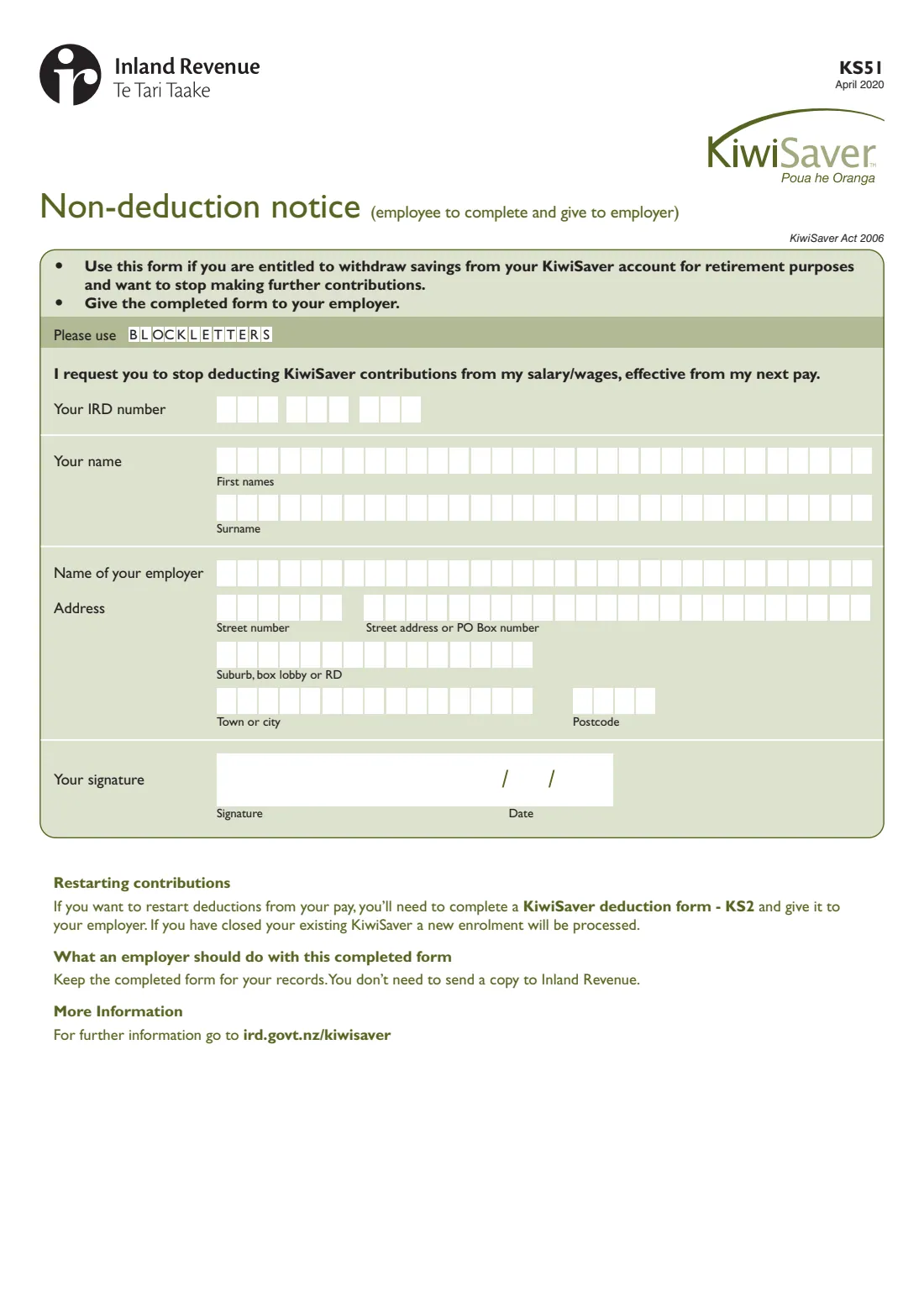
What is KS51 KiwiSaver non-deduction notice?
The KS51 non-deduction notice is for KiwiSaver members who are entitled to withdraw their KiwiSaver savings for retirement purposes and want to stop making further contributions from their pay. Inland Revenue says you're eligible to withdraw when you reach the age of eligibility, currently 65. By signing the notice you ask your employer to stop deducting KiwiSaver contributions from your salary or wages, effective from your next pay.
The form is short: your IRD number, your name, your employer's name, your address, and your signature and date. You give it to your employer — they keep it for their records and don't need to send a copy to Inland Revenue. Inland Revenue's guidance adds that your employer will also stop making employer contributions.
FileIt fills in Inland Revenue's own KS51 PDF from a short guided form. Your name can be pre-filled from your People records, an 8-digit IRD number is placed from the second box, names with macrons or accents print correctly, and the completed notice is saved to your FileIt vault.
- Who fills it
- The employee (KiwiSaver member)
- Given to
- Your employer — they keep it and don't send it to Inland Revenue
- When
- Once you're entitled to withdraw your KiwiSaver savings for retirement (currently at 65)
- Effect
- KiwiSaver deductions stop from your next pay
- Signatures
- The employee signs and dates it
- Edition
- KS51 April 2020
Who needs to fill out KS51 KiwiSaver non-deduction notice?
- Employees who are KiwiSaver members, have reached the age of eligibility to withdraw (currently 65), and want to stop contributing from their pay.
- Anyone past 65 who is still working and would rather keep more of each pay than keep saving into KiwiSaver.
- It isn't for opting out after automatic enrolment in a new job — that's the KS10 opt-out request.
- It isn't for younger members who want a break from saving — they may be able to take a savings suspension instead.
When to use KS51 KiwiSaver non-deduction notice
- When you're entitled to withdraw your KiwiSaver savings for retirement and want your employer to stop deducting contributions.
- Deductions stop from your next pay after your employer receives the notice.
- If you want to restart deductions later, the form says to fill in a KiwiSaver deduction form (KS2) and give it to your employer. If you have closed your KiwiSaver account, a new enrolment will be processed.
What you need before you start
- Your IRD number (8 or 9 digits).
- Your first names and surname.
- The name of your employer.
- Your address — street number and street or PO Box, suburb, box lobby or RD, town or city and postcode.
What’s on KS51 KiwiSaver non-deduction notice
The 2020 edition has 1 page. FileIt asks for it in 1 parts, and it is signed by Employee:
- Non-deduction noticeEmployee
How to fill out KS51 KiwiSaver non-deduction notice, step by step
1 Your details
Enter your IRD number, then your first names and surname in block letters, one letter per box. An 8-digit IRD number starts in the second box — FileIt places it for you.
2 Your employer and address
Give the name of the employer who deducts KiwiSaver from your pay, and your address: street number, street address or PO Box number, suburb, box lobby or RD, town or city and postcode.
3 Sign and date
The form's request reads: "I request you to stop deducting KiwiSaver contributions from my salary/wages, effective from my next pay." Sign and date it, then give it to your employer.
Common mistakes to avoid
- Sending the KS51 to Inland Revenue. It goes to your employer, who keeps it for their records.
- Using it before you're entitled to withdraw your savings for retirement — the form is only for members who are.
- Confusing it with the KS10 opt-out request, which is for new employees who were automatically enrolled.
- Expecting it to withdraw your savings. It only stops deductions from pay — to withdraw your KiwiSaver savings, you contact your KiwiSaver provider.
- Forgetting you can restart. If you change your mind, give your employer a KS2 KiwiSaver deduction form.
After you fill it out
Sign and date the notice, by hand or with FileIt's optional e-signature, and give it to your employer. Deductions stop from your next pay.
Your employer keeps the completed form for their records; they don't need to send a copy to Inland Revenue.
FileIt keeps the completed PDF in your vault, so you have a record of when you asked for deductions to stop. To withdraw your savings, contact your KiwiSaver provider.
Fill out KS51 KiwiSaver non-deduction notice online with FileIt
- Pick the person. Choose someone from People and FileIt fills in their name, date of birth, address and other details it already knows.
- Answer plain-language questions. One part of the form at a time, with the official help text beside each question — 10 fields in all. Your answers save as you go.
- Check the live preview. Watch your answers land on the real Inland Revenue (Te Tari Taake) form, and let FileIt do any worksheet arithmetic.
- Generate the official PDF. FileIt prints your answers into the agency’s own PDF and files it in that person’s folder in your vault. Sign it, or send it for e-signature.
FileIt fills the form — it never files or submits anything for you. Deliver the finished form to whoever asked for it, the way the form’s instructions say.
Start KS51 KiwiSaver non-deduction notice now — it’s freeKS51 KiwiSaver non-deduction notice: frequently asked questions
What is the KS51 form?
The KS51 is Inland Revenue's KiwiSaver non-deduction notice. You give it to your employer to stop KiwiSaver deductions from your pay once you're entitled to withdraw your KiwiSaver savings for retirement purposes.
Who can use the KS51?
KiwiSaver members who are entitled to withdraw their savings for retirement — Inland Revenue says that is currently at age 65 — and who want to stop contributing from their salary or wages.
Where do I send the KS51?
Give it to your employer. The form tells employers to keep it for their records; they don't need to send a copy to Inland Revenue.
When do KiwiSaver deductions stop?
The notice asks your employer to stop deductions effective from your next pay.
Does the KS51 withdraw my KiwiSaver savings?
No. It only stops contributions from your pay. To withdraw your savings, Inland Revenue says to contact your KiwiSaver provider.
Can I start contributing again later?
Yes. Fill in a KiwiSaver deduction form (KS2) and give it to your employer. If you've closed your KiwiSaver account, a new enrolment will be processed.
Can I fill in the KS51 online?
Yes. FileIt guides you through the questions and prints your answers into Inland Revenue's official KS51 PDF, which you can sign by hand or with FileIt's optional e-signature.
Official sources
- Blank form (PDF), published by Inland Revenue (Te Tari Taake): https://www.ird.govt.nz/-/media/project/ir/home/documents/forms-and-guides/ir1---ir99/ks51/ks51-2020.pdf
- Official instructions and guidance: https://www.ird.govt.nz/kiwisaver/kiwisaver-individuals/getting-my-kiwisaver-when-i-retire
- Edition shown on this page: KS51 April 2020 (checked 2026-09-28).
FileIt is not affiliated with or endorsed by Inland Revenue (Te Tari Taake) or any government. This page explains the form in general terms and is not legal, tax or immigration advice. Always read the official instructions, and check that you are using the edition the recipient accepts. Page last reviewed 2026-09-28.