What is Jobsplus engagement form (new employee)?
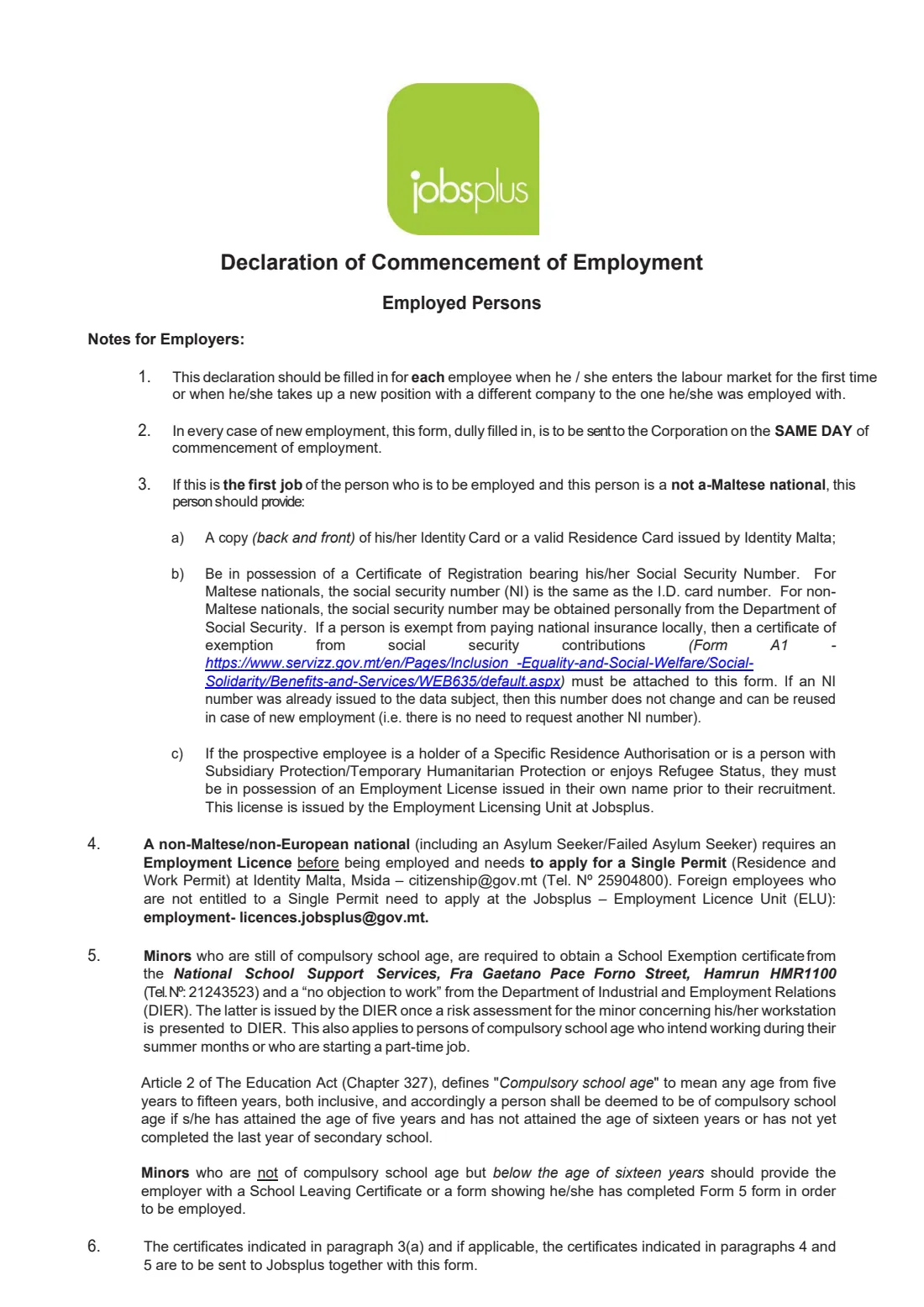
The Engagement Form – Employee, titled 'Declaration of Commencement of Employment – Employed Persons', is how an employer in Malta notifies Jobsplus, the national public employment service, that it has taken someone on. The Employment and Training Services Act (Cap. 594) requires every employer who employs a person, whether full-time, part-time, on a definite or indefinite contract or on probation, to notify Jobsplus. The form's notes ask for it on the same day the employment starts, and a Jobsplus policy note of July 2025 says engagement forms must be submitted no later than four working days from the start date.
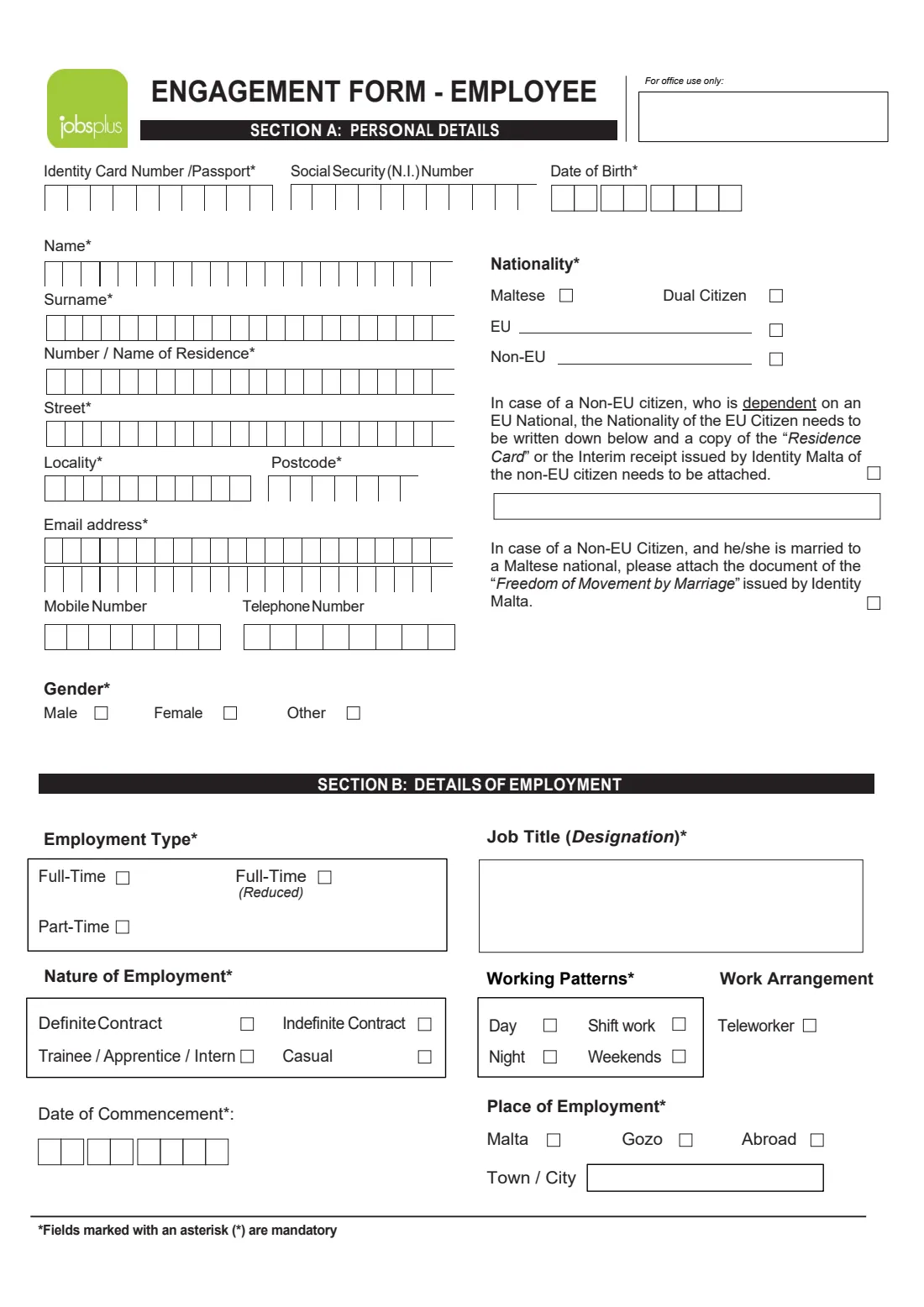
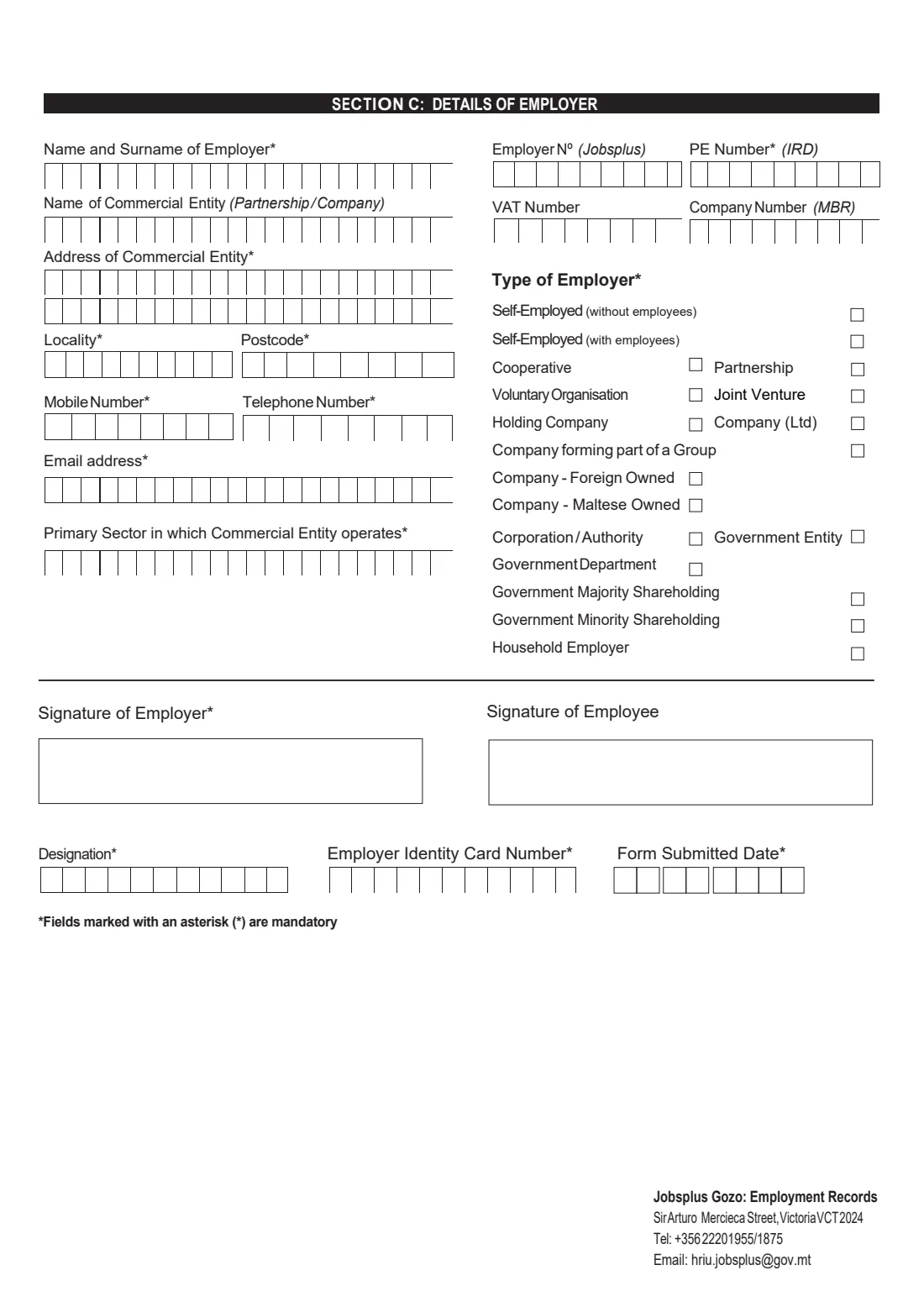
The form has three sections: A, the employee's personal details (ID card or passport, social security number, date of birth, address, contact details, gender and nationality); B, the details of the employment (employment type, nature of the contract, start date, job title, working pattern and place of work); and C, the employer's details (name, entity, address, contacts, sector, Jobsplus employer number, PE number, VAT and company numbers and type of employer). Both the employer and the employee sign. The notes on the first two pages explain the terms and list the certificates some employees need, such as for minors and non-EU nationals.
FileIt lets you fill it in as guided questions and prints each answer into the right boxes of the official Jobsplus PDF, letter by letter, in capitals where the form expects them. The employee's name, date of birth and email can be pre-filled from the People records in your FileIt vault, and the employer's name from their entity. The finished form is saved in your vault and can be sent to the employer and employee for e-signature. Jobsplus also takes engagement forms online through its own employer service; FileIt never submits anything, so you send the form to Jobsplus yourself.
- Who fills it
- The employer, with details taken first-hand from the new employee
- Sent to
- Jobsplus (the form's notes give [email protected]); Jobsplus also accepts it through its online employer service
- When
- On the day employment starts (form notes); no later than four working days after it (Jobsplus policy note, July 2025)
- Signatures
- Employer and employee
- Law
- Employment and Training Services Act, Cap. 594
- Pages
- 2 pages of notes and a 2-page form
Who needs to fill out Jobsplus engagement form (new employee)?
- Employers in Malta and Gozo taking on a new employee, whether full-time, reduced full-time or part-time.
- Employers hiring someone who is entering the labour market for the first time.
- Employers hiring someone who is moving from a different employer.
- Household employers hiring a nanny or a carer for their personal and domestic needs.
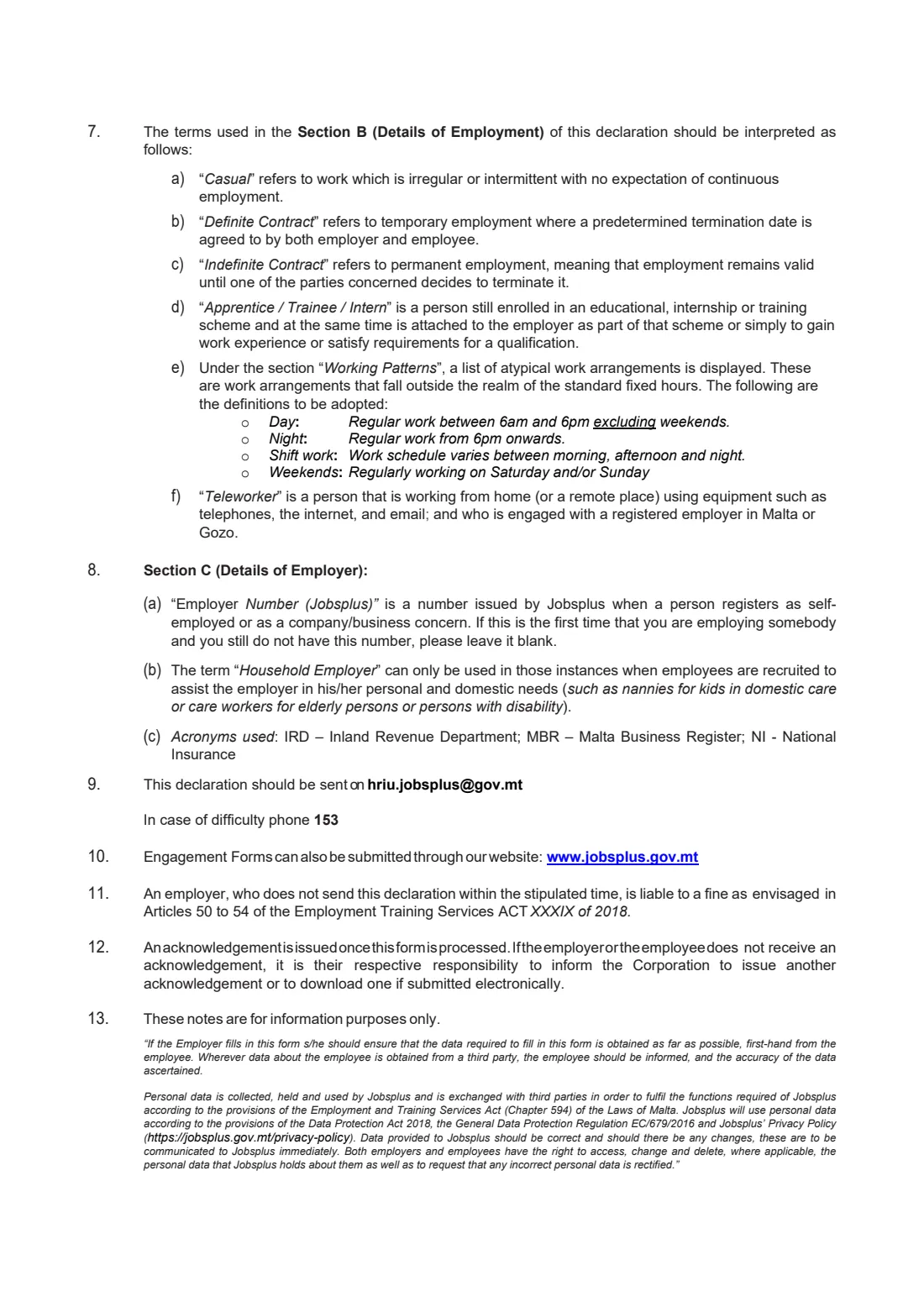
- Employers taking on apprentices, trainees, interns or casual workers.
- Employers of non-Maltese nationals, who may also need to attach identity documents, residence cards or employment licences as the notes explain.
When to use Jobsplus engagement form (new employee)
- On the first day of each new employment, or at the latest within the time Jobsplus sets (four working days, per its July 2025 policy note).
- For every new employee — each engagement gets its own form.
- When an employee moves to you from a different company; it counts as a new engagement.
- The termination form is separate: it is sent within four days after an employment ends.
What you need before you start
- The employee's identity card or passport number and, if they have one, their social security (N.I.) number.
- The employee's date of birth, home address with postcode, email address and phone numbers.
- The employee's gender and nationality; for non-EU nationals, their country and any residence card or 'Freedom of Movement by Marriage' document.
- The start date, job title, employment type, nature of contract, working pattern and place of work.
- The employer's details: the name of the employer, the business name and address, locality, postcode, mobile and landline numbers, email and main sector.
- The employer's Jobsplus employer number (if already issued), PE number, VAT number and company registration number.
- The name, designation and identity card number of the person signing for the employer.
- Certificates the notes require, for example a copy of a first-time non-Maltese employee's ID or residence card, an employment licence, an A1 exemption certificate, or a school exemption certificate for a minor.
What’s on Jobsplus engagement form (new employee)
The 2026 edition has 4 pages. FileIt asks for it in 4 parts, and it is signed by Employer and Employee:
- Section A: Personal details (employee)Employee
- Section B: Details of employmentEmployer
- Section C: Details of employerEmployer
- Signatures and submissionEmployer
How to fill out Jobsplus engagement form (new employee), step by step
1 Section A: Personal details
Enter the employee's identity card or passport number, social security (N.I.) number and date of birth, their name and surname, and their address: number or name of residence, street, locality and postcode. Add their email address and phone numbers, gender and nationality.
For Maltese nationals the social security number is the same as the ID card number. A non-EU citizen who depends on an EU national writes the EU citizen's nationality and attaches a copy of their residence card or Identity Malta's interim receipt; a non-EU citizen married to a Maltese national attaches the 'Freedom of Movement by Marriage' document. The notes ask the employer to take these details first-hand from the employee.
2 Section B: Details of employment
Choose the employment type (full-time, reduced full-time or part-time) and the nature of employment: definite contract (temporary, with an agreed end date), indefinite contract (permanent), trainee / apprentice / intern, or casual (irregular work with no expectation of continuity). Give the date of commencement and the job title.
Tick the working patterns that apply — day (6am to 6pm on weekdays), night, shift work or weekends — and 'Teleworker' if the employee works from home or a remote place. Finish with the place of employment: Malta, Gozo or abroad, and the town or city.
3 Section C: Details of employer
Give the name and surname of the employer, the name of the commercial entity for a partnership or company, its address, locality and postcode, mobile and telephone numbers, email and main sector. Add the Jobsplus employer number (leave it blank if this is your first employee and you don't have one yet), the PE number from the tax administration, the VAT number and the Malta Business Registry company number.
Tick the type of employer, for example Company (Ltd), Company — Maltese owned, Self-employed or Household employer. A household employer is only one who hires help for personal and domestic needs.
4 Signatures, designation and date
The employer and the employee sign in their boxes. Below, give the designation and identity card number of the person signing for the employer and the date the form is submitted.
Common mistakes to avoid
- Sending the form late — the notes ask for the same day, and the Act provides for fines for employers who don't notify.
- Leaving out the certificates the notes require, such as the ID or residence card copy for a first-time non-Maltese employee.
- Employing a non-EU national before they have an employment licence or single permit.
- Ticking 'Household employer' for a business; it's only for help with personal and domestic needs.
- Mixing up the employee's ID number and their social security number for non-Maltese employees, whose numbers differ.
- Forgetting the employee's signature.
- Treating it as a change-of-details form: the notes describe it for someone entering the labour market or taking up a new position with a different company.
After you fill it out
Both the employer and the employee sign the form, by hand or through FileIt's optional e-signature. The employer then sends it to Jobsplus with any required certificates: the notes give [email protected], and Jobsplus also accepts engagement forms through its online employer service. FileIt does not send anything to Jobsplus.
Jobsplus issues an acknowledgement once the form is processed. According to the notes, if the employer or the employee doesn't receive one, it's their responsibility to tell Jobsplus so another can be issued. Keep the acknowledgement with the form: FileIt saves the signed PDF in the employee's folder in your vault.
When the employment ends, the employer notifies Jobsplus again with the termination form within four days.
Fill out Jobsplus engagement form (new employee) online with FileIt
- Pick the person. Choose someone from People and FileIt fills in their name, date of birth, address and other details it already knows.
- Answer plain-language questions. One part of the form at a time, with the official help text beside each question — 64 fields in all. Your answers save as you go.
- Check the live preview. Watch your answers land on the real Jobsplus (Malta's public employment service, formerly ETC) form, and let FileIt do any worksheet arithmetic.
- Generate the official PDF. FileIt prints your answers into the agency’s own PDF and files it in that person’s folder in your vault. Sign it, or send it for e-signature.
FileIt fills the form — it never files or submits anything for you. Deliver the finished form to whoever asked for it, the way the form’s instructions say.
Start Jobsplus engagement form (new employee) now — it’s freeJobsplus engagement form (new employee): frequently asked questions
What is a Jobsplus engagement form?
It's the employer's declaration to Jobsplus that a new employee has started work in Malta. The Employment and Training Services Act (Cap. 594) requires employers to notify Jobsplus of every employment.
When must the engagement form be submitted?
The form's notes say on the same day employment starts. Jobsplus's policy note of July 2025 says no later than four working days from the start date.
Where do I send the engagement form?
To Jobsplus. The notes on the form give [email protected], and Jobsplus also accepts engagement forms online through its employer service.
Who signs the engagement form?
Both the employer and the employee. The employer also gives the signatory's designation and ID card number and the date the form is submitted.
What if I don't have a Jobsplus employer number yet?
The notes say to leave it blank if this is the first time you employ someone and you don't have the number yet.
Is there a different form for self-employed people?
Yes. Self-employed people use the separate self-employed engagement form; this one is for employees.
Can I fill in the Jobsplus engagement form online with FileIt?
Yes, free. FileIt asks the questions, prints the answers into the official Jobsplus PDF and saves it in your vault, with optional e-signature for the employer and employee. You then send it to Jobsplus yourself.
What does a non-EU employee need?
Generally an employment licence before being employed (through a single permit at Identity Malta or Jobsplus's Employment Licence Unit), and the documents the notes list, such as a residence card copy for someone dependent on an EU national.
Official sources
- Blank form (PDF), published by Jobsplus (Malta's public employment service, formerly ETC): https://jobsplus.gov.mt/media/zufim0qq/engagement-form-employee.pdf
- Official instructions and guidance: https://jobsplus.gov.mt/find-candidates/find-candidates-mt-nationals
- Edition shown on this page: No printed edition or date (PDF produced May 2024) (checked 2026-09-26).
FileIt is not affiliated with or endorsed by Jobsplus (Malta's public employment service, formerly ETC) or any government. This page explains the form in general terms and is not legal, tax or immigration advice. Always read the official instructions, and check that you are using the edition the recipient accepts. Page last reviewed 2026-09-26.