What is Form K 35 A (passport)?
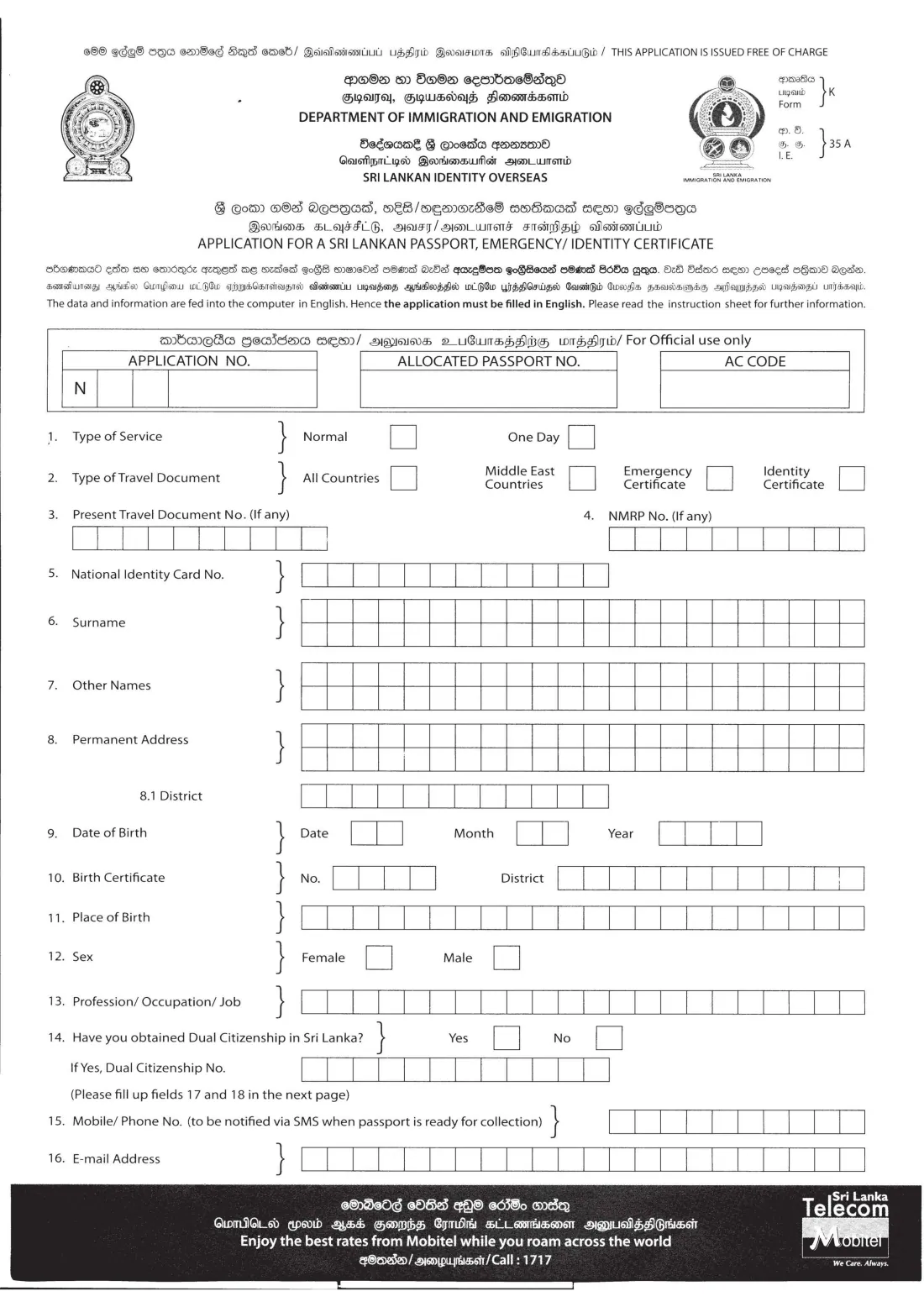
Form K 35 A (also printed as I.E. 35 A) is the Department of Immigration and Emigration's application for a Sri Lankan passport valid for all countries, and for an emergency certificate or identity certificate. The Department's website says all passport applicants, whatever their age, use this form. It is printed in Sinhala, Tamil and English, but the answers must be written in English, because the data is entered into the Department's computer system in English.
The form is strict about layout: one letter in each box, with a blank box between names and words, and names exactly as on your birth certificate. Mistakes in the name or date of birth are awkward to put right once a passport is printed, so it is worth taking care over the first page.
FileIt guides you through Form K 35 A question by question in plain English and prints your answers in capitals into the right boxes of the Department's own PDF, splitting long names and addresses between words across the two rows of boxes. Your name, date of birth and email can be pre-filled from the People records in your FileIt vault, and the finished PDF is saved in your vault. FileIt doesn't submit anything: you print the form, sign it by hand and hand it in yourself.
- Who fills it
- Any Sri Lankan citizen applying for a passport, emergency certificate or identity certificate, including children (a parent or guardian completes it for a child)
- Given to
- The Department of Immigration and Emigration (Head Office in Battaramulla or a Regional Office), or a Sri Lankan mission overseas
- When
- For a first passport, a new passport, or a replacement for a lost one
- Signatures
- Signed by hand inside two signature boxes and under the declaration; the applicant comes in person
- Language
- Answers in English, one letter per box
- Edition
- Form K 35 A as published by the Department (no revision date printed)
Who needs to fill out Form K 35 A (passport)?
- Sri Lankan citizens applying for their first passport.
- Anyone replacing an existing passport, including one that has been lost or stolen.
- Parents or guardians applying for a child under 16. The Department's website says children are no longer included in a parent's passport and need their own.
- Dual citizens of Sri Lanka applying for a Sri Lankan passport, who also fill in the foreign nationality and foreign passport boxes.
- Travellers who need an emergency certificate for India and Nepal, which the instruction sheet mentions for Buddhist pilgrims.
- Sri Lankans abroad applying through a Sri Lankan embassy, high commission or consulate.
When to use Form K 35 A (passport)
- When you need a passport for the first time.
- When your passport is about to expire or has expired and you need a new one.
- When your passport has been lost or stolen: bring the police complaint, or the temporary travel document you arrived on if it was lost abroad.
- For a child under 16, whose passport is issued separately from the parents'.
- When you have become a dual citizen and want a Sri Lankan passport.
What you need before you start
- Your original birth certificate and a photocopy (its number, district and place of birth go on the form).
- Your National Identity Card and a photocopy, if you are over 16.
- Your current passport, if you have one, with a photocopy of the bio-data page.
- A marriage certificate and photocopy if you are applying in a married name.
- Educational or professional certificates and a service certificate, with photocopies, for the profession you give.
- The acknowledgement note from an authorised photo studio (the Department no longer accepts printed photographs).
- For dual citizens: the dual citizenship certificate and a copy of your foreign passport.
- For a child: both parents' passports or NIC cards with photocopies, and their letters of consent.
What’s on Form K 35 A (passport)
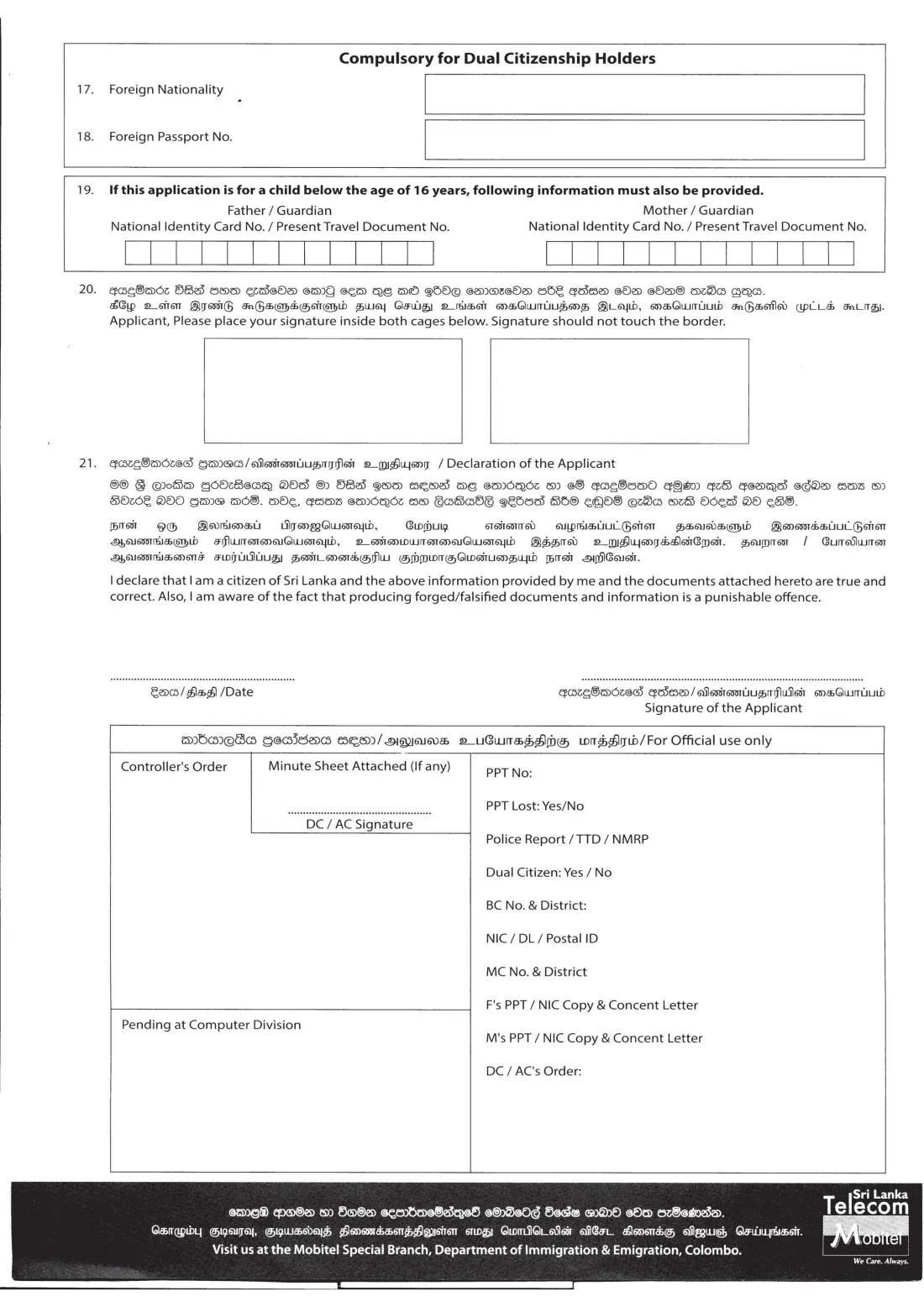
The 2026 edition has 2 pages. FileIt asks for it in 5 parts:
- 1–4. Service, travel document and previous documentsApplicant
- 5–13. The applicantApplicant
- 14–18. Dual citizenship, contact details, foreign nationalityApplicant
- 19. Child under 16 — parents or guardiansApplicant
- 20–21. Signature and declarationApplicant
How to fill out Form K 35 A (passport), step by step
1 1–2. Type of service and travel document
Tick normal or one-day service. The Department's website says the one-day service is available only at the Head Office. Then choose the document: a passport for all countries, an emergency certificate or an identity certificate.
The form also shows a "Middle East Countries" box, but it is blacked out on the Department's current instruction sheet, so FileIt doesn't offer it.
2 3–5. Present travel document, NMRP and National Identity Card
Give the number of your last passport or certificate if you have one (first-time applicants leave it blank). The NMRP box is only for someone who arrived in Sri Lanka on a non-machine-readable passport issued by a Sri Lankan mission abroad.
Item 5 is your National Identity Card number. The instruction sheet asks everyone over 16 to produce their NIC. FileIt checks that a 12-digit NIC begins with your year of birth.
3 6–7. Surname and other names
Write your surname (family name) in item 6 and the rest of your full name in item 7, as in your birth certificate. One letter per box, with a blank box between names. A married woman applying in her husband's name writes that name and brings the marriage certificate.
FileIt prints names in capitals and splits them between words over the two rows of 22 boxes. It warns you if a name is too long to fit.
4 8. Permanent address and district
Give your address of residence in Sri Lanka over the two rows, and the district it is in. If it is too long, abbreviate common words, for example RD for Road.
5 9–13. Date of birth, birth certificate, place of birth, sex and profession
The date of birth, birth certificate number and district, and place of birth must match your birth certificate. The birth certificate number has four boxes.
For profession or occupation, leave a box between words. Bring the certificates that confirm it; the instruction sheet asks for the originals and photocopies.
6 14–18. Dual citizenship, mobile and email
If you have obtained dual citizenship, tick Yes and give the dual citizenship certificate number, then complete items 17 (foreign nationality) and 18 (foreign passport number) on page 2.
The mobile number is used to send an SMS when the passport is ready for collection. The email box has 22 boxes, one character each, so leave it blank if your address is longer.
7 19. Child below the age of 16
For a child under 16, give the NIC or current travel document number of the father or guardian and of the mother or guardian. The instruction sheet asks both parents to be present when the application is handed in, with letters of consent. A parent who is abroad has the consent letter endorsed by the Sri Lankan embassy or high commission there.
If the date of birth shows the applicant is under 16, FileIt asks you to fill in this part.
8 20–21. Signatures and declaration
Sign inside both signature boxes without touching the borders. Then sign under the declaration that you are a citizen of Sri Lanka and that the information and documents are true, and add the date.
These are wet-ink signatures on the printed form. FileIt fills in the date but leaves the signatures to you.
Common mistakes to avoid
- Answering in Sinhala or Tamil. The form is trilingual, but the Department asks for answers in English.
- Squeezing two letters into a box or leaving no gap between names. Use one letter per box and one blank box between names and words.
- Names that don't match the birth certificate. Other names should follow column 2 of the birth certificate.
- Signing across the border of the signature boxes. The instruction sheet says the signature should not touch the lines.
- Forgetting the photo-studio acknowledgement. Printed photographs are not accepted.
- Leaving out item 19 for a child, or coming without both parents or their consent letters.
- Arriving without your current passport, or the police report for a lost one.
After you fill it out
Print the form, check every box against your birth certificate and NIC, and sign by hand in both signature boxes and under the declaration. FileIt fills in the date, but it can't sign for you.
Take the form with the original documents and photocopies to the Department of Immigration and Emigration: the Head Office in Battaramulla or a Regional Office. The Department's website says fingerprints are taken there from applicants aged 16 to 60, so you must attend in person. Applicants abroad hand the form to a Sri Lankan mission. FileIt does not send it for you.
The Department's instruction sheet says the application is returned with the new passport, and asks you to keep it with its documents until the passport expires. A copy of the filled PDF also stays in your FileIt vault.
Fill out Form K 35 A (passport) online with FileIt
- Pick the person. Choose someone from People and FileIt fills in their name, date of birth, address and other details it already knows.
- Answer plain-language questions. One part of the form at a time, with the official help text beside each question — 30 fields in all. Your answers save as you go.
- Check the live preview. Watch your answers land on the real Department of Immigration and Emigration, Sri Lanka (DI&E) form, and let FileIt do any worksheet arithmetic.
- Generate the official PDF. FileIt prints your answers into the agency’s own PDF and files it in that person’s folder in your vault.
FileIt fills the form — it never files or submits anything for you. Deliver the finished form to whoever asked for it, the way the form’s instructions say.
Start Form K 35 A (passport) now — it’s freeForm K 35 A (passport): frequently asked questions
What is Form K 35 A?
It is the Department of Immigration and Emigration's application for a Sri Lankan passport, emergency certificate or identity certificate. The Department's website says every passport applicant, adult or child, uses it.
Can I fill in the Sri Lankan passport form in Sinhala or Tamil?
No. The form is printed in all three languages, but it says the application must be filled in English because the data is entered into the computer in English.
Where do I submit Form K 35 A?
In person at the Department's Head Office in Battaramulla or at a Regional Office, where fingerprints are taken, or through a Sri Lankan mission if you live abroad. FileIt only prepares the form. You hand it in yourself.
Do I need a printed passport photo?
No. The Department says printed photographs are no longer accepted. You have a digital photo taken at an authorised studio, which sends it to the Department and gives you an acknowledgement note to bring with the application.
How do I apply for a passport for my child?
Use the same Form K 35 A and fill in item 19 with both parents' or guardians' NIC or travel document numbers. Bring the child's birth certificate, the parents' passports or NICs with photocopies, and consent letters. The instruction sheet asks both parents to be present.
Can I fill out Form K 35 A online with FileIt?
Yes. FileIt guides you through each question, prints your answers in capitals one letter per box into the official PDF, and splits long names over the two rows. You then print it, sign by hand in the signature boxes and hand it in.
Can I sign Form K 35 A electronically?
No. The signatures go inside the two printed boxes and under the declaration in ink, and you apply in person, so FileIt doesn't offer e-signature for this form.
What if my email address doesn't fit?
The form has 22 boxes for the email address, one character each. If yours is longer, leave it blank. Your mobile number is what the Department uses to notify you by SMS.
Official sources
- Blank form (PDF), published by Department of Immigration and Emigration, Sri Lanka (DI&E): https://www.immigration.gov.lk/content/files/applications/passport_application.pdf
- Official instructions and guidance: https://www.immigration.gov.lk/content/files/applications/instructions_english_td.pdf
- Edition shown on this page: Form K 35 A (I.E. 35 A); no revision date printed (checked 2026-09-26).
FileIt is not affiliated with or endorsed by Department of Immigration and Emigration, Sri Lanka (DI&E) or any government. This page explains the form in general terms and is not legal, tax or immigration advice. Always read the official instructions, and check that you are using the edition the recipient accepts. Page last reviewed 2026-09-26.