What is NSSF employer registration?
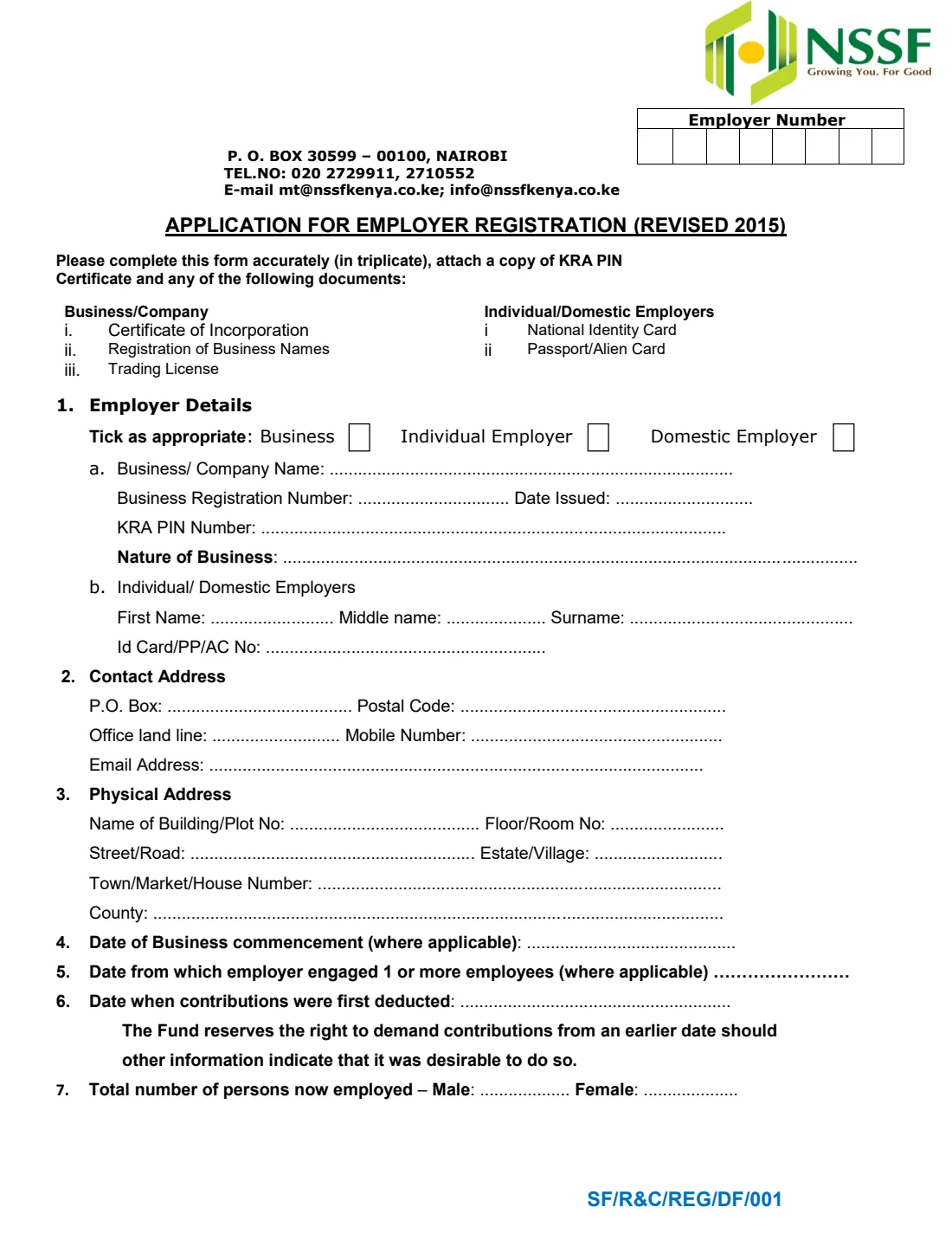
Before an employer can deduct and pay its employees' contributions to Kenya's National Social Security Fund (NSSF), it registers with the Fund and gets an employer number. The Application for Employer Registration (form SF/R&C/REG/DF/001, revised 2015) is NSSF's paper form for that. One form covers three kinds of employer, ticked at the top: a business, an individual employer, or a domestic employer, meaning a household that employs a house help, gardener, driver or nanny.
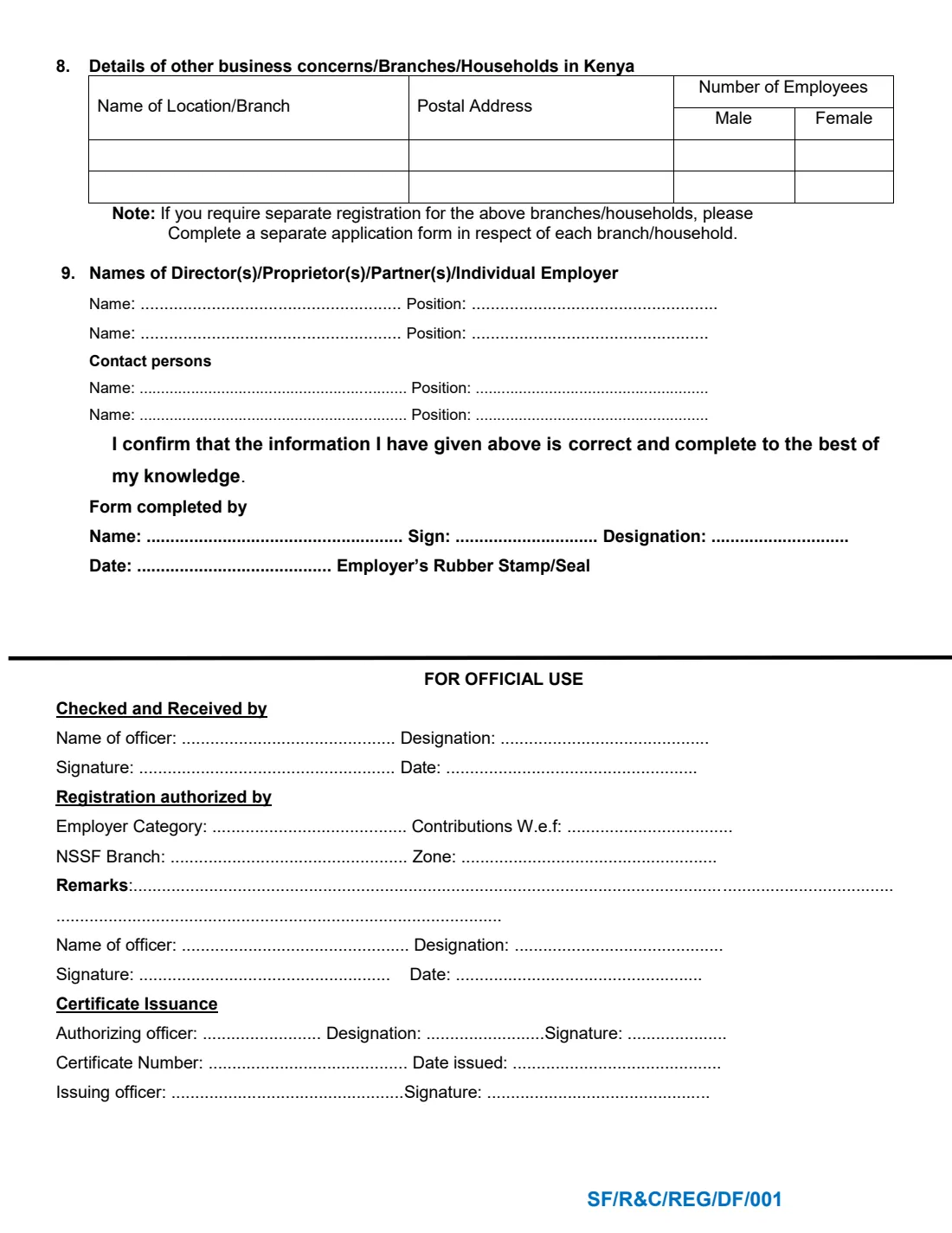
The form collects the employer's identity (business name and registration number, or the individual's name and ID card, passport or alien card number), the KRA PIN, contact and physical addresses, the dates the business started, first took on staff and first deducted contributions, and how many men and women it employs. Page 2 lists other branches or households, the directors, proprietors or individual employer, contact persons, and who completed the form.
FileIt walks you through each item, shows only the part that applies to your type of employer, checks the KRA PIN format and the dates, and prints your answers on NSSF's own PDF. The filled form is saved in your FileIt vault. You print it, sign it by hand and hand it to NSSF yourself: FileIt never submits anything.
- Who fills it
- An employer: a business, an individual employer or a domestic employer (household)
- Given to
- NSSF Kenya, with the documents listed on the form
- Copies
- The form asks for it to be completed in triplicate
- Attach
- A copy of the KRA PIN certificate, plus the business's registration document or the individual's ID card, passport or alien card
- Signatures
- Signed by hand by the person who completes it; a business adds its rubber stamp or seal
- Edition
- Revised 2015 (SF/R&C/REG/DF/001), 2 pages
Who needs to fill out NSSF employer registration?
- A household in Kenya that employs a house help, gardener, driver, nanny or other domestic worker and needs to register as an employer with NSSF.
- An individual (not a business) who employs staff.
- A company, partnership or registered business taking on its first employees.
- An employer with branches or several households who is listing them, or registering one of them separately.
When to use NSSF employer registration
- When you take on your first employee and need an NSSF employer number to pay their contributions.
- When a branch or household needs its own registration: the form's note asks for a separate application for each one.
- When NSSF asks you to register because contributions should already have been paid. The form notes that the Fund reserves the right to demand contributions from an earlier date.
What you need before you start
- Your KRA PIN (a letter, 9 digits and a letter) and a copy of the KRA PIN certificate.
- For a business: the business or company name, its registration number and the date issued, and a copy of the certificate of incorporation, registration of business names or trading licence.
- For an individual or domestic employer: your name and your national ID card, passport or alien card number, and a copy of that document.
- Your postal address (P.O. Box and postal code), phone numbers and email.
- The physical address: building or plot, street, estate or village, town and county.
- The dates the business started, you first engaged an employee and you first deducted contributions, where they apply.
- The number of men and women you employ now.
What’s on NSSF employer registration
The 2015 edition has 2 pages. FileIt asks for it in 11 parts:
- 1. Employer details: type of employerEmployer
- 1(a) Business / companyEmployer
- 1(b) Individual / domestic employerEmployer
- KRA PINEmployer
- 2. Contact addressEmployer
- 3. Physical addressEmployer
- 4 to 7. Dates and employeesEmployer
- 8. Other business concern / branch / household (1)Employer
- 8. Other business concern / branch / household (2)Employer
- 9. Names of director(s) / proprietor(s) / partner(s) / individual employerEmployer
- Declaration: form completed byEmployer
How to fill out NSSF employer registration, step by step
1 1. Employer details
Tick Business, Individual Employer or Domestic Employer. A business fills item 1(a): business or company name, business registration number and date issued, KRA PIN and nature of business. An individual or domestic employer fills item 1(b): first, middle and last names and the ID card, passport or alien card number, plus the KRA PIN. FileIt shows only the part that matches your choice.
2 2. Contact address
Your P.O. Box and postal code, office landline if you have one, mobile number and email address.
3 3. Physical address
Where the business is or, for a domestic employer, the household: name of building or plot number, floor or room, street or road, estate or village, town, market or house number, and county.
4 4 to 7. Dates and number of employees
Item 4 is the date the business started and item 5 the date you first engaged one or more employees, each where it applies. Item 6 is the date contributions were first deducted. Item 7 is the total number of people you employ now, men and women separately.
5 8. Other business concerns, branches or households
Two rows for other locations in Kenya, each with its postal address and the number of male and female employees there. If you want a branch or household registered separately, the form asks for a separate application for it.
6 9. Names and the declaration
List the directors, proprietors, partners or, for a household, yourself as the individual employer, with positions, and up to two contact persons. Then the declaration: 'I confirm that the information I have given above is correct and complete to the best of my knowledge', with the name, signature and designation of the person who completed the form, the date and, for a business, the rubber stamp or seal. The 'For official use' block below is for NSSF.
Common mistakes to avoid
- Ticking more than one type of employer, or filling item 1(a) for a household. A domestic employer fills 1(b).
- Leaving out the KRA PIN, or forgetting the copy of the KRA PIN certificate the form asks you to attach.
- Not attaching the business registration document, or the ID card, passport or alien card for an individual or domestic employer.
- Giving a later date for item 5 or 6 than when you really started employing or deducting. The Fund can demand contributions from an earlier date.
- Filling in the 'Employer Number' boxes or the 'For official use' block. NSSF completes those.
- Sending one copy when the form asks for it to be completed in triplicate.
After you fill it out
Print the filled form from your FileIt vault. The form asks for it in triplicate, so print three copies, sign each by hand and, for a business, stamp it.
Attach a copy of your KRA PIN certificate and the registration or identity document the form lists, and hand the set to NSSF.
Keep a copy, with your employer number once NSSF gives it to you. You need the number to pay contributions, and your employees each need to be registered as NSSF members.
Fill out NSSF employer registration online with FileIt
- Pick the person. Choose someone from People and FileIt fills in their name, date of birth, address and other details it already knows.
- Answer plain-language questions. One part of the form at a time, with the official help text beside each question — 45 fields in all. Your answers save as you go.
- Check the live preview. Watch your answers land on the real National Social Security Fund (NSSF), Kenya form, and let FileIt do any worksheet arithmetic.
- Generate the official PDF. FileIt prints your answers into the agency’s own PDF and files it in that person’s folder in your vault.
FileIt fills the form — it never files or submits anything for you. Deliver the finished form to whoever asked for it, the way the form’s instructions say.
Start NSSF employer registration now — it’s freeNSSF employer registration: frequently asked questions
Do I need to register with NSSF to employ a house help?
The form has a separate box for a 'Domestic Employer', so households employing domestic workers register on it. Fill item 1(b) with your own name and ID number, list yourself in item 9 as the individual employer, and hand it in with a copy of your KRA PIN certificate and ID.
What documents go with the form?
The form asks for a copy of the KRA PIN certificate and, for a business, a certificate of incorporation, registration of business names or trading licence; for an individual or domestic employer, the national identity card, passport or alien card.
What is the Employer Number box at the top?
It's the number NSSF allocates when it registers you. Leave it blank. FileIt doesn't print anything there.
Can I sign the form electronically?
FileIt doesn't set it up for e-signature. The form asks for it in triplicate with a handwritten signature and, for a business, a rubber stamp or seal, so print it and sign by hand.
Does FileIt send the form to NSSF?
No. FileIt fills in NSSF's own PDF and saves it in your vault. You print it, sign it and hand it in yourself.
My employees also need NSSF numbers. Which form is that?
Employees register as members on NSSF's Application Form for Member Registration, which FileIt also fills.
Official sources
- Blank form (PDF), published by National Social Security Fund (NSSF), Kenya: https://www.nssf.or.ke/download/employers-application-for-registration?wpdmdl=2947
- Official instructions and guidance: https://www.nssf.or.ke/
- Edition shown on this page: Revised 2015 (SF/R&C/REG/DF/001) (checked 2026-10-01).
FileIt is not affiliated with or endorsed by National Social Security Fund (NSSF), Kenya or any government. This page explains the form in general terms and is not legal, tax or immigration advice. Always read the official instructions, and check that you are using the edition the recipient accepts. Page last reviewed 2026-10-01.