What is NSSF member registration?
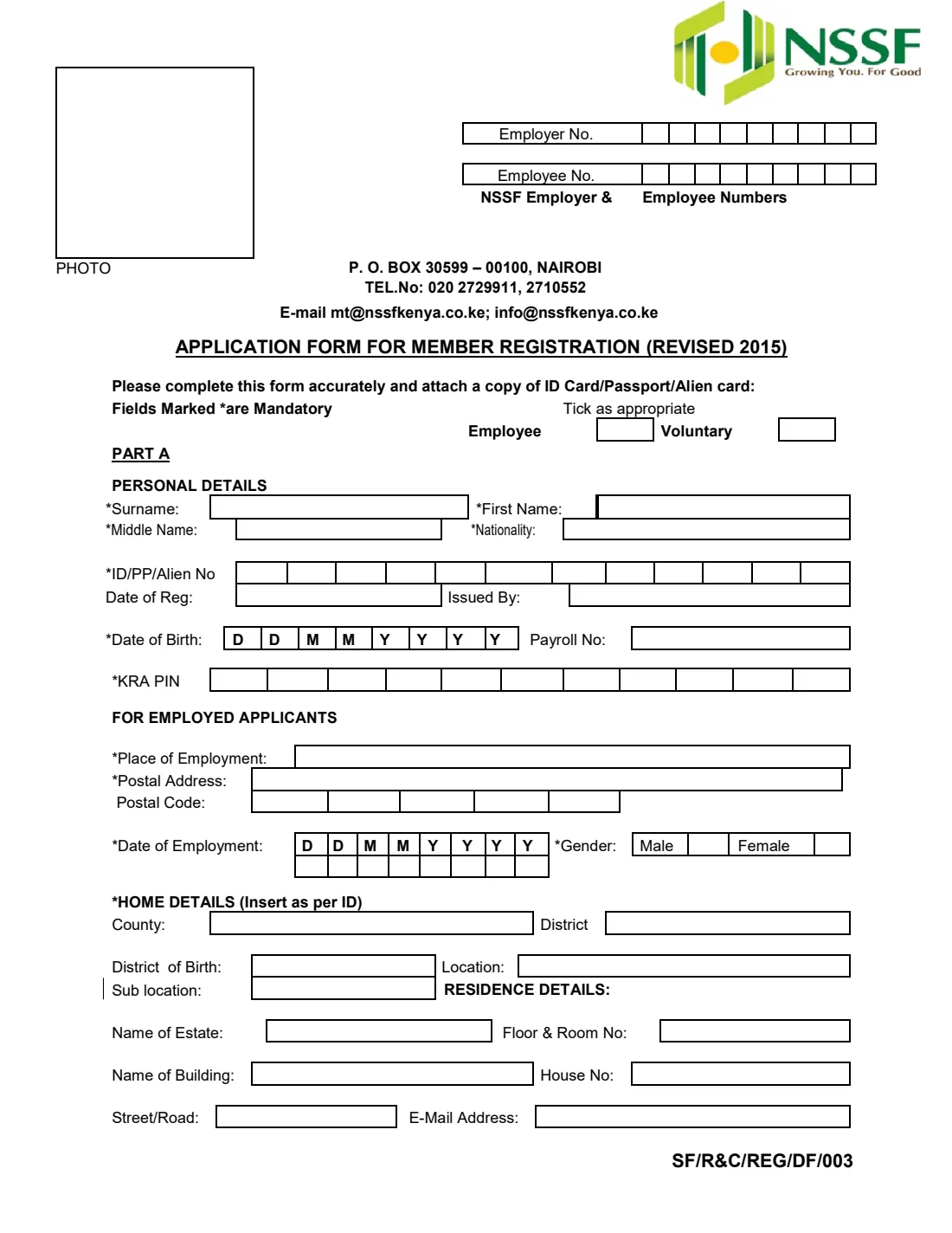
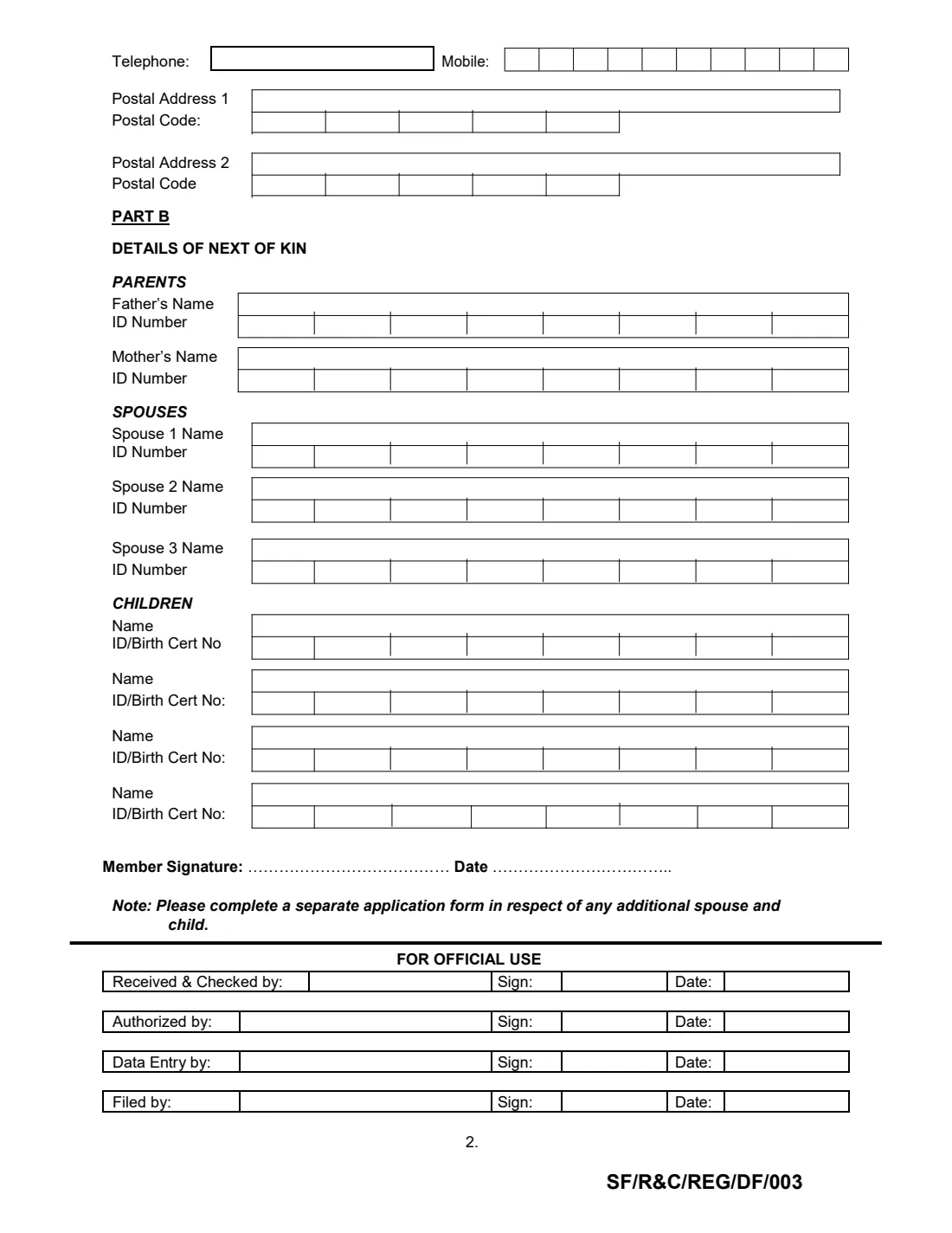
The Application Form for Member Registration (revised 2015, form SF/R&C/REG/DF/003) is the National Social Security Fund's paper form for joining NSSF in Kenya. It registers you either as an employee, whose employer deducts and pays contributions, or as a voluntary member who contributes independently. Part A collects your personal, identification, employment, home and contact details; part B lists your next of kin — parents, spouses and children.
Registration gives you an NSSF membership record, which your contributions and future benefit claims are linked to. The details you give — especially your ID or passport number, KRA PIN and next of kin — are what NSSF uses to identify you and the people connected to you, so they need to match your documents exactly. The form asks you to attach a copy of your ID card, passport or alien card.
FileIt helps you fill in the NSSF form online in plain English. It pre-fills your name, date of birth, email and employer from the People records in your vault, checks your KRA PIN, mobile number, postal codes and dates, prints ID numbers one character per box, and places every answer on NSSF's official PDF. The finished form is saved in your vault folder. FileIt never submits anything to NSSF: you print the form, sign it by hand, and hand it in with a copy of your ID.
- Who fills it
- A person registering with NSSF Kenya — as an employee or a voluntary member.
- Handed in to
- NSSF, with a copy of your ID card, passport or alien card.
- When
- When you first need an NSSF membership, e.g. on starting work or deciding to save voluntarily.
- Signatures
- Your handwritten signature and the date on page 2.
- Edition
- Revised 2015 (SF/R&C/REG/DF/003), 2 pages.
- Mandatory fields
- Those marked * on the form, such as name, ID number, date of birth, KRA PIN and gender.
Who needs to fill out NSSF member registration?
- Employees starting a job in Kenya who are not yet registered with NSSF.
- Self-employed people and informal-sector workers who want to join NSSF as voluntary members.
- Foreign nationals working in Kenya, registering with a passport or alien card.
- Employers' HR teams helping new staff register, collecting the details the form asks for.
- Anyone asked for an NSSF registration by an employer or government office who has never been registered.
When to use NSSF member registration
- When you start your first job and your employer asks for your NSSF details.
- When you decide to save with NSSF voluntarily, without an employer.
- When you have never been registered and need an NSSF number, which NSSF allocates after registration.
- When you have more than three spouses or four children to list — the form's note asks you to complete a separate application form for the additional ones.
What you need before you start
- Your national ID card, passport or alien card — its number, date of issue and issuing office — and a copy to attach.
- Your KRA PIN, from your Kenya Revenue Authority PIN certificate.
- Your date of birth and nationality.
- If employed: your employer's name, postal address and postal code, your date of employment and your payroll number, plus the employer's NSSF number if they give it to you.
- Your home details as printed on your ID: county, district, district of birth, location and sub-location.
- Where you live now: estate, building, floor and room, house number and street.
- Your mobile number, any landline, email address and postal address with its five-digit postal code.
- Your parents', spouses' and children's full names and ID or birth certificate numbers.
What’s on NSSF member registration
The 2015 edition has 2 pages. FileIt asks for it in 7 parts:
- Part A — Personal detailsMember
- Home details (as per ID)Member
- Residence and contact detailsMember
- Part B — Next of kin: parentsMember
- Part B — Next of kin: spousesMember
- Part B — Next of kin: childrenMember
- Member signatureMember
How to fill out NSSF member registration, step by step
1 Employee or Voluntary, and the NSSF numbers
Tick 'Employee' if you work for an employer who will pay your contributions, or 'Voluntary' if you're registering on your own. The boxes at the top right are for the NSSF employer and employee numbers: the employer number belongs to your employer, and the employee number is your own NSSF member number, which NSSF allocates.
FileIt lets you add your employer's number if you have it and leaves the employee number blank for NSSF. The photo box is left for NSSF too.
2 Part A — Personal details
Give your surname, first name and middle name exactly as on your identity document, your nationality, and your ID, passport or alien card number — written one character per box. Add the date of registration (issue) and issuing office of that document if you have them, your date of birth in the DD MM YYYY boxes, and your payroll number if you're employed.
Your KRA PIN goes in the 11 boxes: a letter, nine digits and a letter. FileIt checks the format before it prints anything, and checks that a Kenyan national ID number has no more than eight digits.
3 For employed applicants
Employees give their place of employment, the employer's postal address and postal code, the date they started work (written under the DD MM YYYY boxes), and their gender. Voluntary members skip the employment questions but still tick their gender.
FileIt shows the employment questions only when you tick 'Employee', and checks that your date of employment comes after your date of birth.
4 Home details (insert as per ID)
Copy your county, district, district of birth, location and sub-location from your Kenyan national ID card. These describe where you come from rather than where you live now.
If you are registering with a passport or alien card, fill in whatever applies to you — FileIt only insists on these boxes when you choose a Kenyan national ID.
5 Residence details
Describe where you live now: name of estate, floor and room number, name of building, house number and street or road, then your email address.
On page 2, give your landline if you have one, your mobile number in the ten boxes, and up to two postal addresses, each with its five-digit postal code.
6 Part B — Details of next of kin
List your father and mother, up to three spouses and up to four children, each with a full name and an ID number (for children, an ID or birth certificate number). Each number is written one character per box, eight boxes to a row.
The form's note asks you to complete a separate application form for any additional spouse or child. FileIt asks how many spouses and children you have, shows only those rows, and warns you if the same ID number appears twice or matches your own.
7 Member signature and date
Sign on the 'Member Signature' line and write the date. FileIt can print the date for you, or leave it blank for you to write by hand. The 'For official use' block below is completed by NSSF staff as the form is received, checked, authorised, entered and filed.
Common mistakes to avoid
- Forgetting to attach a copy of your ID card, passport or alien card, which the form asks for.
- Writing your name differently from your ID — use the same spelling and order.
- Entering the KRA PIN wrongly: it has 11 characters, a letter, nine digits and a letter.
- Filling in the 'Employee No.' box yourself — that's your NSSF member number, which NSSF allocates.
- Ticking both Employee and Voluntary, or neither.
- Leaving mandatory (*) fields blank, such as nationality, date of birth, gender or home details.
- Squeezing extra spouses or children onto the page instead of using a separate form, as the note asks.
- Using your current address for the home details — those come from your ID card.
After you fill it out
Print both pages, check every box, and sign on the 'Member Signature' line by hand. Attach a copy of your ID card, passport or alien card, as the form asks.
Hand the form in to NSSF — at an NSSF office, or through your employer if they register you. NSSF staff complete the 'For official use' block as they check and process it, and allocate your NSSF member number. FileIt never submits the form for you, and it can't promise NSSF will accept it.
Keep a copy of the signed form and your ID copy in your FileIt vault, together with the member number NSSF gives you. If your details change later — a new spouse or child, a new address or phone number — ask NSSF how to update your record.
Fill out NSSF member registration online with FileIt
- Pick the person. Choose someone from People and FileIt fills in their name, date of birth, address and other details it already knows.
- Answer plain-language questions. One part of the form at a time, with the official help text beside each question — 56 fields in all. Your answers save as you go.
- Check the live preview. Watch your answers land on the real National Social Security Fund (NSSF), Kenya form, and let FileIt do any worksheet arithmetic.
- Generate the official PDF. FileIt prints your answers into the agency’s own PDF and files it in that person’s folder in your vault.
FileIt fills the form — it never files or submits anything for you. Deliver the finished form to whoever asked for it, the way the form’s instructions say.
Start NSSF member registration now — it’s freeNSSF member registration: frequently asked questions
What is the NSSF member registration form?
It's the National Social Security Fund's 'Application Form for Member Registration (Revised 2015)', form SF/R&C/REG/DF/003. You use it to register with NSSF Kenya as an employee or a voluntary member, giving your personal details, KRA PIN and next of kin.
Can I fill in the NSSF registration form online?
Yes. FileIt lets you answer the questions online and prints your answers into NSSF's official PDF, one character per box where the form has boxes. You then print it, sign it by hand and hand it in with a copy of your ID.
Where do I submit the NSSF registration form?
To NSSF, together with a copy of your ID card, passport or alien card. Employees can also ask their employer, who may register staff with NSSF. FileIt doesn't submit the form for you.
What is the difference between Employee and Voluntary?
An employee works for an employer who deducts and pays NSSF contributions. A voluntary member — for example someone self-employed or in the informal sector — registers and contributes on their own. The form's employment questions are only for employees.
Do I need a KRA PIN to register with NSSF?
The form marks the KRA PIN as mandatory, so have your PIN certificate to hand. The PIN has 11 characters: a letter, nine digits and a letter.
Can foreigners register with NSSF using this form?
The form accepts an ID card, passport or alien card number (ID/PP/Alien No) and asks for your nationality, so it can be completed with a passport or alien card. Fill in the home details that apply to you.
How many next of kin can I list?
Page 2 has room for both parents, three spouses and four children. The form's note asks you to complete a separate application form for any additional spouse or child.
Where do I find my NSSF number after registering?
NSSF allocates your member number when it processes your registration — it's the 'Employee No.' at the top of the form, which you leave blank. Keep it with a copy of the form in your vault once NSSF gives it to you.
Official sources
- Blank form (PDF), published by National Social Security Fund (NSSF), Kenya: https://www.nssf.or.ke/download/members-registration-form?wpdmdl=3268
- Official instructions and guidance: https://www.nssf.or.ke/
- Edition shown on this page: Revised 2015 (SF/R&C/REG/DF/003) (checked 2026-09-26).
FileIt is not affiliated with or endorsed by National Social Security Fund (NSSF), Kenya or any government. This page explains the form in general terms and is not legal, tax or immigration advice. Always read the official instructions, and check that you are using the edition the recipient accepts. Page last reviewed 2026-09-26.