What is Form IR1249?
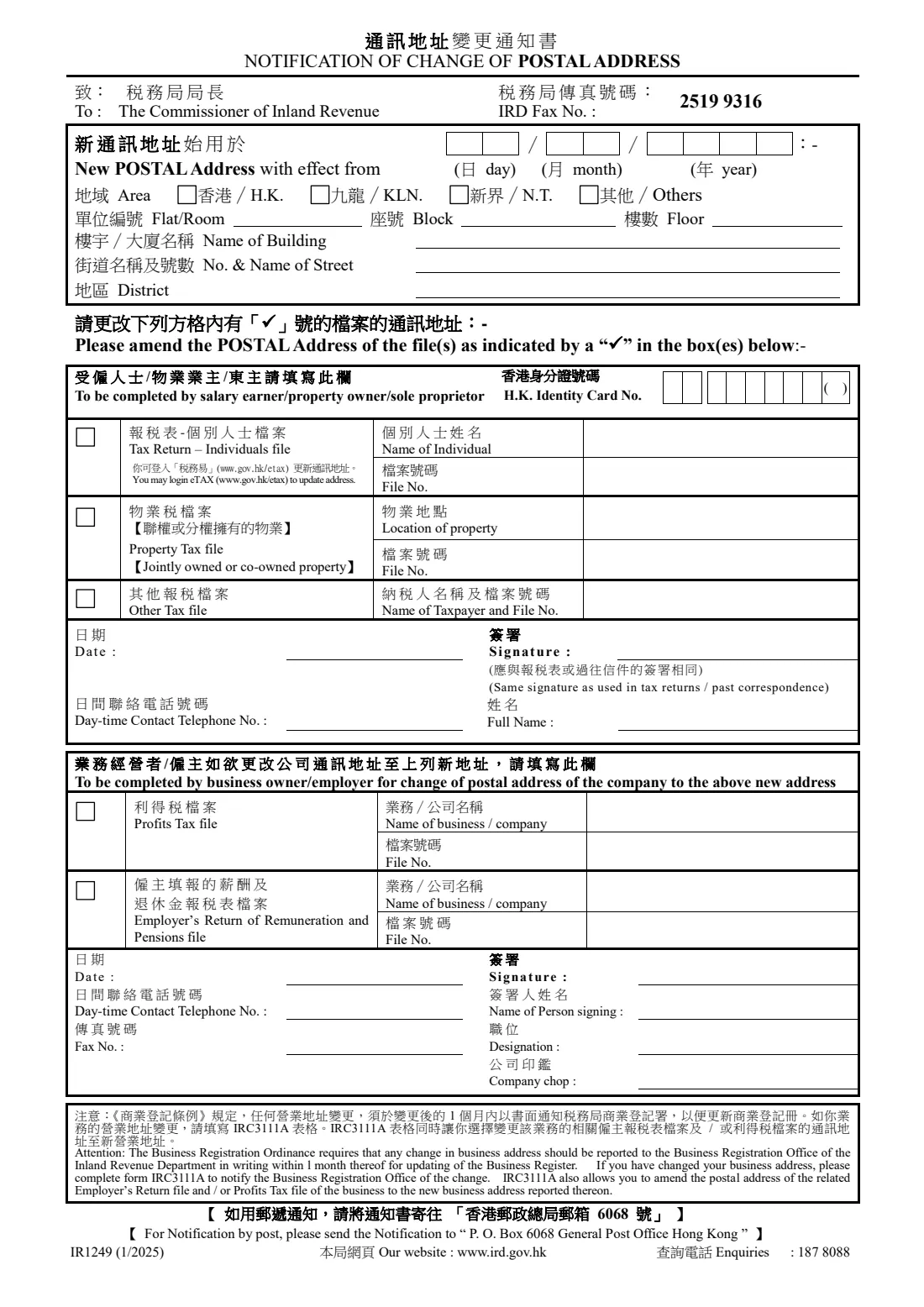
Form IR1249, 'Notification of Change of Postal Address' (通訊地址變更通知書), is addressed to the Commissioner of Inland Revenue. You give the new postal address and the date it takes effect, then tick each tax file whose correspondence should go there: your individual tax return file, a jointly owned or co-owned property's Property Tax file, another tax file, or a business's Profits Tax and Employer's Return files.
Keeping the IRD's address up to date matters because tax returns, assessments and demand notes are sent to the postal address on your file. The IRD asks employers to remind their employees to report a change of postal address within one month. Note that a change of business address is a separate matter: the Business Registration Ordinance requires it to be reported to the Business Registration Office within 1 month, on form IRC3111A.
FileIt helps you complete the bilingual 1/2025 edition of IR1249 in English: it pre-fills your name, company name and today's date from your vault, checks your HKID check digit, prints your answers into the IRD's own PDF and files it in your vault. You then print it, sign it by hand and send it yourself — FileIt never files anything with the IRD.
- Who fills it
- Salary earners, property owners, sole proprietors, and business owners or employers for a company's files
- Given to
- The Commissioner of Inland Revenue — by fax to the number printed on the form, or by post to P.O. Box 6068, General Post Office, Hong Kong
- When
- When your postal address changes; you choose the effective date
- Signatures
- Your handwritten signature, the same as on your tax returns; the business part also takes the signer's name, designation and company chop
- Edition
- IR1249 (1/2025), 2 pages including a fold-and-seal mailer
- Online alternative
- Individuals can update their address in eTAX
Who needs to fill out Form IR1249?
- Salaried employees who have moved and want their tax return and assessments sent to the new address.
- Owners of a jointly owned or co-owned property with a Property Tax file.
- Sole proprietors changing the postal address of their tax files.
- Business owners and employers moving the postal address of a company's Profits Tax file or Employer's Return file.
- People moving overseas who want IRD letters sent to an address outside Hong Kong.
When to use Form IR1249
- As soon as you know your new postal address, giving the date from which it should be used.
- Before tax return season, so the next return reaches you.
- When an employer reminds you, after you move, to update your address with the IRD.
- For a change of business address, also file form IRC3111A with the Business Registration Office within 1 month; IRC3111A can move the Employer's Return and Profits Tax files' postal address too.
What you need before you start
- The new postal address — flat or room, block, floor, building, street and district — and the area (Hong Kong Island, Kowloon, New Territories or elsewhere).
- The date from which the new address applies.
- Your Hong Kong Identity Card number with its check digit.
- The file numbers to change, as shown on your tax returns or IRD letters: your individual tax return file, any Property Tax file (with the property's location) or other tax file.
- For a business: the business or company name and its Profits Tax and/or Employer's Return file numbers.
- A daytime contact telephone number, and a fax number for the business part if you have one.
What’s on Form IR1249
The 2025 edition has 2 pages. FileIt asks for it in 3 parts:
- New postal addressTaxpayer
- Salary earner / property owner / sole proprietorTaxpayer
- Business owner / employer — the company's postal addressTaxpayer
How to fill out Form IR1249, step by step
1 New postal address
Give the date the new postal address takes effect, tick the area — Hong Kong Island, Kowloon, New Territories or Others — and fill in the flat or room, block, floor, building name, street number and name, and district. For an address outside Hong Kong, choose Others and put the city, postcode and country on the district line.
2 To be completed by salary earner / property owner / sole proprietor
Give your HKID number, then tick each of your files whose postal address should change. For the Tax Return – Individuals file, give your name and file number; the form notes that you can also update your address through eTAX. For a Property Tax file on a jointly owned or co-owned property, give the property's location and the file number. For any other tax file, the taxpayer's name and file number.
Finish this part with the date, your daytime contact telephone number, your full name and your signature — the form asks for the same signature as used in your tax returns or past correspondence.
3 To be completed by business owner / employer
Use this part to move a company's postal address to the new address above. Tick the Profits Tax file and/or the Employer's Return of Remuneration and Pensions file and give the business or company name and file number for each. Then the date, a daytime contact telephone number, a fax number, the name and designation of the person signing, their signature and the company chop.
4 Attention note and mailer
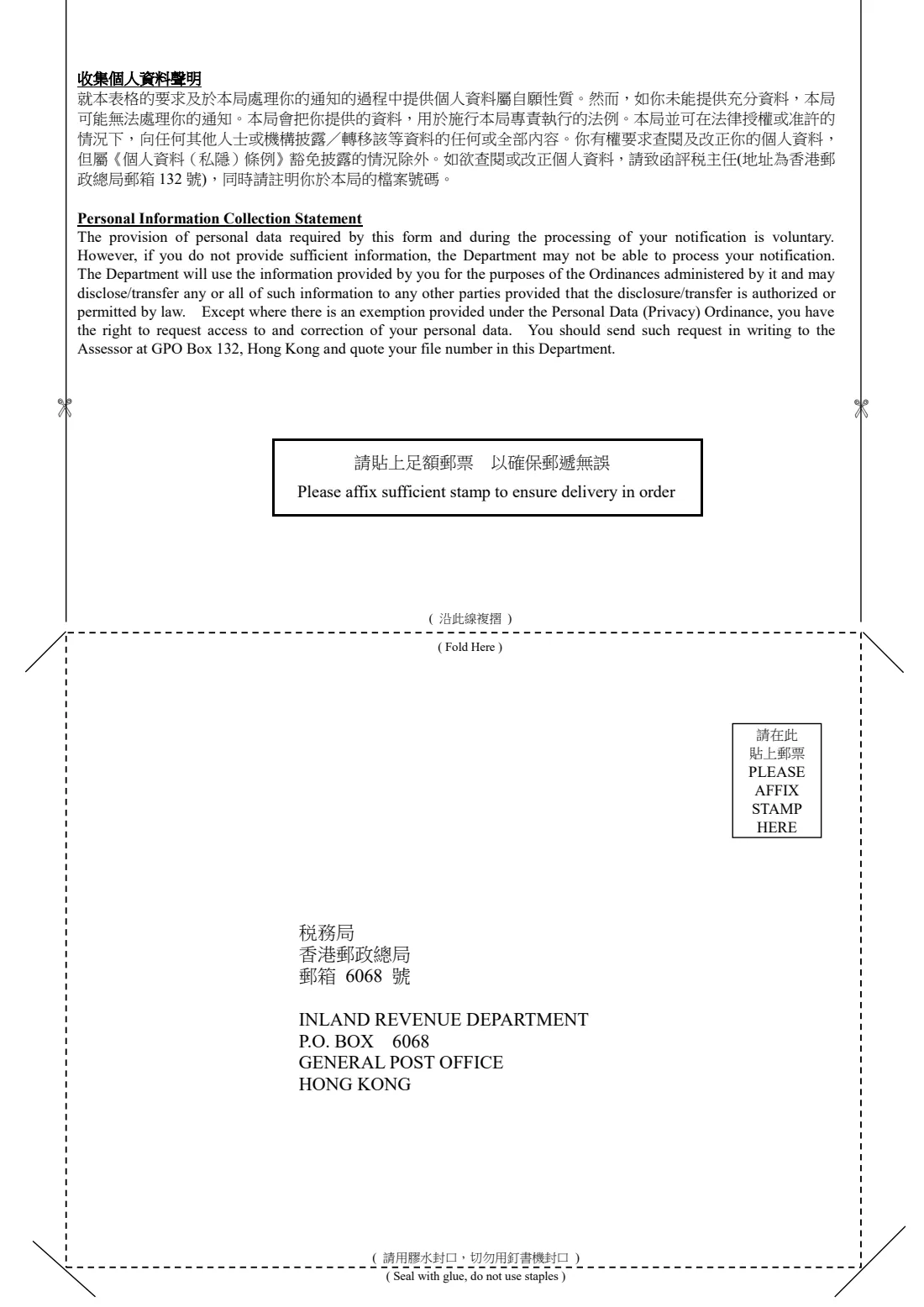
The note at the foot of page 1 reminds businesses that a change of business address must be reported to the Business Registration Office within 1 month, using form IRC3111A. Page 2 is a mailer: fold it as marked, seal it with glue rather than staples, add sufficient postage and send it to P.O. Box 6068, General Post Office, Hong Kong.
Common mistakes to avoid
- Forgetting to tick the files you want changed — only the ticked files are amended.
- Signing differently from your usual signature on tax returns and letters.
- Using IR1249 alone for a change of business address — the Business Registration Office needs form IRC3111A within 1 month.
- Posting the mailer without enough postage, or stapling it shut.
- Leaving out the effective date, or giving a file number from the wrong kind of file.
- Getting the HKID check digit wrong — FileIt checks it for you.
After you fill it out
Print the form and sign it by hand, using the same signature as on your tax returns and past correspondence; for the business part, the named person signs and adds the company chop. FileIt doesn't collect e-signatures for this form.
Send it to the Commissioner of Inland Revenue by fax to the IRD fax number printed on the form, or by post: fold page 2 into a mailer, seal it with glue, add a stamp and post it to P.O. Box 6068, General Post Office, Hong Kong. The IRD's public forms page also lists an e-mail address for this form. Individuals can instead change their address online in eTAX.
FileIt keeps a copy in your vault, so you have a record of the date you notified the IRD and the files you asked it to update.
Fill out Form IR1249 online with FileIt
- Pick the person. Choose someone from People and FileIt fills in their name, date of birth, address and other details it already knows.
- Answer plain-language questions. One part of the form at a time, with the official help text beside each question — 32 fields in all. Your answers save as you go.
- Check the live preview. Watch your answers land on the real Inland Revenue Department (IRD), Hong Kong form, and let FileIt do any worksheet arithmetic.
- Generate the official PDF. FileIt prints your answers into the agency’s own PDF and files it in that person’s folder in your vault.
FileIt fills the form — it never files or submits anything for you. Deliver the finished form to whoever asked for it, the way the form’s instructions say.
Start Form IR1249 now — it’s freeForm IR1249: frequently asked questions
What is Form IR1249?
Form IR1249 is the Hong Kong Inland Revenue Department's Notification of Change of Postal Address. It tells the Commissioner of Inland Revenue your new postal address and which of your tax files — individual, property, business or employer's return — should use it.
Can I change my address with the IRD online instead?
Yes, individuals can update their postal address by logging in to eTAX, as the form itself notes. IR1249 is the paper alternative, and it also covers business files.
How do I send Form IR1249?
By fax to the IRD fax number printed on the form, or by post to P.O. Box 6068, General Post Office, Hong Kong, using the fold-and-seal mailer on page 2. FileIt doesn't send it for you.
Does IR1249 change my business registration address?
No. The form's note says a change of business address must be reported to the Business Registration Office within 1 month on form IRC3111A, which can also move the related Employer's Return and Profits Tax files' postal address.
Can I fill in Form IR1249 online with FileIt?
Yes. FileIt guides you through the English questions, pre-fills your details from your People records, checks your HKID check digit and produces the IRD's official bilingual PDF with your answers printed in. Filling forms is available on every FileIt account, including the free plan.
Can I use an overseas address?
Yes — the form has an 'Others' area for addresses outside Hong Kong. Give the street address on the building and street lines and the city and country on the district line.
Do I need to fill in both parts of the form?
Only the parts that apply. Individuals fill in the salary earner / property owner / sole proprietor part; a business owner or employer fills in the business part for a company's files. You can fill in both on one form.
Can I sign IR1249 electronically in FileIt?
FileIt treats this as a form you sign by hand, because it asks for the same signature as used in your tax returns and, for a business, the company chop. Print it, sign it and send it.
Official sources
- Blank form (PDF), published by Inland Revenue Department (IRD), Hong Kong: https://www.ird.gov.hk/eng/pdf/ir1249.pdf
- Official instructions and guidance: https://www.ird.gov.hk/eng/paf/for.htm
- Edition shown on this page: IR1249 (1/2025) (checked 2026-09-26).
FileIt is not affiliated with or endorsed by Inland Revenue Department (IRD), Hong Kong or any government. This page explains the form in general terms and is not legal, tax or immigration advice. Always read the official instructions, and check that you are using the edition the recipient accepts. Page last reviewed 2026-09-26.