What is Vero 5010e — tax card / prepayment application (residents)?
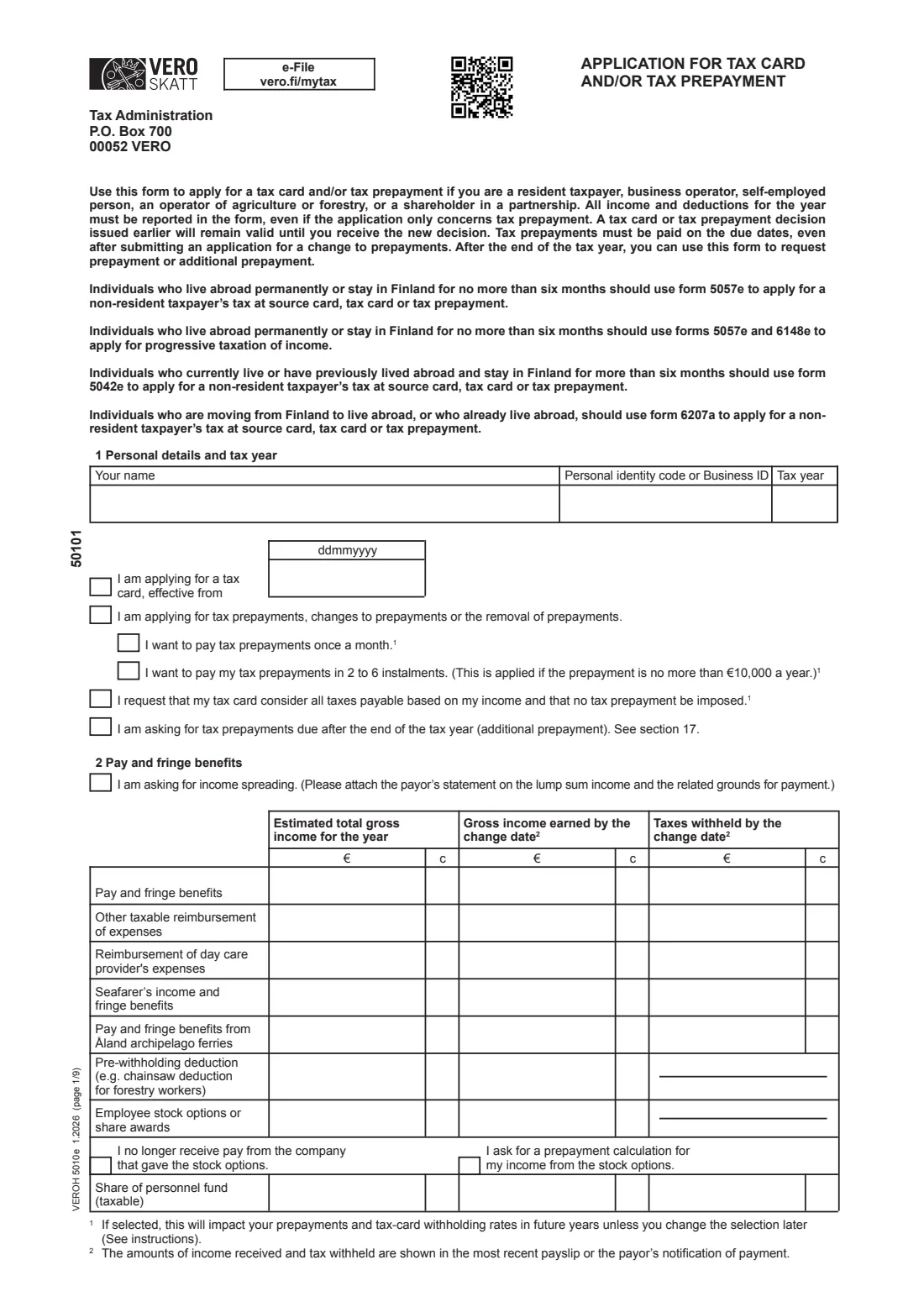
Form 5010e is the English version of Vero's main application for a new tax card (verokortti) or tax prepayment (ennakkovero) for people resident in Finland. It is used by employees, pensioners, business operators, self-employed people, farmers and forest owners, and shareholders in partnerships. The form's key rule is printed on page 1: all income and deductions for the year must be reported, even if you are only applying for a prepayment.
Across 22 parts it covers pay and fringe benefits, benefits such as unemployment or sickness allowance, pensions, other income subject to withholding, study grants, income subject to prepayments, deductions from earned and capital income, repaid shareholder loans, child support and student-loan deductions, dividends, capital gains including crypto assets, business, farming, forestry and partnership income, YEL/MYEL work income, custody of children abroad, a change in family relations, and an additional prepayment after the end of the year.
FileIt breaks the 5010e into optional parts, so you only open the ones that apply to you. You type each amount once in euros and cents and FileIt splits it into the form's separate € and c boxes, adds up your wage-income expenses, checks the personal identity codes and flags figures that don't add up, such as tax withheld exceeding income. It pre-fills your name from your People records, prints everything into Vero's official PDF (1.2026 edition) and saves it to your vault. You sign and deliver it yourself; Vero also offers the same application in MyTax, and FileIt never submits anything.
- Who fills it
- A person resident in Finland: employee, pensioner, business operator, farmer, forest owner or partner
- Given to
- Finnish Tax Administration, P.O. Box 700, 00052 VERO (or the same application in MyTax)
- When
- Whenever your income or deductions change during the year, or after the year ends for an additional prepayment
- Signatures
- Signed by hand on page 9
- Edition
- VEROH 5010e 1.2026, nine pages
Who needs to fill out Vero 5010e — tax card / prepayment application (residents)?
- Employees whose income changes during the year — a pay rise, a second job, a bonus or a period of unemployment.
- Pensioners whose pension starts mid-year or who also receive pay or benefits.
- Business operators and self-employed people who want to change or remove their tax prepayments.
- Farmers, forest owners and reindeer herders with agricultural, forestry or timber income.
- Investors with dividends, capital gains or crypto-asset gains that no tax is withheld from.
- Anyone who wants their tax card to cover all their taxes so that no separate prepayment is imposed.
- People who want to avoid back taxes by asking for an additional prepayment after the tax year.
When to use Vero 5010e — tax card / prepayment application (residents)
- When your estimated income for the year changes enough that your withholding rate would be wrong.
- When you start or stop receiving a benefit or pension, or take on extra work.
- When you have new deductions, such as commuting costs, child support or interest on an investment loan.
- When a business or partnership result differs from what your prepayments were based on.
- After the tax year ends, up to the completion of your tax assessment, to ask for an additional prepayment (part 20).
- People living abroad use forms 5057e or 5042e instead, and people moving abroad use 6207a.
What you need before you start
- Your personal identity code (or your Business ID) and the tax year.
- Your latest payslip, showing pay earned and tax withheld so far this year.
- Payment notifications for benefits and pensions, and any new pension decision.
- Estimates of your income for the whole year from each source.
- Receipts or figures for deductions: unemployment fund fees, training, tools, workspace, commuting, loan interest, child support, student-loan repayments.
- Details of dividends, capital gains and crypto-asset gains and losses.
- Business, agricultural, forestry or partnership figures, and your confirmed YEL/MYEL work income.
- Children's personal identity codes, or custody certificates for children abroad.
- Any separate Vero forms you are attaching, such as travel-expense forms 1A-1D or rental-income forms 7H/7K/7L.
What’s on Vero 5010e — tax card / prepayment application (residents)
The 2026 edition has 9 pages. FileIt asks for it in 20 parts:
- 1 Personal details, tax year and what you apply forApplicant
- 2 Pay and fringe benefitsApplicant
- 3 BenefitsApplicant
- 4 PensionApplicant
- 5 Other income subject to withholding taxApplicant
- 6 Study grantsApplicant
- 7 Personal income subject to prepaymentsApplicant
- 8 Deductions from earned incomeApplicant
- 9 Deductions from capital incomeApplicant
- 10 Repaid shareholder loanApplicant
- 11 Other deductionsApplicant
- 12 Dividends and surplusApplicant
- 13–15 Capital gains and losses (securities and crypto assets)Applicant
- 16 Business incomeApplicant
- 17 YEL/MYEL work income detailsApplicant
- 18 Custody of children outside FinlandApplicant
- 19 Change in family relationsApplicant
- 20 Prepayment after the end of the tax year (additional prepayment)Applicant
- 21 Further information, 22 Enclosures and signatureApplicant
- Amounts as printed (calculated)Applicant
How to fill out Vero 5010e — tax card / prepayment application (residents), step by step
1 1 Personal details and tax year
Give your name, personal identity code or Business ID and the tax year, then tick what you are applying for: a tax card effective from a given date; prepayments, changes to them or their removal (and optionally whether to pay monthly or in 2 to 6 instalments); a tax card that covers all your taxes so no prepayment is imposed; or prepayments due after the year ends. The form's footnote warns that the payment-schedule and all-in choices also affect future years until you change them.
2 2 Pay and fringe benefits
For each kind of pay — ordinary pay and fringe benefits, taxable reimbursements, day-care providers' expenses, seafarer's income, Åland ferry pay, pre-withholding deductions, stock options and personnel fund shares — give the estimated total for the year, the gross amount earned by the date of the application and the tax withheld so far. Your latest payslip shows the last two. You can also ask for income spreading for a lump sum.
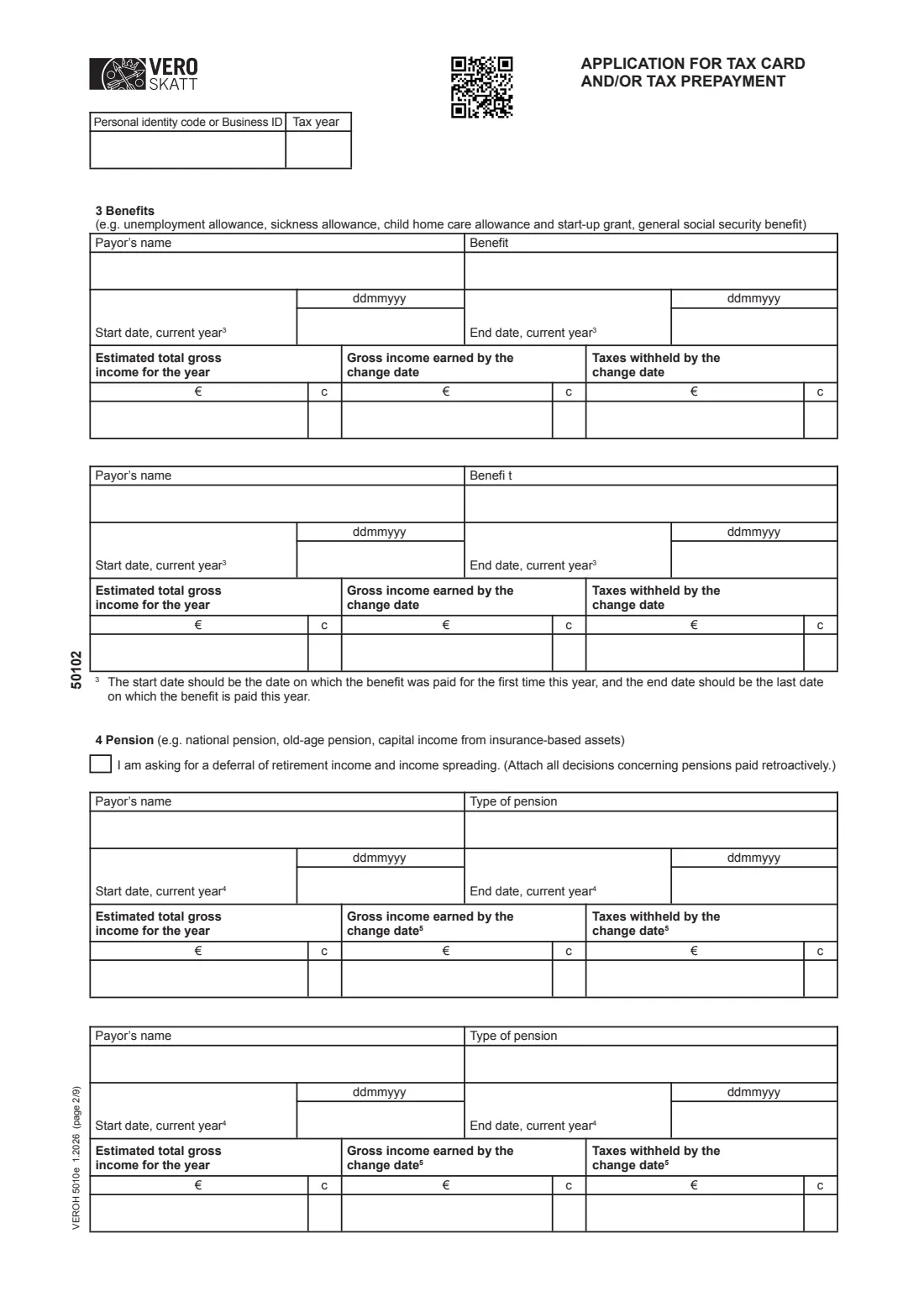
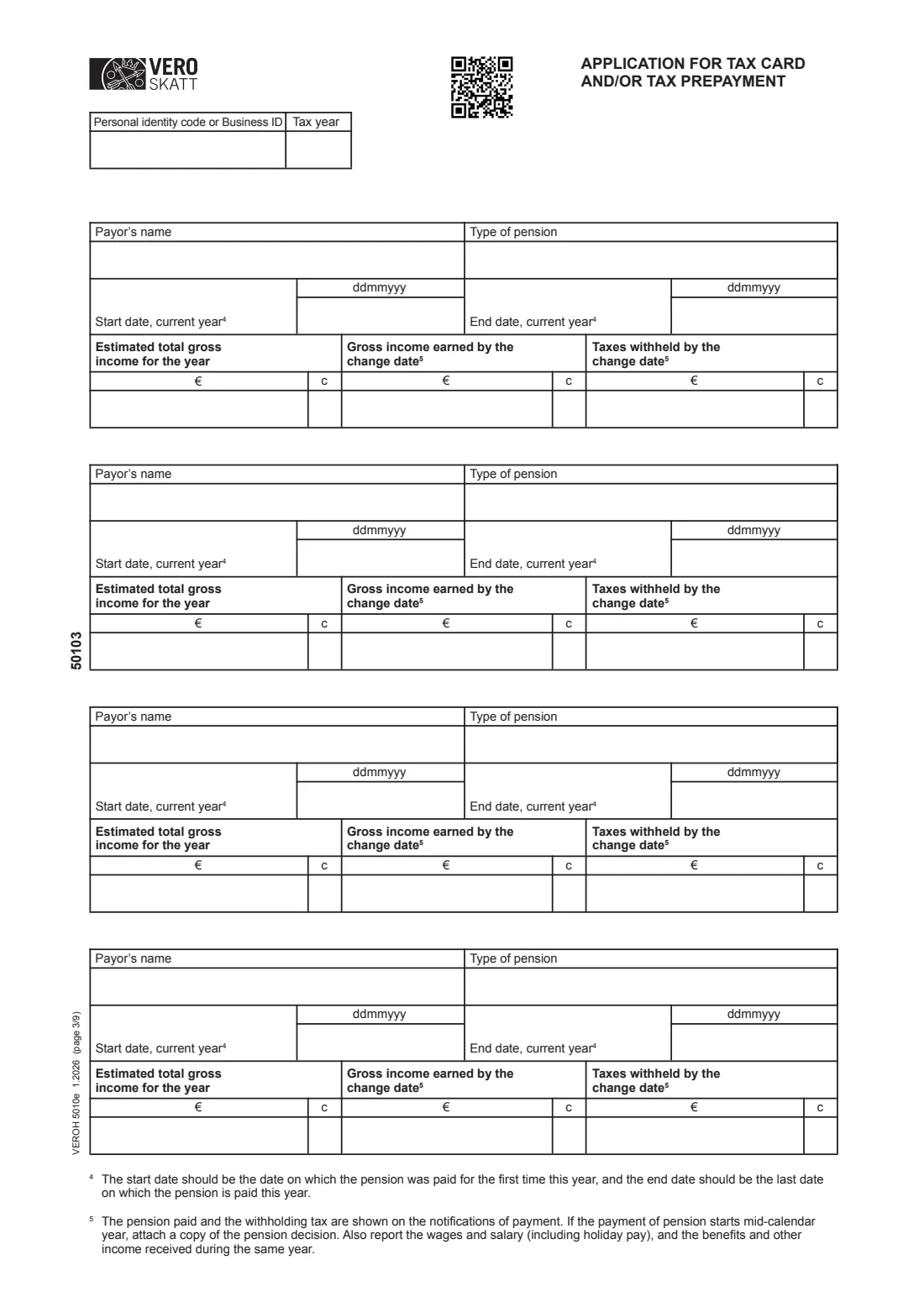
3 3 Benefits and 4 Pension
List up to two benefits and six pensions with the payor, the type, the first and last payment dates this year and the same three amounts. Footnotes explain that the dates are the first and last payments in the current year, and that a pension starting mid-year needs a copy of the pension decision. Part 4 also has a box to ask for deferral of retirement income and income spreading.
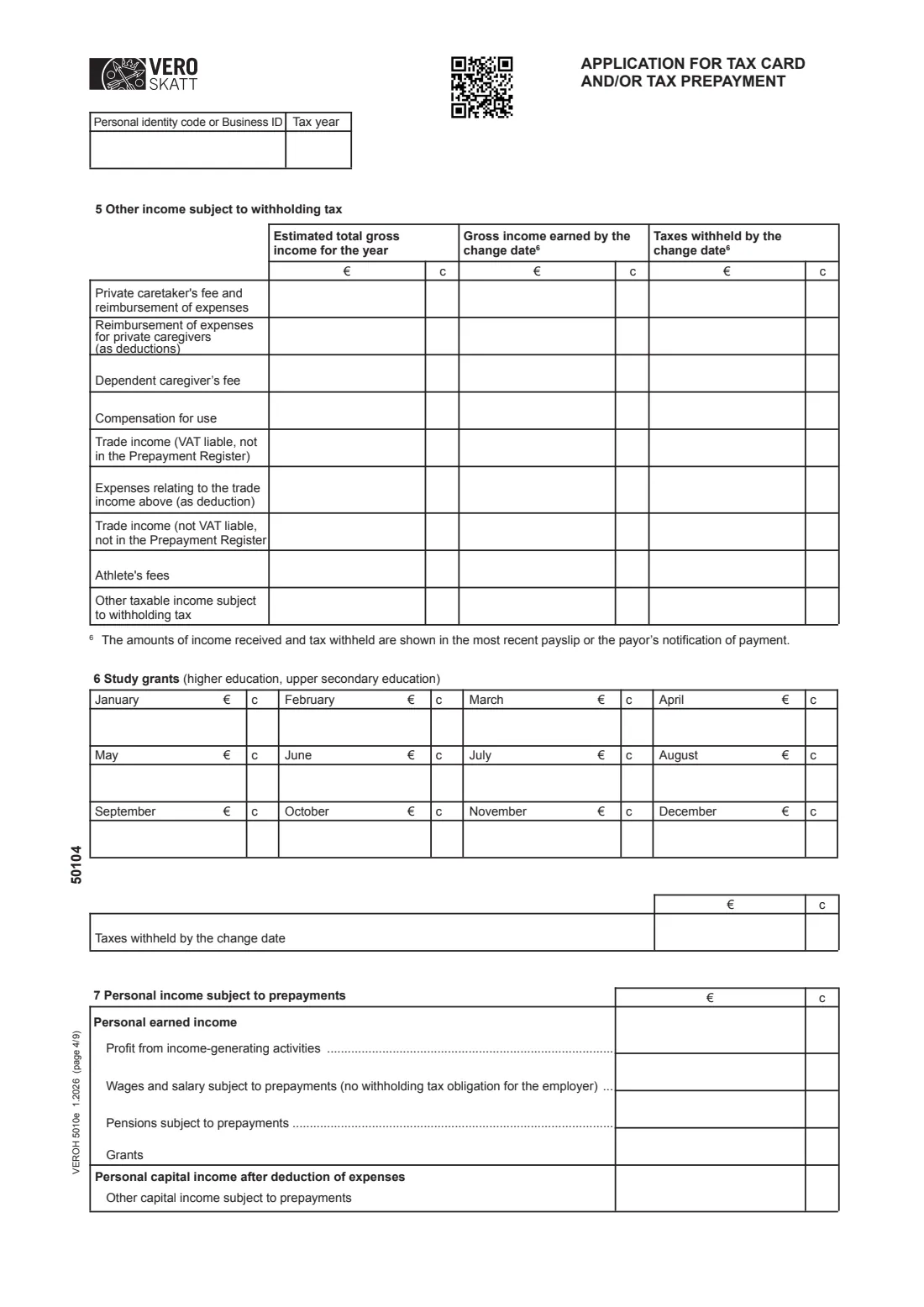
4 5 Other income subject to withholding tax
Covers private caretakers' and dependent caregivers' fees, compensation for use, trade income not in the Prepayment Register (with its expenses), athletes' fees and other income subject to withholding, again as yearly estimate, amount so far and tax withheld.
5 6 Study grants and 7 Personal income subject to prepayments
Part 6 takes your study grant month by month and the tax withheld so far. Part 7 lists income from which no tax is withheld and which is taxed through prepayments instead: profit from income-generating activities, wages with no withholding obligation, pensions and grants subject to prepayments, and other capital income.
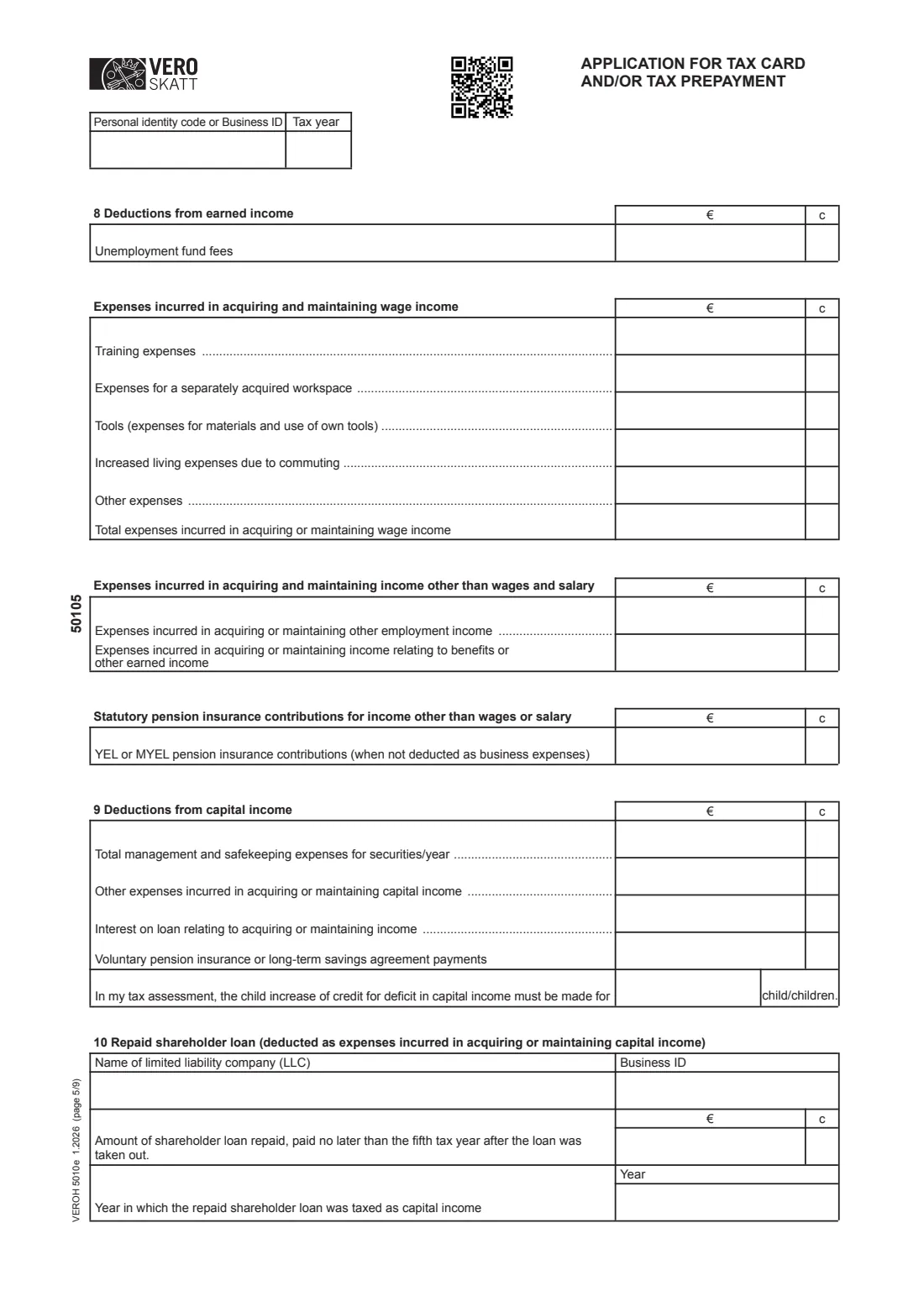
6 8 Deductions from earned income
Unemployment fund fees; expenses of earning wage income such as training, a separately acquired workspace, tools, increased living costs from commuting and other expenses, with their total (FileIt adds it up); expenses for other employment or benefit income; and YEL or MYEL pension contributions not deducted as business expenses.
7 9 Deductions from capital income and 10 Repaid shareholder loan
Part 9 covers securities management fees, other capital-income expenses, interest on loans for producing income, voluntary pension or long-term savings payments, and the number of children for the child increase of the credit for a deficit in capital income. Part 10 records a shareholder loan repaid by the fifth tax year after it was taken out: the company, its Business ID, the amount and the year it was taxed.
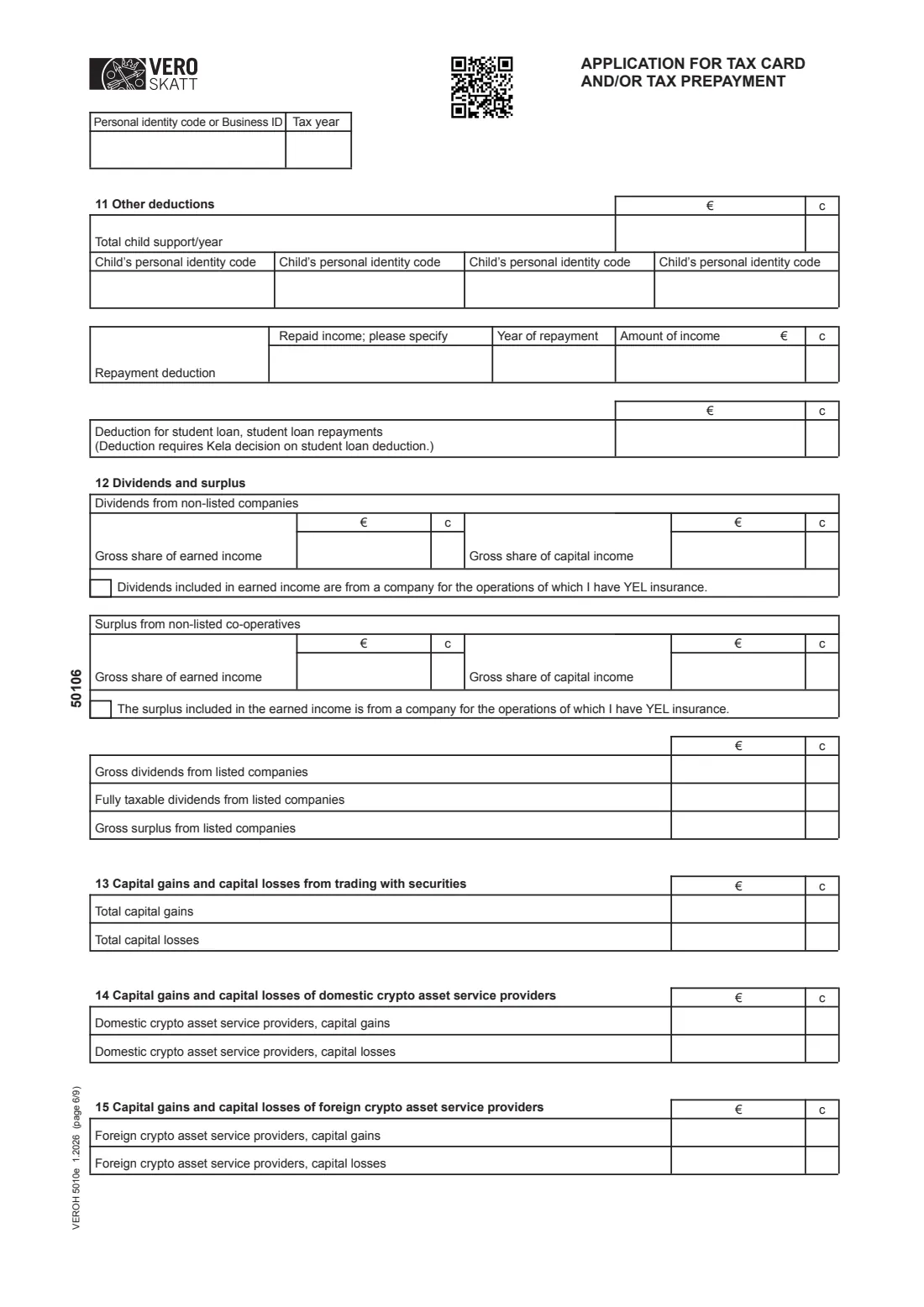
8 11 Other deductions
Total child support paid in the year with up to four children's identity codes, a repayment deduction for income you had to pay back, and the student-loan deduction, which requires Kela's decision.
9 12-15 Dividends, surplus and capital gains
Dividends and co-operative surplus from non-listed companies, split into earned and capital income, with a tick if you have YEL insurance for that company; dividends and surplus from listed companies; and total capital gains and losses from securities and from domestic and foreign crypto-asset service providers.
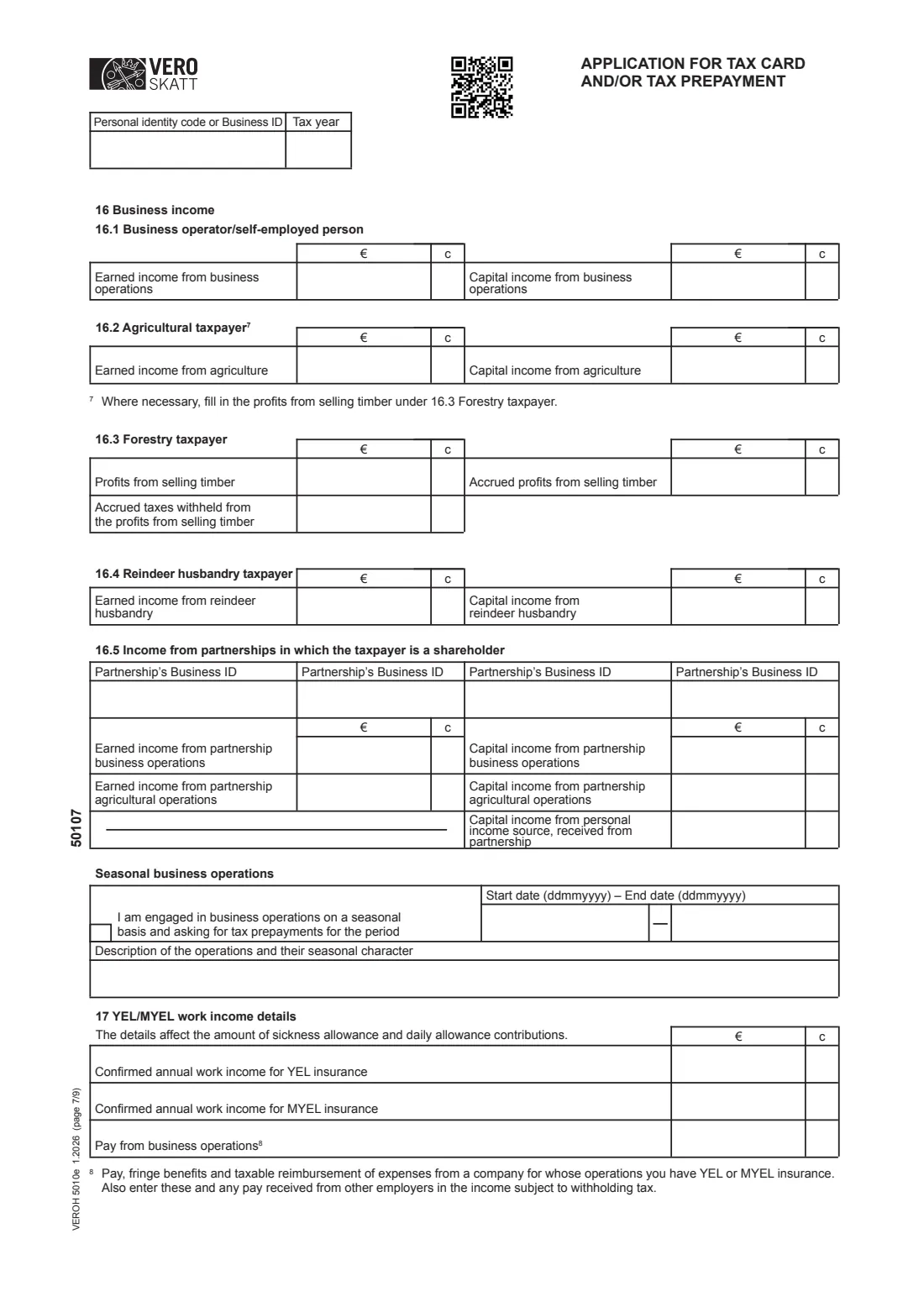
10 16 Business income and 17 YEL/MYEL work income
Earned and capital income from business operations, agriculture, forestry (including timber sales and tax withheld from them), reindeer husbandry and partnerships, with up to four partnership Business IDs, plus seasonal business with its dates and a description. Part 17 asks for your confirmed YEL or MYEL work income and pay from your own company, which affect sickness-allowance and daily-allowance contributions.
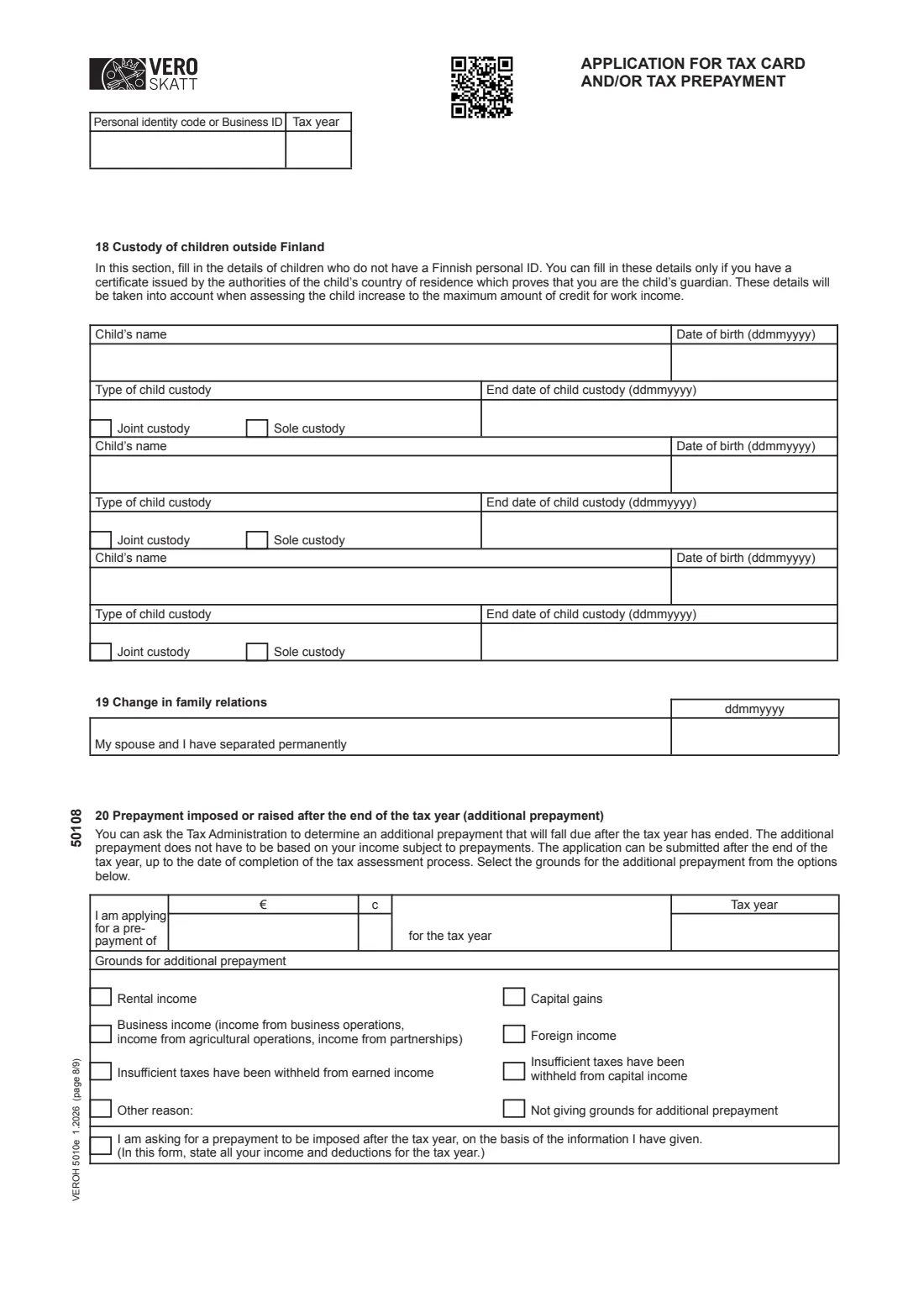
11 18 Custody of children outside Finland and 19 Change in family relations
Part 18 is only for children without a Finnish identity code, and only if you have a certificate from the child's country proving you are the guardian: name, date of birth, joint or sole custody and any end date. Part 19 records the date you and your spouse separated permanently.
12 20 Additional prepayment
Ask for a prepayment after the tax year ends: the amount and tax year, and the grounds — rental income, business income, capital gains, foreign income, too little tax withheld from earned or capital income, another reason, or none. You can also ask Vero to work out the prepayment from the information on the form.
13 21 Further information, 22 Enclosures and signature
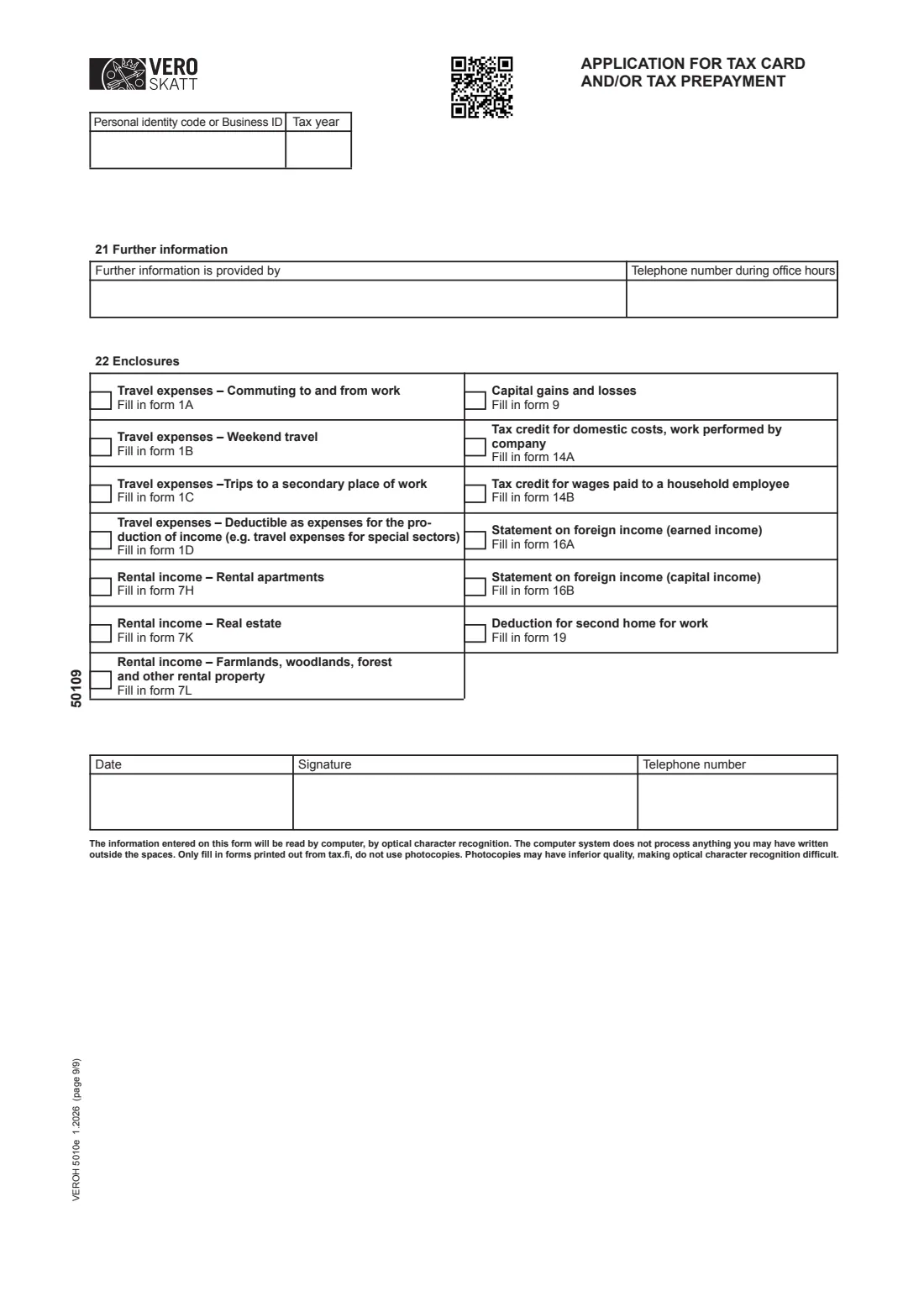
Name a contact person and their daytime phone number, tick each separate Vero form you are attaching, then date and sign page 9. FileIt prints your name in block letters under the signature line.
Common mistakes to avoid
- Reporting only the income the application is about — the form asks for all income and deductions for the year.
- Mixing up 'gross income earned by the change date' with the whole year's estimate.
- Entering a tax-withheld figure larger than the income earned so far.
- Stopping prepayment instalments after applying for a change; the form says they must still be paid on the due dates.
- Claiming rental or travel expenses without attaching the separate forms listed in part 22.
- Using benefit or pension dates from a different year than the tax year.
- Posting an unsigned form or a poor photocopy that the optical character reader can't read.
After you fill it out
Print all nine pages, sign page 9 by hand and post the form with any enclosures to the Finnish Tax Administration, P.O. Box 700, 00052 VERO. Vero also accepts this application as an e-service in MyTax (vero.fi/mytax), shown in the box at the top of page 1. Your earlier tax card or prepayment decision stays valid until you receive the new one.
When you receive a new tax card, give it to your employer or payor. If your prepayments change, pay the new amounts on their due dates. FileIt keeps the filled PDF in your vault as a record of what you reported.
Apply again whenever your income or deductions change significantly during the year, so your withholding and prepayments stay close to your final tax.
Fill out Vero 5010e — tax card / prepayment application (residents) online with FileIt
- Pick the person. Choose someone from People and FileIt fills in their name, date of birth, address and other details it already knows.
- Answer plain-language questions. One part of the form at a time, with the official help text beside each question — 387 fields in all. Your answers save as you go.
- Check the live preview. Watch your answers land on the real Finnish Tax Administration (Verohallinto / Vero) form, and let FileIt do any worksheet arithmetic.
- Generate the official PDF. FileIt prints your answers into the agency’s own PDF and files it in that person’s folder in your vault.
FileIt fills the form — it never files or submits anything for you. Deliver the finished form to whoever asked for it, the way the form’s instructions say.
Start Vero 5010e — tax card / prepayment application (residents) now — it’s freeVero 5010e — tax card / prepayment application (residents): frequently asked questions
What is Vero form 5010e?
It is the English version of the Finnish Tax Administration's application for a tax card and/or tax prepayment, used by people resident in Finland to change their withholding rate or prepayments based on all their income and deductions for the year.
Do I have to fill in all nine pages?
No. You fill in the parts that apply to you, but you must report all your income and deductions for the year. In FileIt each part after the first is optional and only prints when you switch it on.
Can I fill in the 5010e online?
Yes. FileIt gives you a guided web form and prints your answers into Vero's official 5010e PDF, free on every account. Vero also has its own MyTax e-service for the same application.
Where do I send form 5010e?
The paper form goes to the Finnish Tax Administration, P.O. Box 700, 00052 VERO. FileIt doesn't send it for you.
What is the 'change date'?
It is the date of your application. The form asks for the gross income you have earned and the tax withheld up to that date, which you can find on your latest payslip or payment notification.
Can I ask for my tax card to cover all my taxes?
Yes, there is a box for requesting that your tax card take all taxes payable into account so that no prepayment is imposed. The form notes that this choice affects future years until you change it.
What is an additional prepayment?
It is a prepayment set after the tax year ends, which you can ask for up to the completion of your tax assessment, for example if too little tax was withheld or you had capital gains. Part 20 of the form is for this.
Do I sign the 5010e by hand?
Yes. The paper form is signed on page 9 and read by optical character recognition, so FileIt treats it as a wet-ink form.
I live abroad. Is 5010e the right form?
The form says people who live abroad permanently or stay up to six months use 5057e (with 6148e for progressive taxation), people staying longer than six months use 5042e, and people moving abroad use 6207a.
Official sources
- Blank form (PDF), published by Finnish Tax Administration (Verohallinto / Vero): https://www.vero.fi/contentassets/d47b1277cb384a758ae3bb747c2e56ee/5010ev26_t.pdf
- Official instructions and guidance: https://www.vero.fi/en/individuals/tax-cards-and-tax-returns/tax_card/
- Edition shown on this page: VEROH 5010e 1.2026 (checked 2026-09-26).
FileIt is not affiliated with or endorsed by Finnish Tax Administration (Verohallinto / Vero) or any government. This page explains the form in general terms and is not legal, tax or immigration advice. Always read the official instructions, and check that you are using the edition the recipient accepts. Page last reviewed 2026-09-26.