What is Copy or transfer to another Medicare card (MS011)?
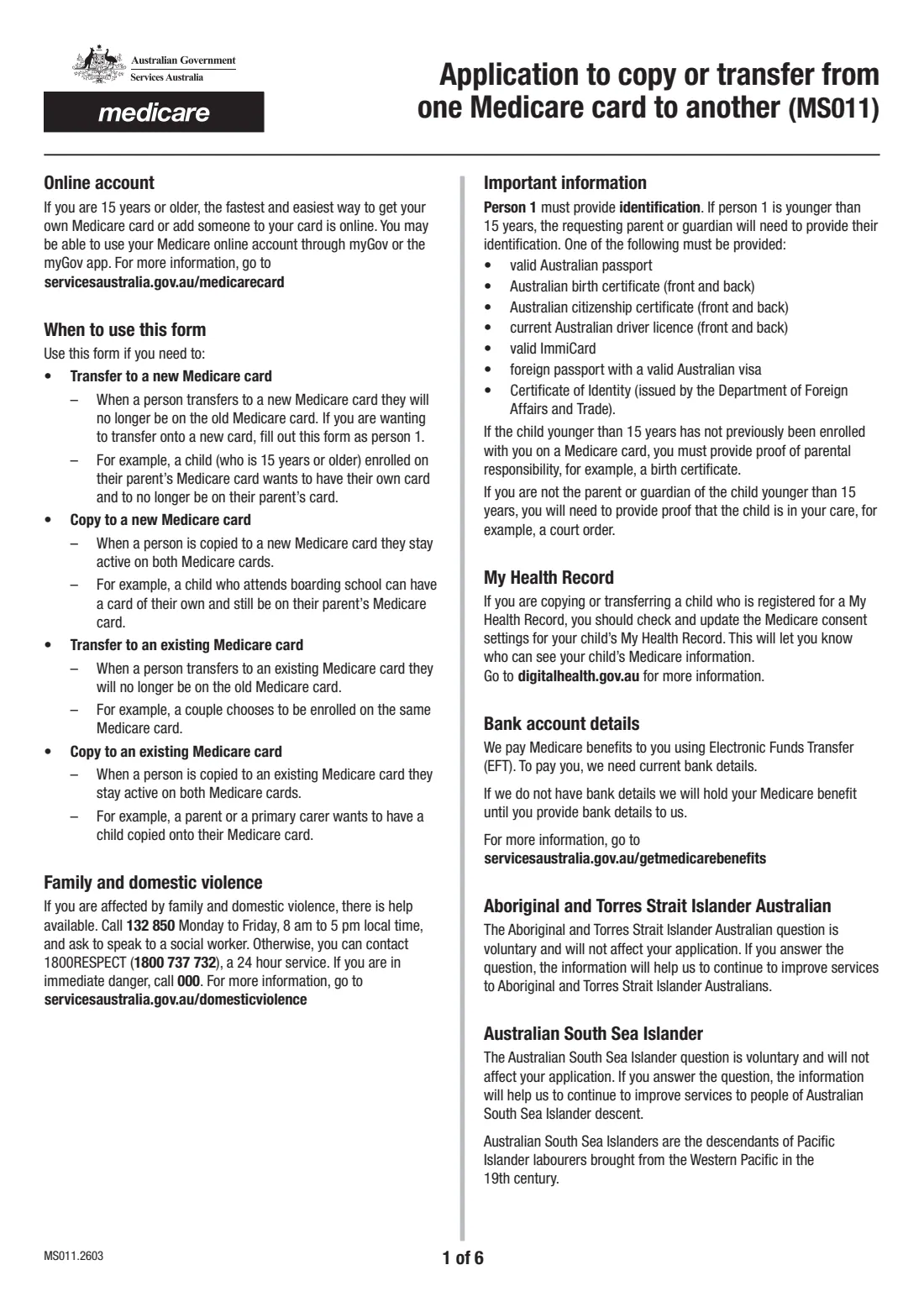
Form MS011 is how you ask Medicare to put a person on another Medicare card. A transfer moves them: they stop being on the old card, as when a 15-year-old gets their own card or a couple join one card. A copy keeps them on both, as when a child at boarding school has a card of their own, or a parent or primary carer has a child copied onto their card.
Up to three people can copy or transfer on one form. Person 1 provides identification, and each person 15 or older completes their own declaration. If anyone is going onto an existing card, the person on that card declares too. For a child younger than 15, a parent or guardian authorises the change: one parent or guardian can authorise a copy, but both (where applicable) must authorise a transfer. People 15 or older can often do this online through their Medicare online account.
FileIt takes you through the current edition (MS011.2603) person by person. It works out the form's yes/no questions for you from the people you add, their reasons and their dates of birth, fills each declaration's full name from the names you've entered, and checks Medicare card numbers. Your answers go into Services Australia's own PDF, saved in your FileIt vault. You then email or post it yourself. FileIt never sends it.
- Who fills it
- Person 1, anyone else copying or transferring, the existing card holder (if any) and a parent or guardian for children under 15
- Given to
- Services Australia (Medicare), by email to [email protected] or post to PO Box 7856, Canberra BC ACT 2610
- People per form
- Up to 3; send a separate sheet for more
- Identification
- Person 1's (or the requesting parent's or guardian's if person 1 is under 15)
- Declarations
- Full name, a tick and the date for each person 15 or older
- Edition
- MS011.2603
Who needs to fill out Copy or transfer to another Medicare card (MS011)?
- Teenagers aged 15 or older who want their own Medicare card, moving off a parent's card.
- Parents or primary carers who want a child copied onto their Medicare card, for example after a separation.
- Families with a child at boarding school or living away who needs a card of their own while staying on the family card.
- Couples who want to be on the same Medicare card.
- Grandparents or other carers who need a child in their care on their card, with a court order or similar documents.
When to use Copy or transfer to another Medicare card (MS011)
- When someone needs to leave one Medicare card for a new or existing card (a transfer).
- When someone needs to be on a second card while staying on the first (a copy).
- When you can't make the change online. People 15 or older can usually do it through their Medicare online account in myGov.
- When a child younger than 15 changes cards and a parent or guardian has to authorise it.
What you need before you start
- Each person's current Medicare card number and the reference number beside their name.
- Names, dates of birth and gender for everyone copying or transferring, and person 1's postal address.
- Person 1's identification, or the requesting parent's or guardian's if person 1 is under 15. Any one of: a valid Australian passport, an Australian birth certificate, an Australian citizenship certificate, a current Australian driver licence, a valid ImmiCard, a foreign passport with a valid Australian visa, or a DFAT Certificate of Identity.
- For a child under 15 not previously enrolled with you: proof of parental responsibility (such as a birth certificate) or proof the child is in your care (such as a court order).
- For an existing card: that card's number and the card holder's details. They must be 15 or older.
- Optionally, bank account details for Medicare benefits. These can't be recorded for children younger than 14.
What’s on Copy or transfer to another Medicare card (MS011)
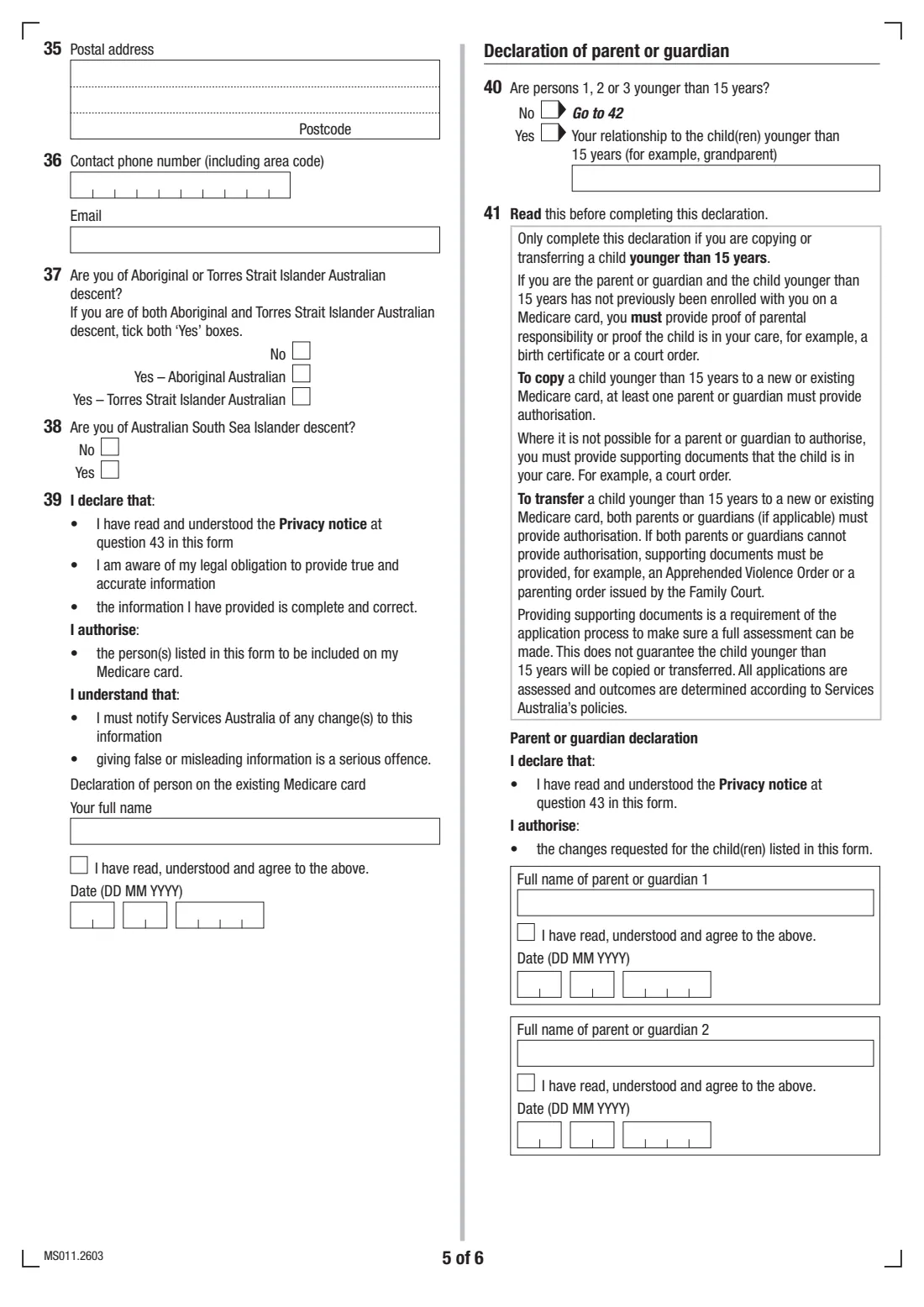
The 2026 edition has 6 pages. FileIt asks for it in 9 parts:
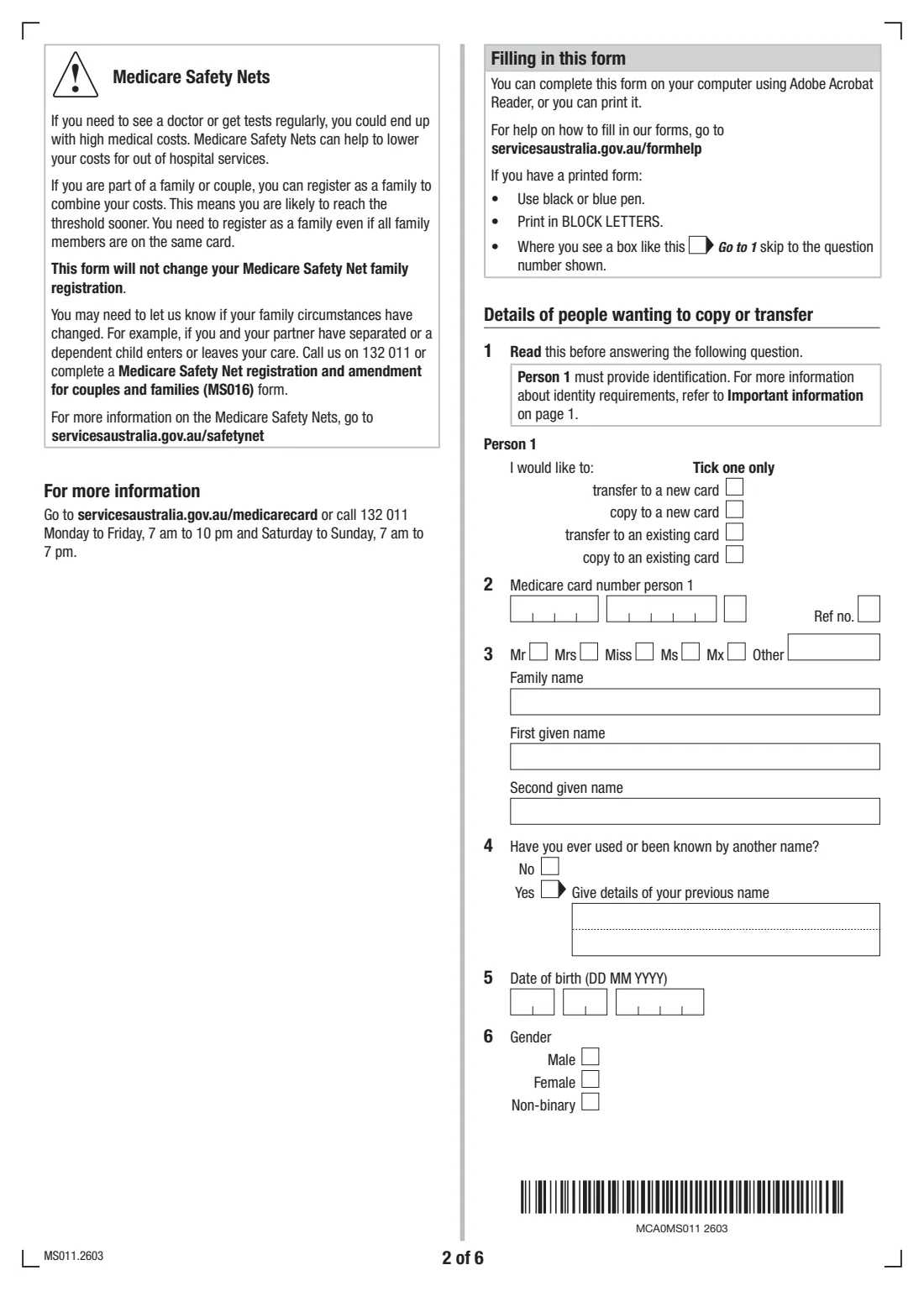
- Person 1 (questions 1–12)Person 1
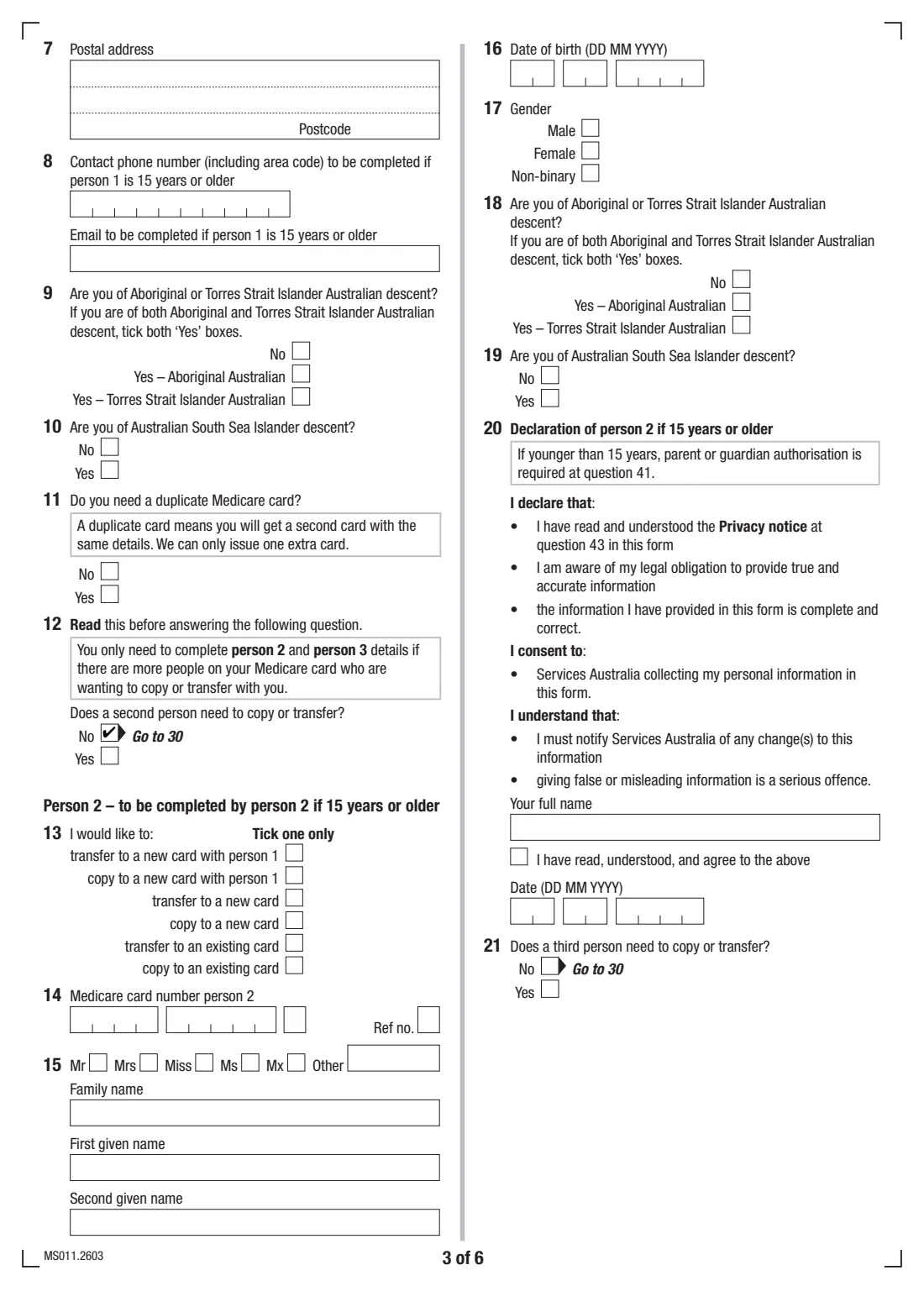
- Person 2 (questions 13–21)Person 2
- Person 3 (questions 22–29)Person 3
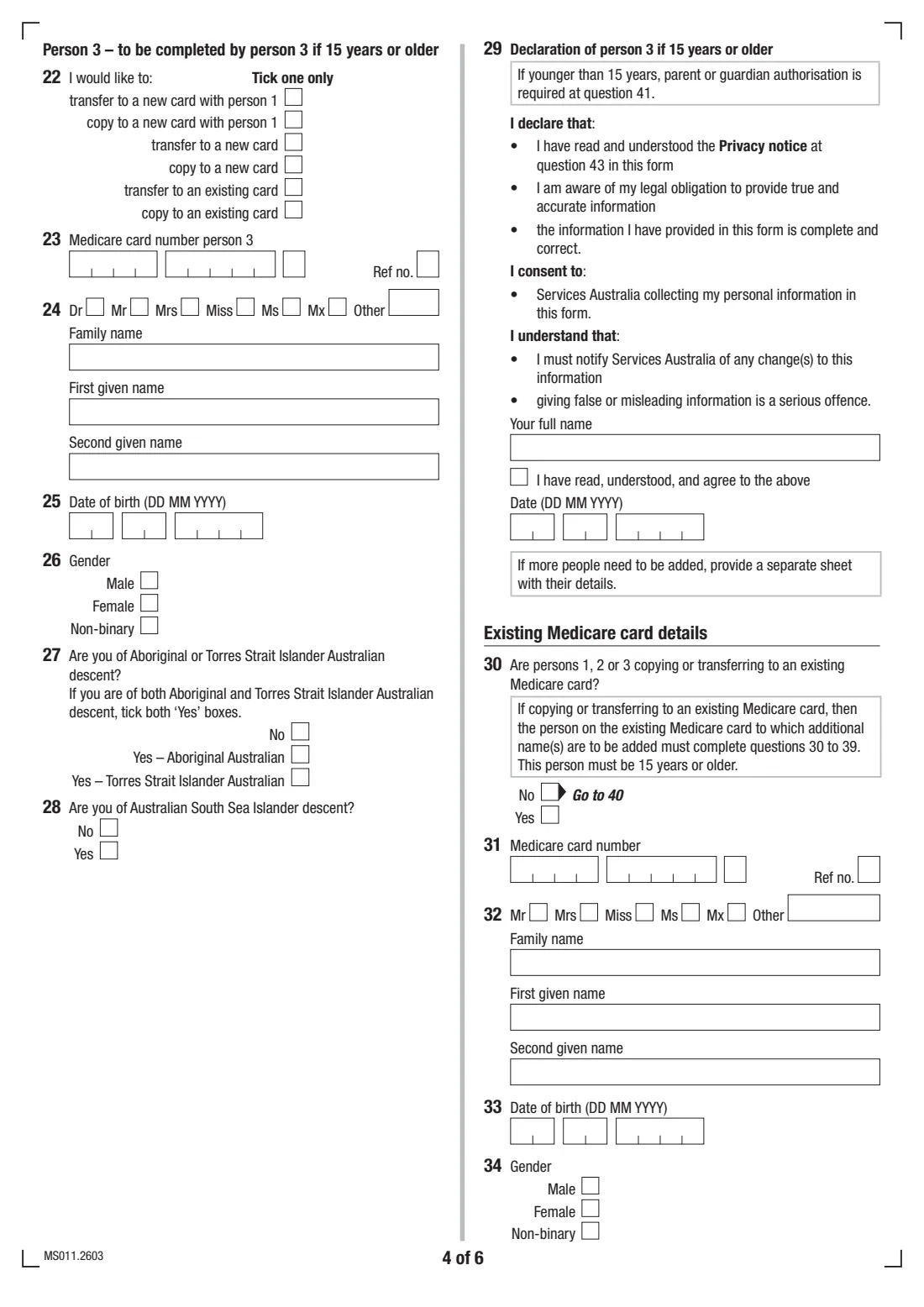
- Existing Medicare card (question 30)Person 1
- Existing Medicare card holder (questions 31–39)Existing card holder
- Declaration of parent or guardian (question 40)Person 1
- Parent or guardian authorisation (question 41)Parent or guardian
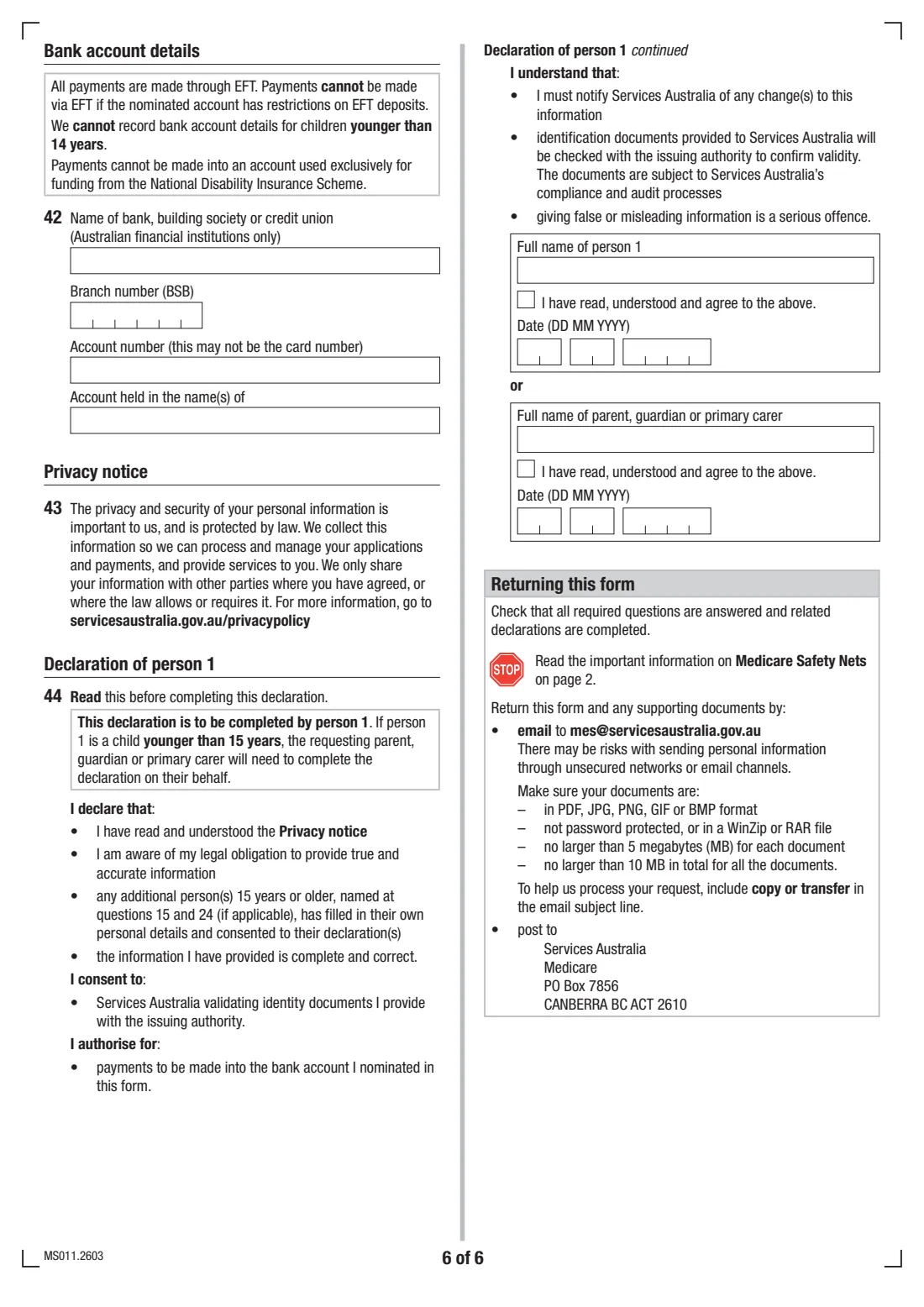
- Bank account details (question 42)Person 1
- Declaration of person 1 (question 44)Person 1
How to fill out Copy or transfer to another Medicare card (MS011), step by step
1 Person 1 (questions 1 to 12)
Choose whether person 1 is transferring or copying, to a new or an existing card. Then give their current card number, name, any previous names, date of birth, gender and postal address. Add a phone number and email if person 1 is 15 or older. The Aboriginal and Torres Strait Islander and South Sea Islander questions are voluntary. Question 11 asks whether you need a duplicate card; only one extra card can be issued.
2 Persons 2 and 3 (questions 13 to 29)
Switch these on only if more people on the card are copying or transferring with person 1. Each can go to a new card with person 1, to a new card of their own, or to an existing card. A person 15 or older ticks and dates their own declaration. FileIt answers questions 12 and 21 from whether you add person 2 and person 3.
3 Existing Medicare card (questions 30 to 39)
If anyone is going to an existing card, the person on that card gives the card number and their details, then ticks and dates their declaration authorising the others to be added. FileIt answers question 30 from the reasons you chose.
4 Parent or guardian (questions 40 and 41)
Question 40 is answered from the dates of birth. If anyone is younger than 15, a parent or guardian gives their relationship to the child and authorises the change. A second parent or guardian also authorises a transfer where applicable. If they can't, supporting documents such as an Apprehended Violence Order or a Family Court parenting order are needed.
5 Bank account (question 42)
Optional: the account Medicare benefits are paid into by EFT. It can't be an account with EFT restrictions or one used only for NDIS funding, and bank details can't be recorded for children younger than 14.
6 Declaration of person 1 (question 44)
Person 1 ticks and dates the declaration, which also authorises payments into the nominated account. If person 1 is younger than 15, the requesting parent, guardian or primary carer completes it instead, with their own full name.
Common mistakes to avoid
- Choosing 'transfer' when you mean 'copy'. A transfer takes the person off the old card.
- Forgetting the existing card holder's part when someone is moving onto an existing card.
- Leaving out the second parent's or guardian's authorisation when transferring a child under 15, without supporting documents.
- Not sending person 1's identification, or the parent's or guardian's if person 1 is under 15.
- Giving bank details for a child younger than 14.
- Missing a declaration for a person 15 or older on the form.
After you fill it out
Check that every declaration has a full name, the tick and a date. Services Australia's MS011 page says the form must be completed by everyone listed who is 15 or older, and by the existing card holder when someone joins their card.
Email the form and documents to [email protected] with 'copy or transfer' in the subject line: PDF, JPG, PNG, GIF or BMP files, not password protected or zipped, up to 5 MB each and 10 MB in total. Or post them to Services Australia, Medicare, PO Box 7856, Canberra BC ACT 2610. The supporting documents don't need to be certified.
This form doesn't change a Medicare Safety Net family registration. If your family circumstances have changed, Services Australia may need to hear about that separately (form MS016).
FileIt keeps the completed PDF in your vault. File each new Medicare card there when it arrives.
Fill out Copy or transfer to another Medicare card (MS011) online with FileIt
- Pick the person. Choose someone from People and FileIt fills in their name, date of birth, address and other details it already knows.
- Answer plain-language questions. One part of the form at a time, with the official help text beside each question — 104 fields in all. Your answers save as you go.
- Check the live preview. Watch your answers land on the real Services Australia (Medicare) form, and let FileIt do any worksheet arithmetic.
- Generate the official PDF. FileIt prints your answers into the agency’s own PDF and files it in that person’s folder in your vault.
FileIt fills the form — it never files or submits anything for you. Deliver the finished form to whoever asked for it, the way the form’s instructions say.
Start Copy or transfer to another Medicare card (MS011) now — it’s freeCopy or transfer to another Medicare card (MS011): frequently asked questions
What's the difference between copying and transferring?
A transfer moves the person: they're no longer on the old card. A copy keeps them on both cards.
How does my 15-year-old get their own Medicare card?
At 15 or older they can usually do it through their Medicare online account in myGov. On paper, they complete MS011 as person 1 and choose 'transfer to a new card' (or 'copy to a new card' to stay on the family card too), with their own identification.
Who has to sign or declare?
Everyone listed who is 15 or older completes their declaration: a full name, a tick and the date. So does the holder of any existing card someone is joining. For children younger than 15, a parent or guardian authorises the change.
Can one parent copy a child onto their card without the other parent?
The form says one parent or guardian can authorise a copy. A transfer needs both parents or guardians where applicable. If that isn't possible, send supporting documents such as an Apprehended Violence Order or a Family Court parenting order.
Where do I send MS011?
Email [email protected] with 'copy or transfer' in the subject line, or post to Services Australia, Medicare, PO Box 7856, Canberra BC ACT 2610. FileIt doesn't send it for you.
Does MS011 change our Medicare Safety Net registration?
No. The form says it won't change your Safety Net family registration. Use the Medicare Safety Net registration and amendment form (MS016) or call Medicare.
Official sources
- Blank form (PDF), published by Services Australia (Medicare): https://www.servicesaustralia.gov.au/sites/default/files/2026-03/ms011-2603en-f.pdf
- Official instructions and guidance: https://www.servicesaustralia.gov.au/ms011
- Edition shown on this page: MS011.2603 (checked 2026-09-28).
FileIt is not affiliated with or endorsed by Services Australia (Medicare) or any government. This page explains the form in general terms and is not legal, tax or immigration advice. Always read the official instructions, and check that you are using the edition the recipient accepts. Page last reviewed 2026-09-28.