What is Medicare claim (MS014)?
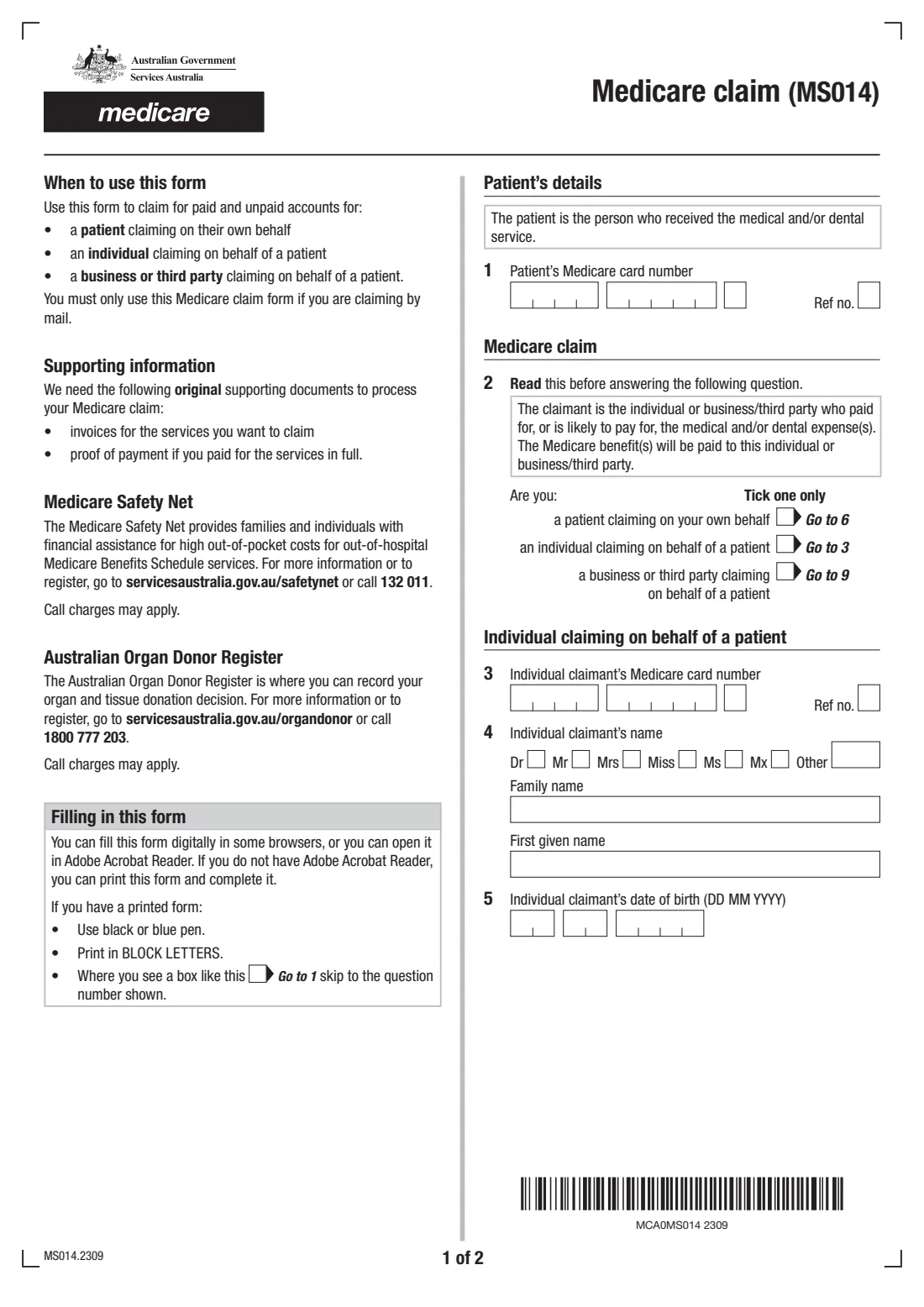
Form MS014 is Services Australia's paper Medicare claim. You use it to claim the Medicare benefit for a doctor's or specialist's account that hasn't been claimed at the practice — whether you've already paid it or not. The claimant can be the patient, an individual claiming on the patient's behalf (a parent for a child, for example), or a business or third party. The executor or administrator of a deceased claimant's estate uses it too.
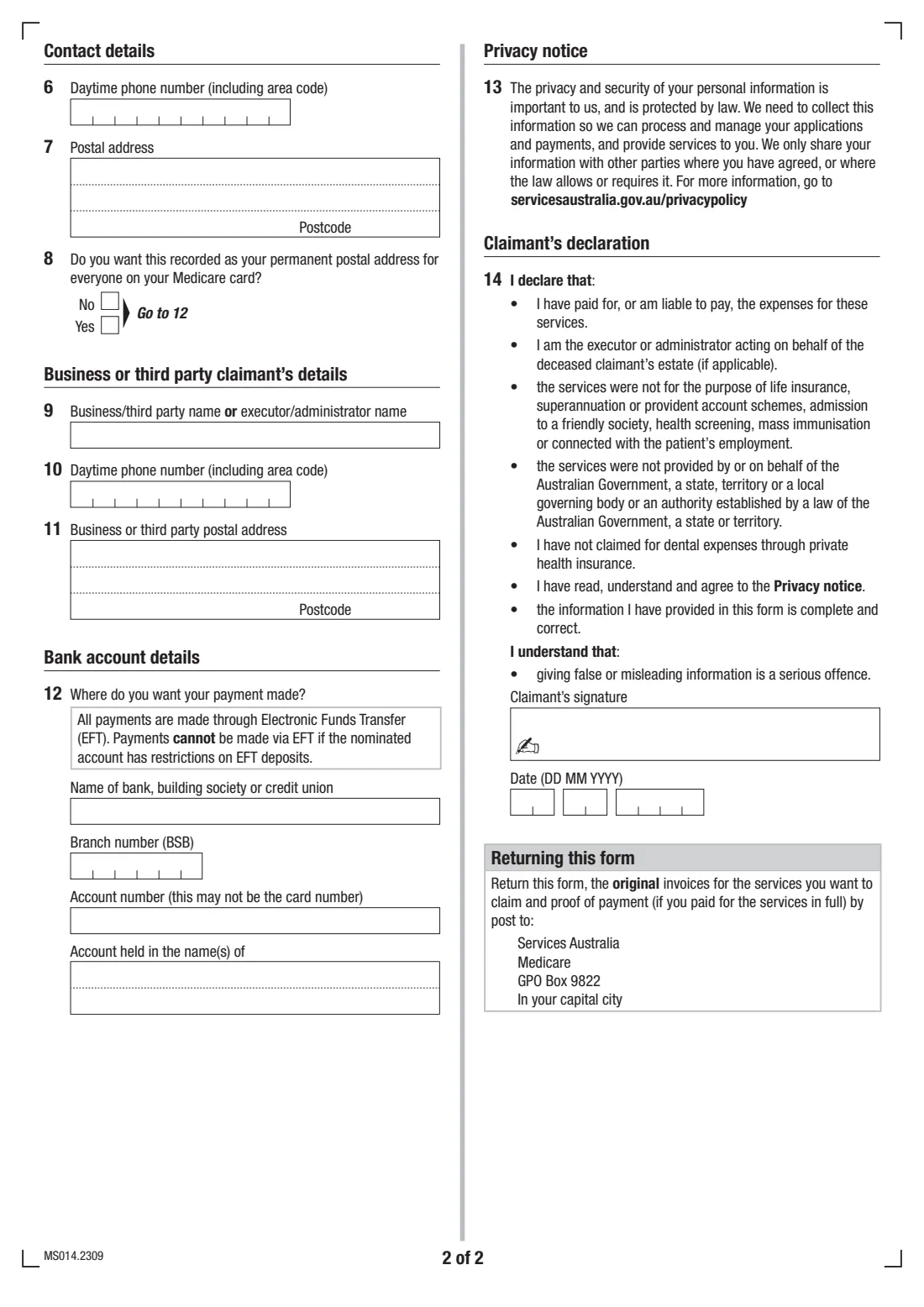
The form is short: the patient's Medicare card number, who is claiming, a phone number and postal address, the bank account the benefit should go into, and a signed declaration. You post it to Medicare with the original invoices and, if you paid in full, proof of payment. Services Australia notes that claiming online is quicker, so the paper form is for when that isn't an option.
FileIt walks you through the current edition (MS014.2309), shows only the questions that apply to the claimant you choose, checks each Medicare card number's check digit and the BSB, and prints your answers into Services Australia's own PDF. The finished form is saved in your FileIt vault. You print it, sign it and post it yourself, because FileIt never lodges anything.
- Who fills it
- The claimant: the patient, an individual claiming for them, or a business or third party
- Given to
- Services Australia (Medicare), by post to GPO Box 9822 in your capital city
- Send with it
- Original invoices, plus proof of payment if you paid in full
- Payment
- Electronic Funds Transfer into an Australian bank, building society or credit union account
- Signatures
- The claimant
- Edition
- MS014.2309
Who needs to fill out Medicare claim (MS014)?
- Patients who paid a doctor, specialist or other Medicare-covered service and didn't get the rebate at the practice.
- Patients with an unpaid account who want to claim the Medicare benefit before paying the provider.
- Parents or carers claiming for a child's appointments on their own Medicare card.
- People helping an older relative claim a medical account on that relative's behalf.
- Executors and administrators claiming Medicare benefits owed for a deceased person's medical accounts.
- Businesses or third parties that paid, or are liable to pay, a patient's medical or dental expenses.
When to use Medicare claim (MS014)
- When you can't or don't want to claim online or at the practice.
- When you have one or more medical or dental invoices and want the Medicare benefit paid into your bank account.
- When you're claiming for someone else and need the benefit paid to you as the person who paid the account.
- When your bank details have changed or Services Australia doesn't have them yet — the form lets you add them.
What you need before you start
- The patient's 10-digit Medicare card number and their reference number (the digit beside their name on the card).
- If you're claiming for someone else: your own Medicare card number and reference number, name and date of birth.
- For a business or third party: the business, executor or administrator name, phone number and postal address.
- The original invoices for the services you're claiming, and proof of payment if you paid in full.
- The name of your bank, building society or credit union, the BSB, account number and account name, if Medicare needs them.
What’s on Medicare claim (MS014)
The 2023 edition has 2 pages. FileIt asks for it in 7 parts, and it is signed by Claimant:
- Patient's details (question 1)Claimant
- Who is claiming (question 2)Claimant
- Individual claiming on behalf of a patient (questions 3–5)Claimant
- Contact details (questions 6–8)Claimant
- Business or third party claimant's details (questions 9–11)Claimant
- Bank account details (question 12)Claimant
- Claimant's declaration (question 14)Claimant
How to fill out Medicare claim (MS014), step by step
1 Patient's details (question 1)
The patient is the person who received the medical or dental service. The form doesn't ask for their name: the Medicare card number and the reference number beside their name identify them. FileIt checks the card number's check digit, so a mistyped digit is caught before you print.
2 Who is claiming (question 2)
Tick one: a patient claiming on their own behalf, an individual claiming on behalf of a patient, or a business or third party claiming on behalf of a patient. The claimant is whoever paid, or is likely to pay, the account, and the benefit is paid to them. FileIt then shows only the questions for that claimant, following the form's 'Go to' instructions.
3 Individual claimant (questions 3 to 5)
If you're claiming for someone else as an individual, give your own Medicare card number and reference number, your title and name, and your date of birth.
4 Contact details (questions 6 to 8)
Patients and individual claimants give a daytime phone number and a postal address, and say whether that address should become the permanent postal address for everyone on their Medicare card. FileIt prints the suburb and state together on the address's third line, as the form expects.
5 Business or third party (questions 9 to 11)
A business, third party, executor or administrator gives their name, daytime phone number and postal address instead.
6 Bank account (question 12)
Medicare pays benefits by Electronic Funds Transfer, and can't pay into an account that restricts EFT deposits. Give the bank name, BSB, account number and account name if Services Australia doesn't already have your current details. FileIt asks for all four together.
7 Declaration (question 14)
The claimant signs and dates the declaration. It confirms that they paid or are liable to pay the expenses, and that the services weren't for things like life insurance, superannuation, health screening or employment, or provided by a government body. It also confirms that no dental expenses were claimed through private health insurance. FileIt fills in the date and leaves the signature box for you.
Common mistakes to avoid
- Sending copies instead of the original invoices. The form asks for the originals.
- Leaving out proof of payment when the account was paid in full.
- Missing the patient's reference number. The card number alone doesn't say which person on the card received the service.
- Ticking more than one box at question 2. The form says to tick one only.
- Giving an account that can't receive EFT deposits.
- Forgetting to sign the declaration.
After you fill it out
Print the form, sign the claimant's declaration, and check the date.
Post it with the original invoices, and proof of payment if you paid in full, to Services Australia, Medicare, GPO Box 9822 in your capital city. Services Australia also accepts the claim in person at a service centre.
FileIt keeps a copy of the completed form in your vault, so you have a record of what you claimed. Scan the invoices into the same folder before you post the originals.
Fill out Medicare claim (MS014) online with FileIt
- Pick the person. Choose someone from People and FileIt fills in their name, date of birth, address and other details it already knows.
- Answer plain-language questions. One part of the form at a time, with the official help text beside each question — 30 fields in all. Your answers save as you go.
- Check the live preview. Watch your answers land on the real Services Australia (Medicare) form, and let FileIt do any worksheet arithmetic.
- Generate the official PDF. FileIt prints your answers into the agency’s own PDF and files it in that person’s folder in your vault. Sign it, or send it for e-signature.
FileIt fills the form — it never files or submits anything for you. Deliver the finished form to whoever asked for it, the way the form’s instructions say.
Start Medicare claim (MS014) now — it’s freeMedicare claim (MS014): frequently asked questions
What is the MS014 form?
MS014 is Services Australia's paper Medicare claim form. It's used to claim the Medicare benefit for paid or unpaid medical and dental accounts by mail or at a service centre.
Can I claim for my child with MS014?
Yes. Tick 'an individual claiming on behalf of a patient', give your child's Medicare card and reference number as the patient, and give your own card number, name and date of birth at questions 3 to 5.
Do I have to pay the account before I claim?
No. The form covers paid and unpaid accounts. If you paid in full, include proof of payment with the original invoices.
Where do I send the Medicare claim form?
By post to Services Australia, Medicare, GPO Box 9822 in your capital city, with the original invoices. Services Australia's MS014 page also mentions claiming in person at a service centre. FileIt doesn't send it for you.
How will I get the money?
Medicare pays benefits by Electronic Funds Transfer into the bank account on the form, or the one it already holds for you.
Can I fill in the MS014 online?
FileIt fills in the official PDF for you: it asks the questions, prints your answers into the government's layout, and saves the result in your vault, ready to print, sign and post. Services Australia also offers online claiming, which it describes as the quickest way to get your benefit.
Official sources
- Blank form (PDF), published by Services Australia (Medicare): https://www.servicesaustralia.gov.au/sites/default/files/2023-09/ms014-2309en-f.pdf
- Official instructions and guidance: https://www.servicesaustralia.gov.au/ms014
- Edition shown on this page: MS014.2309 (checked 2026-09-28).
FileIt is not affiliated with or endorsed by Services Australia (Medicare) or any government. This page explains the form in general terms and is not legal, tax or immigration advice. Always read the official instructions, and check that you are using the edition the recipient accepts. Page last reviewed 2026-09-28.