

What is the telecom site survey form template?
Network installations go wrong when the survey is thin. The installer arrives to find the rack full, the lead-in duct blocked, no power for the new equipment or a riser that needs a permit to open. Each surprise means a return visit, a revised quote or a missed handover date.
This telecom site survey template gives field technicians a consistent checklist. It starts with the site, contacts, access hours and access requirements such as escorts, inductions, permits and asbestos register checks. The equipment room page records the room type, rack space, power, cooling, incoming services and lead-in duct, with photos required. The cable paths page covers the services to install, outlets, access points, run lengths, containment, fire-rated penetrations and a route description.
The last page lists hazards, risk notes, materials, estimated labour and the survey outcome, with an optional customer signature. Each survey is filed as a PDF with its photos and drawings in your FileIt vault.
- Best for
- Network installers, telecom contractors, ISPs and in-house IT or facilities teams
- Filled in by
- The field technician or surveyor on site
- Time to complete
- About 15 minutes, plus photos
- Includes
- Access requirements, comms room and rack check, lead-in duct, containment, fire-stopping prompt, materials, outcome, signature
Who uses a telecom site survey form?
- Surveying an office floor for new structured cabling
- Checking a building's lead-in and comms room before a fibre connection
- Planning Wi-Fi access points across a school campus
- Assessing a warehouse for cabling and wireless coverage
- Surveying a multi-tenant building's risers before a tenant fit-out
- Recording a survey that ends with further work needed before installation
Questions on this telecom site survey form
39 questions over 4 pages · includes signature, file upload, conditional questions, multiple pages.
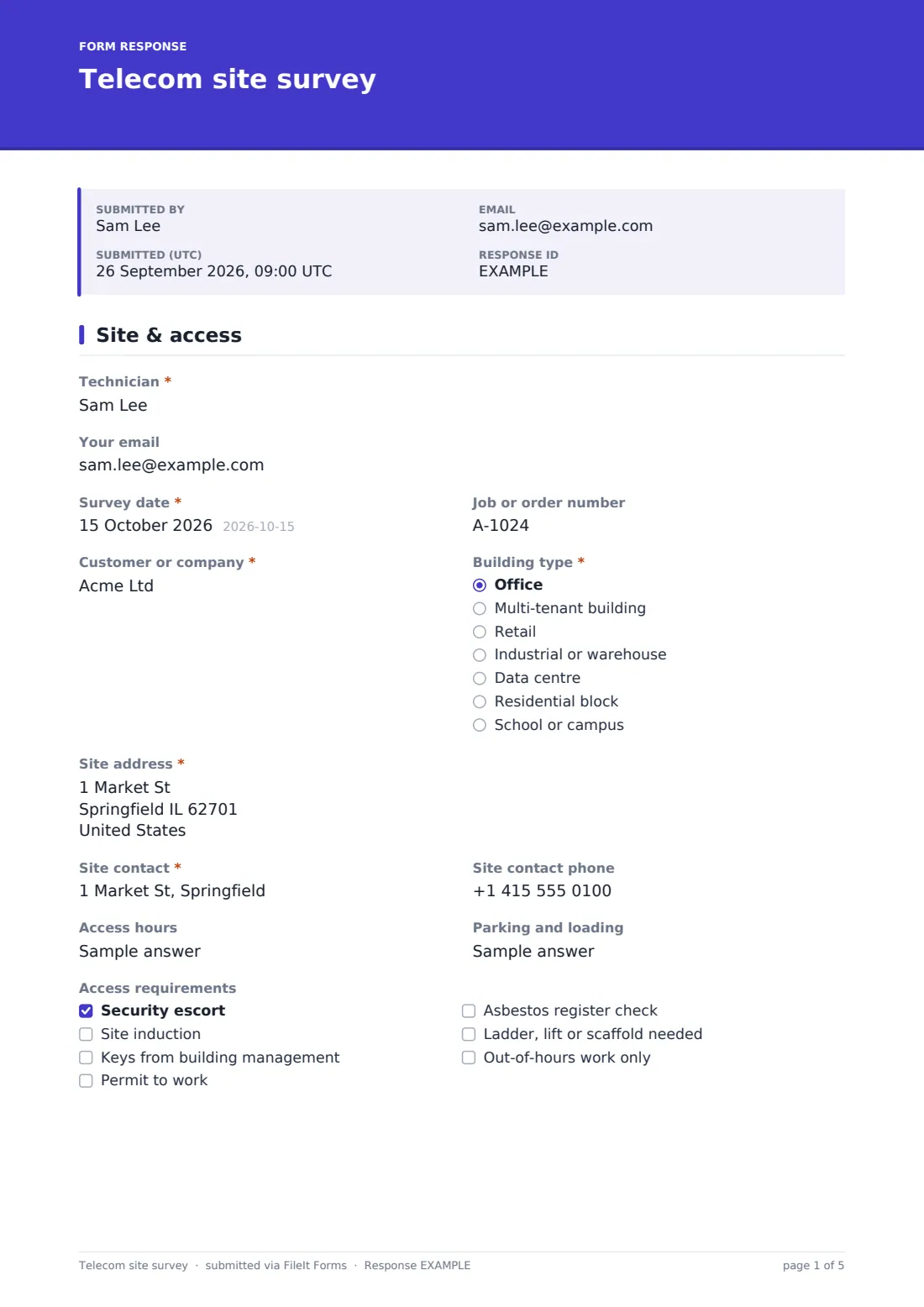
1 Site & access
- Technician*
- Your email
- Survey date*
- Job or order number
- Customer or company*
- Building type* Office · Multi-tenant building · Retail · Industrial or warehouse · Data centre · Residential block · School or campus
- Site address*
- Site contact*
- Site contact phone
- Access hours
- Parking and loading
- Access requirements Security escort · Site induction · Keys from building management · Permit to work · Asbestos register check · Ladder, lift or scaffold needed · Out-of-hours work only
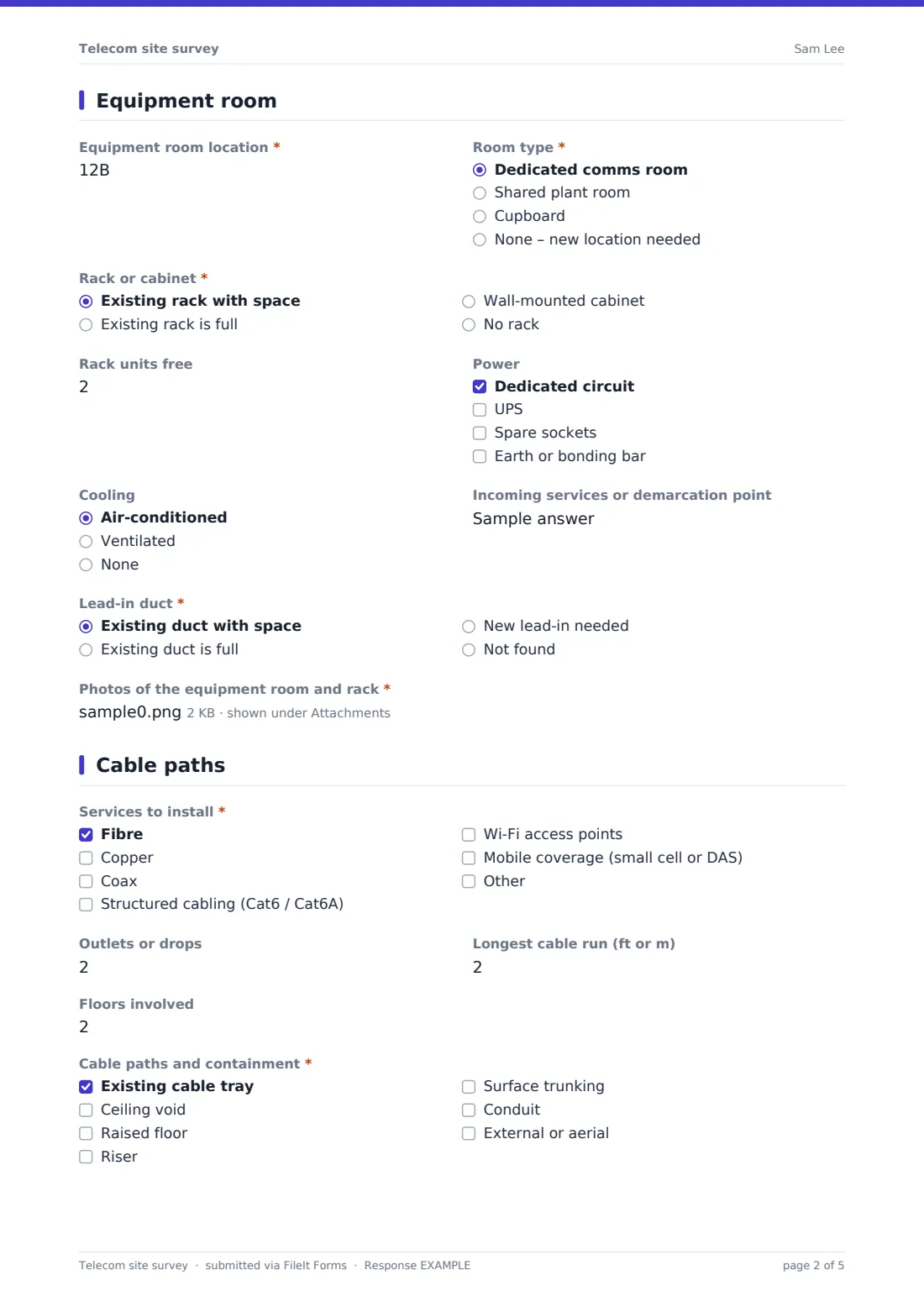
2 Equipment room
- Equipment room location*
- Room type* Dedicated comms room · Shared plant room · Cupboard · None – new location needed
- Rack or cabinet* Existing rack with space · Existing rack is full · Wall-mounted cabinet · No rack
- Rack units free asked only when it applies
- Power Dedicated circuit · UPS · Spare sockets · Earth or bonding bar
- Cooling Air-conditioned · Ventilated · None
- Incoming services or demarcation point
- Lead-in duct* Existing duct with space · Existing duct is full · New lead-in needed · Not found
- Photos of the equipment room and rack*
3 Cable paths
- Services to install* Fibre · Copper · Coax · Structured cabling (Cat6 / Cat6A) · Wi-Fi access points · Mobile coverage (small cell or DAS)
- Outlets or drops
- Wi-Fi access points asked only when it applies
- Longest cable run (ft or m)
- Floors involved
- Cable paths and containment* Existing cable tray · Ceiling void · Raised floor · Riser · Surface trunking · Conduit · External or aerial
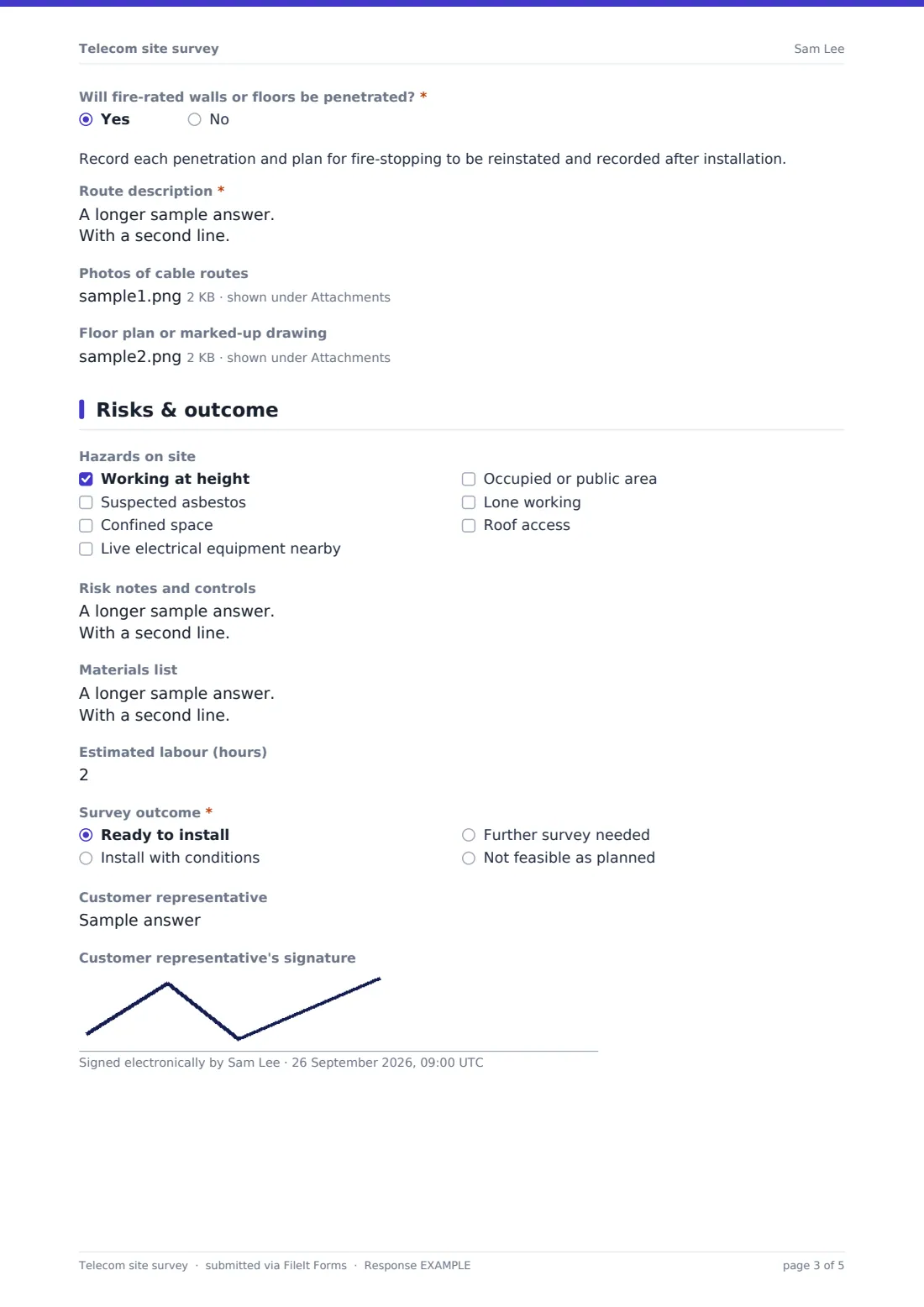
- Will fire-rated walls or floors be penetrated?*
- Route description*
- Photos of cable routes
- Floor plan or marked-up drawing
4 Risks & outcome
- Hazards on site Working at height · Suspected asbestos · Confined space · Live electrical equipment nearby · Occupied or public area · Lone working · Roof access
- Risk notes and controls
- Materials list
- Estimated labour (hours)
- Survey outcome* Ready to install · Install with conditions · Further survey needed · Not feasible as planned
- Conditions or next steps* asked only when it applies
- Customer representative
- Customer representative's signature
The telecom site survey form, page by page
1 Site & access
Technician, an optional email for a copy, Survey date, Job or order number, Customer or company, Building type and Site address come first. Site contact and phone, Access hours and Parking and loading follow. Access requirements lists escorts, inductions, keys from building management, permits to work, asbestos register checks, ladder or lift needs and out-of-hours work.
2 Equipment room
Equipment room location and Room type start the page. Rack or cabinet records whether there's space; an existing rack with space asks how many rack units are free. Power, Cooling, Incoming services or demarcation point and Lead-in duct follow, and photos of the room and rack are required.
3 Cable paths
Services to install covers fibre, copper, coax, structured cabling, Wi-Fi and mobile coverage. Outlets or drops, Wi-Fi access points, Longest cable run and Floors involved size the job. Cable paths and containment lists trays, ceiling voids, raised floors, risers, trunking, conduit and external routes. A yes to fire-rated penetrations shows a reminder about fire-stopping. Route description, route photos and a floor plan upload finish the page.
4 Risks & outcome
Hazards on site, Risk notes and controls, Materials list and Estimated labour help plan the work. Survey outcome is ready to install, install with conditions, further survey needed or not feasible as planned; anything but ready asks for conditions or next steps. The customer representative can sign.
Make the template yours
- Add a dropdown of your cable and equipment standards
- Rename services to match your product range
- Make the customer signature required if you need sign-off before quoting
- Remove the mobile coverage option if you don't install it
- Route surveys to your project or design team's address
- File surveys into a vault folder per customer or building
Tips for a better telecom site survey form
- Photograph rack labels, patch panels and the lead-in duct before anything else
- Check the asbestos register before lifting ceiling tiles or drilling
- Walk every cable route, not only the start and end points
- Note fire-rated walls and floors so fire-stopping is priced in
- Confirm access hours and who holds keys before booking the installation
Every response becomes a PDF in your vault
Each survey is saved as a PDF in the vault folder you choose, with photos and floor plans attached. You're notified straight away and the technician can receive a copy.
The Responses table lets you filter by outcome, building type or service and export to CSV to plan installation schedules and materials.
- Start from this template. It opens in the FileIt Forms designer — change any question, add pages, set the rules for when questions appear.
- Share it. Turn on a public link, or send it to people by email, each with their own link. They don’t need a FileIt account.
- Get the answers as PDFs. Each response is saved as a PDF in the vault folder you choose, with uploaded files attached — and listed in a Responses table you can export to CSV.
Telecom site survey form: frequently asked questions
Is this telecom site survey template free?
Yes. It's included with the Forms app on every FileIt account, including the free plan.
Can I upload floor plans?
Yes. There's an upload for up to three floor plans or marked-up drawings, plus up to eighteen room and route photos.
Does the form calculate cable quantities?
No. Record the run lengths and outlets, and list the materials yourself. FileIt Forms has no calculations.
Can the customer sign on site?
Yes. There's an optional signature for the customer representative, which works with a finger on a phone or tablet.
Does it cover fire-stopping rules?
It prompts the technician to record penetrations and plan fire-stopping. FileIt doesn't give regulatory advice, so follow the rules for your building and region.
Do technicians need a FileIt account?
No. Anyone with the link can complete the survey.