What is the subscription box preferences form template?
Personalisation is a big part of why people choose a subscription box over buying things themselves. But a tailored box needs real information — what each subscriber likes, what they'd hate to receive, their sizes, and anything they're allergic to.
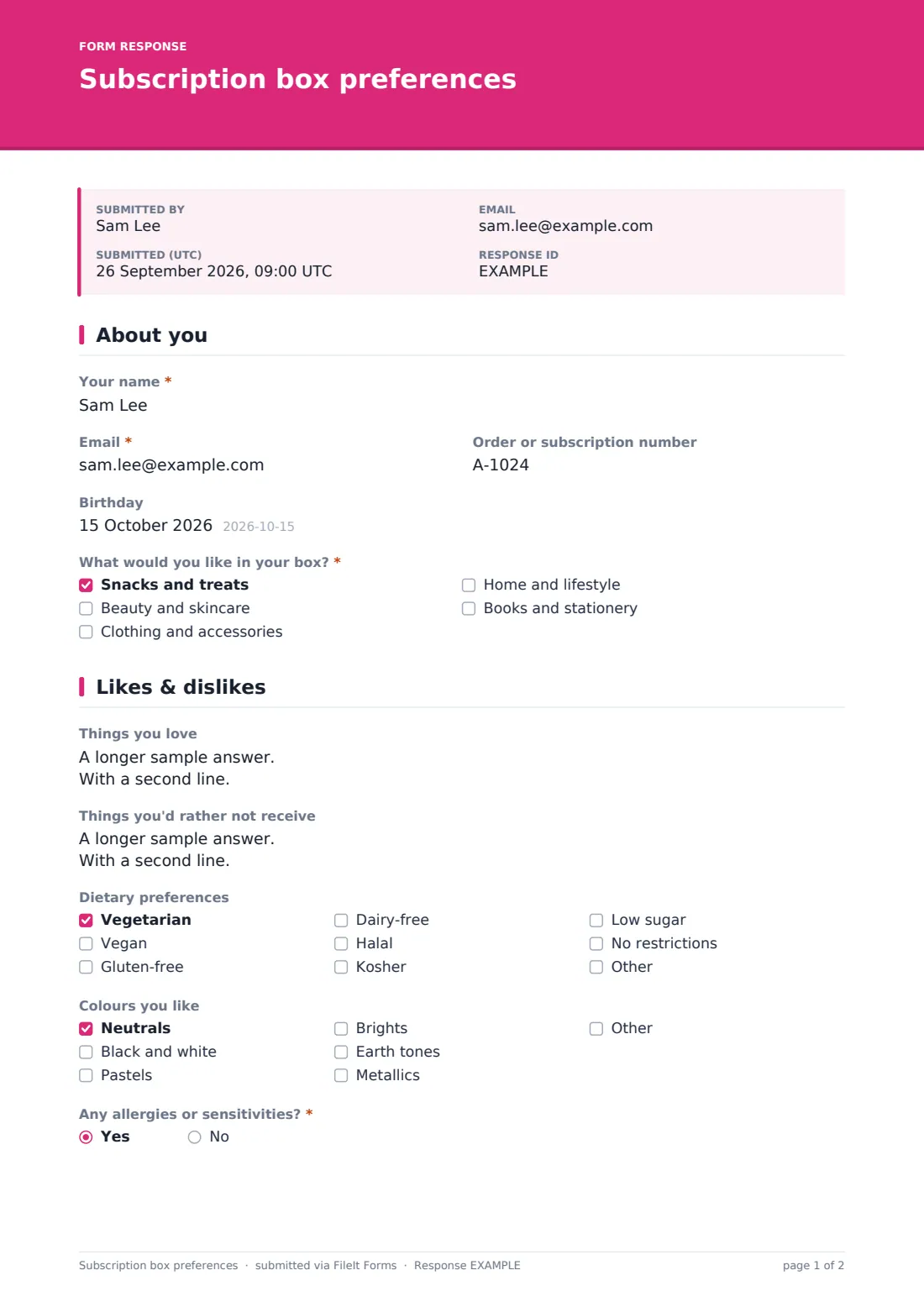
This subscription box preferences form asks for it in a friendly, short format. The first page collects the subscriber's name, email, order number, an optional birthday and what they'd like in their box — snacks, beauty, clothing, home or books. Ticking clothing reveals sizes and fit. The second page covers things they love and would rather not receive; dietary preferences appear for snack boxes, and skin type and fragrance for beauty boxes. Colours, allergies and how adventurous to be follow.
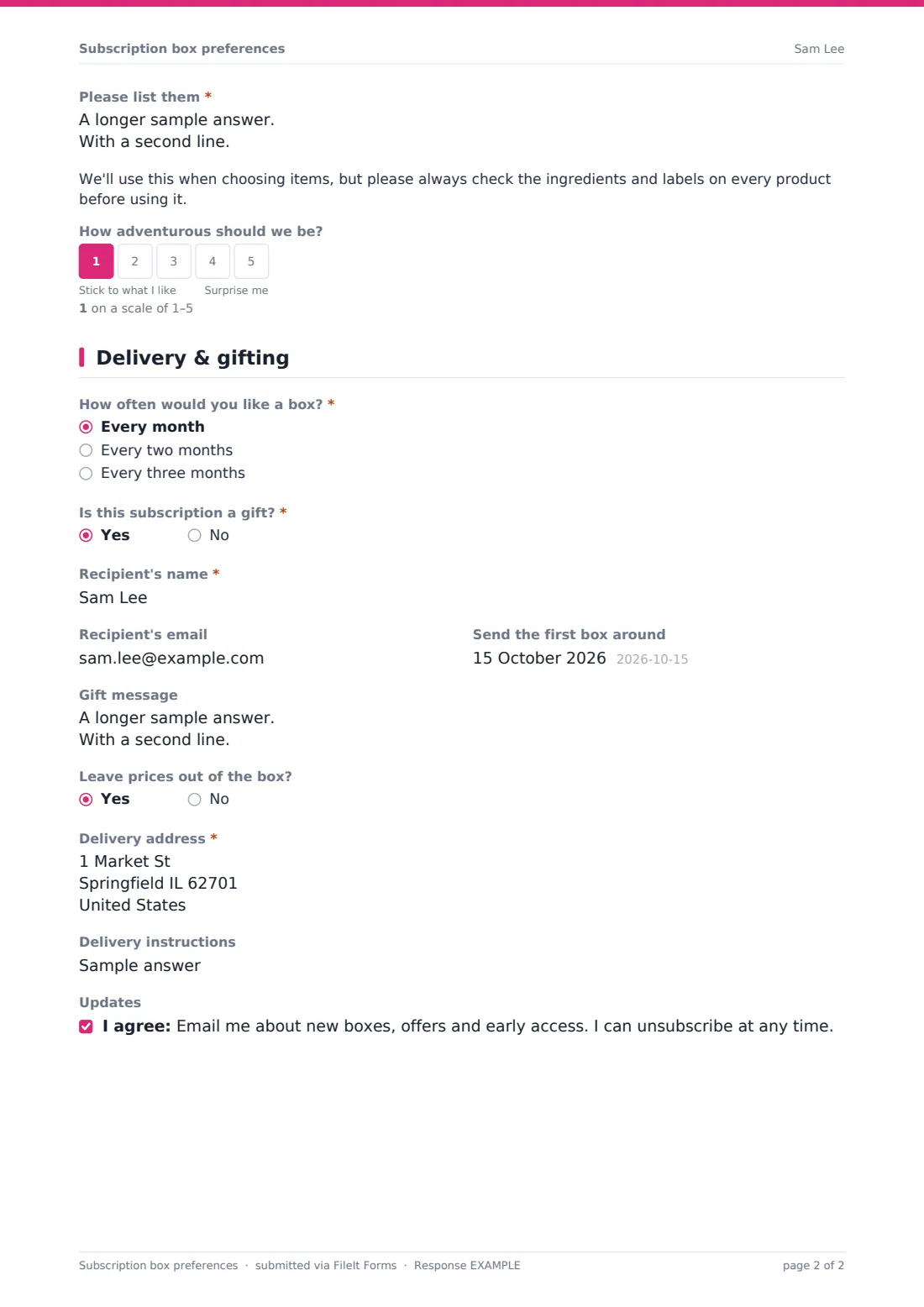
The final page sets delivery frequency and the delivery address, with gift options — recipient, first-box date, gift message and whether to leave prices out — for subscriptions bought as presents. Subscribers can opt in to marketing emails. Each profile is saved as a PDF in your FileIt vault, ready for the team picking boxes.
- Best for
- Subscription box businesses — snacks, beauty, clothing, lifestyle or books
- Filled in by
- New subscribers, or gift buyers on behalf of the recipient
- Time to complete
- About 5 minutes
- Includes
- Questions that adapt to box contents, allergy follow-up, adventurousness scale, gift options and marketing opt-in
Who uses a subscription box preferences form?
- A snack box company recording dietary needs and allergies
- A beauty box tailoring products to skin type and fragrance preference
- A clothing subscription collecting sizes and fit
- Taking gift subscription details and messages
- Updating a long-time subscriber's preferences
- A small maker launching a curated monthly box
Questions on this subscription box preferences form
28 questions over 3 pages · includes conditional questions, multiple pages, consent checkbox, ratings.
1 About you
- Your name*
- Email*
- Order or subscription number
- Birthday
- What would you like in your box?* Snacks and treats · Beauty and skincare · Clothing and accessories · Home and lifestyle · Books and stationery
- Top size asked only when it applies XS · S · M · L · XL · XXL · 3XL
- Bottoms or waist size asked only when it applies
- Shoe size asked only when it applies
- How do you like things to fit? asked only when it applies Fitted · Regular · Relaxed
2 Likes & dislikes
- Things you love
- Things you'd rather not receive
- Dietary preferences asked only when it applies Vegetarian · Vegan · Gluten-free · Dairy-free · Halal · Kosher · Low sugar · No restrictions
- Skin type asked only when it applies Dry · Oily · Combination · Normal · Sensitive
- Fragrance asked only when it applies Love scented products · Light scents only · Fragrance-free please
- Colours you like Neutrals · Black and white · Pastels · Brights · Earth tones · Metallics
- Any allergies or sensitivities?*
- Please list them* asked only when it applies
- How adventurous should we be?
3 Delivery & gifting
- How often would you like a box?* Every month · Every two months · Every three months
- Is this subscription a gift?*
- Recipient's name* asked only when it applies
- Recipient's email asked only when it applies
- Send the first box around asked only when it applies
- Gift message asked only when it applies
- Leave prices out of the box? asked only when it applies
- Delivery address*
- Delivery instructions
- Updates
The subscription box preferences form, page by page
1 About you
The subscriber enters their name, email, order or subscription number and, optionally, their birthday. What would you like in your box? is required — snacks and treats, beauty and skincare, clothing and accessories, home and lifestyle, or books and stationery.
Ticking clothing reveals a Your sizes section with top size, bottoms or waist size, shoe size and how they like things to fit.
2 Likes & dislikes
Things you love and Things you'd rather not receive come first. Dietary preferences appear for snack boxes, and skin type and fragrance preference for beauty boxes, so subscribers only see questions that apply. Colours they like follow for everyone.
Any allergies or sensitivities? is required. Yes requires a list and shows a note asking subscribers to always check ingredients and labels themselves. A 1–5 scale from Stick to what I like to Surprise me sets how adventurous to be.
3 Delivery & gifting
Delivery frequency is required. If the subscription is a gift, the form asks for the recipient's name, optional email, when to send the first box, a gift message and whether to leave prices out.
The delivery address is required, with optional delivery instructions, and an unticked marketing opt-in lets subscribers choose whether to hear about new boxes and offers.
Make the template yours
- Change the box contents list to the categories you actually offer
- Replace the sizes with the size system your clothing uses
- Add brand-specific questions, such as coffee roast or tea type
- Change delivery frequencies to match your plans
- Prefill each subscriber's name and email with personal links after checkout
- Edit the gift message length to fit your printed cards
Tips for a better subscription box preferences form
- Send the form straight after checkout, while the subscriber is still excited
- Treat every allergy answer seriously and flag it clearly for the packing team
- Use the dislikes answer as firmly as the likes — one unwanted item can sour a box
- Invite subscribers to update their preferences every few months
- Keep marketing consent optional and separate from the order
- Check the gift start date against your shipping cut-offs before confirming
Every response becomes a PDF in your vault
Each profile is saved as a PDF in the vault folder you choose, so the team picking boxes can look up any subscriber's preferences. You're emailed as preferences arrive, and the subscriber can receive a copy.
Subscribers can submit again to update their preferences. The Responses table lists every profile and exports to CSV for planning stock or sorting subscribers by preference.
- Start from this template. It opens in the FileIt Forms designer — change any question, add pages, set the rules for when questions appear.
- Share it. Turn on a public link, or send it to people by email, each with their own link. They don’t need a FileIt account.
- Get the answers as PDFs. Each response is saved as a PDF in the vault folder you choose, with uploaded files attached — and listed in a Responses table you can export to CSV.
Subscription box preferences form: frequently asked questions
Is this template free?
Yes. It's included in the FileIt Forms app on every account, including the free plan, and every question can be edited, removed or added to.
Do subscribers need a FileIt account?
No. Anyone with the form's link can fill it in without creating a FileIt account.
Do subscribers see questions that don't apply to them?
No. Size questions only appear when clothing is ticked, dietary questions for snacks, and skin type and fragrance for beauty.
How are allergies handled?
Subscribers who say yes must list their allergies, and see a note asking them to check ingredients and labels on every product. The form doesn't replace your own allergen procedures.
Can someone fill this in for a gift recipient?
Yes. Saying it's a gift reveals fields for the recipient, first-box date, message and whether to leave prices out.
Does it connect to our shop or subscription platform?
No. FileIt Forms doesn't sync with e-commerce platforms; you can include the order number to match profiles to orders.
Is the marketing opt-in required?
No. It's optional and unticked, so subscribers choose whether to receive marketing emails.
Can subscribers update their preferences later?
Yes. The form accepts more than one submission, and each update is saved as a new PDF.