What is the gift card order form template?
Gift card orders tend to arrive in the worst possible format: a voicemail in December, a hurried email with no recipient address, a phone call asking for “the usual voucher” for someone's mum. This template collects a complete order in one go: what kind of card, how much, how many, who it's for, what it should say and how it should get there.
The first choice, “What would you like?”, separates a gift card for an amount from a voucher for a specific experience or service. A voucher asks which one, with examples like dinner for two or a 60-minute massage, which suits restaurants, spas and activity providers as much as shops.
Delivery decides the rest of the form. “How should we deliver it?” offers email to the recipient, post, collection, or email to the buyer to pass on. Emailing the recipient reveals “Recipient's email” and an optional “Send on” date for birthdays. Post reveals a postal address and whether to post it to the recipient or the buyer. Collection asks when they'll come in. Payment isn't taken on the form, and a note asks customers not to include card details. You confirm the total and take payment your usual way. Each order is filed as a PDF in your FileIt vault.
- Best for
- Restaurants, spas, salons, independent shops, activity centres and hotels selling gift cards or vouchers
- Filled in by
- Customers buying a gift, or businesses ordering cards for staff and clients
- Time to complete
- About 2 minutes
- Includes
- Value or experience vouchers, quantity, occasion, gift message, and delivery-specific follow-up questions
Who uses a gift card order form?
- A restaurant selling dinner-for-two vouchers in the run-up to the holidays
- A day spa emailing treatment vouchers to recipients on their birthday
- A bookshop posting physical gift cards to customers who live out of town
- A company ordering 40 gift cards as staff thank-you gifts
- A climbing centre taking voucher orders it can't process in person at busy times
Questions on this gift card order form
18 questions · includes conditional questions, consent checkbox.
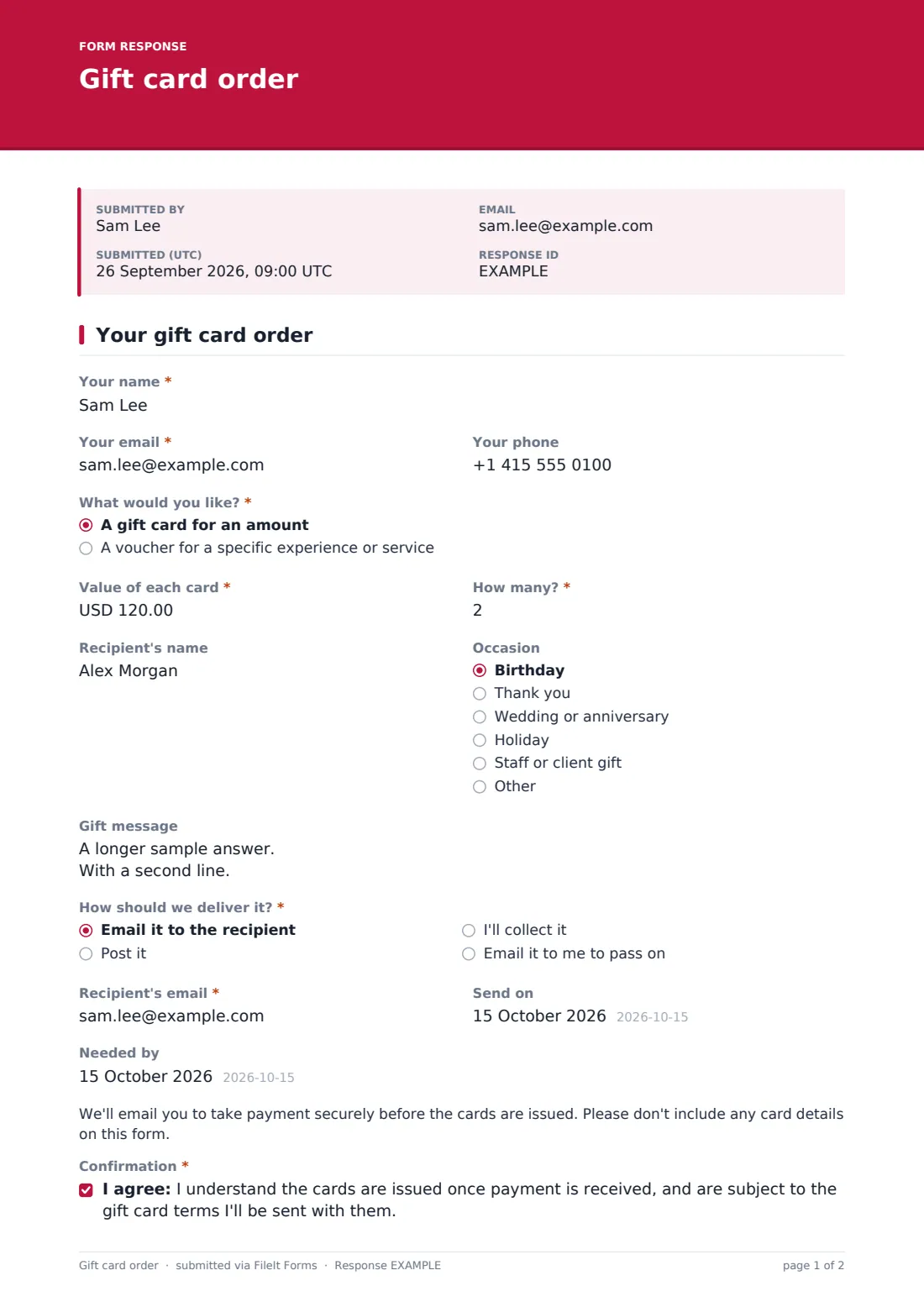
1 Your gift card order
- Your name*
- Your email*
- Your phone
- What would you like?* A gift card for an amount · A voucher for a specific experience or service
- Which experience or service?* asked only when it applies
- Value of each card*
- How many?*
- Recipient's name
- Occasion Birthday · Thank you · Wedding or anniversary · Holiday · Staff or client gift · Other
- Gift message
- How should we deliver it?* Email it to the recipient · Post it · I'll collect it · Email it to me to pass on
- Recipient's email* asked only when it applies
- Send on asked only when it applies
- Postal address* asked only when it applies
- Post it to asked only when it applies The recipient · Me
- When will you collect it? asked only when it applies
- Needed by
- Confirmation*
The gift card order form, page by page
1 Your gift card order
The buyer gives their name, email and phone, then chooses an amount or a voucher. “Value of each card” takes an amount between 5 and 1,000, and “How many?” up to fifty. An optional “Recipient's name” has help text for buyers who'll add names later. An “Occasion” dropdown covers birthdays, thank-yous, weddings and anniversaries, holidays, and staff or client gifts.
“Gift message” takes up to 250 characters, printed on the card or included in the email. The delivery questions come next, followed by a “Needed by” date and the payment note. The buyer confirms they understand the cards are issued once payment is received and are subject to the gift card terms they'll be sent.
Make the template yours
- Change the minimum and maximum card values, or swap the amount for a dropdown of set values
- List your experiences as a dropdown in place of the free-text voucher field
- Change the currency if you don't sell in US dollars
- Remove the post option if you only sell digital cards
- Close the form after a holiday cut-off date so late orders don't slip through
Tips for a better gift card order form
- Say in the cover text how quickly orders are processed, especially in December
- Check gift messages for typos before printing — buyers often type on their phones
- Send payment links promptly so cards arrive on time
- Put your gift card terms, such as validity, in the email that goes with each card
- Use the occasion field to plan seasonal promotions for next year
Every response becomes a PDF in your vault
Each order is filed in your vault as a PDF and you're emailed at once. The buyer receives a copy of their order, so they can check the recipient's details and message.
In the Responses table, search orders by recipient or occasion, check the “Needed by” dates, and export to CSV when you have a batch of cards to print or email.
- Start from this template. It opens in the FileIt Forms designer — change any question, add pages, set the rules for when questions appear.
- Share it. Turn on a public link, or send it to people by email, each with their own link. They don’t need a FileIt account.
- Get the answers as PDFs. Each response is saved as a PDF in the vault folder you choose, with uploaded files attached — and listed in a Responses table you can export to CSV.
Gift card order form: frequently asked questions
Is this gift card order form free?
Yes. It's one of the starter templates in FileIt's Forms app, on every account including the free plan.
Does the form take payment?
No. It collects the order, and a note asks customers not to enter card details. You contact the buyer to take payment through your usual payment system.
Does FileIt create or send the gift cards?
No. You issue the cards or vouchers yourself. The form gives you the details you need to do it.
Can the card be emailed on a particular date?
Yes. When the buyer chooses email delivery to the recipient, they can pick a “Send on” date, and you send it then.
Can businesses order lots of cards at once?
Yes. Quantity goes up to fifty, and you can raise the limit in the designer.
Can I sell experience vouchers as well as gift cards?
Yes. Choosing a voucher asks which experience or service it's for.