
What is the speaker evaluation form template?
Conference organisers have to decide every year which speakers to bring back, and speakers want to know what landed and what didn't. Applause and hallway comments aren't much to go on. A short evaluation straight after each session gives both sides something concrete.
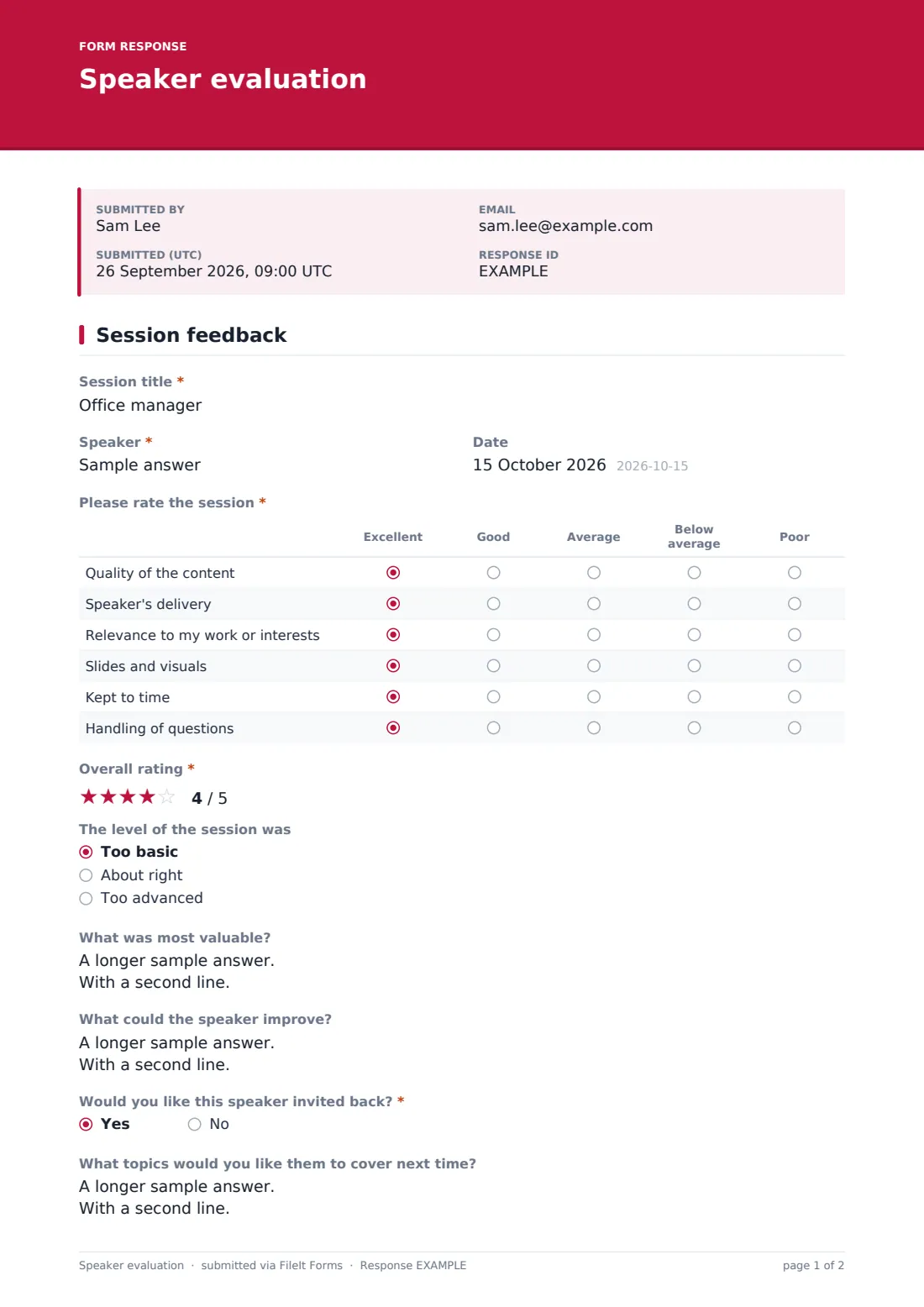
This one-page form asks attendees to name the session and speaker, then rate six parts of it on a five-point grid from excellent to poor: the content, the delivery, its relevance to their work or interests, the slides and visuals, keeping to time and the handling of questions. A star rating gives an overall score, and a quick question checks whether the level was too basic, about right or too advanced.
Two open questions ask what was most valuable and what the speaker could improve. Then comes Would you like this speaker invited back? A yes reveals a box for the topics they'd like covered next time, which is useful material for planning the next program. Each evaluation is filed as a PDF in FileIt.
- Best for
- Conference organisers, event teams, professional associations and meetup hosts
- Filled in by
- Session attendees
- Time to complete
- About a minute
- Includes
- Session and speaker details, a six-row rating grid, overall stars, level check, open comments and invite-back topic ideas
Who uses a speaker evaluation form?
- Putting a QR code on the screen at the end of every conference talk
- Collecting feedback on keynotes to share with the speakers' agents
- Choosing which workshop leaders to invite back next year
- Professional associations rating sessions at an annual meeting
- Meetup organisers giving first-time speakers constructive feedback
- Internal company events reviewing lunch-and-learn presenters
Questions on this speaker evaluation form
12 questions · includes conditional questions, ratings.
1 Session feedback
- Session title*
- Speaker*
- Date
- Please rate the session* Excellent · Good · Average · Below average · Poor
- Overall rating*
- The level of the session was Too basic · About right · Too advanced
- What was most valuable?
- What could the speaker improve?
- Would you like this speaker invited back?*
- What topics would you like them to cover next time? asked only when it applies
- Your role or field
- May we pass your comments to the speaker?
The speaker evaluation form, page by page
1 Session feedback
Session title and speaker are required, and the date is optional. The required grid Please rate the session has six rows: quality of the content, speaker's delivery, relevance to my work or interests, slides and visuals, kept to time, and handling of questions. Each is rated excellent, good, average, below average or poor.
Overall rating is a required five-star question. The level of the session was offers too basic, about right or too advanced. What was most valuable? and What could the speaker improve? are open text. Would you like this speaker invited back? is required, and a yes reveals What topics would you like them to cover next time? Finally, attendees can give their role or field and say whether their comments may be passed to the speaker.
Make the template yours
- Make the session title a dropdown of your program so answers are consistent
- Add a question for the track, room or time slot
- Remove the slides row for panels or fireside chats
- Add a question about the venue, sound or catering for the whole event
- Create one form per session if you want each speaker's results filed separately
- Edit the confirmation message to point attendees to the next session
Tips for a better speaker evaluation form
- Show the link or QR code on the last slide and give people a minute to answer
- Use a dropdown of session titles to avoid typos in free text
- Only share comments with speakers when the attendee has said yes
- Read the 'too basic' and 'too advanced' answers together with role or field
- Collect invite-back topic ideas into your planning for next year
- Thank speakers with a short summary of what attendees valued most
Every response becomes a PDF in your vault
Each evaluation is saved as a PDF in the vault folder you choose, and the organiser is emailed. Turn off owner notifications in Settings if you expect hundreds of responses.
In Responses, search by speaker or session title, then export to CSV to average the grid scores per talk and compare speakers across the event.
- Start from this template. It opens in the FileIt Forms designer — change any question, add pages, set the rules for when questions appear.
- Share it. Turn on a public link, or send it to people by email, each with their own link. They don’t need a FileIt account.
- Get the answers as PDFs. Each response is saved as a PDF in the vault folder you choose, with uploaded files attached — and listed in a Responses table you can export to CSV.
Speaker evaluation form: frequently asked questions
Is this speaker evaluation form free?
Yes. It's one of the starter templates in FileIt's Forms app, available on every account, including the free plan.
Do attendees need to sign in?
No. They scan a code or open a link and answer straight away. Only the organiser needs a FileIt account.
Can I use one form for every session?
Yes. Attendees name the session and speaker, and you can filter or export by those answers. Or duplicate the form per session.
Can I share results with speakers?
Yes, by exporting their responses. Each attendee says whether their comments may be passed on, so you can filter out those who said no.
Does FileIt average the ratings for me?
No. Export the responses to CSV and calculate averages in a spreadsheet.
Can attendees answer more than once?
Yes. Multiple responses from one browser are allowed by default, so people can rate several sessions with the same link.