What is the seasonal staff return intent form template?
Seasonal businesses rely on good people coming back year after year, but finding out who's returning usually means a round of texts and calls weeks before the season starts. Meanwhile records go out of date: people move, change names, gain new qualifications.
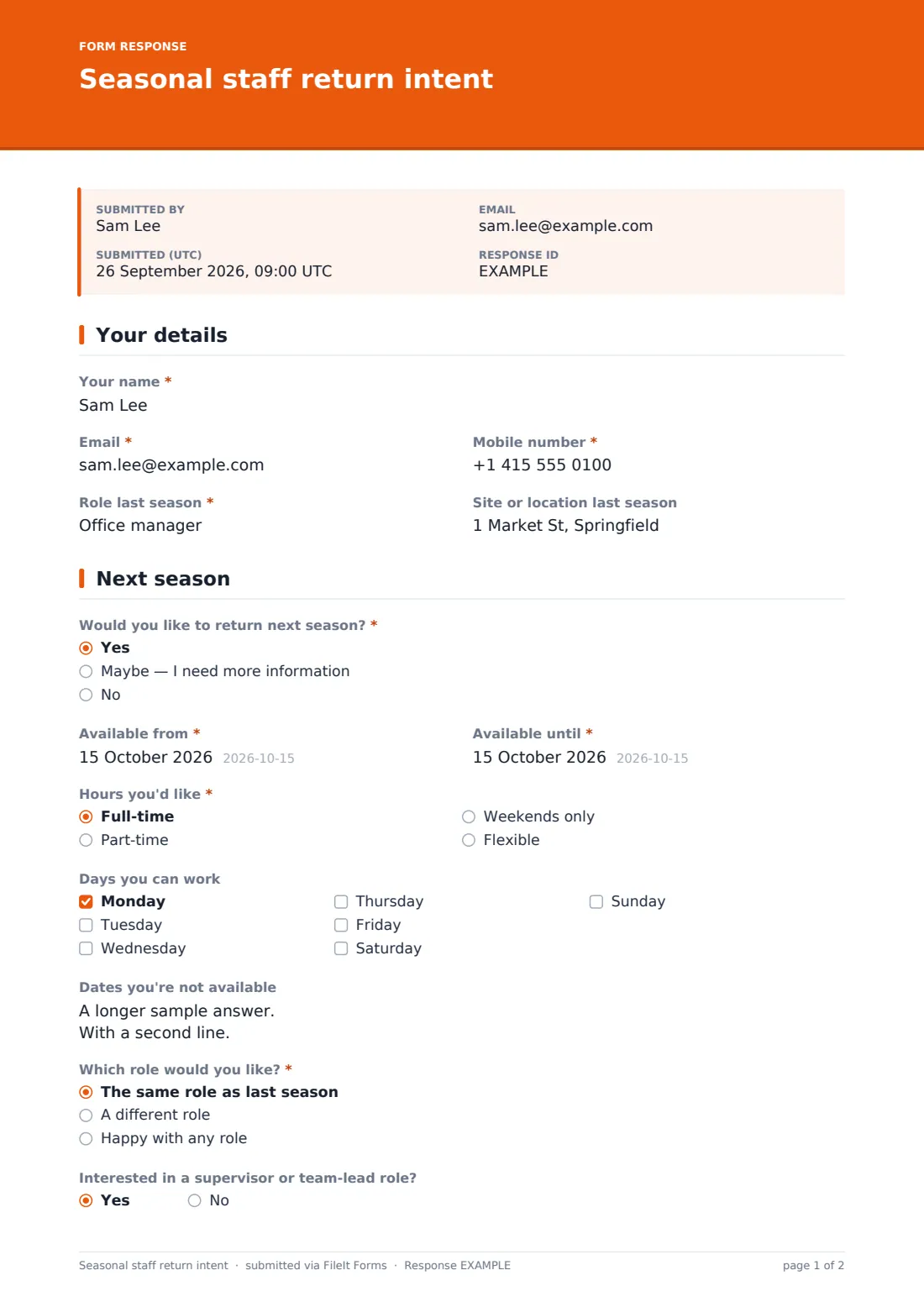
This template asks last season's workers the questions that matter in one short form. They confirm their details and last season's role and site, then say whether they'd like to return — yes, maybe or no. A maybe asks what they'd like to know; a no asks, optionally, why and whether you can contact them about future seasons.
Returners give their available dates, hours, days, dates they can't work, preferred role, interest in a supervisor role and willingness to work at another site. A changes page updates address, name, emergency contact and qualifications — bank details are deliberately left off the form. Every answer is saved as a PDF in your FileIt vault.
- Best for
- Seasonal employers: hospitality, retail, farms, camps, events and tourism
- Filled in by
- Last season's seasonal workers
- Time to complete
- About 3 minutes
- Includes
- Yes/maybe/no paths, availability dates and days, role preference and record updates
Who uses a seasonal staff return intent form?
- A ski resort inviting last winter's staff back
- A summer camp asking counsellors about next year
- A farm planning harvest workers
- A retailer recalling holiday-season staff
- An events company building its crew list for the festival season
- A tourist attraction planning summer rotas
Questions on this seasonal staff return intent form
25 questions over 3 pages · includes conditional questions, multiple pages, consent checkbox.
1 Your details
- Your name*
- Email*
- Mobile number*
- Role last season*
- Site or location last season
2 Next season
- Would you like to return next season?* Yes · Maybe — I need more information · No
- What would you like to know? asked only when it applies
- Can you tell us why? (optional) asked only when it applies Found other work · Studying · Moving away · Pay · Hours or schedule · My experience last season
- Can we contact you about future seasons? asked only when it applies
- Available from* asked only when it applies
- Available until* asked only when it applies
- Hours you'd like* asked only when it applies Full-time · Part-time · Weekends only · Flexible
- Days you can work asked only when it applies Monday · Tuesday · Wednesday · Thursday · Friday · Saturday · Sunday
- Dates you're not available asked only when it applies
- Which role would you like?* asked only when it applies The same role as last season · A different role · Happy with any role
- Which role?* asked only when it applies
- Interested in a supervisor or team-lead role? asked only when it applies
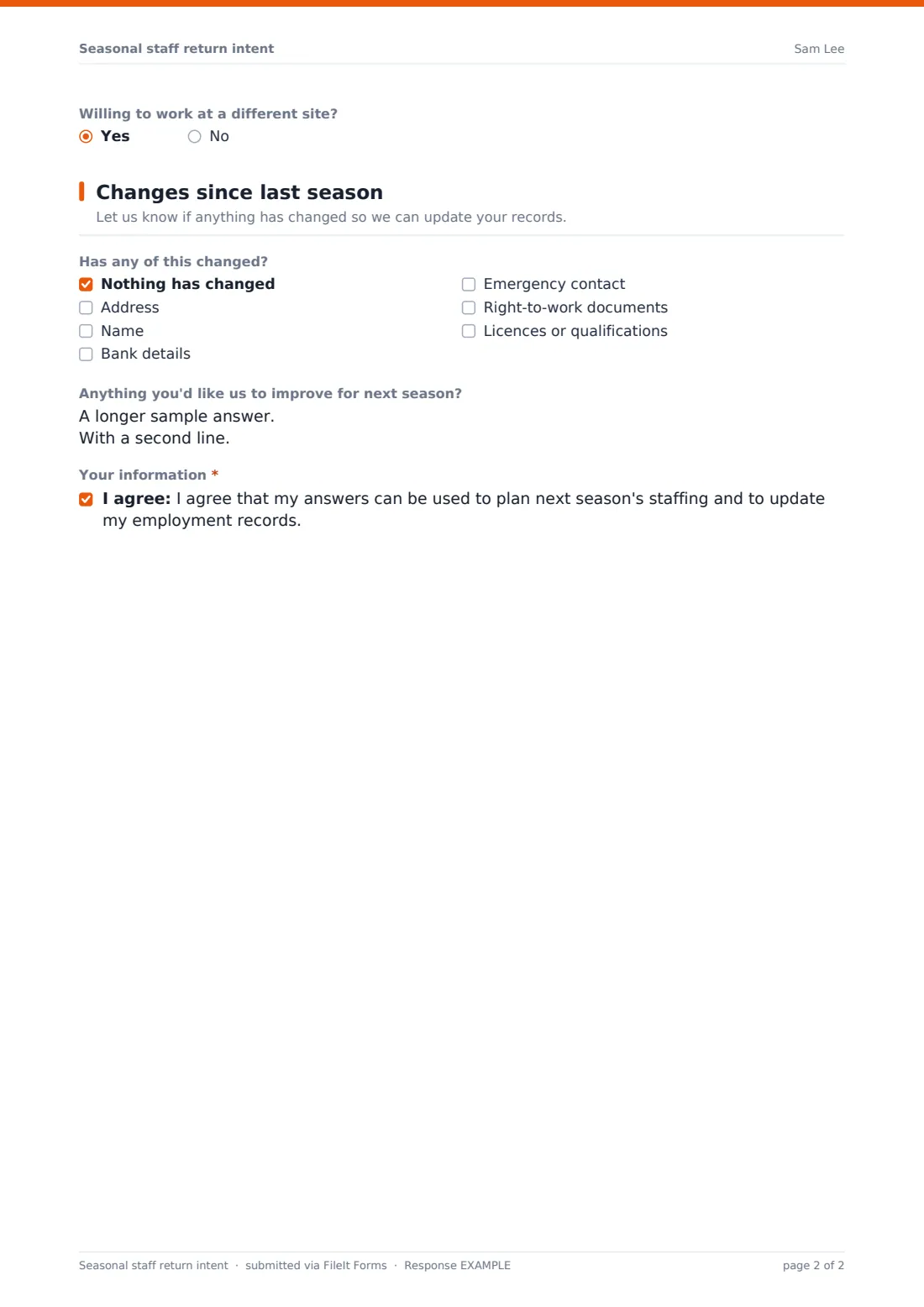
- Willing to work at a different site? asked only when it applies
3 Changes since last season
- Has any of this changed? Nothing has changed · Address · Name · Bank details · Emergency contact · Right-to-work documents · Licences or qualifications
- New address* asked only when it applies
- New name* asked only when it applies
- New emergency contact (name, relationship, phone)* asked only when it applies
- New licences or qualifications asked only when it applies
- Anything you'd like us to improve for next season?
- Your information*
The seasonal staff return intent form, page by page
1 Your details
The worker gives Your name, Email, Mobile number, Role last season and Site or location last season.
2 Next season
Would you like to return next season? has three paths. Maybe asks what they'd like to know. No asks, optionally, why — other work, studying, moving, pay, hours or last season's experience — and whether you can contact them about future seasons. Yes or maybe opens Available from and until dates, Hours you'd like, Days you can work, dates they're not available, Which role would you like? (with a box for a different role), interest in a supervisor or team-lead role and willingness to work at a different site.
3 Changes since last season
A tick list asks what has changed: nothing, address, name, bank details, emergency contact, right-to-work documents or qualifications. Each change opens the matching question; ticking bank details shows a note that you'll get in touch rather than collecting them on the form, and ticking right-to-work documents shows a note that you'll check the new documents before their first shift. The page ends with optional feedback and consent to use the answers for planning and records.
Make the template yours
- Replace role preference with a dropdown of your actual seasonal roles
- Add your sites as options for a preferred location
- Send personal links pre-filled with each worker's name, email and last role
- Set a closing date a few weeks before you need to confirm rotas
- Add a question about accommodation if you provide staff housing
- Route responses into a vault folder for the coming season
Tips for a better seasonal staff return intent form
- Send the form soon after the season ends while people are still engaged
- Follow up quickly with returners so they don't accept other work first
- Read the reasons from people not returning — they often point to easy fixes
- Never collect bank details on a general form; update them through payroll
- Re-check right-to-work documents for returners whose permission was time-limited
- Thank people who say no — they may come back another year
Every response becomes a PDF in your vault
Every answer is saved as a PDF in your vault and the worker receives a copy. With notifications on, the person planning the season sees responses as they arrive.
Export the responses to a CSV to build next season's availability list — dates, hours, days and roles — and to update records for anyone whose details changed.
- Start from this template. It opens in the FileIt Forms designer — change any question, add pages, set the rules for when questions appear.
- Share it. Turn on a public link, or send it to people by email, each with their own link. They don’t need a FileIt account.
- Get the answers as PDFs. Each response is saved as a PDF in the vault folder you choose, with uploaded files attached — and listed in a Responses table you can export to CSV.
Seasonal staff return intent form: frequently asked questions
Is this seasonal staff return form free?
Yes. It's part of the FileIt Forms app on every plan, including the free plan.
Do workers need a FileIt account?
No. Anyone with the link can respond without signing up.
Can we send it only to last season's staff?
Yes. Send personal links by email, each pre-filled with the worker's details, instead of sharing a public link.
Why doesn't the form collect bank details?
Bank details are better handled through payroll. Ticking bank details shows a note that you'll be in touch.
Is this a job offer?
No. It records interest and availability so you can plan. Offers and contracts follow your usual process.
Can it be used for more than one site?
Yes. Workers can say which site they worked at and whether they'd work elsewhere.