What is the sales forecast submission form template?
Forecast calls go long when each rep reports differently — one gives a single number, another walks through every deal, a third has changed their commit without saying why. Collecting the forecast in a consistent format before the call means the meeting can be spent on the deals that need help.
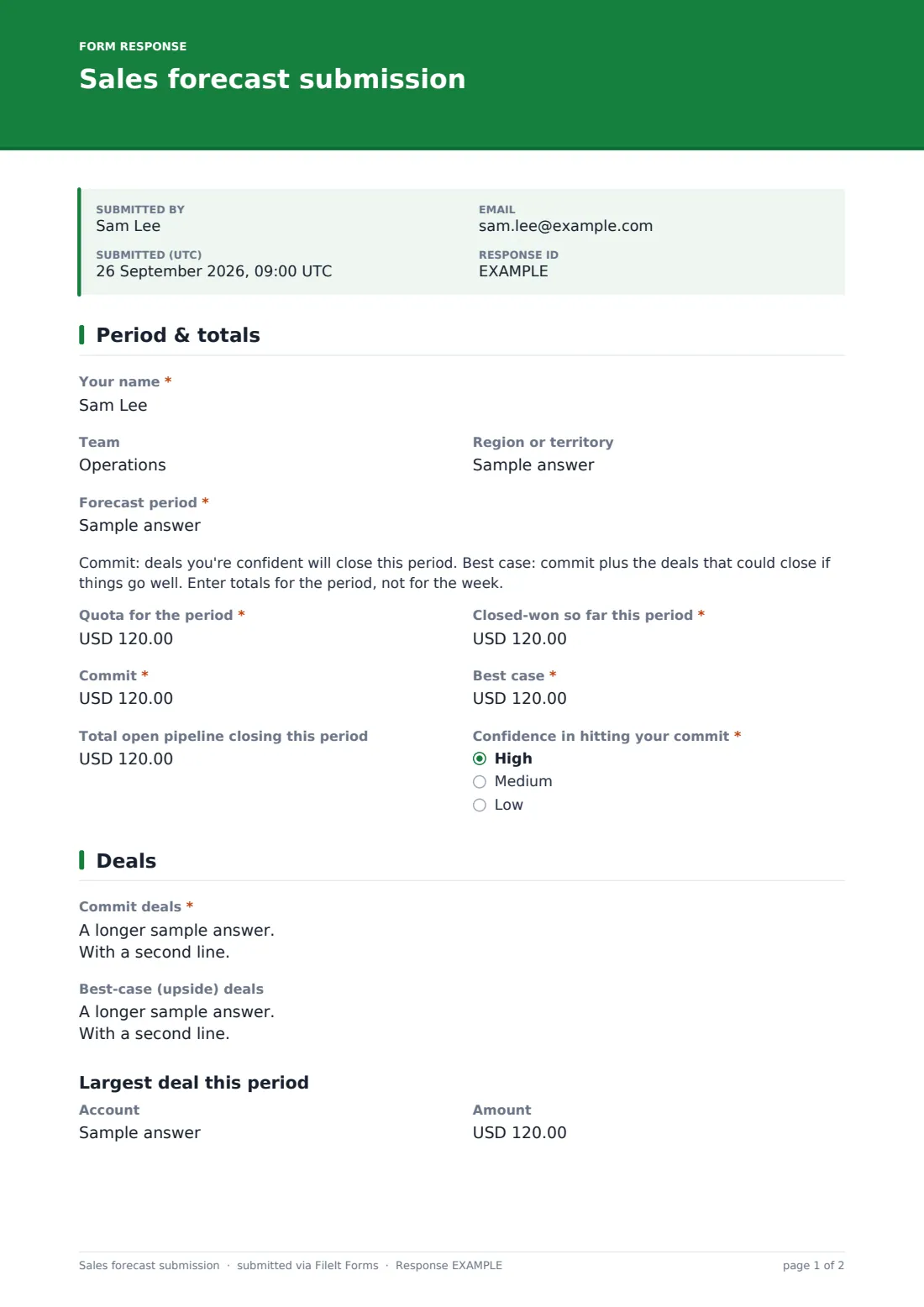
This sales forecast submission form opens with the period, quota, closed-won to date, commit, best case, open pipeline and the rep's confidence in hitting commit, with short definitions of commit and best case shown above the numbers. The second page lists commit and upside deals one per line, details the largest deal of the period, and accepts an optional pipeline export.
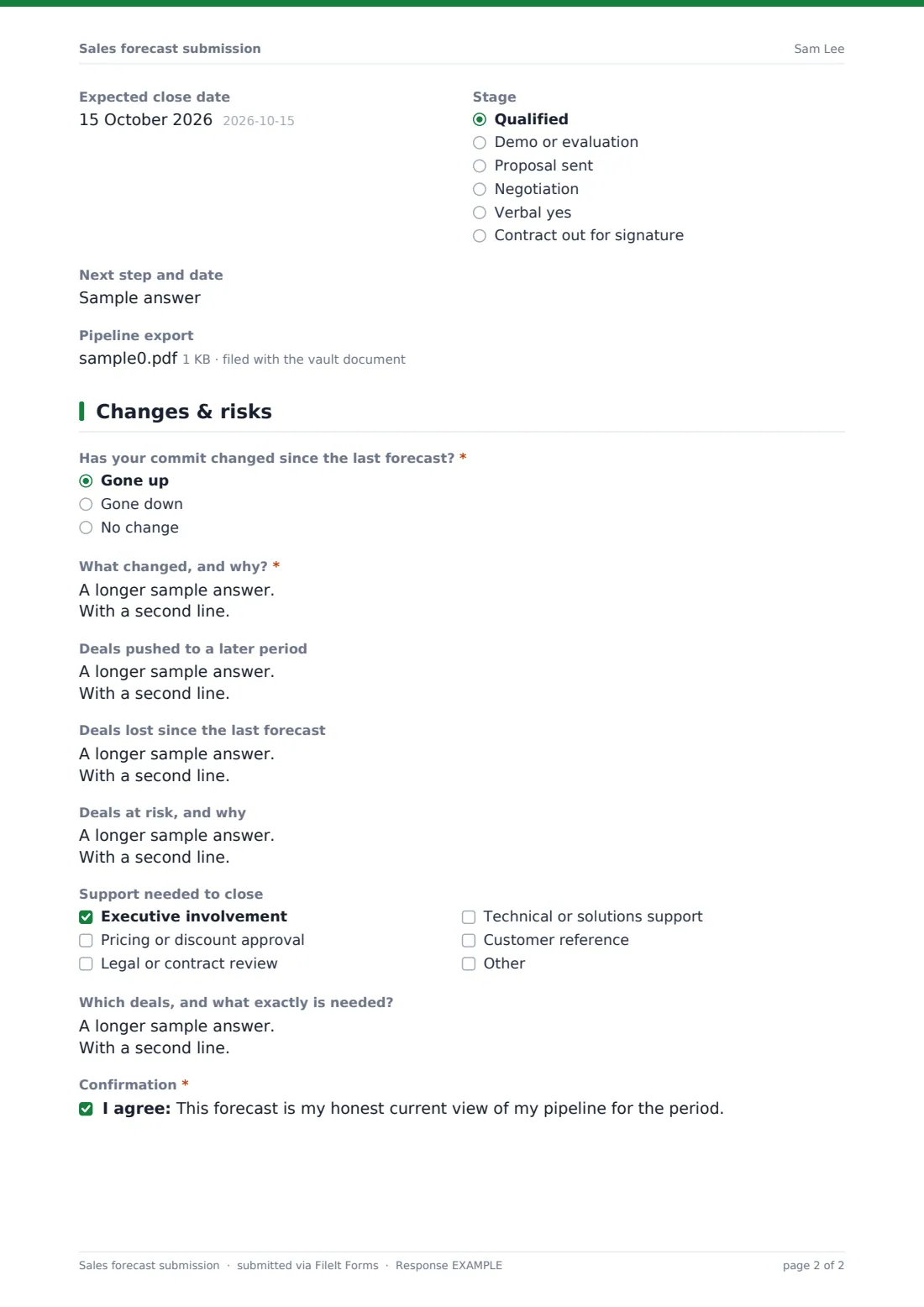
The last page asks whether commit has gone up, down or stayed the same — and why, if it moved — along with deals pushed, lost or at risk and the support needed to close. Reps confirm the forecast is their honest view, and each submission is saved as a PDF in your FileIt vault.
- Best for
- Sales managers, sales operations and revenue teams running regular forecast calls
- Filled in by
- Each sales rep, before the forecast call
- Time to complete
- About 5–10 minutes
- Includes
- Commit and best-case totals, deal lists, largest-deal detail, change explanation and support requests
Who uses a sales forecast submission form?
- Weekly forecast submissions ahead of a Monday sales call
- Month-end or quarter-end forecast roll-ups
- A small sales team without a CRM forecasting module
- Regional managers collecting forecasts from their reps
- Keeping a record of how forecasts changed through a quarter
- Flagging deals that need executive or pricing help early
Questions on this sales forecast submission form
26 questions over 3 pages · includes file upload, conditional questions, multiple pages, consent checkbox.
1 Period & totals
- Your name*
- Team
- Region or territory
- Forecast period*
- Quota for the period*
- Closed-won so far this period*
- Commit*
- Best case*
- Total open pipeline closing this period
- Confidence in hitting your commit* High · Medium · Low
2 Deals
- Commit deals*
- Best-case (upside) deals
- Account
- Amount
- Expected close date
- Stage Qualified · Demo or evaluation · Proposal sent · Negotiation · Verbal yes · Contract out for signature
- Next step and date
- Pipeline export
3 Changes & risks
- Has your commit changed since the last forecast?* Gone up · Gone down · No change
- What changed, and why?* asked only when it applies
- Deals pushed to a later period
- Deals lost since the last forecast
- Deals at risk, and why
- Support needed to close Executive involvement · Pricing or discount approval · Legal or contract review · Technical or solutions support · Customer reference
- Which deals, and what exactly is needed? asked only when it applies
- Confirmation*
The sales forecast submission form, page by page
1 Period & totals
The rep enters their name, team, region and the forecast period. A short note defines commit and best case before the numbers, so every rep uses the same meaning.
Quota, closed-won so far, commit and best case are required currency fields; total open pipeline is optional. Confidence in hitting your commit — high, medium or low — completes the page.
2 Deals
Commit deals are listed one per line with account, amount, close date and next step, and best-case deals follow the same format. A Largest deal this period section records the account, amount, expected close date, stage and next step.
Reps can attach a pipeline export from a CRM or their own spreadsheet if your team wants the detail.
3 Changes & risks
Has your commit changed since the last forecast? is required; if it went up or down, the rep must explain what changed and why. Separate boxes cover deals pushed to a later period, deals lost and deals at risk.
A checklist of support needed — executive involvement, pricing approval, legal review, technical support or a customer reference — opens a detail box when anything is ticked. The rep confirms the forecast is their honest current view before submitting.
Make the template yours
- Change the stage list to match your own sales process
- Rename commit and best case if your team uses different categories, such as probable and upside
- Change the currency on the amount fields
- Set a closing date so the form stops accepting forecasts after the call
- File each period's forecasts in its own vault folder
- Add a manager sign-off field if forecasts are reviewed and approved
Tips for a better sales forecast submission form
- Agree what commit means and stick to it — the definition shown on the form helps
- Ask reps to submit a set time before the call so managers can read every forecast first
- Focus the call on changes and deals at risk rather than reading out every deal
- Compare commit against what actually closed at period end to calibrate future forecasts
- Act on support requests before the call where you can
- Keep past submissions; the change history is useful in pipeline reviews
Every response becomes a PDF in your vault
Each forecast is saved as a PDF in the vault folder you choose, with any pipeline export attached. Owner notifications email the sales manager as each rep submits.
The Responses table shows every submission side by side, and a CSV export lets sales operations add up commit and best case across the team.
- Start from this template. It opens in the FileIt Forms designer — change any question, add pages, set the rules for when questions appear.
- Share it. Turn on a public link, or send it to people by email, each with their own link. They don’t need a FileIt account.
- Get the answers as PDFs. Each response is saved as a PDF in the vault folder you choose, with uploaded files attached — and listed in a Responses table you can export to CSV.
Sales forecast submission form: frequently asked questions
Is this template free?
Yes. It's included in the FileIt Forms app on every account, including the free plan, and every question can be edited, removed or added to.
Does it total the team's forecast automatically?
No. Each rep's forecast is saved separately. Export the Responses table to CSV to add up commit and best case across the team.
Does it connect to our CRM?
No. FileIt Forms doesn't sync with CRMs. Reps can attach a CRM export as a file if you want the detail.
Can reps submit every week?
Yes. The form allows multiple submissions, and each one is saved as its own PDF.
What's the difference between commit and best case?
On this form, commit is the deals the rep is confident will close this period, including what's already closed. Best case is commit plus upside deals that could close. You can change the wording to match your team's definitions.
Can I send personal links to each rep?
Yes. Email each rep a personal link prefilled with their name, or share one link with the whole team.
Can I stop submissions after the forecast call?
Yes. Set a closing date in the form's settings, or close the form manually.
Why does the form ask for a confirmation?
The confirmation reminds reps the forecast should be their honest view, which keeps the numbers useful for planning.