What is the channel deal registration form template?
Deal registration exists to stop two partners — or a partner and your own sales team — chasing the same customer. It only works if registrations are complete enough to check: who the end customer is, what's being proposed, roughly what it's worth, and how far along the deal is.
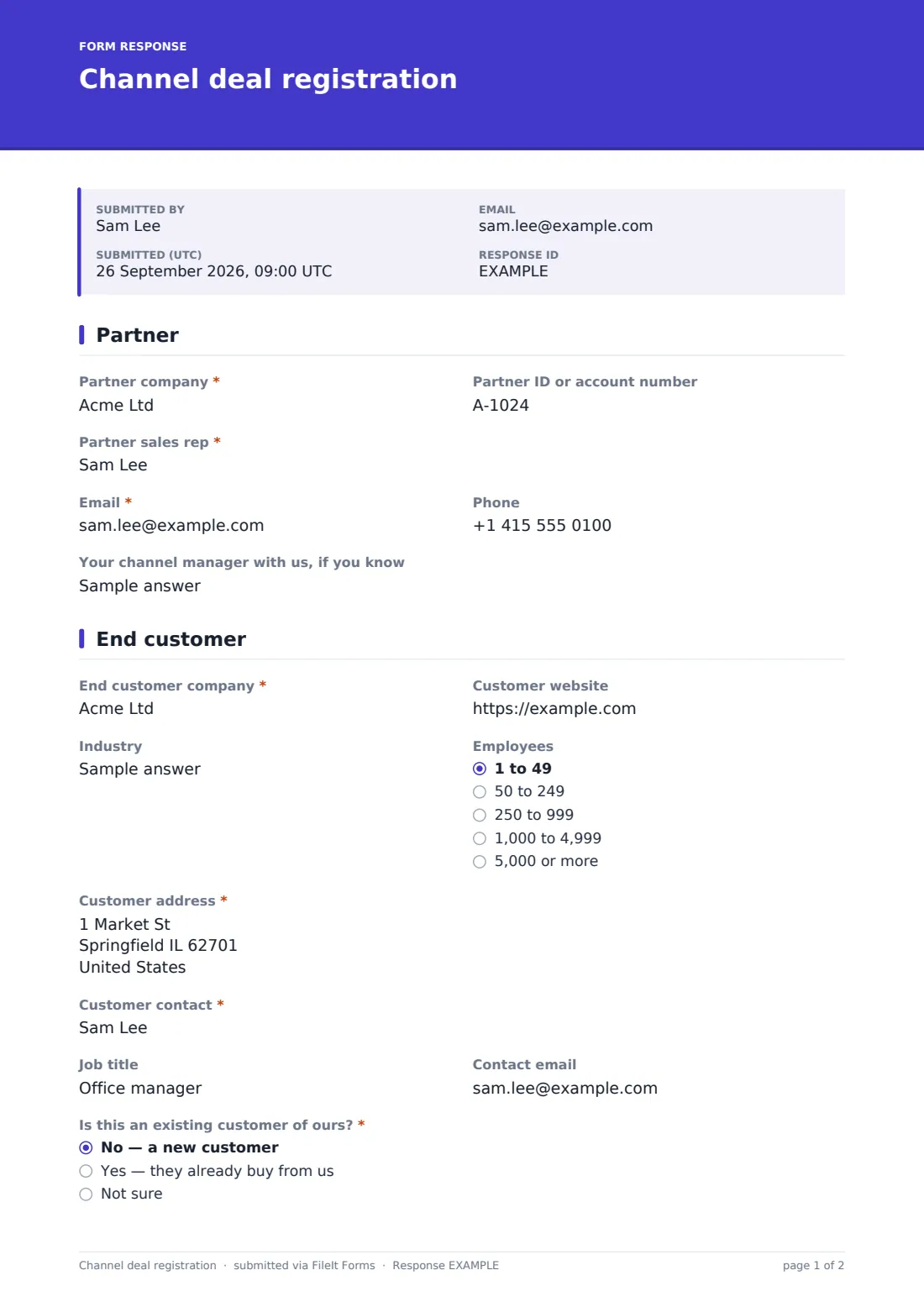
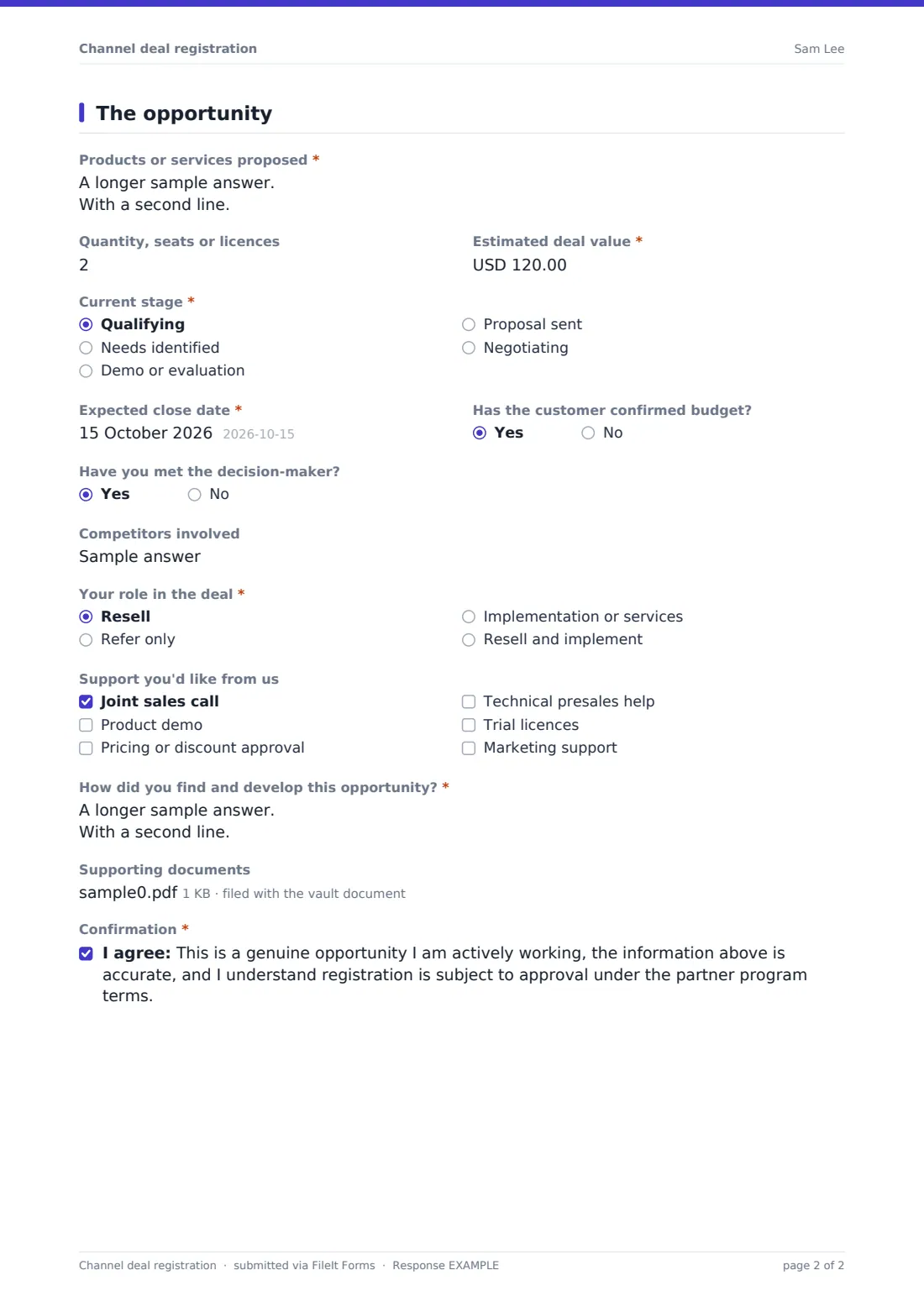
This channel deal registration form collects that in three short pages. The partner gives their company, partner ID and sales rep, then the end customer's company, website, industry, size, address and contact, and whether the customer already buys from you. The opportunity page covers products, quantity, estimated value, stage, expected close date, budget and decision-maker status, competitors, the partner's role and any support they'd like.
Partners explain how they found and developed the opportunity and confirm it's genuine and subject to approval under your program terms. Every registration is saved as a PDF in your FileIt vault, giving your channel team a dated record of who registered what.
- Best for
- Vendors and distributors running a reseller or partner program
- Filled in by
- The partner's sales rep
- Time to complete
- About 5–8 minutes
- Includes
- End customer details, deal value and stage, partner role, support requests, document upload and confirmation
Who uses a channel deal registration form?
- A software vendor collecting reseller deal registrations
- A hardware distributor protecting partner-sourced opportunities
- An MSP program registering services deals
- A growing vendor replacing registrations sent by email
- Spotting channel conflict between partners chasing the same customer
- Collecting referral-only opportunities from consultants
Questions on this channel deal registration form
28 questions over 3 pages · includes file upload, multiple pages, consent checkbox.
1 Partner
- Partner company*
- Partner ID or account number
- Partner sales rep*
- Email*
- Phone
- Your channel manager with us, if you know
2 End customer
- End customer company*
- Customer website
- Industry
- Employees 1 to 49 · 50 to 249 · 250 to 999 · 1,000 to 4,999 · 5,000 or more
- Customer address*
- Customer contact*
- Job title
- Contact email
- Is this an existing customer of ours?* No — a new customer · Yes — they already buy from us · Not sure
3 The opportunity
- Products or services proposed*
- Quantity, seats or licences
- Estimated deal value*
- Current stage* Qualifying · Needs identified · Demo or evaluation · Proposal sent · Negotiating
- Expected close date*
- Has the customer confirmed budget?
- Have you met the decision-maker?
- Competitors involved
- Your role in the deal* Resell · Refer only · Implementation or services · Resell and implement
- Support you'd like from us Joint sales call · Product demo · Pricing or discount approval · Technical presales help · Trial licences · Marketing support
- How did you find and develop this opportunity?*
- Supporting documents
- Confirmation*
The channel deal registration form, page by page
1 Partner
The partner enters their company, partner ID or account number, the sales rep's name, email and phone, and their channel manager if they know one. That's enough for your team to match the registration to the right partner account.
2 End customer
End customer company and address are required, along with the customer contact. Website, industry, employee count, job title and contact email give the context needed to check for duplicates.
Is this an existing customer of ours? — no, yes or not sure — tells the channel team straight away whether an account owner needs to be consulted.
3 The opportunity
The partner lists the products or services proposed, quantity and estimated deal value, and chooses the current stage from qualifying to negotiating. Expected close date is required; budget confirmation, whether they've met the decision-maker and competitors involved add qualification detail.
Your role in the deal covers resell, refer only, implementation or both. Partners can request a joint call, demo, pricing approval, presales help, trial licences or marketing support, must describe how they found and developed the opportunity, can upload up to 3 supporting documents, and confirm the registration before submitting.
Make the template yours
- Add a dropdown of your product lines instead of free text
- Change the stage list to match your partner program's stages
- Put your program's protection period and rules in a paragraph on the first page
- Change the currency on the deal value
- Route registrations to a vault folder per region or partner tier
- Edit the confirmation message to say how quickly registrations are reviewed
Tips for a better channel deal registration form
- Publish your registration rules — what qualifies, how long protection lasts and what ends it — alongside the form
- Check new registrations against existing customers and open registrations before approving
- Reply to every registration with an approve or decline, so partners know where they stand
- Ask for a real customer contact; registrations without one are hard to verify
- Review stale registrations regularly and follow up on expected close dates that have passed
- Keep each registration's PDF as the dated record if a conflict comes up later
Every response becomes a PDF in your vault
Each registration is saved as a PDF in the vault folder you choose, dated by its submission, with any supporting documents attached. Owner notifications email your channel team when one arrives, and the partner can receive a copy.
The Responses table lists every registration so your team can search by customer, sort by expected close date or export to CSV to check for duplicates.
- Start from this template. It opens in the FileIt Forms designer — change any question, add pages, set the rules for when questions appear.
- Share it. Turn on a public link, or send it to people by email, each with their own link. They don’t need a FileIt account.
- Get the answers as PDFs. Each response is saved as a PDF in the vault folder you choose, with uploaded files attached — and listed in a Responses table you can export to CSV.
Channel deal registration form: frequently asked questions
Is this template free?
Yes. It's included in the FileIt Forms app on every account, including the free plan, and every question can be edited, removed or added to.
Do partners need a FileIt account?
No. Anyone with the form's link can fill it in without creating a FileIt account.
Does submitting the form protect the deal automatically?
No. The form records the registration; your channel team decides whether to approve it under your own program rules.
Can we show our program rules on the form?
Yes. Add a paragraph to the first page with your protection period and conditions.
Can we send each partner a personal link?
Yes. Email personal links prefilled with the partner rep's name and email, or share a public link in your partner portal.
Does it check for duplicate registrations?
Not automatically. Export the Responses table to CSV or search it by customer name to spot duplicates.
Can partners attach a proposal?
Yes. Up to 3 supporting documents — PDF, Word or Excel — can be uploaded.
Does it integrate with our CRM or partner portal?
No. FileIt Forms doesn't sync with external systems; registrations are saved as PDFs and in the Responses table.