What is the sailing course enrollment form template?
Sailing schools need to know a few things before anyone steps into a dinghy. Has this person sailed before? Can they swim? Is there a health condition the instructor should hear about on the slipway rather than in the water? This template collects those answers when people book, so you don't have to chase paper forms on the morning of the course.
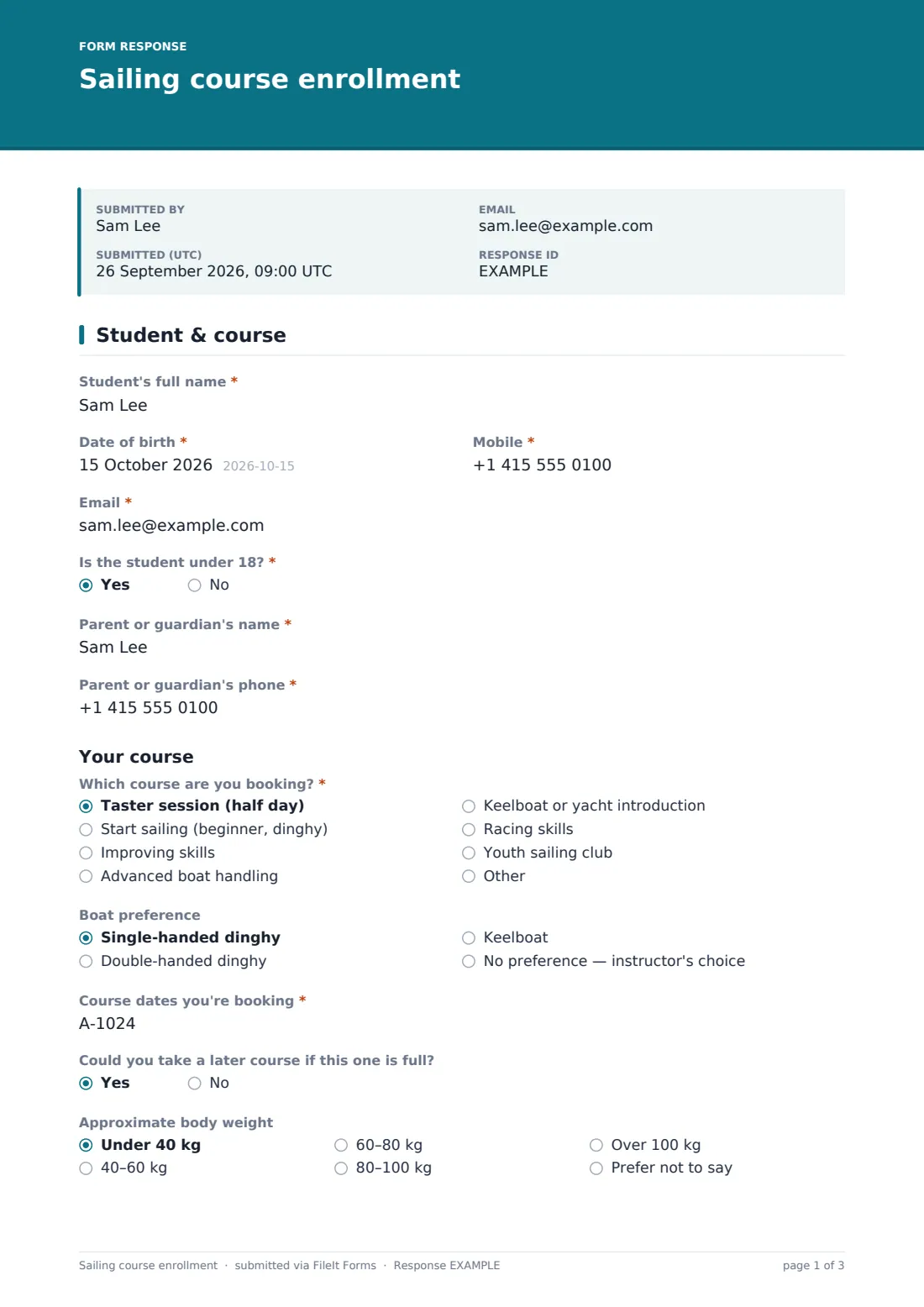
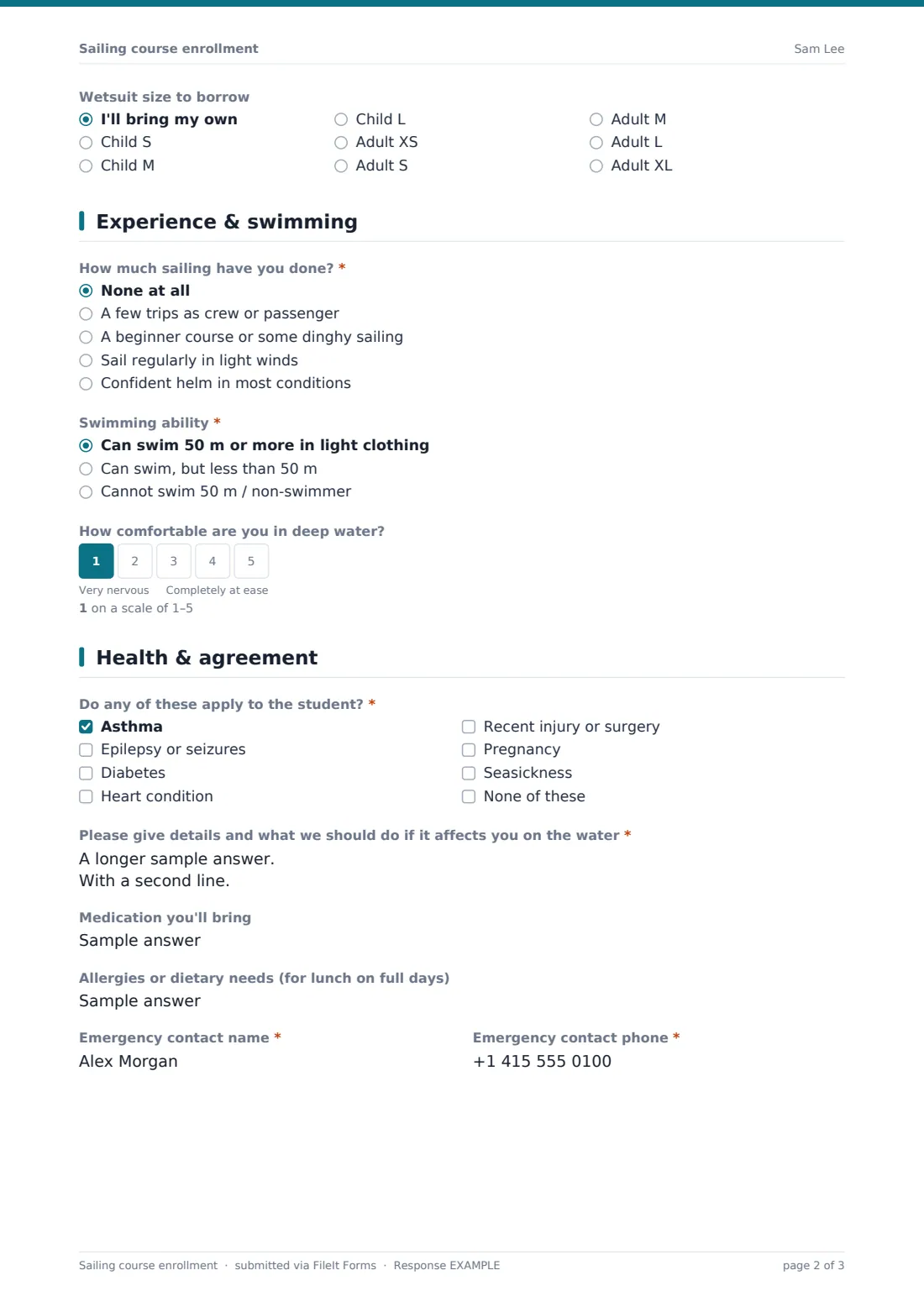
The first page covers the student and the booking: name, date of birth, contact details, the course from taster session to racing skills, a boat preference, the dates and a wetsuit size to borrow. Answering yes to 'Is the student under 18?' adds the parent or guardian's name and phone. The second page asks 'How much sailing have you done?', lets experienced sailors upload a certificate or logbook page, and asks about swimming. Anyone who chooses 'Cannot swim 50 m / non-swimmer' sees a short note and a buoyancy-aid acknowledgement they have to tick.
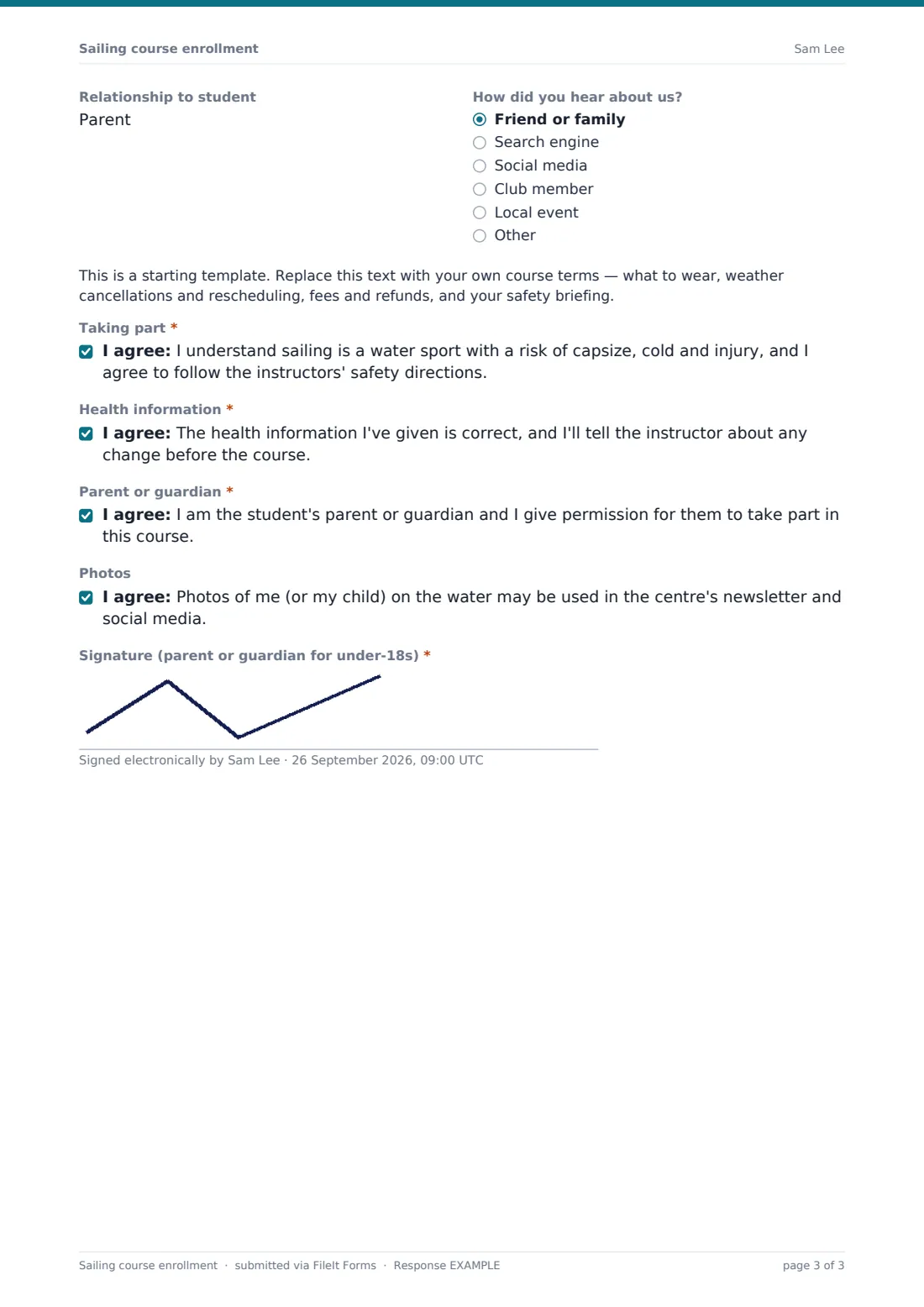
The last page collects health conditions, medication, dietary needs for full-day courses and an emergency contact, then your course terms, the consents and a signature. Each enrollment is saved as a signed PDF in your FileIt vault, along with any uploaded certificate.
- Best for
- Sailing schools, yacht and dinghy clubs, outdoor activity centres
- Filled in by
- The student, or a parent or guardian for under-18s
- Time to complete
- About 5 minutes
- Includes
- Course and dates, experience, swimming ability, buoyancy-aid acknowledgement, health, signature
Who uses a sailing course enrollment form?
- An adult beginner books a two-day start sailing course
- A parent enrols a twelve-year-old in the youth sailing club for the summer
- A returning sailor uploads a certificate to skip straight to improving skills
- A centre runs taster sessions for a corporate team day and needs a form from everyone
- A non-swimmer books a keelboat introduction and confirms the buoyancy-aid rule in advance
- A club collects racing-course entries ahead of the season
Questions on this sailing course enrollment form
33 questions over 3 pages · includes signature, file upload, conditional questions, multiple pages, consent checkbox, ratings.
1 Student & course
- Student's full name*
- Date of birth*
- Mobile*
- Email*
- Is the student under 18?*
- Parent or guardian's name* asked only when it applies
- Parent or guardian's phone* asked only when it applies
- Which course are you booking?* Taster session (half day) · Start sailing (beginner, dinghy) · Improving skills · Advanced boat handling · Keelboat or yacht introduction · Racing skills · Youth sailing club
- Boat preference Single-handed dinghy · Double-handed dinghy · Keelboat · No preference — instructor's choice
- Course dates you're booking*
- Could you take a later course if this one is full?
- Approximate body weight Under 40 kg · 40–60 kg · 60–80 kg · 80–100 kg · Over 100 kg · Prefer not to say
- Wetsuit size to borrow I'll bring my own · Child S · Child M · Child L · Adult XS · Adult S · Adult M · Adult L · Adult XL
2 Experience & swimming
- How much sailing have you done?* None at all · A few trips as crew or passenger · A beginner course or some dinghy sailing · Sail regularly in light winds · Confident helm in most conditions
- Do you hold a sailing certificate or logbook? asked only when it applies
- Certificate name and level asked only when it applies
- Upload your certificate or logbook page asked only when it applies
- Swimming ability* Can swim 50 m or more in light clothing · Can swim, but less than 50 m · Cannot swim 50 m / non-swimmer
- How comfortable are you in deep water?
- Buoyancy aid* asked only when it applies
3 Health & agreement
- Do any of these apply to the student?* Asthma · Epilepsy or seizures · Diabetes · Heart condition · Recent injury or surgery · Pregnancy · Seasickness · None of these
- Please give details and what we should do if it affects you on the water* asked only when it applies
- Medication you'll bring
- Allergies or dietary needs (for lunch on full days)
- Emergency contact name*
- Emergency contact phone*
- Relationship to student
- How did you hear about us? Friend or family · Search engine · Social media · Club member · Local event · Other
- Taking part*
- Health information*
- Parent or guardian* asked only when it applies
- Photos
- Signature (parent or guardian for under-18s)*
The sailing course enrollment form, page by page
1 Student & course
'Student's full name', date of birth, mobile and email, and a required 'Is the student under 18?' that adds the parent or guardian's name and phone. Then 'Which course are you booking?' (with an Other option), boat preference, 'Course dates you're booking', whether a later course would do if this one is full, an optional weight band for pairing crews, and 'Wetsuit size to borrow'.
2 Experience & swimming
A required 'How much sailing have you done?'. Anyone with some experience is asked whether they hold a certificate or logbook, and can name it and upload it. 'Swimming ability' is required, followed by 'How comfortable are you in deep water?' on a 1–5 scale. Choosing 'Cannot swim 50 m / non-swimmer' shows a note and a required buoyancy-aid acknowledgement.
3 Health & agreement
A required checklist (asthma, epilepsy, diabetes, heart condition, recent injury, pregnancy, seasickness, none) with details asked unless 'None of these' is ticked. Then medication, allergies or dietary needs, an emergency contact and relationship, and how they heard about you. A placeholder for your terms, consents for taking part and for the health information, a parent or guardian consent for under-18s, optional photo consent and a signature.
Make the template yours
- Rename the course options to match your own scheme and levels
- Replace the terms placeholder with your clothing list, weather policy and refund rules
- Change the 50 m threshold if your centre uses a different swimming test
- Drop the wetsuit and weight questions if students bring their own kit
- Set a close date or a response limit to match the places on each course
- Save each course's enrollments in its own vault folder
Tips for a better sailing course enrollment form
- Print the swimming and health answers for the instructor's clipboard before the first session
- Use the Responses table to count wetsuit sizes the night before
- Ask experienced sailors for their certificate — it saves an assessment sail on day one
- Send the link with your booking confirmation so forms are in before people arrive
- Have your terms and risk wording checked by someone qualified for your area
Every response becomes a PDF in your vault
Every enrollment becomes a signed PDF in your vault, with uploaded certificates attached. You get an email for each booking, and the student gets a copy when they give an email address.
Export the responses to CSV to build crew lists, or open a single response to check one student's swimming and medical notes.
- Start from this template. It opens in the FileIt Forms designer — change any question, add pages, set the rules for when questions appear.
- Share it. Turn on a public link, or send it to people by email, each with their own link. They don’t need a FileIt account.
- Get the answers as PDFs. Each response is saved as a PDF in the vault folder you choose, with uploaded files attached — and listed in a Responses table you can export to CSV.
Sailing course enrollment form: frequently asked questions
Is the sailing course enrollment template free?
Yes. It's one of the starter templates in the Forms app, included with every FileIt account, including the free plan. You can edit every question.
What happens when someone says they can't swim 50 m?
They see a short note and a required acknowledgement that they'll wear a buoyancy aid at all times on the water, pontoon and slipway. The answer is printed on their PDF so instructors know before the course.
Can parents enroll their children?
Yes. Answering yes to 'Is the student under 18?' adds the parent or guardian's details and their consent, and the parent signs.
Can students upload a certificate from another school?
Yes. Students with some experience who hold a certificate or logbook get an optional upload for up to two files.
Does the form take payment?
No. FileIt Forms collects the booking details and signature. Take payment the way you do now and mention it in your terms or confirmation message.
Do students need a FileIt account?
No. They fill in and sign the form from a link on a phone or computer.