What is the release deployment checklist form template?
Most failed releases aren't caused by exotic bugs. They come from a skipped step: a migration nobody reviewed, a snapshot that wasn't taken, a smoke test that was meant to happen after lunch. A checklist completed during the release, not reconstructed afterwards, is one of the cheapest safeguards a team can have.
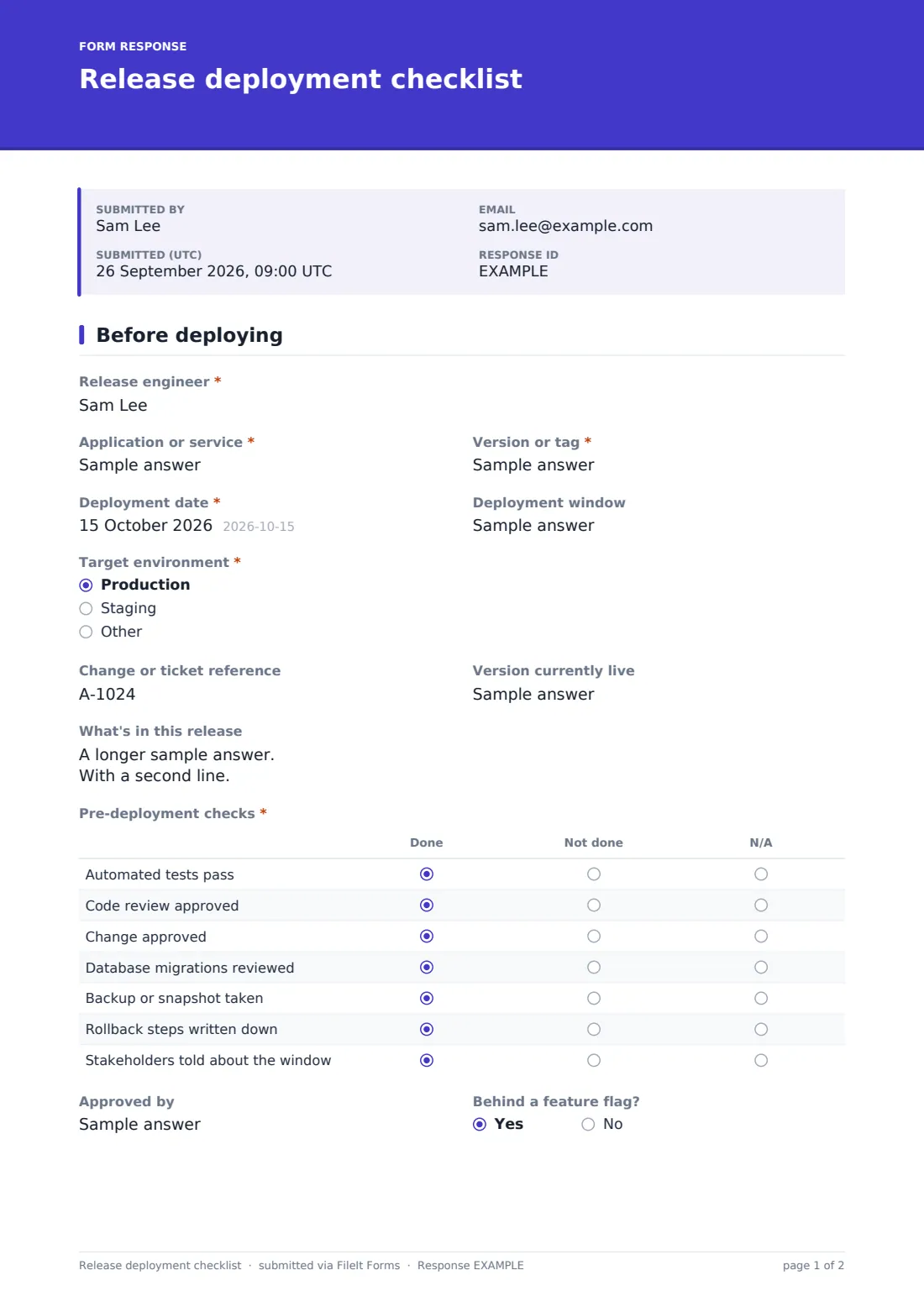
This two-page checklist starts with the basics: the service, the version or tag, the deployment window, the target environment, the change reference and the version currently live, which is what you would roll back to. A grid of seven pre-deployment checks covers tests, code review, change approval, database migrations, backups, written rollback steps and stakeholder communication, each marked done, not done or N/A.
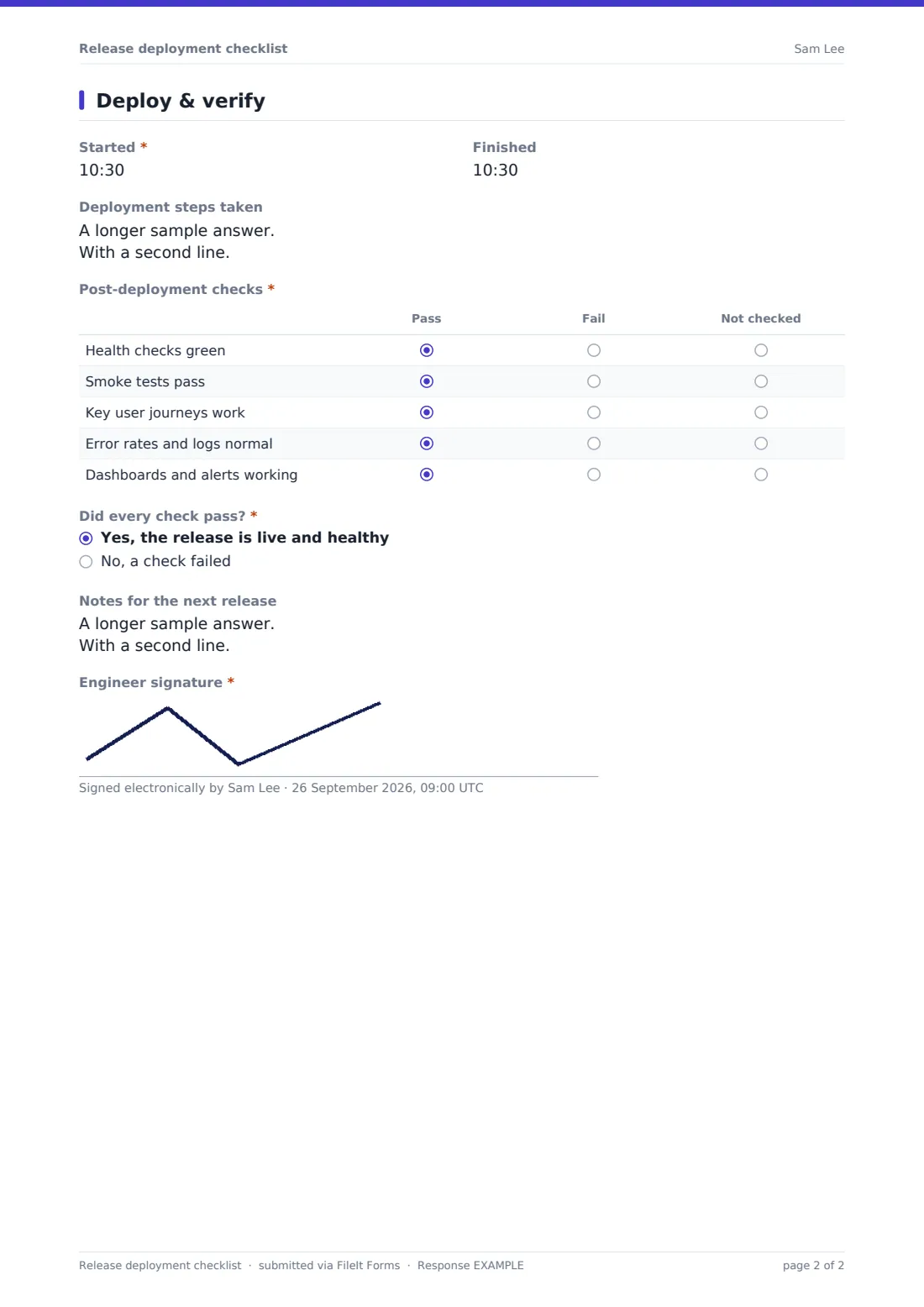
The second page records start and finish times, the steps taken and five post-deployment checks. Did every check pass? is the turning point. Answering no opens a short rollback section: what failed, what happened next, the version rolled back to, when, and whether the service was healthy afterwards. The engineer signs, and the record is filed as a PDF in your FileIt vault.
- Best for
- Software teams, DevOps and IT operations running scheduled releases
- Filled in by
- The engineer running the deployment
- Time to complete
- 5–10 minutes across the release
- Includes
- Pre- and post-deployment check grids, timings, a rollback section on failure, signature
Who uses a release deployment checklist form?
- Monthly production releases of a web application
- Deploying a database schema change with a rollback plan
- Releases that need evidence for a change advisory board
- Teams without a full CI/CD pipeline who deploy by hand
- Recording why a release was rolled back
- Staging deployments before a customer demo
Questions on this release deployment checklist form
25 questions over 2 pages · includes signature, conditional questions, multiple pages, ratings.
1 Before deploying
- Release engineer*
- Application or service*
- Version or tag*
- Deployment date*
- Deployment window
- Target environment* Production · Staging
- Change or ticket reference
- Version currently live
- What's in this release
- Pre-deployment checks* Done · Not done · N/A
- Approved by
- Behind a feature flag?
2 Deploy & verify
- Started*
- Finished
- Deployment steps taken
- Post-deployment checks* Pass · Fail · Not checked
- Did every check pass?* Yes, the release is live and healthy · No, a check failed
- What failed?* asked only when it applies
- What happened next?* asked only when it applies Rolled back to the previous version · Fixed forward · Left live with a known issue, accepted by the owner
- Rolled back to version* asked only when it applies
- Rollback completed at asked only when it applies
- Service healthy after the rollback?* asked only when it applies
- Incident or ticket raised asked only when it applies
- Notes for the next release
- Engineer signature*
The release deployment checklist form, page by page
1 Before deploying
The release engineer names the application or service, the version or tag and the deployment date and window. Target environment is production, staging or something else. The change or ticket reference and the version currently live sit side by side, and What's in this release takes notes or a link. The Pre-deployment checks grid covers automated tests, code review, change approval, migrations, a backup or snapshot, written rollback steps and telling stakeholders. Approved by and Behind a feature flag? round off the page.
2 Deploy & verify
Start and finish times bracket the Deployment steps taken. The Post-deployment checks grid marks health checks, smoke tests, key user journeys, error rates and logs, and dashboards and alerts as pass, fail or not checked. Did every check pass? asks for a plain yes or no. A no asks What failed? and What happened next?: rolled back, fixed forward, or left live with an accepted known issue. Rolling back asks for the version, the time it finished and whether the service was healthy after. An incident reference, notes for next time and the engineer's signature complete it.
Make the template yours
- Replace the check rows with your own release runbook steps
- Add a second signature for the release approver
- Make the change reference required if every release needs one
- Add a link to your release notes template in the cover text
- File records into a vault folder per service
Tips for a better release deployment checklist form
- Fill the checklist in as you go, during the window
- Write the rollback steps before you start, not when you need them
- Record the live version first so you know exactly what to return to
- Say a check failed even if it was fixed in minutes; patterns show over time
- Use notes for the next release to capture anything that slowed you down
Every response becomes a PDF in your vault
Each release record is filed as a signed PDF in your FileIt vault and the form owner is emailed, so team leads see every release and every rollback.
The CSV export makes it easy to count releases, failures and rollbacks per service over a quarter.
- Start from this template. It opens in the FileIt Forms designer — change any question, add pages, set the rules for when questions appear.
- Share it. Turn on a public link, or send it to people by email, each with their own link. They don’t need a FileIt account.
- Get the answers as PDFs. Each response is saved as a PDF in the vault folder you choose, with uploaded files attached — and listed in a Responses table you can export to CSV.
Release deployment checklist form: frequently asked questions
Is this release checklist free?
Yes. It's a starter template in the FileIt Forms app, and you can change any check.
Does FileIt deploy code or run the checks?
No. The checklist records what your team did and found. Deployment and testing happen in your own tools.
Why isn't the rollback section shown every time?
It appears only when Did every check pass? is answered no, so successful releases stay short.
Can it work as change management evidence?
It gives you a dated, signed record of each release with its change reference, which many teams use alongside their change process.
Can the whole team use one form?
Yes. Share the form link and each engineer submits a record for the releases they run.