
What is the peer-to-peer fundraiser sign-up form template?
Peer-to-peer fundraising works because people give to people they know. Your job is to make signing up painless and to get the ingredients of a good fundraising page from each supporter: a goal, a headline, a photo and a few honest sentences about why they're doing it. Chasing those by email after someone has said yes is where many fundraisers lose momentum.
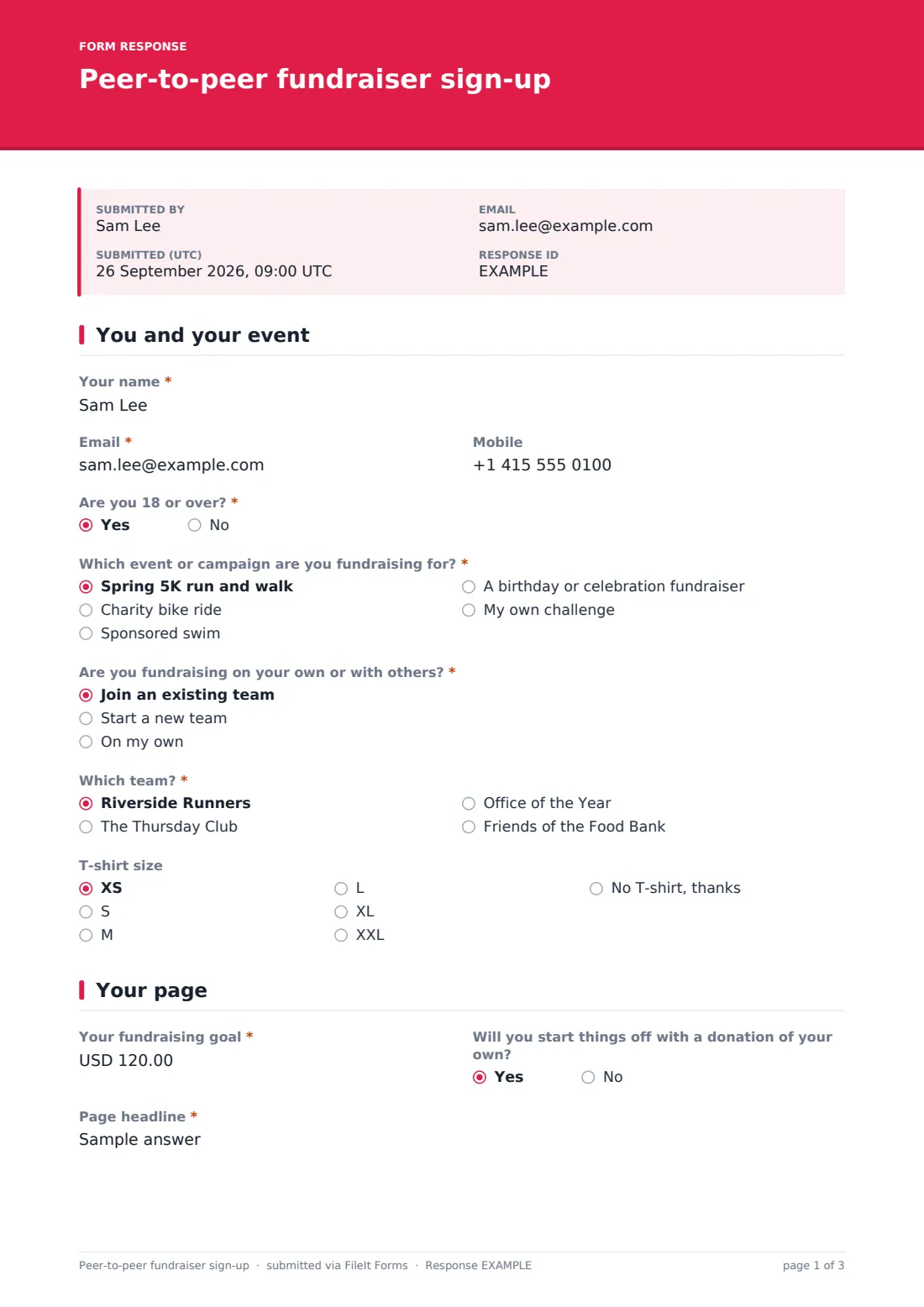
This sign-up form gathers them while enthusiasm is high. Page one handles the practical side: name, email and mobile, an age check that asks for a parent or guardian's details for under-18s, and "Which event or campaign are you fundraising for?", which includes "My own challenge" for people doing their own thing. "Are you fundraising on your own or with others?" branches: joining an existing team shows the team list, and starting a new team asks for its name and expected size. A T-shirt size rounds off the page.
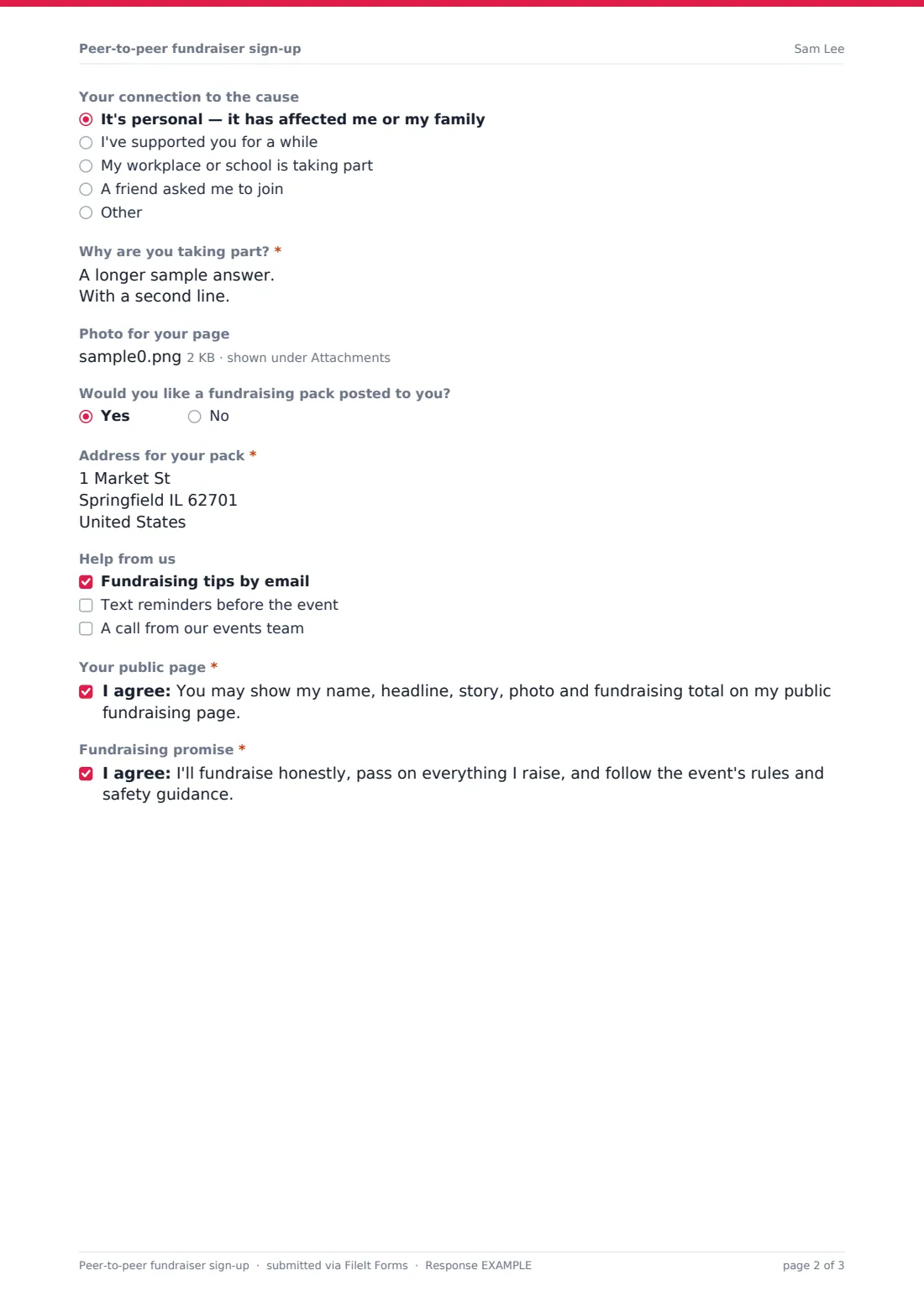
Page two is the fundraising page itself: "Your fundraising goal", "Page headline", "Your connection to the cause" and "Why are you taking part?", plus a photo upload. Supporters can ask for a posted fundraising pack and choose the help they'd like. Two short statements cover publishing their page and fundraising honestly. Each sign-up is filed as a PDF in your FileIt vault, photo attached, ready for whoever builds the pages on your fundraising platform.
- Best for
- Charities and community groups running sponsored events, challenges or birthday fundraisers
- Filled in by
- Individual fundraisers and team captains
- Time to complete
- About 5 minutes
- Includes
- Under-18 guardian details, event list, join/start/solo team logic, goal, headline, story, photo, pack request, two consents
Who uses a peer-to-peer fundraiser sign-up form?
- Sign-ups for a fun run, bike ride or sponsored swim
- Supporters setting up their own challenge or birthday fundraiser
- Workplace teams fundraising together for a charity partner
- Collecting stories and photos before pages go live on your platform
- Gathering T-shirt sizes and pack addresses in the same step
- A school or church raising money for an appeal
Questions on this peer-to-peer fundraiser sign-up form
24 questions over 2 pages · includes file upload, conditional questions, multiple pages, consent checkbox.
1 You and your event
- Your name*
- Email*
- Mobile
- Are you 18 or over?*
- Parent or guardian's name* asked only when it applies
- Parent or guardian's email* asked only when it applies
- Which event or campaign are you fundraising for?* Spring 5K run and walk · Charity bike ride · Sponsored swim · A birthday or celebration fundraiser · My own challenge
- What's your challenge?* asked only when it applies
- Are you fundraising on your own or with others?* Join an existing team · Start a new team · On my own
- Which team?* asked only when it applies Riverside Runners · The Thursday Club · Office of the Year · Friends of the Food Bank
- Team name* asked only when it applies
- How many people do you expect on the team? asked only when it applies
- T-shirt size XS · S · M · L · XL · XXL · No T-shirt, thanks
2 Your page
- Your fundraising goal*
- Will you start things off with a donation of your own?
- Page headline*
- Your connection to the cause It's personal — it has affected me or my family · I've supported you for a while · My workplace or school is taking part · A friend asked me to join
- Why are you taking part?*
- Photo for your page
- Would you like a fundraising pack posted to you?
- Address for your pack* asked only when it applies
- Help from us Fundraising tips by email · Text reminders before the event · A call from our events team
- Your public page*
- Fundraising promise*
The peer-to-peer fundraiser sign-up form, page by page
1 You and your event
Name and email are required, the mobile is optional. Answering no to "Are you 18 or over?" asks for a parent or guardian's name and email. The event dropdown has sample events to replace; choosing "My own challenge" asks "What's your challenge?". The team question offers "Join an existing team" (a dropdown of teams), "Start a new team" ("Team name" and expected size) or "On my own". T-shirt size includes a no-thanks option.
2 Your page
"Your fundraising goal" sits beside an optional question about making their own first donation. "Page headline" has an example placeholder, then "Your connection to the cause" and the required story question, with help text explaining why it matters. A single photo upload, an optional fundraising pack (which asks for an address), a choice of tips, text reminders or a call, and two required statements finish the form.
Make the template yours
- Replace the sample events and teams with your own — update the team list as new teams form
- Change the currency and minimum on the fundraising goal
- Remove the T-shirt question if your event doesn't include one
- Add a question about registration fees if your event charges one
- Close the form automatically on a date with the CloseAt setting
- Notify your events team as well as yourself on every sign-up
Tips for a better peer-to-peer fundraiser sign-up form
- Set pages live quickly — fundraisers share most in the first few days
- Suggest a goal on your event page; people often pick the first number they see
- Encourage a first donation of their own; empty pages raise less
- Use the story text in your thank-you messages and social posts, with permission
- Introduce new team members to their captain soon after they join
Every response becomes a PDF in your vault
Each sign-up is saved as a PDF in your vault with the photo attached, and you're notified by email. The fundraiser can get a copy of their answers.
Filter the Responses table by event or team, and export to CSV to bulk-create pages on your fundraising platform or check T-shirt numbers. FileIt doesn't take donations or host fundraising pages.
- Start from this template. It opens in the FileIt Forms designer — change any question, add pages, set the rules for when questions appear.
- Share it. Turn on a public link, or send it to people by email, each with their own link. They don’t need a FileIt account.
- Get the answers as PDFs. Each response is saved as a PDF in the vault folder you choose, with uploaded files attached — and listed in a Responses table you can export to CSV.
Peer-to-peer fundraiser sign-up form: frequently asked questions
Is this peer-to-peer fundraising sign-up template free?
Yes. It's included in FileIt's Forms app on the free plan.
Does FileIt create the fundraising pages?
No. The form collects what you need; you build the pages on whatever fundraising platform you use.
How do teams work?
Choosing "Join an existing team" shows a list of teams you maintain; "Start a new team" asks for the team name and expected size.
Can under-18s sign up?
The form asks whether the fundraiser is 18 or over, and if not, requires a parent or guardian's name and email. Set your own age rules for events.
Can fundraisers upload a photo?
Yes, one image for their page. It's attached to the filed PDF.
Do fundraisers need a FileIt account?
No. They sign up through the link you share.