

What is the patient insurance information form template?
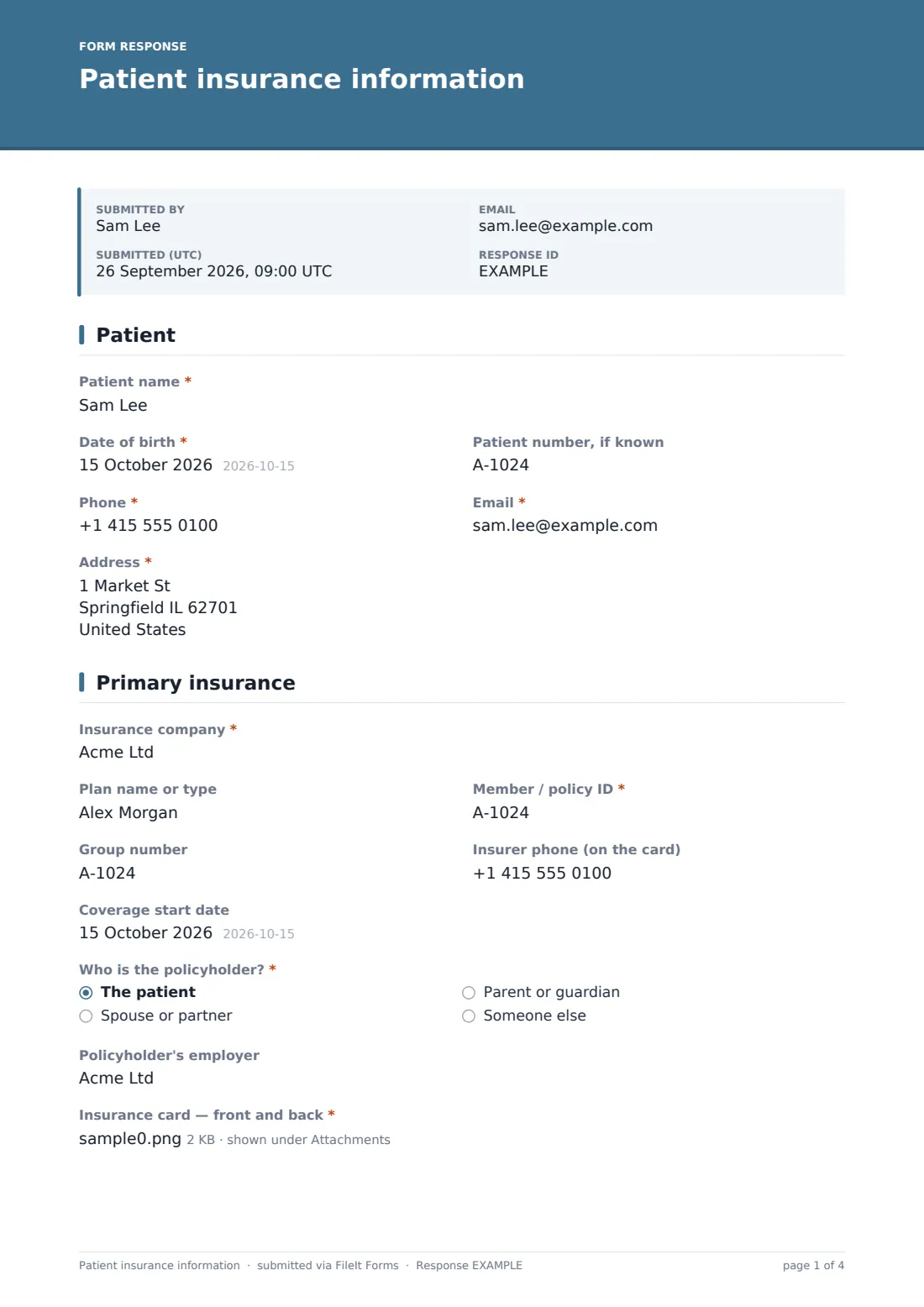
Insurance details typed at the front desk from a card held up behind glass are a common source of rejected claims. This form lets patients enter their insurer, member ID, group number and policyholder details themselves before their visit, and upload clear photos of the front and back of their card.
It covers the cases that trip up billing: a policyholder who isn't the patient (asking their name, date of birth and employer), a second plan with its own numbers and card, and visits related to an accident or work injury where another insurer may need to be billed first. The final page records three authorisations — accuracy, billing and release of information, and financial responsibility for anything insurance doesn't pay.
Each submission is saved as a signed PDF with the card images attached in your FileIt vault.
- Best for
- Medical, dental, therapy and specialist practices that bill insurers
- Filled in by
- The patient or their parent, guardian or representative
- Time to complete
- About 5 minutes
- Includes
- Card photo uploads, policyholder details, secondary plan, accident question, three authorisations
Who uses a patient insurance information form?
- New patient registration before a first appointment
- Annual insurance updates for existing patients
- Patients switching plans mid-year
- Children covered under a parent's policy
- Patients with both primary and secondary coverage
- Accident or work-injury visits that need the right payer
Questions on this patient insurance information form
31 questions over 4 pages · includes signature, file upload, conditional questions, multiple pages, consent checkbox.
1 Patient
- Patient name*
- Date of birth*
- Patient number, if known
- Phone*
- Email*
- Address*
2 Primary insurance
- Insurance company*
- Plan name or type
- Member / policy ID*
- Group number
- Insurer phone (on the card)
- Coverage start date
- Who is the policyholder?* The patient · Spouse or partner · Parent or guardian · Someone else
- Policyholder name* asked only when it applies
- Policyholder date of birth asked only when it applies
- Policyholder's employer
- Insurance card — front and back*
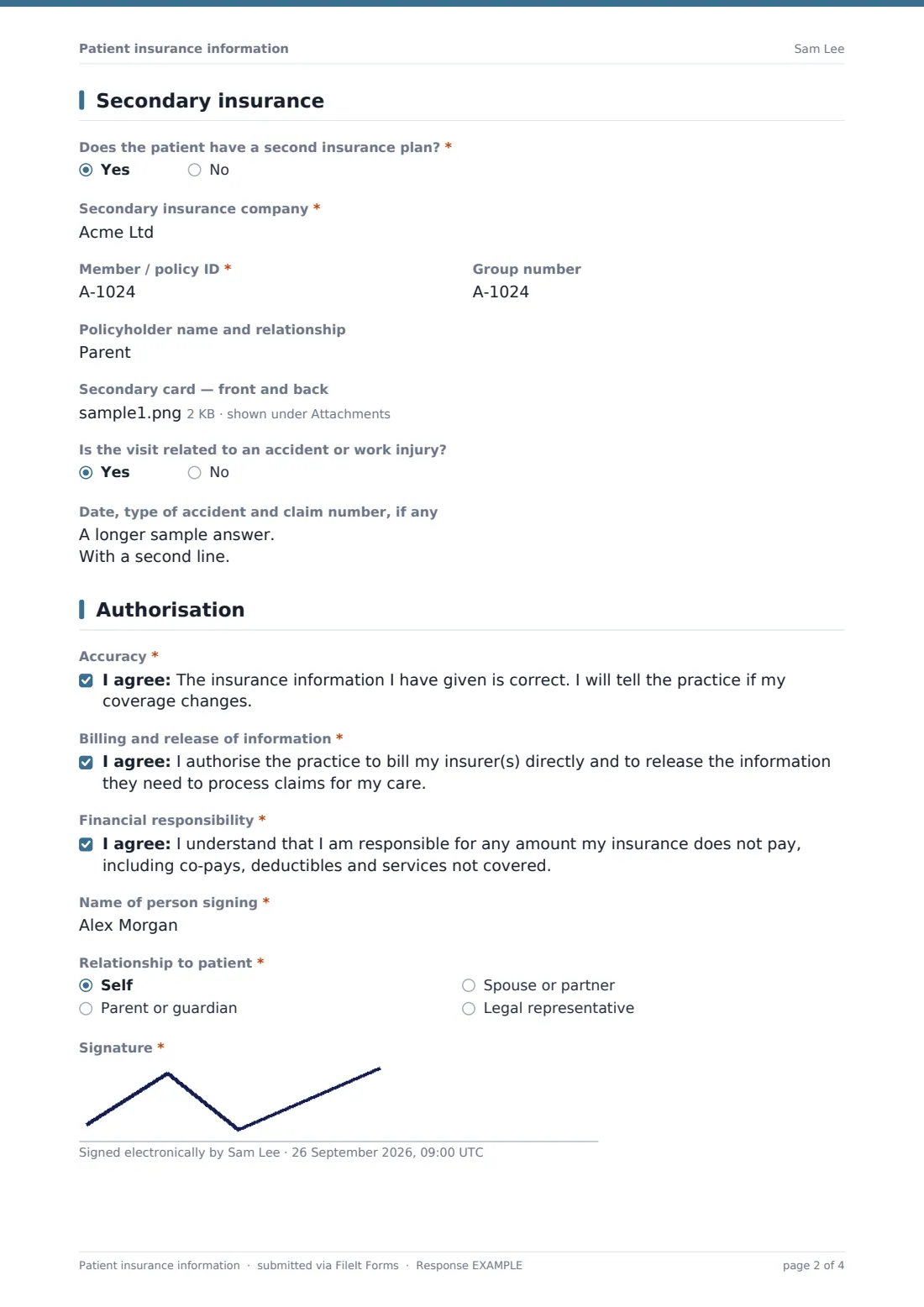
3 Secondary insurance
- Does the patient have a second insurance plan?*
- Secondary insurance company* asked only when it applies
- Member / policy ID* asked only when it applies
- Group number asked only when it applies
- Policyholder name and relationship asked only when it applies
- Secondary card — front and back asked only when it applies
- Is the visit related to an accident or work injury?
- Date, type of accident and claim number, if any asked only when it applies
4 Authorisation
- Accuracy*
- Billing and release of information*
- Financial responsibility*
- Name of person signing*
- Relationship to patient* Self · Parent or guardian · Spouse or partner · Legal representative
- Signature*
The patient insurance information form, page by page
1 Patient
Name, date of birth, patient number if known, phone, email and address.
2 Primary insurance
The insurer, plan type, member ID, group number, insurer phone and coverage start date. The policyholder — the patient, a spouse, a parent or someone else — with the holder's name and date of birth when it isn't the patient, and their employer if the plan is through work. Photos of the front and back of the card are required.
3 Secondary insurance
Whether there's a second plan; if so, its insurer, member ID, group number, policyholder and card photos. A last question asks whether the visit relates to an accident or work injury, with space for the date, type and any claim number.
4 Authorisation
Three consents — that the information is correct, authorising the practice to bill the insurer and release claim information, and accepting responsibility for amounts not covered — then the signer's name, relationship to the patient and signature.
Make the template yours
- Change the plan-type placeholder to match insurers common in your area
- Add a Medicare, Medicaid or national health number field if relevant
- Remove the secondary insurance page if you only bill one payer
- Pair it with your financial policy form for new patients
- Have the authorisation wording reviewed for your billing practices and local rules
- File each patient's insurance record into their folder in your vault
Tips for a better patient insurance information form
- Ask for an updated form at the start of each year or when a patient mentions a new job
- Verify eligibility with the insurer before the appointment
- Check the card photos are readable before the patient arrives
- Pay attention to accident-related visits — the payer order may differ
- Don't collect payment card numbers on this form
Every response becomes a PDF in your vault
The signed form and card images are saved together as a PDF in your FileIt vault, and your billing team is emailed. The patient can receive a copy.
Use the Responses table to see which patients' details are ready to verify, and export to CSV if your billing system imports it.
- Start from this template. It opens in the FileIt Forms designer — change any question, add pages, set the rules for when questions appear.
- Share it. Turn on a public link, or send it to people by email, each with their own link. They don’t need a FileIt account.
- Get the answers as PDFs. Each response is saved as a PDF in the vault folder you choose, with uploaded files attached — and listed in a Responses table you can export to CSV.
Patient insurance information form: frequently asked questions
Is this patient insurance form free?
Yes. It's part of the Forms app on every FileIt account, including the free plan.
Can patients upload photos of their insurance card?
Yes. Front and back for the primary plan (required), and for a secondary plan if they have one.
What if the patient isn't the policyholder?
Choose who the policyholder is and the form asks for their name, date of birth and employer.
Does it collect card payment details?
No. It collects insurance information only.
Is the authorisation wording legally reviewed?
It's a plain-language starting point. Check it against your billing practices and local regulations.
Do patients need an account?
No. They fill it in from the link you share.