What is the office supplies order form template?
Supplies requests are small, frequent and easy to get wrong. "Can I get some pens?" doesn't say how many, which colour or where to deliver them, and "we need toner" is no help without the printer model. The office manager ends up chasing details for every order, then working out which budget each one belongs to.
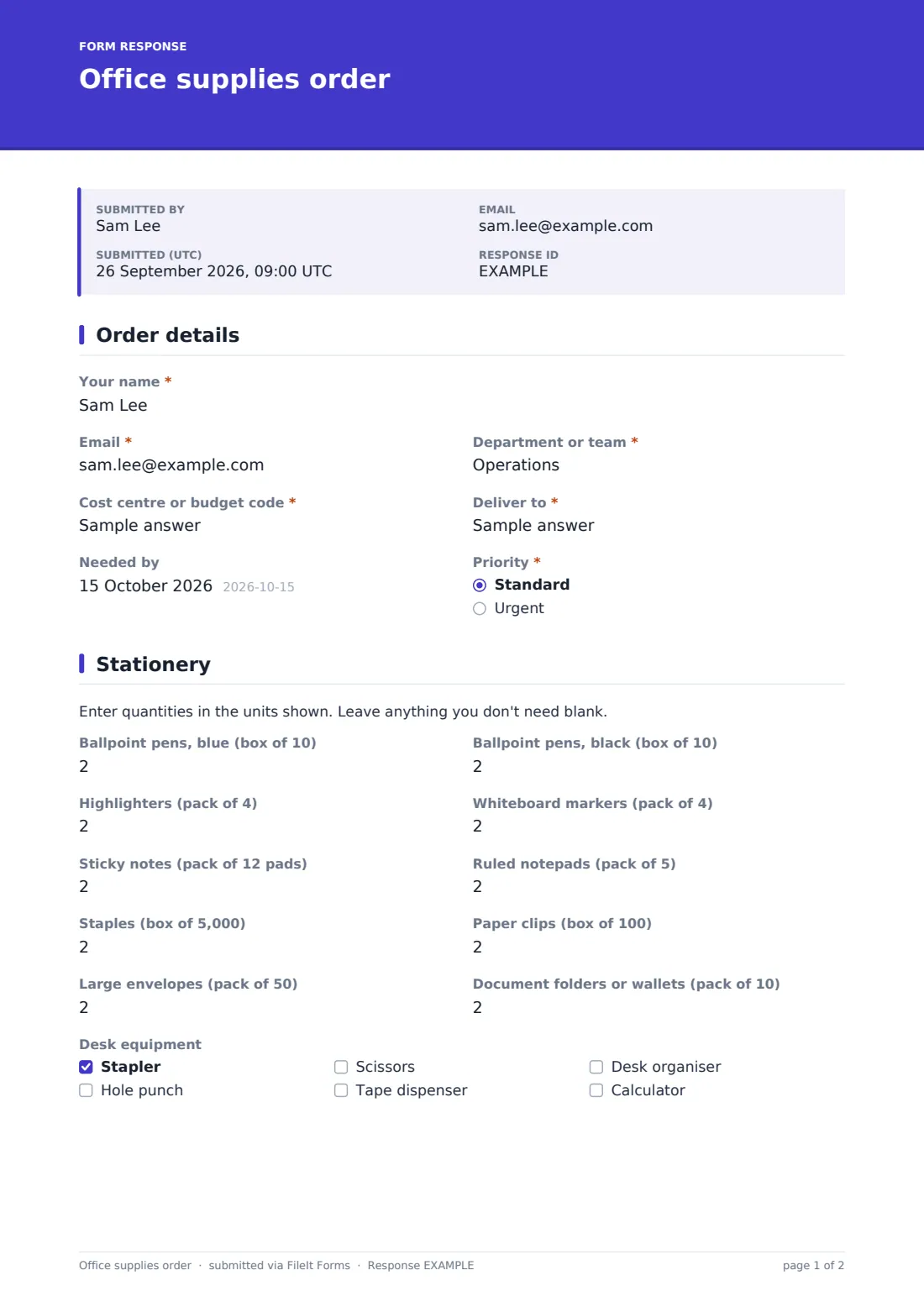
This office supplies order form is laid out like a stock list. Each common item has its own quantity box with the pack size in the label — pens by the box of ten, copy paper by the ream, sticky notes by the pack of twelve pads — so quantities mean the same thing to everyone. The order details page captures the department, cost centre, delivery location, a needed-by date and whether it's urgent.
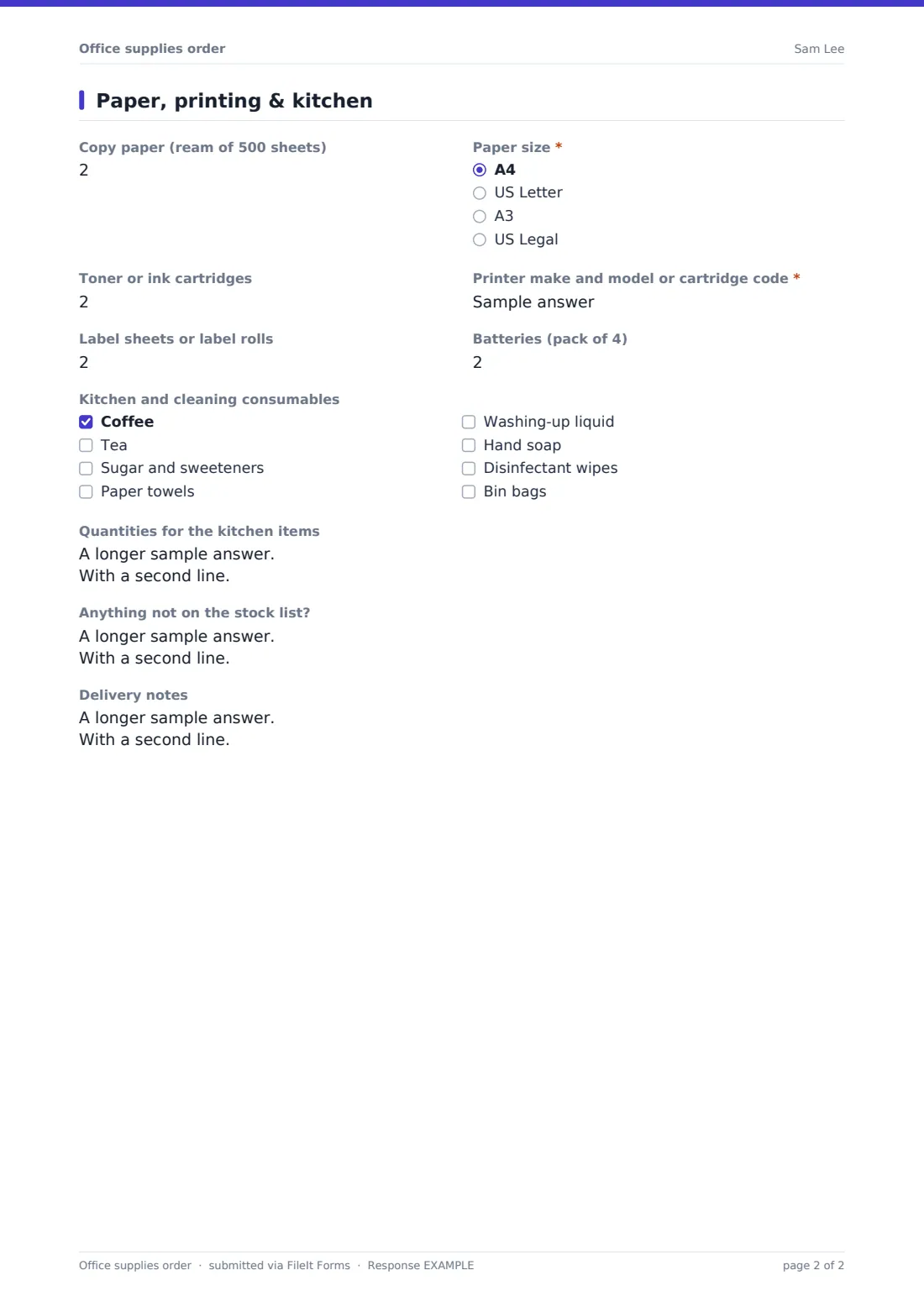
Toner orders must give the printer model or cartridge code, copy paper asks for the paper size, and anything off the list goes in a free-text box. Each order is filed as a PDF in your FileIt vault, so you can export a month of orders to reconcile against the budget.
- Best for
- Office managers, admin teams and schools that keep a central stationery cupboard
- Filled in by
- Any member of staff who needs supplies
- Time to complete
- About 2 minutes
- Includes
- Quantity boxes with pack sizes, printer model for toner, kitchen consumables, off-list requests, cost centre
Who uses a office supplies order form?
- A weekly stationery run from the central supplies cupboard
- Departments ordering supplies charged to their own cost centre
- Restocking printer toner without guessing the cartridge type
- A school office collecting teachers' stationery requests before term
- Keeping the staff kitchen stocked with coffee, tea and cleaning supplies
- An office manager consolidating requests into one supplier order
Questions on this office supplies order form
29 questions over 3 pages · includes conditional questions, multiple pages.
1 Order details
- Your name*
- Email*
- Department or team*
- Cost centre or budget code*
- Deliver to*
- Needed by
- Priority* Standard · Urgent
- Why is it urgent?* asked only when it applies
2 Stationery
- Ballpoint pens, blue (box of 10)
- Ballpoint pens, black (box of 10)
- Highlighters (pack of 4)
- Whiteboard markers (pack of 4)
- Sticky notes (pack of 12 pads)
- Ruled notepads (pack of 5)
- Staples (box of 5,000)
- Paper clips (box of 100)
- Large envelopes (pack of 50)
- Document folders or wallets (pack of 10)
- Desk equipment Stapler · Hole punch · Scissors · Tape dispenser · Desk organiser · Calculator
3 Paper, printing & kitchen
- Copy paper (ream of 500 sheets)
- Paper size* asked only when it applies A4 · US Letter · A3 · US Legal
- Toner or ink cartridges
- Printer make and model or cartridge code* asked only when it applies
- Label sheets or label rolls
- Batteries (pack of 4)
- Kitchen and cleaning consumables Coffee · Tea · Sugar and sweeteners · Paper towels · Washing-up liquid · Hand soap · Disinfectant wipes · Bin bags
- Quantities for the kitchen items asked only when it applies
- Anything not on the stock list?
- Delivery notes
The office supplies order form, page by page
1 Order details
Your name, Email, Department or team and Cost centre or budget code come first, then Deliver to (floor, room or desk) and an optional Needed by date. Priority is standard or urgent; urgent orders must say Why is it urgent?, which helps the office manager decide what to pick first.
2 Stationery
A short note asks for quantities in the units shown. Ten quantity boxes follow, each with its pack size: blue and black ballpoint pens, highlighters, whiteboard markers, sticky notes, ruled notepads, staples, paper clips, large envelopes and document folders. Desk equipment is a checklist for one-off items — stapler, hole punch, scissors, tape dispenser, desk organiser and calculator.
3 Paper, printing & kitchen
Copy paper by the ream asks for the Paper size — A4, US Letter, A3 or US Legal — when a quantity is entered. Ordering toner or ink cartridges requires the Printer make and model or cartridge code. Label sheets and batteries have their own boxes.
Kitchen and cleaning consumables is a checklist from coffee and tea to hand soap and bin bags, and ticking anything opens a box for quantities. Anything not on the stock list? takes product codes or links, with a reminder that off-list items may need a purchase requisition. Delivery notes close the order.
Make the template yours
- Rename the quantity boxes and pack sizes to match your own supplier's catalogue
- Remove the paper sizes you don't use, or add a second copy paper box if you stock two sizes
- Replace the cost centre text field with a dropdown of your budget codes
- Add a Max to each quantity box to cap how much one person can order
- Edit the confirmation message with your real delivery day
- Add a manager approval question for orders over a set amount
Tips for a better office supplies order form
- Keep the stock list short — the items people order most, not the supplier's whole catalogue
- Export orders weekly to CSV and total them before placing one supplier order
- Photograph the printer's cartridge label once and add the codes to the help text
- Review off-list requests monthly; frequent ones belong on the stock list
- Share the form link on the supplies cupboard door with a QR code
Every response becomes a PDF in your vault
Each order is saved as a PDF titled with the person's name and date in the vault folder you choose, and the office manager is notified. The person ordering can receive a copy of what they asked for.
In the Responses table you can filter by department or cost centre and export orders to CSV — useful for adding up quantities before a supplier order, or for charging supplies back to budgets each month.
- Start from this template. It opens in the FileIt Forms designer — change any question, add pages, set the rules for when questions appear.
- Share it. Turn on a public link, or send it to people by email, each with their own link. They don’t need a FileIt account.
- Get the answers as PDFs. Each response is saved as a PDF in the vault folder you choose, with uploaded files attached — and listed in a Responses table you can export to CSV.
Office supplies order form: frequently asked questions
Is this office supplies order form free?
Yes. It's a starter template in the FileIt Forms app, which every account has, including the free plan.
Does the form add up the total cost?
No. FileIt Forms has no calculated fields. Export orders to CSV and total them in a spreadsheet, or add a price to each label.
Can I change the items on the stock list?
Yes. Every quantity box is an ordinary number question you can rename, remove or add to in the designer.
Does the form place the order with our supplier?
No. It collects staff requests. You place the supplier order yourself.
Can staff order things that aren't on the list?
Yes, in the free-text box at the end. The help text notes that some items may need a purchase requisition instead.
Do staff need a FileIt account?
No. Anyone with the link can place an order.