What is the locksmith job authorization form template?
A locksmith opening a door has to be confident the person asking actually has the right to be on the other side of it. Checking photo ID and some proof of address or ownership, and getting a signature agreeing the work and the price, protects the customer, the real owner and the locksmith if a job is ever questioned.
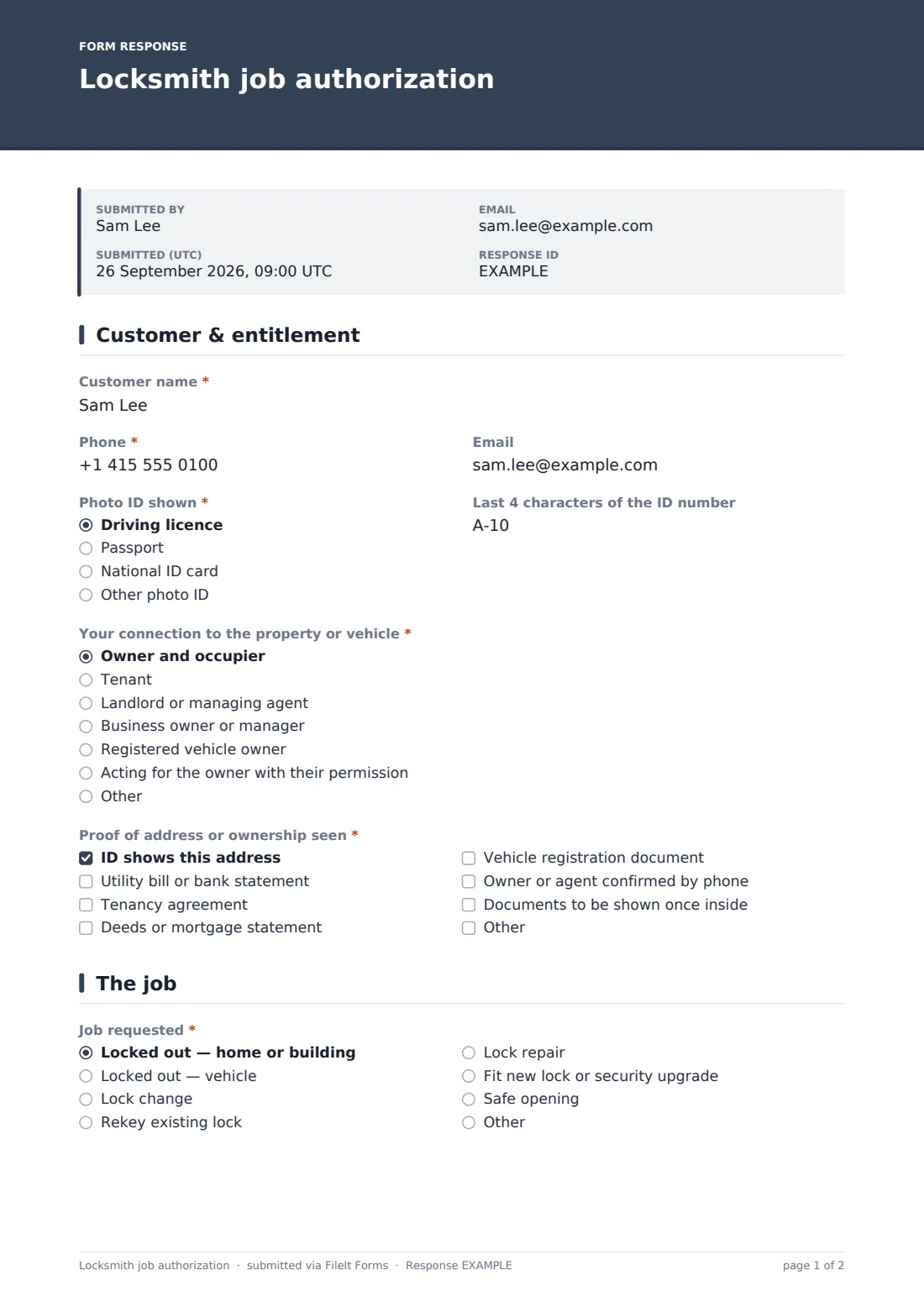
This template is filled in on site, before work starts. The customer gives their name and contact details, the type of photo ID shown and its last four characters, and their connection to the property or vehicle — owner, tenant, landlord, business manager, registered vehicle owner or someone acting for the owner. Tenants say whether their landlord agreed to a lock change; someone acting for an owner gives the owner's name and phone. The locksmith ticks which proof of address or ownership was seen.
The job page records what's needed — a home or vehicle lockout, lock change, rekey, repair, new lock or safe opening — with the address, vehicle details and locks involved. The customer then agrees the quoted price, payment method and an authorisation statement, and signs. The signed form is saved as a PDF in FileIt.
- Best for
- Locksmiths, security installers and property maintenance teams
- Filled in by
- The customer, on the locksmith's phone or tablet
- Time to complete
- About 3 minutes
- Includes
- ID and proof-of-entitlement checks, tenant and third-party follow-ups, job type, quoted price, authorisation statement and signature
Who uses a locksmith job authorization form?
- Emergency home lockouts late at night
- Vehicle lockouts at the roadside
- Lock changes for tenants, with the landlord's agreement noted
- Lock changes after a move or a lost key
- Letting agents booking a lock change for a managed property
- Safe openings where ownership must be shown first
Questions on this locksmith job authorization form
22 questions over 3 pages · includes signature, conditional questions, multiple pages, consent checkbox.
1 Customer & entitlement
- Customer name*
- Phone*
- Photo ID shown* Driving licence · Passport · National ID card · Other photo ID
- Last 4 characters of the ID number
- Your connection to the property or vehicle* Owner and occupier · Tenant · Landlord or managing agent · Business owner or manager · Registered vehicle owner · Acting for the owner with their permission
- Has your landlord agreed to a lock change?* asked only when it applies Yes · No · No lock change needed — entry only
- Owner's name and phone* asked only when it applies
- Proof of address or ownership seen* ID shows this address · Utility bill or bank statement · Tenancy agreement · Deeds or mortgage statement · Vehicle registration document · Owner or agent confirmed by phone · Documents to be shown once inside
2 The job
- Job requested* Locked out — home or building · Locked out — vehicle · Lock change · Rekey existing lock · Lock repair · Fit new lock or security upgrade · Safe opening
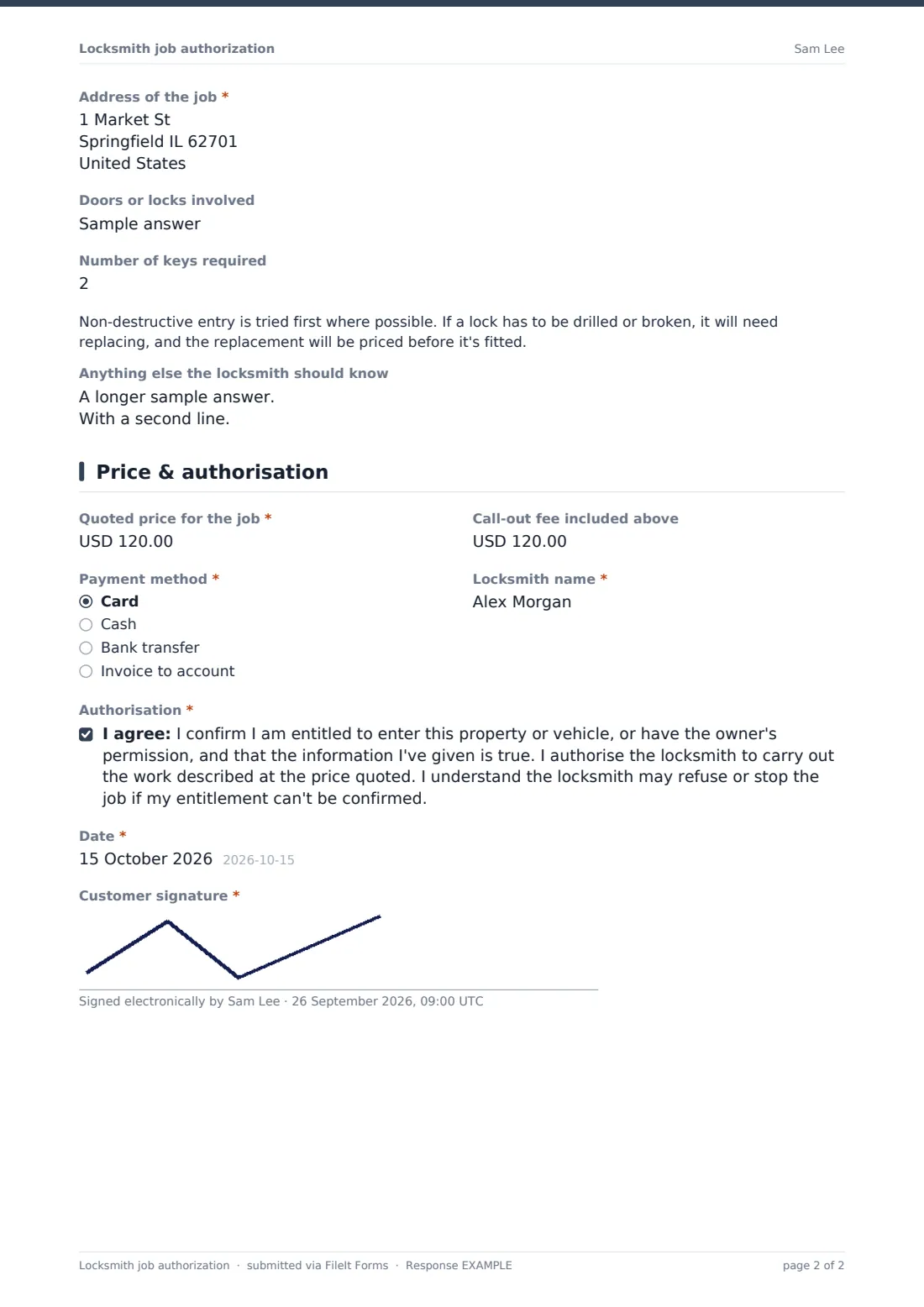
- Address of the job*
- Vehicle make, model and registration* asked only when it applies
- Doors or locks involved
- Number of keys required
- Anything else the locksmith should know
3 Price & authorisation
- Quoted price for the job*
- Call-out fee included above
- Payment method* Card · Cash · Bank transfer · Invoice to account
- Locksmith name*
- Authorisation*
- Date*
- Customer signature*
The locksmith job authorization form, page by page
1 Customer & entitlement
The customer gives their name, phone and email, the type of photo ID shown and its last four characters, and their connection to the property or vehicle. Choosing tenant asks whether the landlord agreed to a lock change; acting for the owner asks for the owner's name and phone. At least one proof must be ticked: ID showing the address, a bill or statement, tenancy agreement, deeds, vehicle registration document, confirmation by phone, or documents to be shown once inside.
2 The job
Pick the job — a home or vehicle lockout, lock change, rekey, repair, new lock or security upgrade, or safe opening — and enter the address of the job — for a vehicle, where it is now. A vehicle lockout also asks for the make, model and registration. The locksmith notes the doors or locks involved and how many keys are needed, and a short note explains that non-destructive entry is tried first and any replacement lock is priced before fitting.
3 Price & authorisation
Record the quoted price, any call-out fee included, the payment method and the locksmith's name. The customer agrees an authorisation statement confirming they're entitled to access, authorising the work at the quoted price and accepting the job may be stopped if entitlement can't be confirmed, then dates and signs.
Make the template yours
- Change the currency on the price fields to your own
- Add your standard price list or call-out charges to the cover text
- Add a field for the lock make and security rating you fitted
- Add a before-and-after photo upload for damaged locks
- Prefill the locksmith's name with a personal link per technician
- File each technician's jobs in their own vault folder
Tips for a better locksmith job authorization form
- Check that the name on the ID matches the person signing
- If entitlement can't be shown, consider stopping or contacting the owner first
- Don't record full ID numbers — the last four characters are enough to reference it
- Agree the price before starting, especially for out-of-hours call-outs
- Explain when non-destructive entry may not be possible
- Give the customer their copy — FileIt can email it automatically
Every response becomes a PDF in your vault
The signed authorisation is saved as a PDF in the vault folder you choose, with the ID check, proofs seen, job, price and signature together. The customer can be emailed a copy if they gave an email address.
In Responses, search by address or name if a job is ever queried, or export to CSV for your job records.
- Start from this template. It opens in the FileIt Forms designer — change any question, add pages, set the rules for when questions appear.
- Share it. Turn on a public link, or send it to people by email, each with their own link. They don’t need a FileIt account.
- Get the answers as PDFs. Each response is saved as a PDF in the vault folder you choose, with uploaded files attached — and listed in a Responses table you can export to CSV.
Locksmith job authorization form: frequently asked questions
Is this locksmith authorization form free?
Yes. It's part of the Forms app, included with every FileIt account, the free plan too.
Does the form verify the customer's ID?
No. The locksmith checks the ID and documents in person and records what was seen. The form keeps a signed record of that check.
Should we store a copy of the customer's ID?
The form records the ID type and last four characters rather than an image. If you decide to add an ID photo, make sure your privacy notice covers it.
Can the customer sign on my phone?
Yes. The form works on any phone or tablet and the signature is drawn on screen.
Can I use it for vehicle lockouts?
Yes. Choosing a vehicle lockout asks for the make, model and registration, and the registration document is one of the proofs you can tick.
Does FileIt take the payment?
No. The form records the agreed price and payment method; you take payment as you normally do.