What is the job shadowing request form template?
Job shadowing is one of the cheapest development tools an organisation has: an afternoon watching the finance team close the month, a day on the warehouse floor, a week alongside a product manager. It usually happens informally, which means it depends on who you know, the host team doesn't know what the visitor wants to get out of it, and nobody thinks about who covers the visitor's own work.
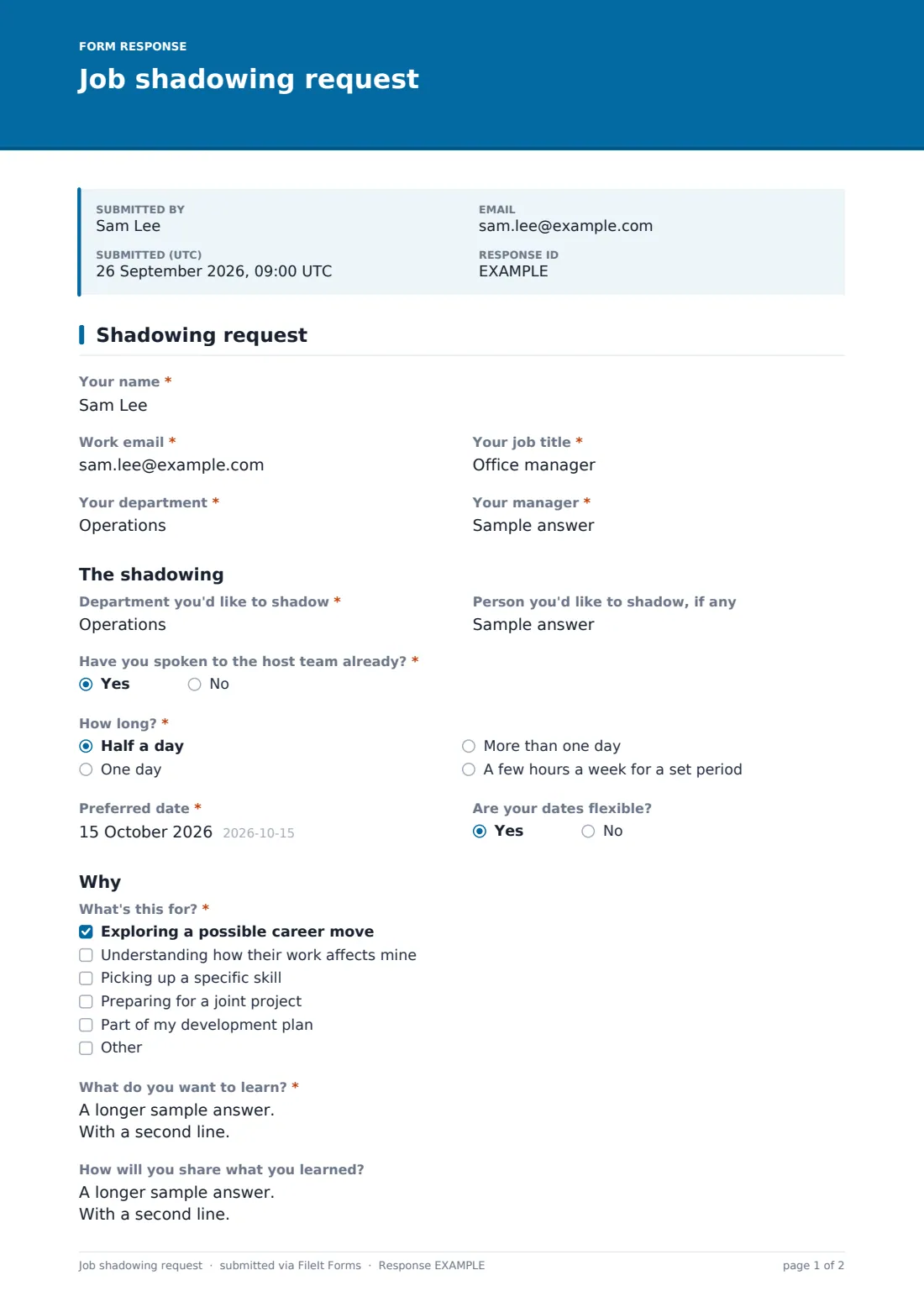
This one-page request makes shadowing open to everyone and easy to plan. The employee names the department they'd like to shadow and, optionally, a specific person, says whether they've already spoken to the host team, and picks how long: half a day, a day, more than one day, or a few hours a week. Choosing More than one day reveals the last day and a required cover plan. A recurring arrangement asks which day, which hours and for how many weeks.
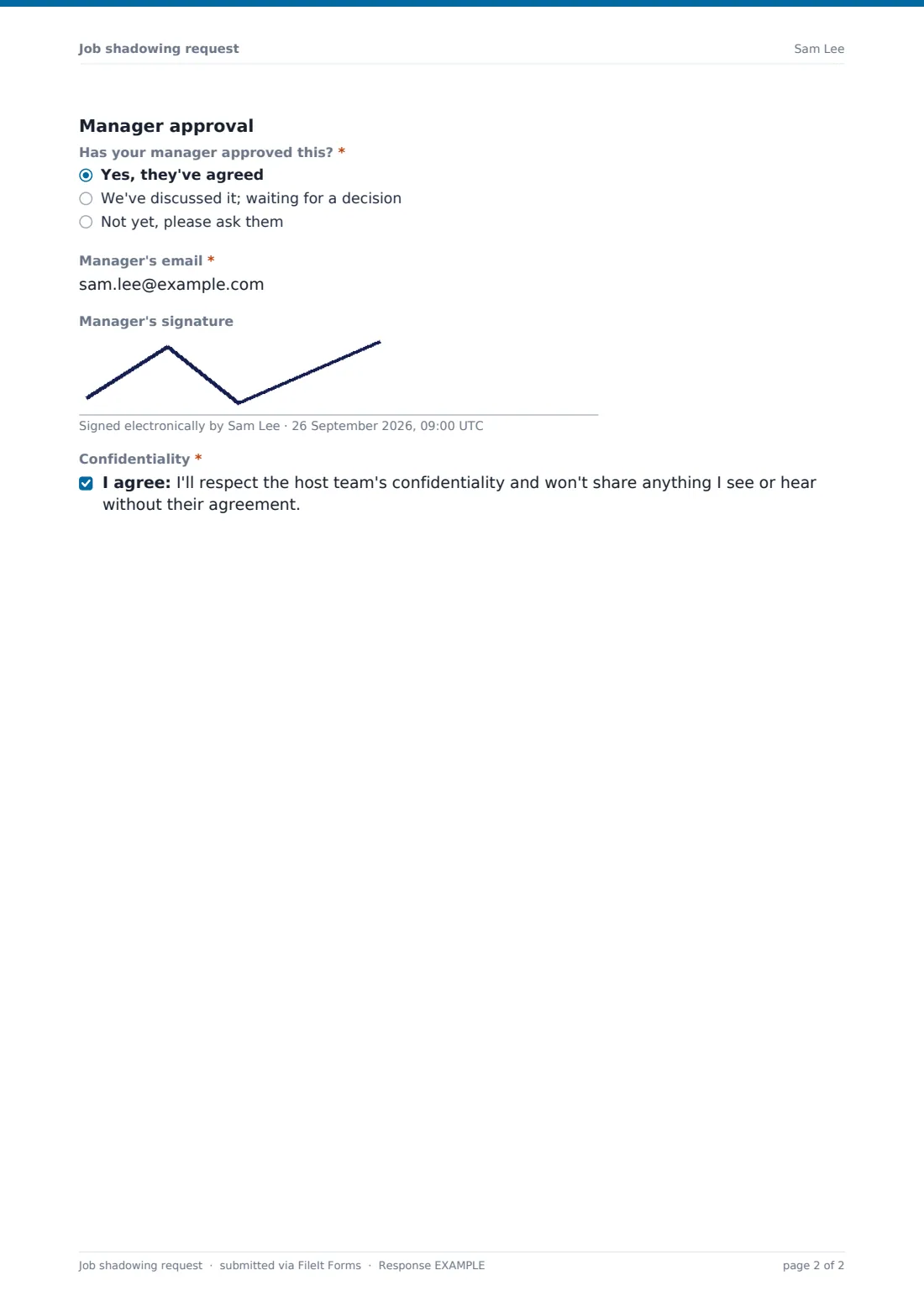
The employee then says what it's for, what they want to learn and how they'll share it. The last section records whether the manager has approved, their email, an optional signature and a confidentiality promise. Each request is filed as a PDF in your FileIt vault.
- Best for
- HR and learning teams, and managers who want cross-team development
- Filled in by
- The employee who wants to shadow
- Time to complete
- About 4 minutes
- Includes
- Host details, four length options, cover plan, learning goals, manager approval and confidentiality
Who uses a job shadowing request form?
- A customer service agent spending a day with the product team
- A junior accountant shadowing the controller during month-end
- A nurse exploring a move into a specialist unit
- An engineer learning how sales demos the product before a joint project
- A graduate rotation program collecting requests in one place
- A hospital or school offering shadowing as part of a development plan
Questions on this job shadowing request form
21 questions · includes signature, conditional questions, consent checkbox.
1 Shadowing request
- Your name*
- Work email*
- Your job title*
- Your department*
- Your manager*
- Department you'd like to shadow*
- Person you'd like to shadow, if any
- Have you spoken to the host team already?*
- How long?* Half a day · One day · More than one day · A few hours a week for a set period
- Preferred date*
- Last day* asked only when it applies
- How will your work be covered while you're away?* asked only when it applies
- Which day and hours, and for how many weeks?* asked only when it applies
- Are your dates flexible?
- What's this for?* Exploring a possible career move · Understanding how their work affects mine · Picking up a specific skill · Preparing for a joint project · Part of my development plan
- What do you want to learn?*
- How will you share what you learned?
- Has your manager approved this?* Yes, they've agreed · We've discussed it; waiting for a decision · Not yet, please ask them
- Manager's email*
- Manager's signature
- Confidentiality*
The job shadowing request form, page by page
1 Shadowing request
The employee enters Your name, Work email, Your job title, Your department and Your manager.
Under The shadowing, they name the Department you'd like to shadow, the person (optional), and answer Have you spoken to the host team already? How long? offers half a day, one day, more than one day and a few hours a week for a set period. They give a Preferred date. More than one day adds the Last day and How will your work be covered while you're away? The recurring choice asks which day, the hours and how many weeks. Are your dates flexible? helps the host.
Under Why, What's this for? lists exploring a career move, understanding another team's work, picking up a skill, preparing for a joint project and a development plan, plus Other. What do you want to learn? is required, and How will you share what you learned? is optional.
Under Manager approval, Has your manager approved this? has three answers, followed by the Manager's email, an optional Manager's signature and a confidentiality statement the employee agrees to.
Make the template yours
- Replace the host department field with a dropdown of departments that take visitors
- Add the learning team to the notification emails
- Make the manager's signature required if you only accept pre-approved requests
- Remove the recurring option if you only offer one-off visits
- Add a question for health and safety induction if visitors go on site
- Edit the confidentiality statement to match your own policy
Tips for a better job shadowing request form
- Ask the host team before you agree a date; nobody likes a surprise visitor
- Share the learning goals with the host in advance so they can plan useful time
- Keep first visits short; a half day is often enough to know whether to go back
- Follow up a week later to ask what the employee took away
- Track requests over a year to see which teams are most in demand as hosts
Every response becomes a PDF in your vault
Each request is saved as a PDF in the vault folder you choose, titled with the employee's name and the date. You're notified by email, and the employee can keep a copy.
HR or the learning team confirms with the manager and host, then agrees the date. The Responses table shows every request and its approval status, and the CSV export makes it easy to report on cross-team development.
- Start from this template. It opens in the FileIt Forms designer — change any question, add pages, set the rules for when questions appear.
- Share it. Turn on a public link, or send it to people by email, each with their own link. They don’t need a FileIt account.
- Get the answers as PDFs. Each response is saved as a PDF in the vault folder you choose, with uploaded files attached — and listed in a Responses table you can export to CSV.
Job shadowing request form: frequently asked questions
Is this job shadowing request template free?
Yes. It's a starter template in FileIt's Forms app on every account, and you can change every question.
Does the form book the shadowing?
No. It collects the request. HR, the manager and the host team agree the details.
When is a cover plan needed?
When the employee chooses More than one day. The form then asks for the last day and how their work will be covered.
Can the manager sign the form?
Yes. There's an optional signature for the manager if they're with the employee. Otherwise HR can confirm by email.
Can people outside the organisation use it?
It's written for employees, but you could adapt it for students or volunteers by changing the labels.
Do employees need a FileIt account?
No. Share the link on your intranet and anyone can submit a request.