What is the income verification form template?
Lenders, landlords, benefit schemes and finance teams often need someone other than the applicant to confirm what they earn. Asking for "a letter from your employer" produces letters in every shape: some with annual salary and no pay frequency, some with a monthly figure and no year-to-date, some unsigned. Comparing them is slow, and chasing the missing piece is slower.
This one-page income verification template asks the employer or accountant the same questions every time. They name the person, choose the income source and give the pay frequency, the gross amount per pay period and the year-to-date total. Employment reveals the job title, start date and employment type. Choosing Self-employed swaps those for the business name, what the business does, the tax year the figures cover, net profit for that year and where the figures came from. A question on overtime, bonus or commission catches the variable pay that a basic salary figure hides.
The person confirming signs at the end, and every response is filed as a PDF in your FileIt vault, so you hold a signed, dated record rather than a forwarded email.
- Best for
- Landlords, lenders, brokers, housing schemes and finance teams
- Filled in by
- The employer's HR or payroll team, or the person's accountant
- Time to complete
- About 4 minutes
- Includes
- Employment and self-employed branches, year-to-date figures, variable pay and a signature
Who uses a income verification form?
- A letting agent confirming an applicant's salary with their employer before a tenancy
- A mortgage broker collecting a self-employed client's net profit from their accountant
- A housing association checking income for an affordable rent scheme
- A credit union verifying a member's wages before a loan decision
- An employer's payroll team replacing ad hoc letters with one standard response
- A guarantor check where the guarantor's income needs independent confirmation
Questions on this income verification form
30 questions · includes signature, conditional questions, consent checkbox.
1 Income verification
- Person whose income you're confirming*
- Requested by
- Their reference number
- Income source* Employment (wages or salary) · Self-employed · Pension or retirement income · Other regular income
- Job title* asked only when it applies
- Employed since* asked only when it applies
- Employment type* asked only when it applies Full-time, permanent · Part-time, permanent · Fixed-term or temporary · Seasonal or casual
- Business name* asked only when it applies
- What the business does* asked only when it applies
- Tax year these figures cover* asked only when it applies
- Net profit for that tax year* asked only when it applies
- Figures are taken from* asked only when it applies The filed tax return · Year-end accounts we prepared · Draft or management accounts · Other records
- Describe the income* asked only when it applies
- Pay frequency* Weekly · Every two weeks · Twice a month · Monthly · Annually · Irregular
- Gross amount per pay period*
- Year-to-date gross earnings
- Year to date as at
- Expected gross income this year
- Does the income include overtime, bonus or commission?
- Describe the variable pay asked only when it applies
- Your name*
- You are confirming this as* The employer (HR, payroll or a manager) · Their accountant or tax preparer · Other
- Job title*
- Organisation*
- Email*
- Phone
- Notes
- Confirmation*
- Signature*
- Date*
The income verification form, page by page
1 Income verification
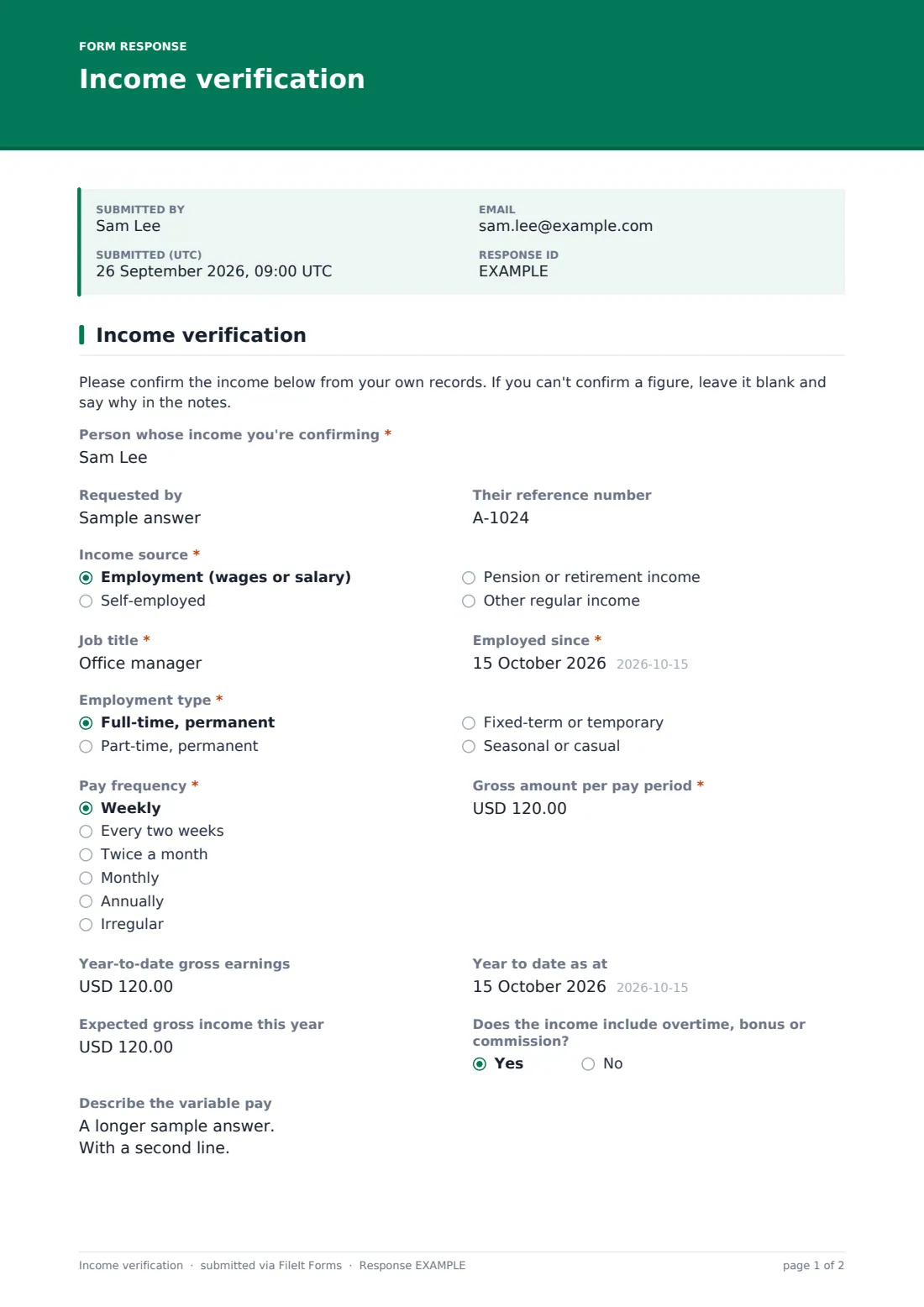
A short note asks the verifier to work from their own records and leave a figure blank if they can't confirm it. They name the Person whose income you're confirming and can note who requested the check and their reference number.
Income source offers employment, self-employed, pension or retirement income, and other regular income. Employment asks for the Job title, Employed since and Employment type (full-time, part-time, fixed-term or seasonal). Self-employed asks for the Business name, What the business does, Tax year these figures cover, Net profit for that tax year, and whether Figures are taken from a filed tax return, year-end accounts, draft accounts or other records. Other income asks for a short description.
Pay frequency runs from weekly to annually, with an Irregular choice, alongside Gross amount per pay period, Year-to-date gross earnings and the date they run to, and Expected gross income this year. Answering yes to Does the income include overtime, bonus or commission? opens a box to describe it.
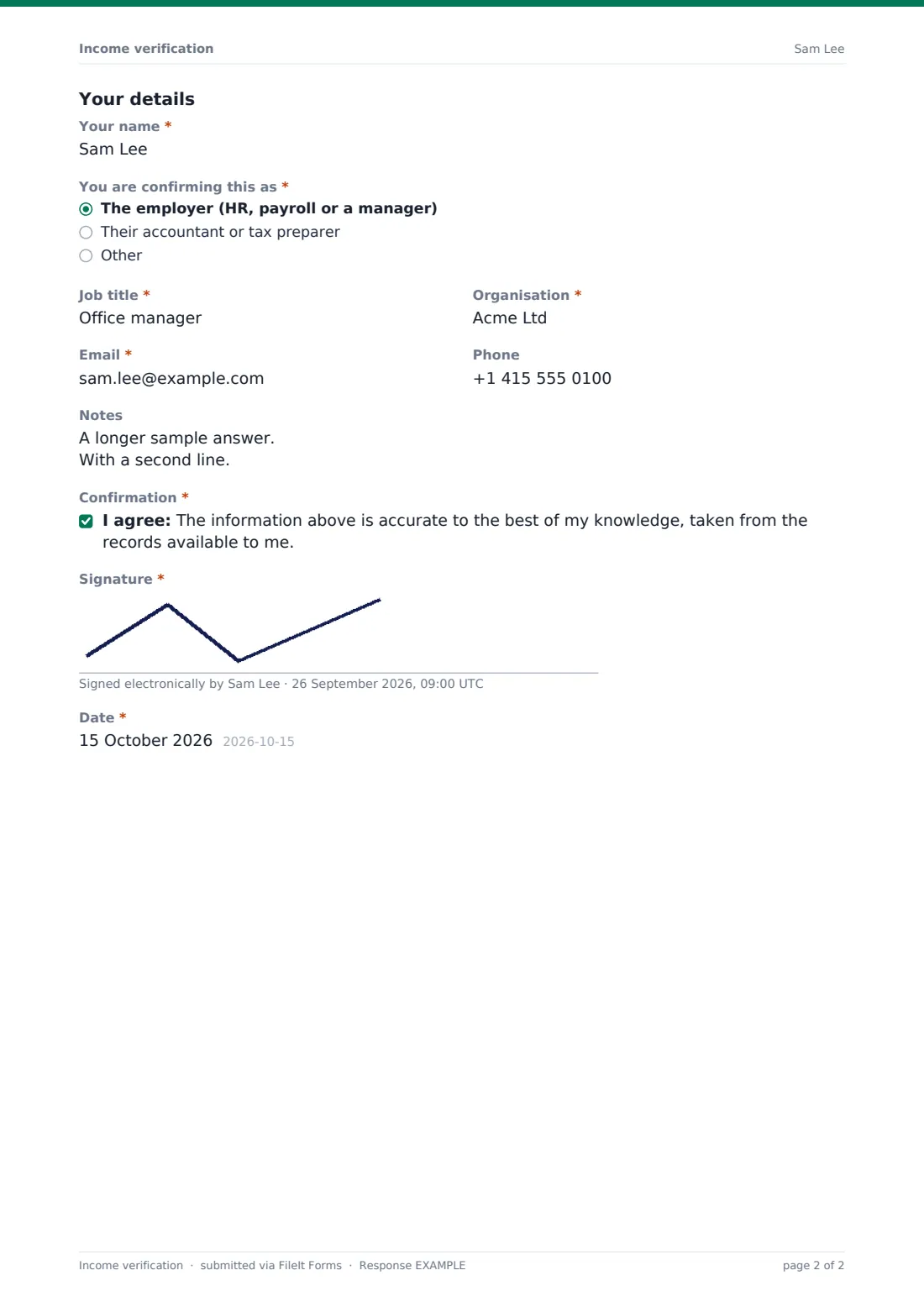
Under Your details, the verifier gives their name, says whether they're confirming as the employer, an accountant or tax preparer, or other, and adds job title, organisation, email and phone. They confirm the information comes from the records available to them, then sign and date.
Make the template yours
- Put the applicant's signed consent to share their income in the cover text or as a required upload
- Change the currency on the amount fields to match your country
- Add a payslip upload if you'd like the employer to attach recent pay stubs
- Remove the pension branch if you only ever verify employment income
- Set a close date when you're collecting verifications for a single application round
- Send personal email requests to each employer so responses are matched to the right applicant
Tips for a better income verification form
- Get the applicant's written consent before contacting their employer or accountant
- Send the request to a phone number or email you've found yourself, not only one the applicant gave you
- Ask for year-to-date figures; they show whether a salary is actually being paid as stated
- Treat draft or management accounts with more caution than a filed return, and note which you relied on
- Keep these responses in a restricted vault folder, since they hold personal financial details
Every response becomes a PDF in your vault
Each confirmation becomes a signed PDF in the vault folder you choose, titled with the person's name and the date. You're emailed when it arrives, and the verifier can receive a copy of what they signed.
In the Responses table you can search by person or organisation, and export to CSV to compare figures across applicants. A sent request shows whether the employer has opened or completed it, and you can send a reminder from the Share tab.
- Start from this template. It opens in the FileIt Forms designer — change any question, add pages, set the rules for when questions appear.
- Share it. Turn on a public link, or send it to people by email, each with their own link. They don’t need a FileIt account.
- Get the answers as PDFs. Each response is saved as a PDF in the vault folder you choose, with uploaded files attached — and listed in a Responses table you can export to CSV.
Income verification form: frequently asked questions
Is this income verification form free?
Yes. It's a starter template in FileIt's Forms app on every account, and every question can be edited.
Who should fill it in?
Someone with access to the person's pay or business records: usually HR or payroll at the employer, or the accountant for someone self-employed.
Does FileIt check the figures?
No. FileIt stores what the verifier enters and their signature. Deciding whether the income meets your criteria stays with you.
What does the self-employed option ask?
The business name, what it does, the tax year covered, net profit for that year and whether the figures come from a filed return, year-end accounts, draft accounts or other records.
Can I send it straight to the employer?
Yes. Publish the form and use Send by email with the employer's address. You'll see when the request is viewed and submitted.
Does the employer need a FileIt account?
No. They open the link, fill in the form, sign on screen and submit.