What is the graduation guest ticket request form template?
Graduation teams have to balance hall capacity, guest lists and accessibility for hundreds of families, usually in a few weeks. Collecting it all through one form means fewer emails and a list you can actually seat from.
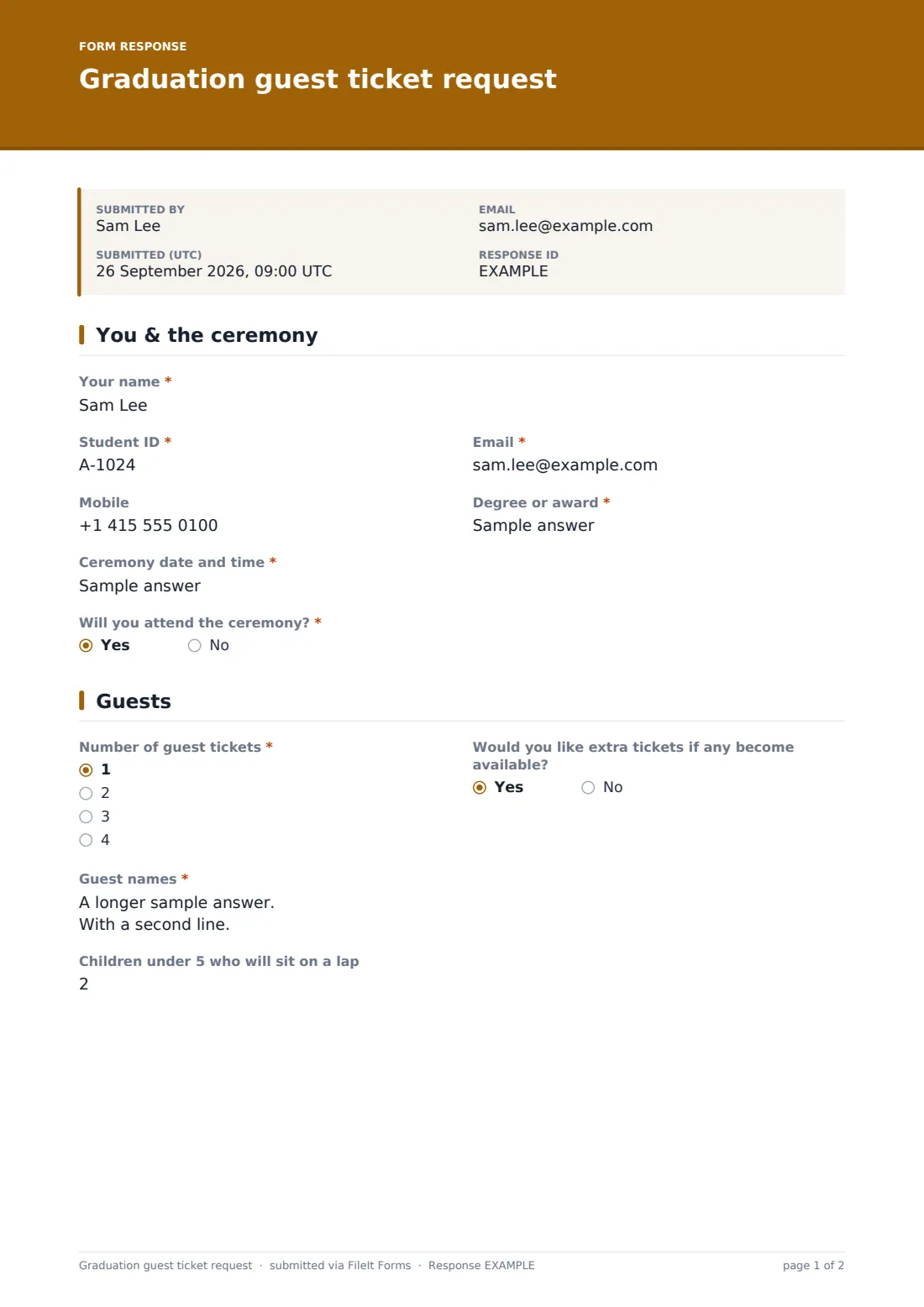
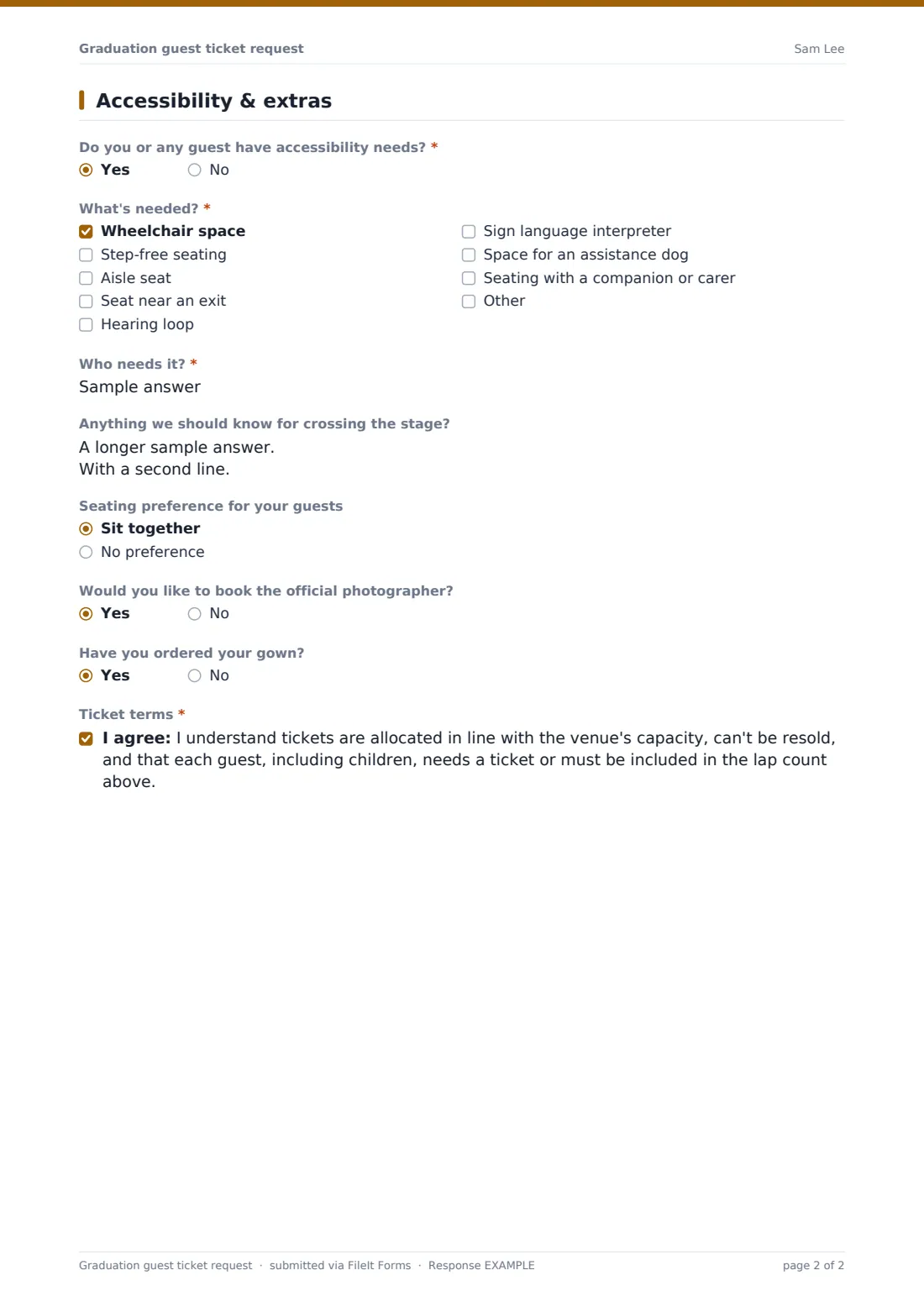
This template opens with the graduate's details, degree and ceremony, and whether they'll attend. Graduates who won't attend see a note and skip the rest. Those attending choose up to four guest tickets, can ask to join a waiting list for extras, list guest names, and give the number of under-fives sitting on a lap. The last page records accessibility needs for the graduate or any guest, seating preference, interest in the official photographer, whether the gown is ordered, and agreement to the ticket terms.
Every request is saved in your FileIt vault, and the Responses table becomes your ticket list.
- Best for
- Universities, colleges and high schools running graduation ceremonies
- Filled in by
- The graduating student
- Time to complete
- About 3 minutes
- Includes
- Non-attendance path, guest names, waiting list, accessibility checklist, ticket terms
Who uses a graduation guest ticket request form?
- A university allocates two guest tickets per graduate
- A high school plans seating for a commencement in the gym
- A college books wheelchair spaces and interpreters in advance
- A ceremony team builds a waiting list for spare tickets
- A department records who won't attend and graduates in absence
- An events office exports the guest list for the venue
Questions on this graduation guest ticket request form
19 questions over 3 pages · includes conditional questions, multiple pages, consent checkbox.
1 You & the ceremony
- Your name*
- Student ID*
- Email*
- Mobile
- Degree or award*
- Ceremony date and time*
- Will you attend the ceremony?*
2 Guests
- Number of guest tickets* asked only when it applies 1 · 2 · 3 · 4
- Would you like extra tickets if any become available? asked only when it applies
- Guest names* asked only when it applies
- Children under 5 who will sit on a lap asked only when it applies
3 Accessibility & extras
- Do you or any guest have accessibility needs?* asked only when it applies
- What's needed?* asked only when it applies Wheelchair space · Step-free seating · Aisle seat · Seat near an exit · Hearing loop · Sign language interpreter · Space for an assistance dog · Seating with a companion or carer
- Who needs it?* asked only when it applies
- Anything we should know for crossing the stage? asked only when it applies
- Seating preference for your guests asked only when it applies Sit together · No preference
- Would you like to book the official photographer? asked only when it applies
- Have you ordered your gown? asked only when it applies
- Ticket terms* asked only when it applies
The graduation guest ticket request form, page by page
1 You & the ceremony
Name, Student ID, email, degree and ceremony date are required, with an optional mobile. 'Will you attend the ceremony?' is required; a no shows a note about graduating in absence and skips the guest questions.
2 Guests
For graduates attending: the number of guest tickets (1 to 4), whether they'd like extras if available, guest names one per line, and children under five who will sit on a lap.
3 Accessibility & extras
Whether anyone has accessibility needs. A yes asks what's needed, from wheelchair space to a hearing loop, interpreter or assistance dog space, who it's for and anything to know about crossing the stage. Then seating preference, photographer and gown questions, and agreement to the ticket terms.
Make the template yours
- Change the guest ticket options to your allocation
- Replace the ceremony text box with a dropdown of your ceremony dates
- Set a close date for your ticket deadline
- Remove the photographer and gown questions if they're booked elsewhere
- Edit the children rule to match your venue's policy
- Add a dietary question if there's a reception afterwards
Tips for a better graduation guest ticket request form
- Publish your allocation and deadline when you share the link
- Contact graduates with accessibility needs before the day to confirm arrangements
- Use the waiting list answer to release returned tickets fairly
- Export the guest names to the venue a week ahead
- Send personal links so every response is matched to a graduate
Every response becomes a PDF in your vault
Each request is saved as a PDF in your vault and the graduation team is emailed. The graduate receives a copy.
The Responses table shows attendance, ticket numbers and accessibility needs, and you can export a CSV for seating and printing tickets.
- Start from this template. It opens in the FileIt Forms designer — change any question, add pages, set the rules for when questions appear.
- Share it. Turn on a public link, or send it to people by email, each with their own link. They don’t need a FileIt account.
- Get the answers as PDFs. Each response is saved as a PDF in the vault folder you choose, with uploaded files attached — and listed in a Responses table you can export to CSV.
Graduation guest ticket request form: frequently asked questions
Is this graduation guest ticket template free?
Yes. It's one of the Forms app's starter templates, available on every FileIt account, including the free plan.
Can graduates say they won't attend?
Yes. Answering no shows a note about graduating in absence and skips the guest and accessibility questions.
Does the form issue the tickets?
No. It collects requests. Your team allocates and sends the tickets.
Can we limit how many tickets each graduate asks for?
Yes. Edit the options on the number of guest tickets question.
How are accessibility needs recorded?
A checklist covers wheelchair space, step-free seating, hearing loop, interpreters and more, with who needs it.
Do graduates need a FileIt account?
No. They reply from a link.