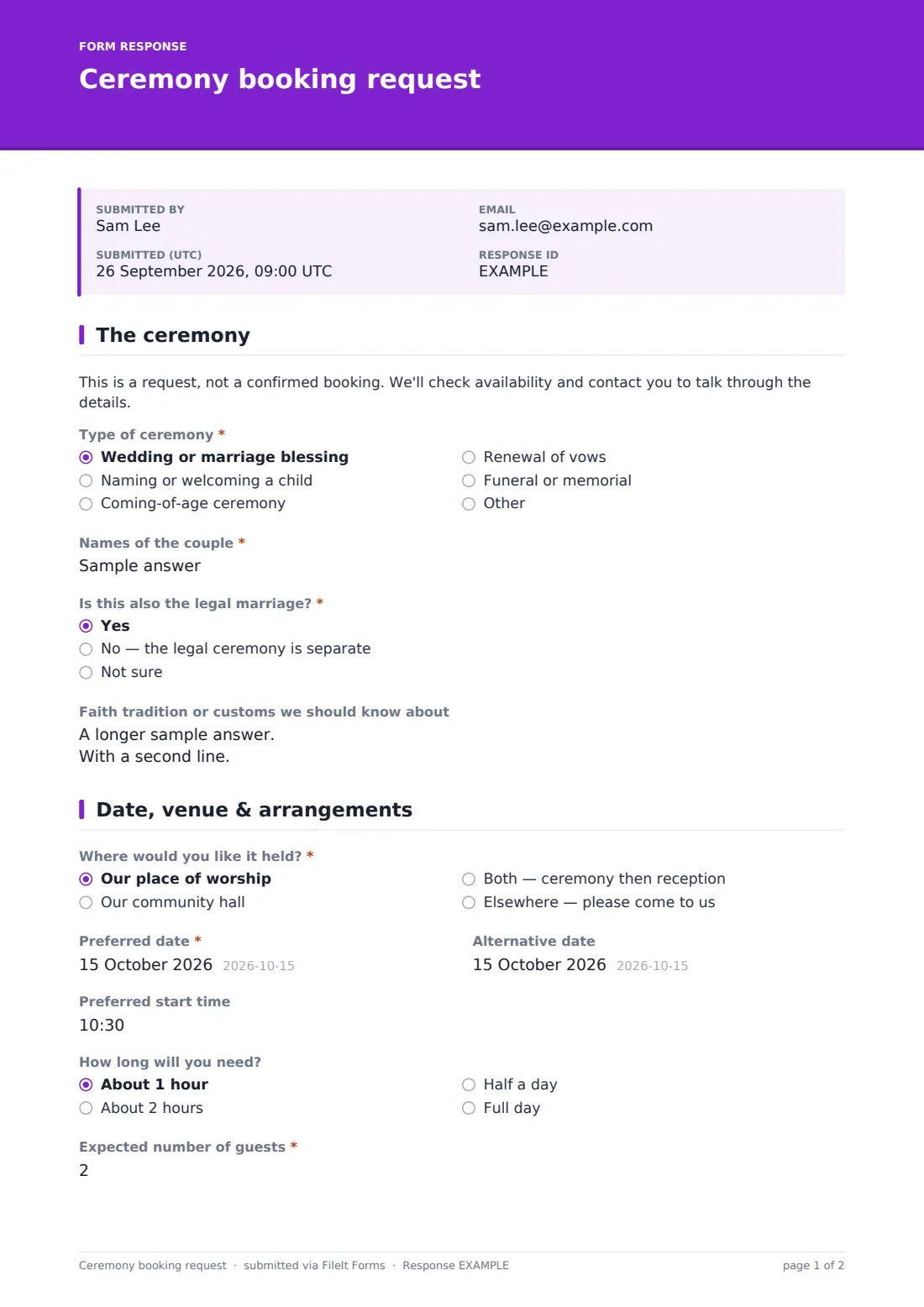
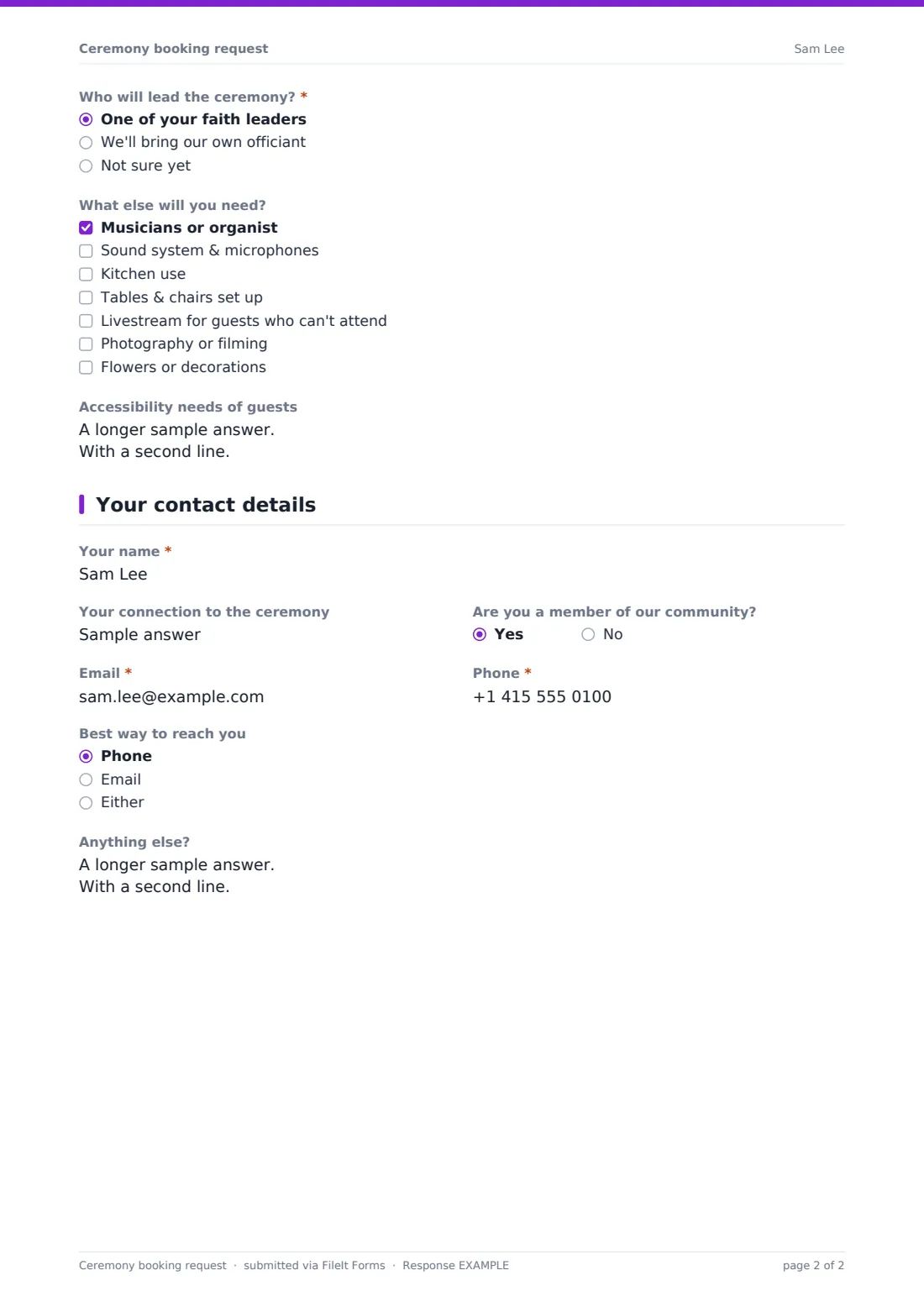
What is the ceremony booking request form template?
Places of worship and community halls that host ceremonies usually get requests three different ways: a phone call, an email, and a form scribbled on paper at the front desk after a service. Details go missing, follow-up questions take another round of calls, and nobody has a clean record of what a family actually asked for. This ceremony booking request form template puts all of that in one place: a single online form that adjusts its questions depending on whether someone is requesting a wedding, a naming ceremony, a coming-of-age celebration, a renewal of vows, or a memorial.
An online ceremony request form template beats a paper intake sheet because the person filling it in only sees questions that apply to their ceremony — a family planning a memorial isn't asked about a wedding party, and a couple isn't asked for the name of someone who has died. The person requesting the ceremony doesn't need a FileIt account; they just open the link you share and fill it in from a phone or computer.
Once someone submits the form, FileIt turns their answers into a PDF and files it in the vault folder you choose — so every ceremony request lands in the same place, in the same format, ready to check against the calendar.
- Best for
- Churches, synagogues, mosques, temples and community halls that take ceremony requests
- Filled in by
- The family or individual requesting the ceremony
- Time to complete
- About 5 to 8 minutes, depending on the type of ceremony
- Includes
- Conditional questions by ceremony type, an address field for off-site venues, and a guest-count field
Who uses a ceremony booking request form?
- A church or chapel collecting requests for wedding blessings and vow renewals
- A synagogue taking requests for baby naming ceremonies
- A community hall booking coming-of-age celebrations, such as a bar or bat mitzvah reception or quinceañera-style event
- A temple, mosque or multi-faith centre handling requests for memorials and funerals alongside happier occasions
- A venue coordinator who needs one intake form instead of five separate paper checklists for five ceremony types
- A congregation office that wants every ceremony request recorded the same way, whether it comes from a member or a visitor
Questions on this ceremony booking request form
29 questions over 3 pages · includes conditional questions, multiple pages.
1 The ceremony
- Type of ceremony* Wedding or marriage blessing · Naming or welcoming a child · Coming-of-age ceremony · Renewal of vows · Funeral or memorial
- Names of the couple* asked only when it applies
- Is this also the legal marriage?* asked only when it applies Yes · No — the legal ceremony is separate · Not sure
- Child's name* asked only when it applies
- Child's date of birth asked only when it applies
- Name of the young person* asked only when it applies
- Name of the person who has died* asked only when it applies
- Date of death asked only when it applies
- Funeral director, if any asked only when it applies
- Faith tradition or customs we should know about
2 Date, venue & arrangements
- Where would you like it held?* Our place of worship · Our community hall · Both — ceremony then reception · Elsewhere — please come to us
- Address of the venue* asked only when it applies
- Preferred date*
- Alternative date
- Preferred start time
- How long will you need? About 1 hour · About 2 hours · Half a day · Full day
- Expected number of guests*
- Who will lead the ceremony?* One of your faith leaders · We'll bring our own officiant · Not sure yet
- Officiant's name and contact asked only when it applies
- What else will you need? Musicians or organist · Sound system & microphones · Kitchen use · Tables & chairs set up · Livestream for guests who can't attend · Photography or filming · Flowers or decorations
- Who will provide the food? asked only when it applies Family and friends · A caterer · We'd like to ask the community kitchen team
- Accessibility needs of guests
3 Your contact details
- Your name*
- Your connection to the ceremony
- Are you a member of our community?
- Email*
- Phone*
- Best way to reach you Phone · Email · Either
- Anything else?
The ceremony booking request form, page by page
1 The ceremony
This page starts with the question "Type of ceremony," with options for a wedding or marriage blessing, naming or welcoming a child, a coming-of-age ceremony, a renewal of vows, or a funeral or memorial (and an "Other" option for anything not listed). Whatever is chosen here decides which follow-up questions appear next — this is the form's main piece of conditional logic.
If someone selects a wedding, the form asks for the names of the couple and whether this will also be the legal marriage, since rules on registering a marriage differ depending on where you are — the form doesn't try to answer that question, it just flags it for the couple to check. Choosing naming reveals fields for the child's name and date of birth; coming-of-age reveals a field for the young person's name; and memorial reveals fields for the name of the person who has died, the date of death, and an optional funeral director. Everyone answers one more question on this page regardless of ceremony type: "Faith tradition or customs we should know about," a free-text box for readings, rituals, music, dress or timing that matter to the family.
2 Date, venue & arrangements
Here the requester picks where they'd like the ceremony held — your place of worship, your community hall, both (ceremony then reception), or somewhere else entirely, in which case the form asks for that venue's address. They give a preferred date, an optional alternative date, a start time, and how long they expect to need the space, from about an hour up to a full day, along with the expected number of guests.
The rest of the page covers who's involved and what's needed: whether one of your own faith leaders will lead the ceremony or the family is bringing their own officiant (with a field for that officiant's contact details), a checklist of extras such as musicians, a sound system, kitchen use, table and chair set-up, livestreaming or photography, and a note field for guests' accessibility needs. Choosing kitchen use in that checklist reveals one more question — who's providing the food — so catering only comes up when it's actually relevant.
3 Your contact details
The final page collects the requester's name, their connection to the ceremony (the help text suggests examples like "bride," "parent," or "son of the deceased"), whether they're a member of your community, their email and phone number, how they'd prefer to be contacted, and an open space for anything else. A short note above these fields reminds everyone that this is a request, not a confirmed booking — you'll check availability and follow up before anything is locked in.
Make the template yours
- Add ceremony types beyond the five built in — the ceremony type question already allows a free-text "Other" answer, or you can add fixed options of your own in the designer
- Turn off questions your congregation doesn't need, such as the funding-style questions, or add new ones like a preferred readings list
- Set a closing date on the form during a busy season (holidays, spring wedding season) so requests pause once your calendar is full
- Route requests to different vault folders by having separate forms per ceremony type, or file everything under one "Ceremony requests" folder and sort later
- Add extra conditional questions of your own — for example, a follow-up question that only appears when someone chooses "Elsewhere" for the venue, asking about parking or access
- Turn on an emailed PDF copy to the requester so they have a record of exactly what they submitted
Tips for a better ceremony booking request form
- Keep the memorial questions gentle and minimal — ask only what you need to schedule and plan the service, and let families add more in their own words in the free-text field
- Ask about accessibility needs early, not as an afterthought, so you can actually plan around wheelchair access, hearing loops or step-free routes before the day
- Set expectations clearly in your confirmation message — this form is a starting point for a conversation, so say so, rather than implying a date is locked in
- For weddings, make sure your confirmation or a follow-up email addresses the legal marriage question directly, since couples often aren't sure who to ask
- Review new requests regularly rather than letting them sit, especially for time-sensitive ones like memorials
- Keep a consistent naming pattern in your vault folders (for example, by month or by ceremony type) so past requests are easy to find later
Every response becomes a PDF in your vault
When someone submits the form, FileIt turns their answers into a PDF, names it using the document title pattern you set (by default including the requester's name), and files it in the vault folder you've chosen. You can turn on an email notification so you or your team know the moment a new request comes in, and you can add extra addresses so more than one person on your team sees it.
From there, the usual next step is a phone call or email to check the date against your calendar and talk through anything the form couldn't cover — the confirmation message on this template is deliberately worded to say a request has been received, not that a ceremony is booked. You can open any submitted PDF straight from the Responses table at any time, filter to find a specific request, or export everything to CSV if you need to look across a whole season of bookings at once.
- Start from this template. It opens in the FileIt Forms designer — change any question, add pages, set the rules for when questions appear.
- Share it. Turn on a public link, or send it to people by email, each with their own link. They don’t need a FileIt account.
- Get the answers as PDFs. Each response is saved as a PDF in the vault folder you choose, with uploaded files attached — and listed in a Responses table you can export to CSV.
Ceremony booking request form: frequently asked questions
Is this ceremony booking form template free?
Yes. It's one of the ready-made templates included in the Forms app on every FileIt account, including the free plan. You can use it as it comes or edit any part of it in the designer.
Does the person requesting a ceremony need a FileIt account?
No. You share a public link or send them a personal emailed link, and they fill it in without signing up for anything.
Do I get the completed request as a PDF?
Yes. Every submission is automatically turned into a PDF and saved in the vault folder you choose, with the requester's answers laid out clearly.
Does submitting this form actually book the ceremony?
No — it's a request. The form and its confirmation message make that clear, so you're expected to check your calendar and follow up with the family before anything is confirmed.
Can this form handle the legal side of a wedding?
It only asks whether the ceremony will also be the legal marriage, as a flag for your team — it doesn't collect a signature or provide any legal advice. Couples should confirm their own local requirements for registering a marriage.
Can I add more ceremony types than the ones built in?
Yes. The ceremony type question already accepts a typed-in "Other" answer, and you can add, remove or reorder the fixed options in the drag-and-drop designer.
Can I limit how many requests come in for a busy period?
Yes — in the form's settings you can set a closing date or a maximum number of responses, which is useful around holidays or peak wedding season.
Is this the right form for guests to RSVP to a wedding or event?
No — this template is for the family or couple requesting the ceremony itself. For guests replying to an invitation, a dedicated RSVP template is a better fit.