What is the voluntary self-identification form template?
Many employers ask applicants and staff to self-identify their gender, race and ethnicity, veteran status and disability. Done well, it helps an organisation see who it attracts and hires, and spot where its processes may be shutting people out. Done badly, it feels intrusive, gets mixed into hiring decisions, or ends up stapled to someone's application.
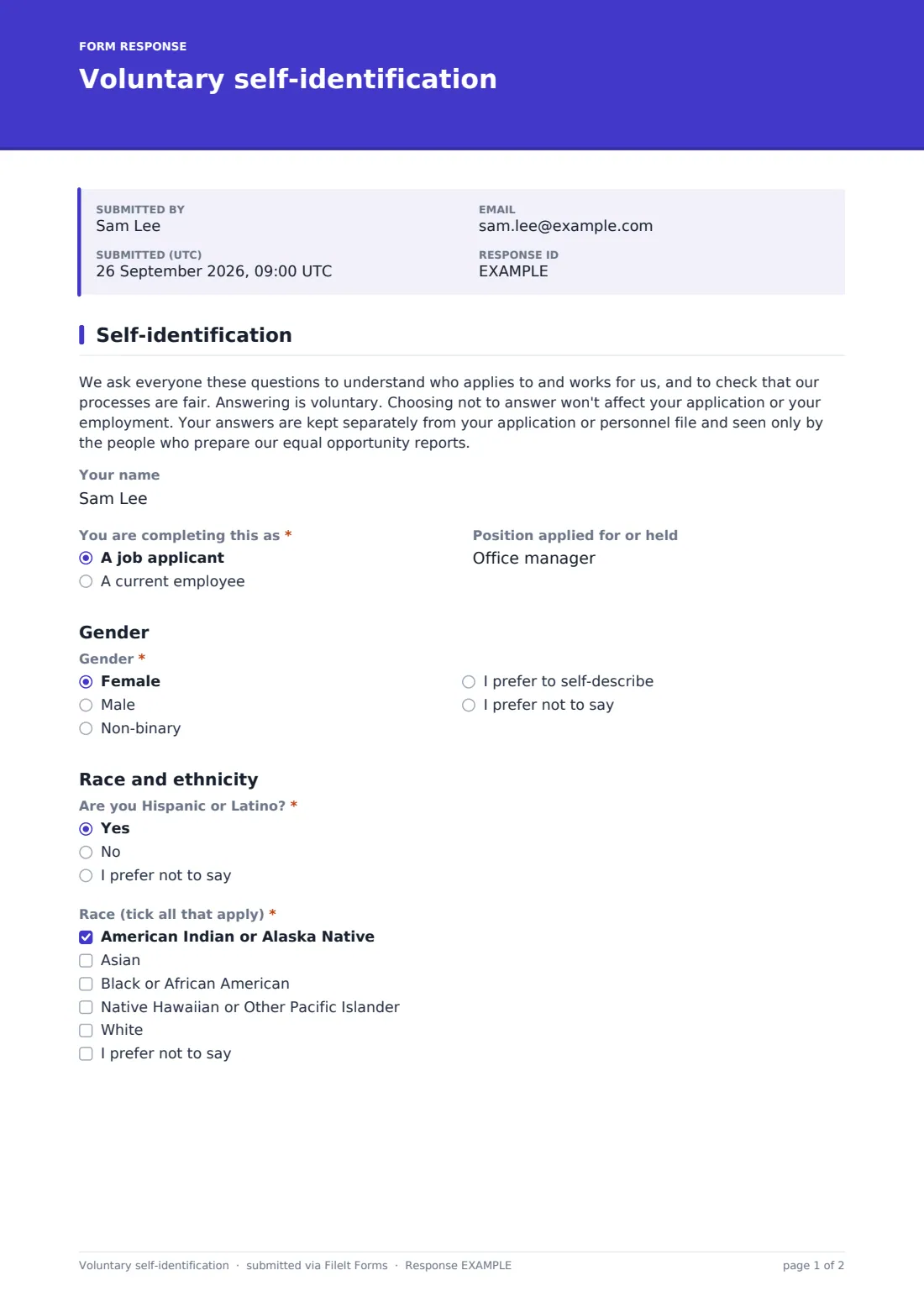
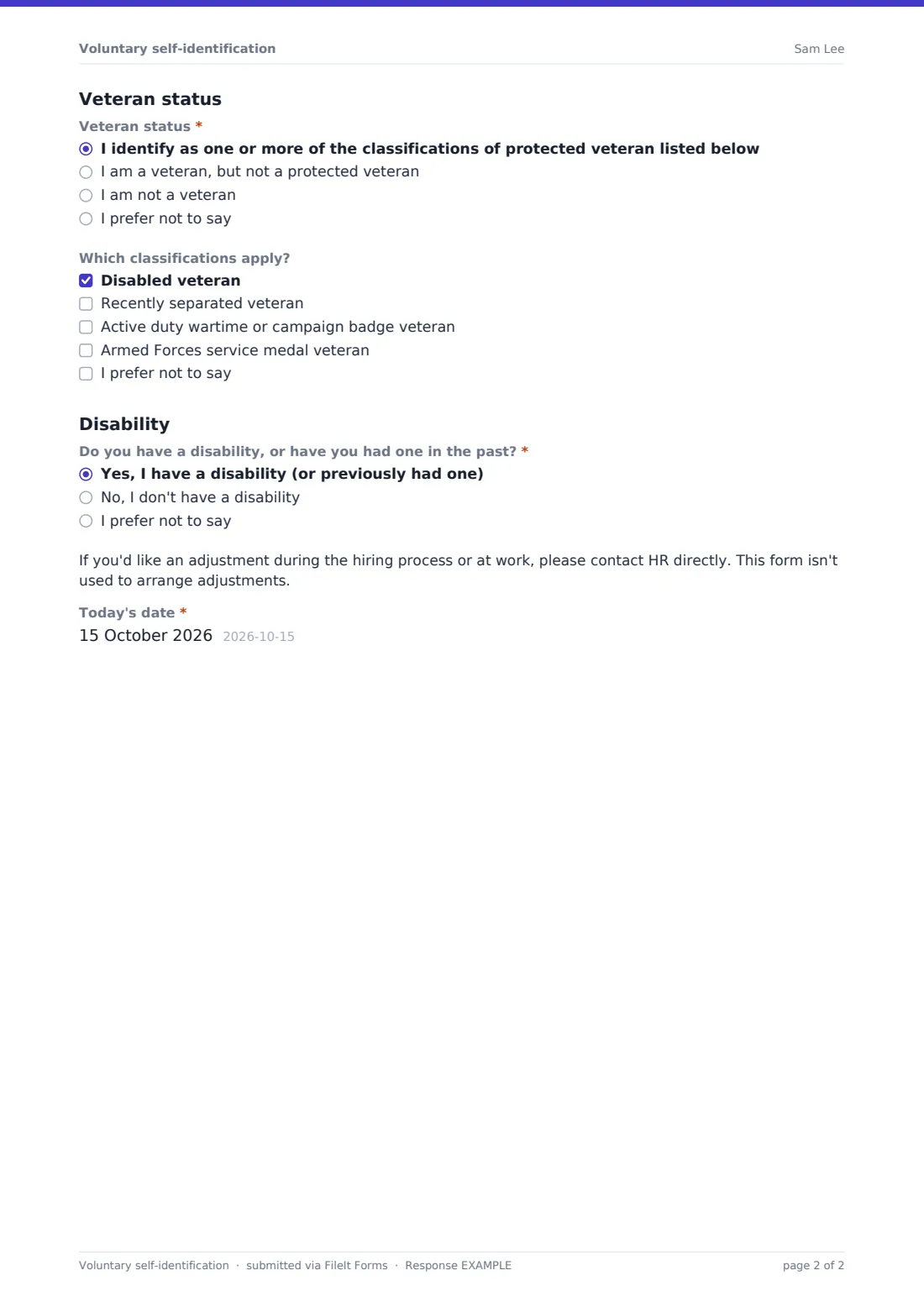
This one-page voluntary self-identification template is written to be done well. It opens by saying why the questions are asked, that answering is voluntary, and that answers are kept apart from applications and personnel files. Every question has an I prefer not to say answer. Gender includes Non-binary and a self-describe option. Race is a tick-all-that-apply list after a separate Hispanic or Latino question. Veteran status has four answers, and choosing that you identify as a protected veteran reveals the four classifications to tick.
The disability question has a short note pointing people to HR for adjustments, since this form isn't the place to ask. Because responses arrive through their own form and land in their own vault folder, you can keep them separate from your hiring paperwork.
- Best for
- US employers that collect equal opportunity data from applicants or staff
- Filled in by
- Job applicants and employees, voluntarily
- Time to complete
- About 2 minutes
- Includes
- Gender, race and ethnicity, veteran status with classifications, disability, prefer not to say throughout
Who uses a voluntary self-identification form?
- Sending applicants the link after they apply, separately from the application
- Inviting current employees to update their data every few years
- A growing company starting to report on the diversity of its hiring
- A recruiter keeping self-identification out of the hiring manager's view
- An organisation reviewing whether its job ads reach a wide range of people
- A federal contractor collecting data alongside its own required notices
Questions on this voluntary self-identification form
11 questions · includes conditional questions.
1 Self-identification
- Your name
- You are completing this as* A job applicant · A current employee
- Position applied for or held
- Gender* Female · Male · Non-binary · I prefer to self-describe · I prefer not to say
- How do you describe your gender? asked only when it applies
- Are you Hispanic or Latino?* Yes · No · I prefer not to say
- Race (tick all that apply)* American Indian or Alaska Native · Asian · Black or African American · Native Hawaiian or Other Pacific Islander · White · I prefer not to say
- Veteran status* I identify as one or more of the classifications of protected veteran listed below · I am a veteran, but not a protected veteran · I am not a veteran · I prefer not to say
- Which classifications apply? asked only when it applies Disabled veteran · Recently separated veteran · Active duty wartime or campaign badge veteran · Armed Forces service medal veteran · I prefer not to say
- Do you have a disability, or have you had one in the past?* Yes, I have a disability (or previously had one) · No, I don't have a disability · I prefer not to say
- Today's date*
The voluntary self-identification form, page by page
1 Self-identification
An opening paragraph explains why the questions are asked and that they're voluntary. Your name is optional. You are completing this as distinguishes a job applicant from a current employee, with an optional Position applied for or held.
Under Gender, the choices are Female, Male, Non-binary, I prefer to self-describe (which asks How do you describe your gender?) and I prefer not to say.
Under Race and ethnicity, Are you Hispanic or Latino? comes first, then Race (tick all that apply) with five categories and I prefer not to say.
Under Veteran status, choosing the protected veteran answer reveals Which classifications apply? with disabled veteran, recently separated veteran, active duty wartime or campaign badge veteran and Armed Forces service medal veteran. Other answers are a veteran who isn't protected, not a veteran, or prefer not to say.
Under Disability, Do you have a disability, or have you had one in the past? has three answers. Yes shows a note that adjustments are arranged through HR, not this form. The form ends with Today's date.
Make the template yours
- Replace the wording with any official text you're required to use
- Remove the name field if you don't need to link answers to reporting records
- Keep Collect identity set to none in Settings, as the template does, so nobody is asked for a name or email first
- Add HR's contact details to the adjustment note
- Adapt the categories if you collect data outside the US
- Send responses to a vault folder only your reporting team can open
Tips for a better voluntary self-identification form
- Send this separately from the application, and never show answers to the people making hiring decisions
- Explain why you collect the data; response rates go up when people know
- Check whether you have obligations to use particular official wording or forms, and swap them in if so
- Report only on groups large enough that individuals can't be identified
- Invite employees to update their answers from time to time, since circumstances change
Every response becomes a PDF in your vault
Each response is saved as a PDF in the vault folder you choose. Pick one only your reporting team can open. You can turn off owner notifications if you'd rather not get an email for each one.
The Responses table and CSV export give you the data for counts and trends. Keep it apart from hiring records, and share only aggregated results.
- Start from this template. It opens in the FileIt Forms designer — change any question, add pages, set the rules for when questions appear.
- Share it. Turn on a public link, or send it to people by email, each with their own link. They don’t need a FileIt account.
- Get the answers as PDFs. Each response is saved as a PDF in the vault folder you choose, with uploaded files attached — and listed in a Responses table you can export to CSV.
Voluntary self-identification form: frequently asked questions
Is this voluntary self-identification template free?
Yes. It's a starter template in FileIt's Forms app on every account, and you can edit every question.
Do applicants have to answer?
No. The form says answering is voluntary, and every question offers I prefer not to say.
Is this the official government form?
No. It's a general template. If you're required to use specific official forms or wording, use those or paste the official text in.
How do I keep answers away from hiring managers?
Publish it as its own form, file responses into a restricted vault folder, and send notifications only to the people who prepare reports.
Why does the disability answer show a note about HR?
This form is for statistics. Requests for adjustments go to HR directly, so the note tells people where to ask.
Do applicants need a FileIt account?
No. They open the link and submit without signing up.