What is the community service hours verification form template?
Students, award applicants and people completing court-ordered service all need the same thing at the end: written confirmation from the organisation where they served. Too often that means a handwritten note on letterhead, missing dates or the supervisor's phone number, that a school counselor or probation officer then has to chase. This verification form gives supervisors one clear page to fill in and sign.
The supervisor records the volunteer's name and what the hours are for. Choosing "Court-ordered community service" reveals the "Case or docket number", the court or referring agency and any probation officer or caseworker; a school requirement asks for the school and student ID instead. Then come the first and last days of service, total hours, the hours required, a day-by-day log or an uploaded sign-in sheet, and a description of the work.
The organisation and supervisor details, a question about whether they're related to the volunteer, a confirmation statement and a signature complete the page. The signed verification is filed as a PDF in your FileIt vault, and the volunteer can be emailed a copy.
- Best for
- Nonprofits, places of worship and agencies that host community service volunteers
- Filled in by
- The volunteer's supervisor
- Time to complete
- About 4 minutes
- Includes
- Purpose of hours, case number for court-ordered service, dates and totals, task description, supervisor details and signature
Who uses a community service hours verification form?
- A food bank confirming hours for high-school graduation requirements
- A church verifying court-ordered community service
- A youth program signing off hours for a scholarship application
- A volunteer coordinator issuing verifications for dozens of students in spring
- An animal shelter documenting hours for a club or award program
Questions on this community service hours verification form
32 questions · includes signature, file upload, conditional questions, consent checkbox.
1 Hours verification
- Volunteer's name*
- Volunteer's date of birth
- Volunteer's email
- These hours are for* A school, graduation or college requirement · Court-ordered community service · A scholarship, club or award program · Something else
- School or program name asked only when it applies
- Student ID asked only when it applies
- Case or docket number* asked only when it applies
- Court or referring agency* asked only when it applies
- Probation officer or caseworker, if any asked only when it applies
- Program or award name asked only when it applies
- What are the hours for?* asked only when it applies
- First day of service*
- Last day of service*
- Total hours completed*
- Hours required, if you know
- Dates and hours
- Sign-in sheet or timesheet
- What did the volunteer do?*
- Was all of this service unpaid?*
- How would you describe their work? Excellent · Good · Satisfactory · I have concerns
- Please describe your concerns* asked only when it applies
- Organisation name*
- Organisation address*
- The organisation is A registered nonprofit or charity · A place of worship · A government or public agency · A school · Other
- Supervisor's name*
- Title or role*
- Phone*
- Email*
- Are you related to the volunteer?*
- Supervisor's confirmation*
- Supervisor's signature*
- Date*
The community service hours verification form, page by page
1 Hours verification
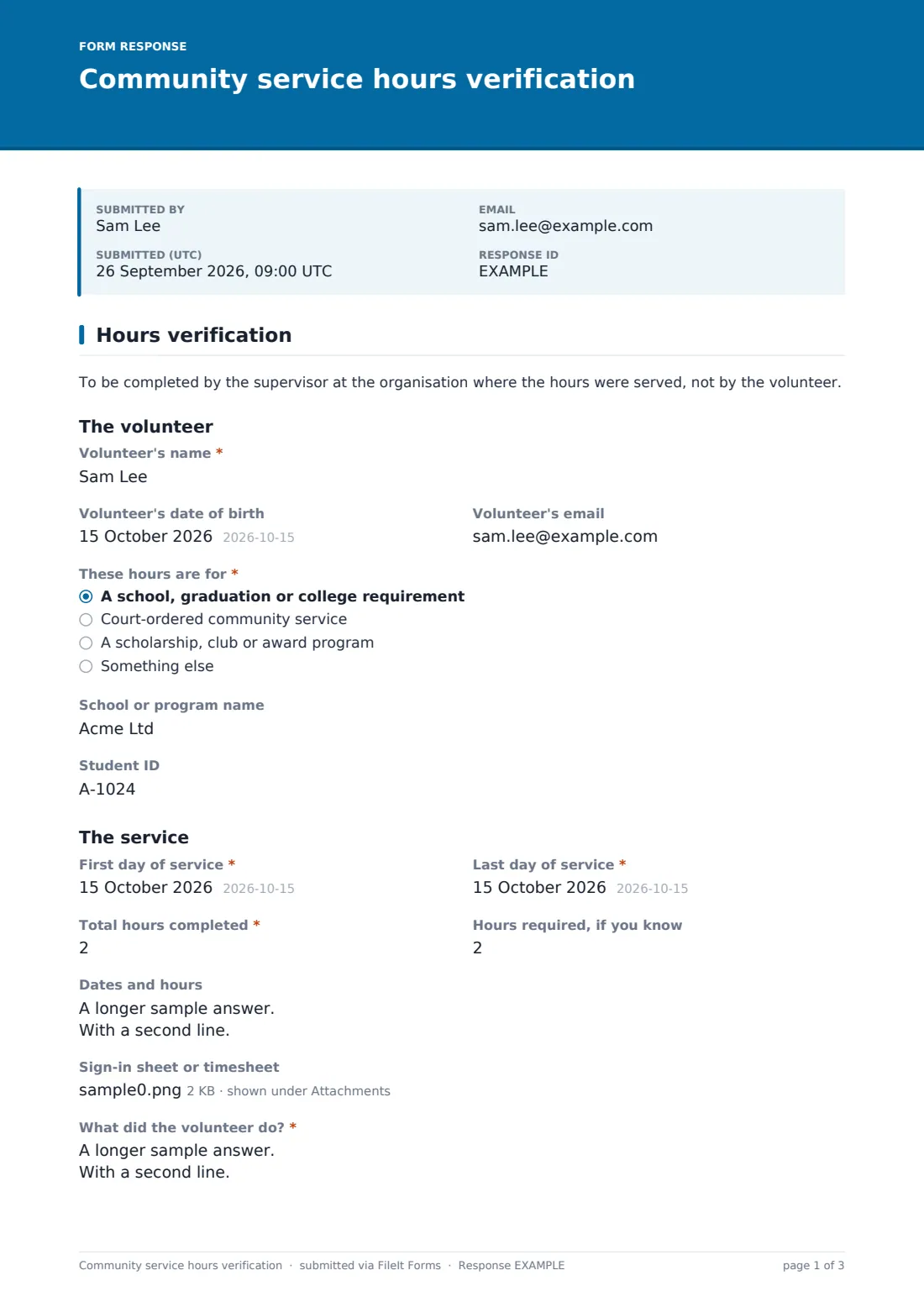
A short note asks the supervisor, not the volunteer, to complete the form. Under "The volunteer" they enter the "Volunteer's name", date of birth and email. "These hours are for" has four answers: a school, graduation or college requirement (asking for the school or program name and student ID); court-ordered community service (asking for the "Case or docket number", "Court or referring agency" and "Probation officer or caseworker, if any"); a scholarship, club or award program; or something else.
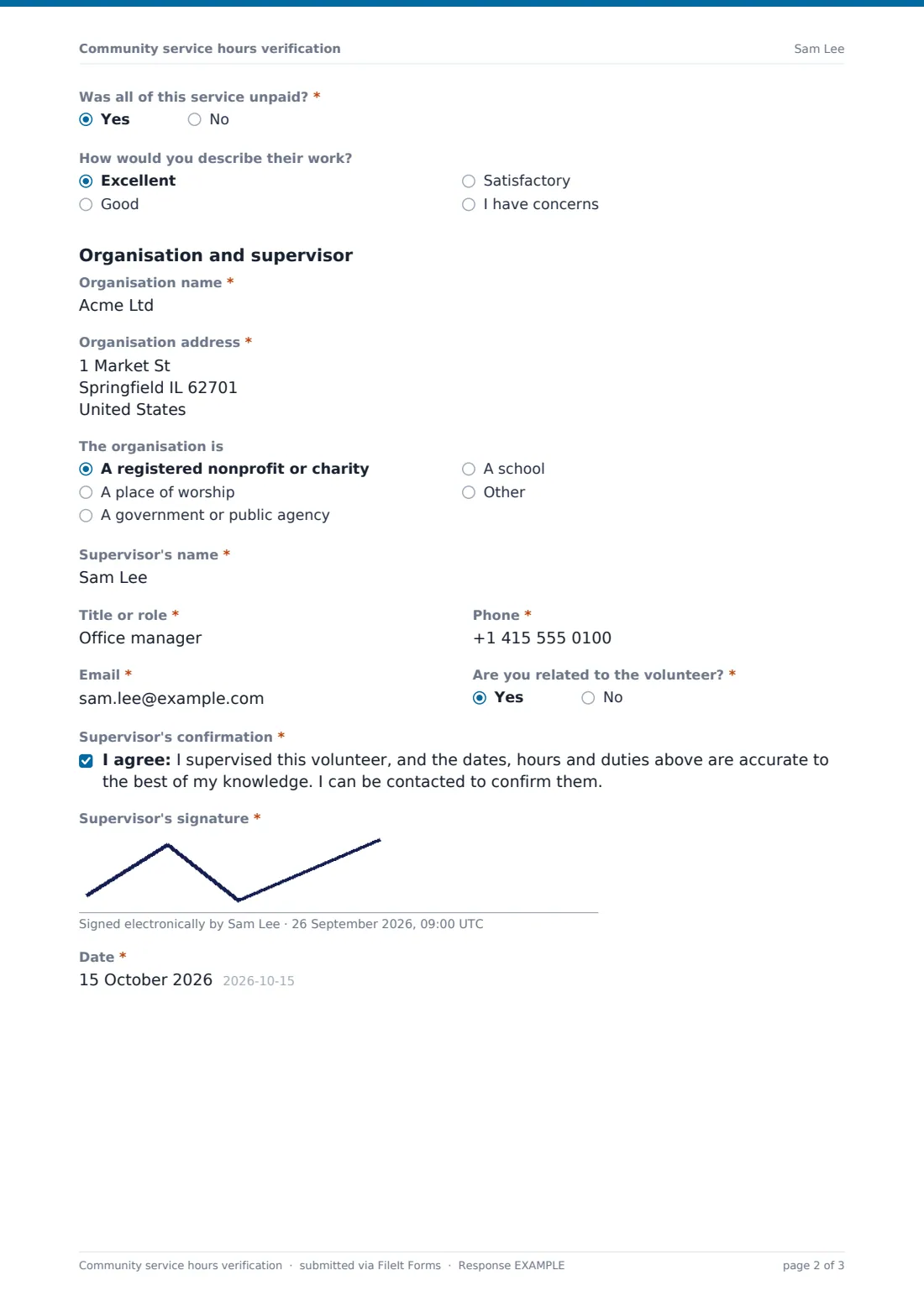
Under "The service" the supervisor gives the "First day of service", "Last day of service", "Total hours completed" in quarter-hour steps and the hours required, if known. "Dates and hours" takes a line per day, or a sign-in sheet or timesheet can be uploaded. "What did the volunteer do?" is required, along with "Was all of this service unpaid?". "How would you describe their work?" is optional; choosing "I have concerns" asks for details.
Finally the supervisor gives the organisation's name, address and type, their own name, title, phone and email, and answers "Are you related to the volunteer?". They agree to the "Supervisor's confirmation" and sign.
Make the template yours
- Add your organisation's name and address as defaults in the cover text
- Remove the court-ordered option if you don't host court referrals
- Add the specific wording a local school district or court asks for to the confirmation
- Change the step on total hours if you only count whole hours
- Send the form to each supervisor from the Share tab so you know who still needs to respond
- File verifications in a folder for your volunteer coordinator
Tips for a better community service hours verification form
- Check what the school or court needs before the volunteer starts, not after
- Keep a sign-in sheet during the service and upload it with the verification
- Only sign for hours you or your team actually supervised
- Answer the relationship question honestly — many programs don't accept verification from a relative
- Send the volunteer their copy promptly; deadlines are often tight
Every response becomes a PDF in your vault
The verification becomes a signed PDF in your FileIt vault with any sign-in sheet attached, and the form owner is emailed. If the volunteer's email was entered, they receive a copy to pass on to their school or court.
The Responses table lists every verification by volunteer and date, so you can answer a follow-up call from a counselor or probation officer in seconds, and export to CSV for your yearly volunteer totals.
- Start from this template. It opens in the FileIt Forms designer — change any question, add pages, set the rules for when questions appear.
- Share it. Turn on a public link, or send it to people by email, each with their own link. They don’t need a FileIt account.
- Get the answers as PDFs. Each response is saved as a PDF in the vault folder you choose, with uploaded files attached — and listed in a Responses table you can export to CSV.
Community service hours verification form: frequently asked questions
Is this community service verification form free?
Yes. It's one of the starter templates in FileIt's Forms app, available on every account including the free plan.
When does the case number field appear?
Only when the supervisor chooses "Court-ordered community service". It then asks for the case or docket number, the court or agency and any probation officer.
Will a court or school accept this form?
That's up to them. Many accept a signed letter or form from the host organisation, but always check their requirements first.
Who should fill it in?
The supervisor at the organisation where the service was done. The opening note says so, and the confirmation is in the supervisor's name.
Can the volunteer get a copy?
Yes. Enter the volunteer's email and they're sent a copy of the signed verification.
Can I attach a timesheet instead of typing every date?
Yes. "Sign-in sheet or timesheet" accepts PDFs, photos, Excel or CSV files, up to three.