What is the babysitter information sheet form template?
Before a night out, most parents end up scribbling the same information on a sticky note: bedtime, allergies, the neighbor's number, what's for dinner. It works until it's rushed, illegible, or left behind on the counter. This form turns that sticky note into a proper sheet that a sitter can read at a glance, or a parent can fill in ahead of time and keep ready for the next booking.
Because it's a form rather than a blank page, it prompts for details that are easy to forget under time pressure — the local emergency number, where an inhaler is kept, whether the sitter is allowed to drive the children anywhere. Conditional questions mean a family with one child isn't shown fields for a second or third child, and a family with no allergies skips straight past the allergy details.
Once submitted, FileIt turns the sheet into a PDF saved in your vault. Print it, keep it on your phone, or forward it straight to the sitter — either way, it's a complete, dated reference rather than something reconstructed from memory each time.
- Best for
- Parents and guardians briefing a babysitter, nanny or au pair
- Filled in by
- A parent or guardian, ahead of a booking
- Time to complete
- About 5–8 minutes, depending on number of children
- Includes
- Conditional questions per child, allergy and medication details, house rules checklist
Who uses a babysitter information sheet form?
- A parent preparing a sheet for a one-off evening babysitter
- A family with a regular sitter who wants an updated sheet each time routines change
- Briefing a new nanny or au pair on children's routines and house rules in their first week
- A grandparent or relative stepping in to watch the children who needs the same information as a sitter would
- Recording allergy and medication details clearly so nothing is left to memory in an emergency
- Setting expectations up front about visitors, driving, or bath time for a specific evening
- Keeping a family's own record of routines that's easy to update as children grow
Questions on this babysitter information sheet form
34 questions over 5 pages · includes conditional questions, multiple pages.
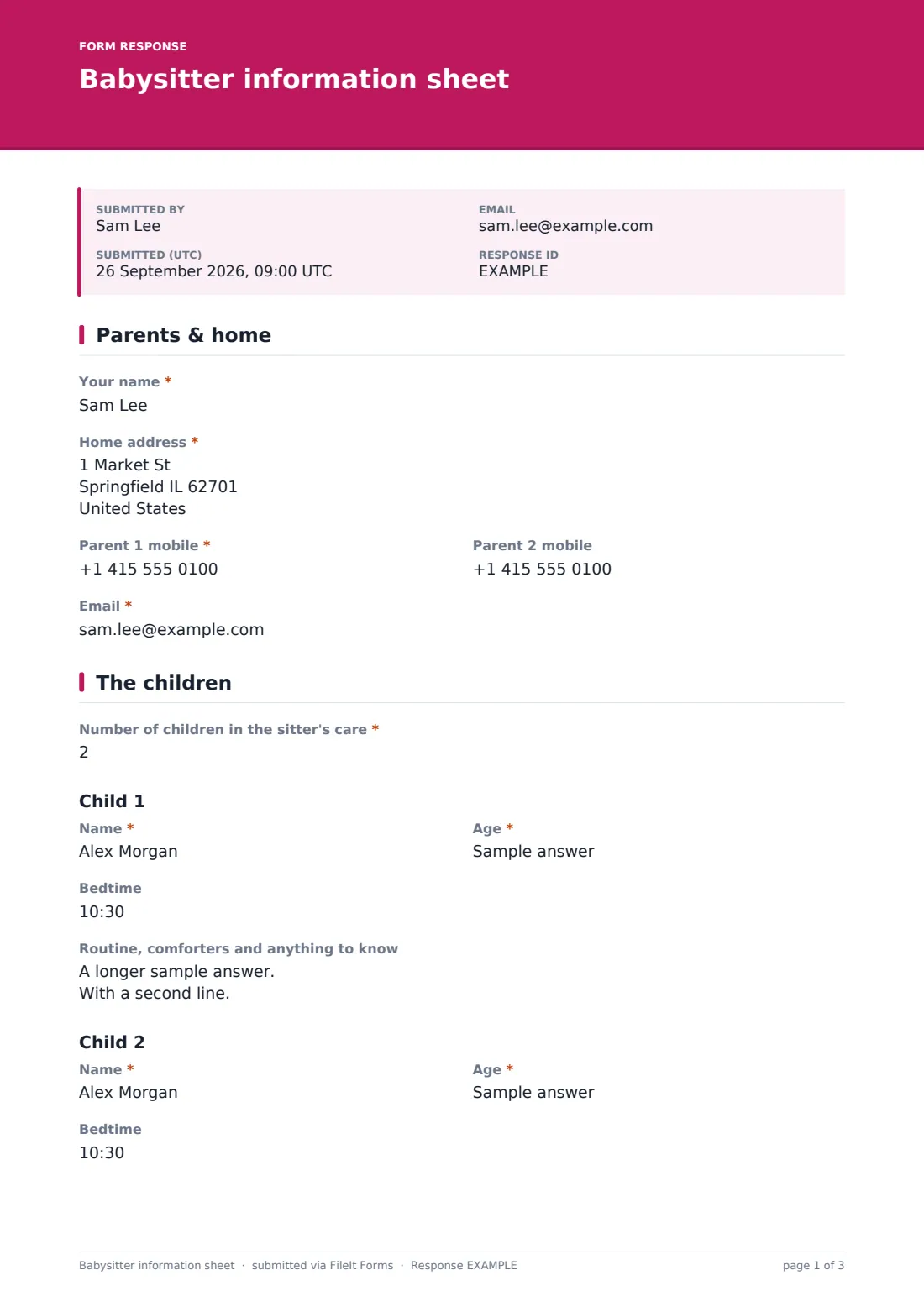
1 Parents & home
- Your name*
- Home address*
- Parent 1 mobile*
- Parent 2 mobile
- Email*
2 The children
- Number of children in the sitter's care*
- Name*
- Age*
- Bedtime
- Routine, comforters and anything to know
- Name* asked only when it applies
- Age* asked only when it applies
- Bedtime asked only when it applies
- Routine, comforters and anything to know asked only when it applies
- Other children asked only when it applies
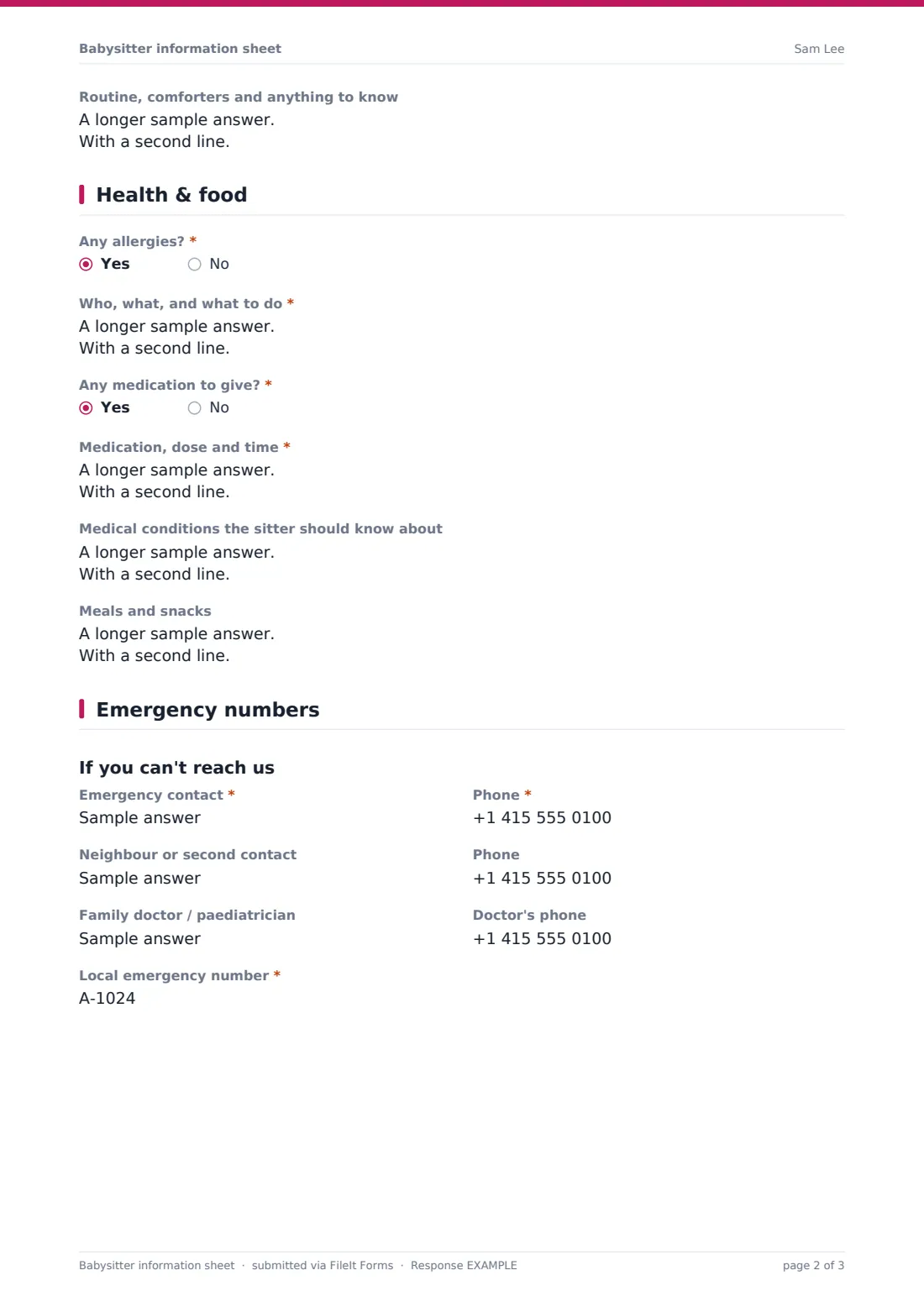
3 Health & food
- Any allergies?*
- Who, what, and what to do* asked only when it applies
- Any medication to give?*
- Medication, dose and time* asked only when it applies
- Medical conditions the sitter should know about
- Meals and snacks
4 Emergency numbers
- Emergency contact*
- Phone*
- Neighbour or second contact
- Phone
- Family doctor / paediatrician
- Doctor's phone
- Local emergency number*
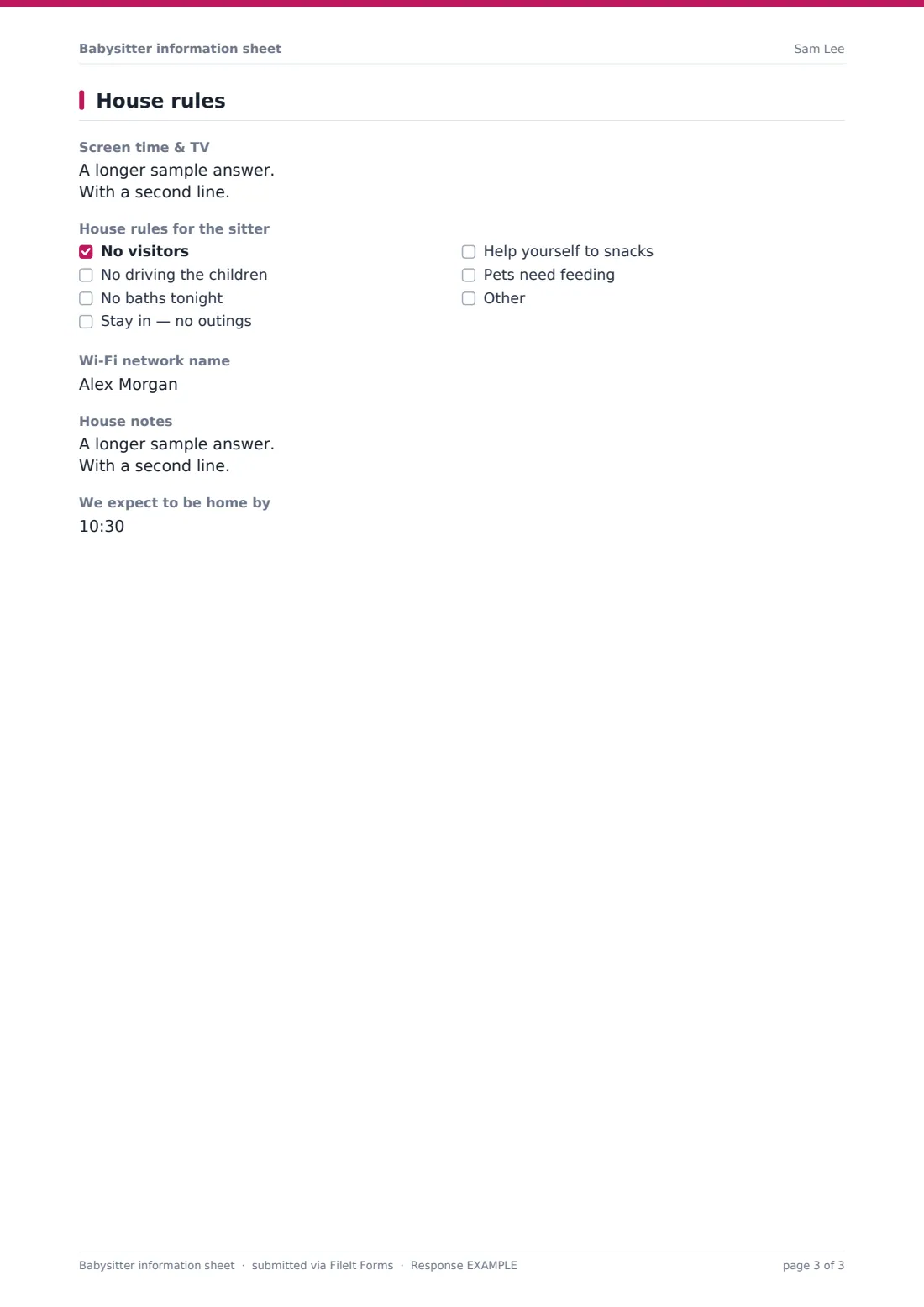
5 House rules
- Screen time & TV
- House rules for the sitter No visitors · No driving the children · No baths tonight · Stay in — no outings · Help yourself to snacks · Pets need feeding
- Pet care asked only when it applies
- Wi-Fi network name
- House notes
- We expect to be home by
The babysitter information sheet form, page by page
1 Parents & home
The sheet opens with the parent's name, home address, and mobile numbers for both parents where relevant, plus an email address. This is the information a sitter needs first if something comes up and the parents aren't answering right away.
2 The children
A number field asks how many children are in the sitter's care, and the form adjusts to match. The first child's section — name, age, bedtime, and a "Routine, comforters and anything to know" field — always shows. A second child's identical section only appears if the number of children is more than one, and a broader "Other children" field for names, ages and routines only appears once there are more than two, so a family with one child never scrolls past irrelevant headings for a second or third.
3 Health & food
Two required yes/no questions ask about allergies and about medication to give. Answering yes to allergies opens a required field asking who is affected, what the allergy is, and what to do if the child is exposed, including where any auto-injector or antihistamine is kept. Answering yes to medication similarly opens a required field for the medication, dose and time.
An optional field covers other medical conditions the sitter should know about, like asthma, and another covers meals and snacks — what's available, and any food rules for the evening.
4 Emergency numbers
Under the heading "If you can't reach us," the form asks for a primary emergency contact and phone number (required), an optional second contact such as a neighbor, the family doctor or pediatrician's details, and the local emergency number (911, 999, 112 or whatever applies), which is required. This page exists specifically for the situation where the parents themselves can't be reached.
5 House rules
The last page covers screen time and TV rules, then a checklist of common house rules — no visitors, no driving the children, no baths tonight, stay in with no outings, help yourself to snacks, or pets need feeding. Choosing "pets need feeding" reveals a field for pet care instructions. There's a field for the Wi-Fi network name (with a note to share the password in person rather than in writing), a general house notes field for things like a sticking door or where a spare key is kept, and the time the parents expect to be home.
Make the template yours
- Adjust the house rules checklist to match your own household's actual rules
- Add a question for a specific bedtime routine step your children need, like a nightlight or a particular song
- Remove the pet care question entirely if it doesn't apply to your household
- Turn on an emailed PDF copy so you automatically get a copy to keep alongside the one you print
- File completed sheets by date in your vault so you can reuse an old one as a starting point next time
- Add a photo upload field if you want to include a current photo of each child on the sheet
- Allow multiple responses so you can fill in a fresh sheet each time routines or contacts change
Tips for a better babysitter information sheet form
- Fill in the sheet as close to the booking as possible so numbers and instructions are current
- Keep the local emergency number field filled in even if it feels obvious — a sitter under stress shouldn't have to guess it
- Be specific about allergy instructions rather than just naming the allergy, especially where an auto-injector is involved
- Update the sheet before every booking rather than reusing an old one if a child's routine or medication has changed
- Print or save the PDF somewhere the sitter can find it quickly, not just in an email they'd have to search for
- Keep the Wi-Fi password out of the written sheet and hand it over in person, as the form itself suggests
Every response becomes a PDF in your vault
Once you submit the sheet, FileIt saves it as a PDF in the vault folder you choose, ready to print, send to your sitter's phone, or keep for reference. If you've turned on an emailed copy, you'll get your own PDF automatically as well.
Most parents print the sheet or share it with the sitter right before they leave, then keep the PDF in their vault as a record they can reuse or update the next time — since it's already filled in, updating it for the next booking is usually just changing a date or a bedtime rather than starting from scratch.
- Start from this template. It opens in the FileIt Forms designer — change any question, add pages, set the rules for when questions appear.
- Share it. Turn on a public link, or send it to people by email, each with their own link. They don’t need a FileIt account.
- Get the answers as PDFs. Each response is saved as a PDF in the vault folder you choose, with uploaded files attached — and listed in a Responses table you can export to CSV.
Babysitter information sheet form: frequently asked questions
Is this babysitter information sheet template free?
Yes — it's one of the ready-made templates included on every FileIt account, including the free plan, and every question can be edited or removed.
Does my sitter need a FileIt account to see the sheet?
No. Once you've filled it in and saved the PDF, you can print it, text it, or email it to your sitter directly — they don't need any account at all.
How do I get the completed sheet as a PDF?
As soon as you submit the form, it's automatically saved as a PDF in the vault folder you've set up, ready to open, print or share.
Can I fill in a sheet for more than one child?
Yes — enter the number of children and the form shows a matching section for each one, with routines, ages and bedtimes kept separate.
Can I reuse the same sheet for a regular sitter?
You can allow multiple responses in the form's settings and submit a fresh, updated sheet each time details change, rather than editing an old PDF.
How do I create a babysitter info sheet like this from scratch?
Use the FileIt Forms designer to build one with drag-and-drop questions, or start from this template and adjust the sections to your family's needs.
Should I include medication instructions on the sheet?
Yes, if relevant — the template has a dedicated question for medication, dose and timing, though it's not a substitute for speaking to your sitter directly about anything urgent.
Is this sheet a substitute for telling my sitter important things in person?
No — treat it as a written backup. Anything urgent, like an allergy that could be life-threatening, is worth explaining out loud as well as writing down.