What is the away game travel consent form template?
Every youth coach knows the scramble before an away fixture: who's on the bus, who's getting a lift, whose parent hasn't replied, and where the paper slip with the allergy note ended up. This one-page template gives each family a single form per trip, so the coach has a signed consent and the trip-specific details in one place.
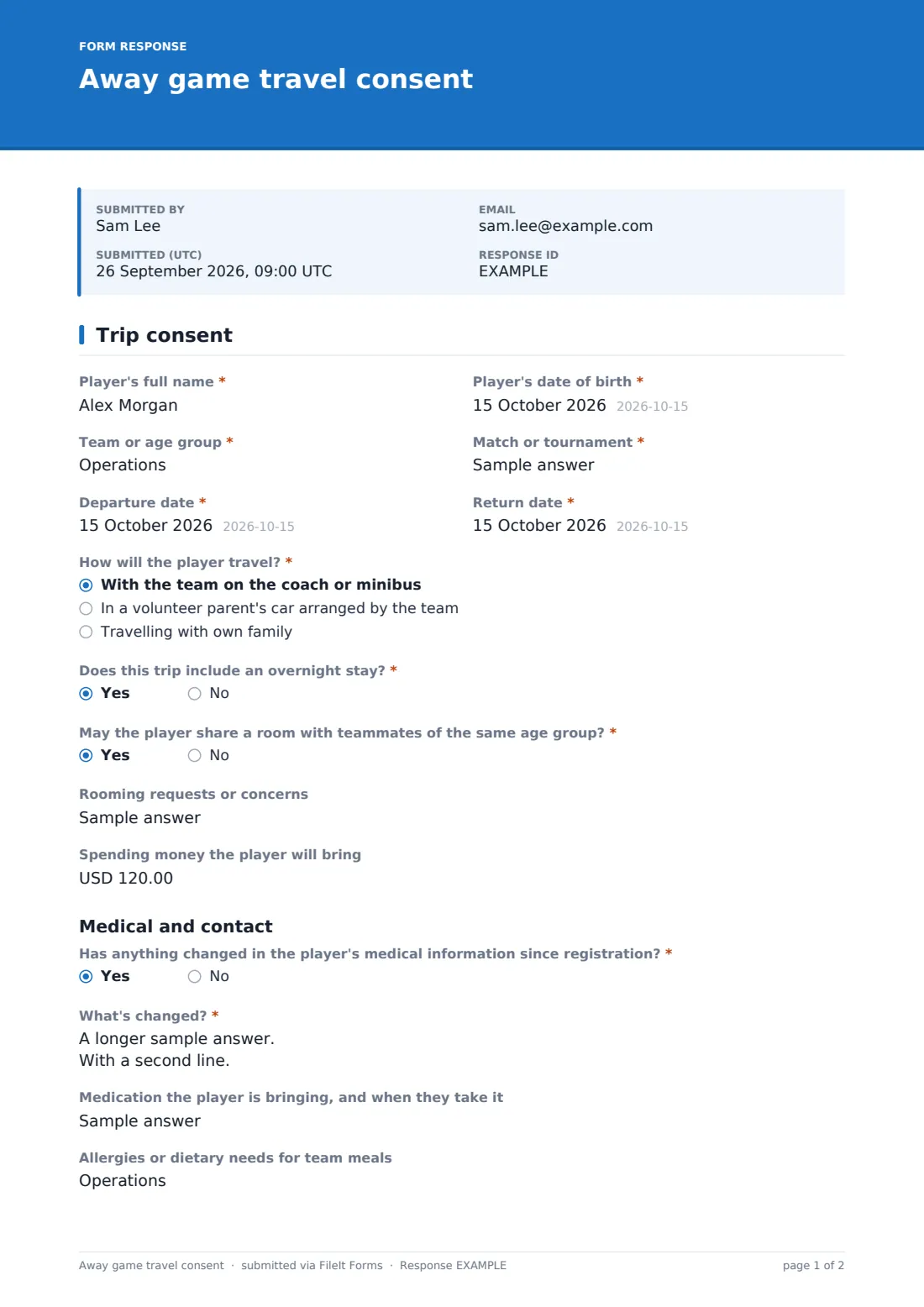
Parents give the player's name, date of birth, team, the match or tournament, and the departure and return dates. 'How will the player travel?' has three answers: the team coach or minibus, a volunteer parent's car, or 'Travelling with own family'. That last one adds a release-from-team-transport section. It asks for the adult responsible while travelling, their mobile, where and when the player will be handed over, whether they'll travel home with the family too, and a release statement to tick.
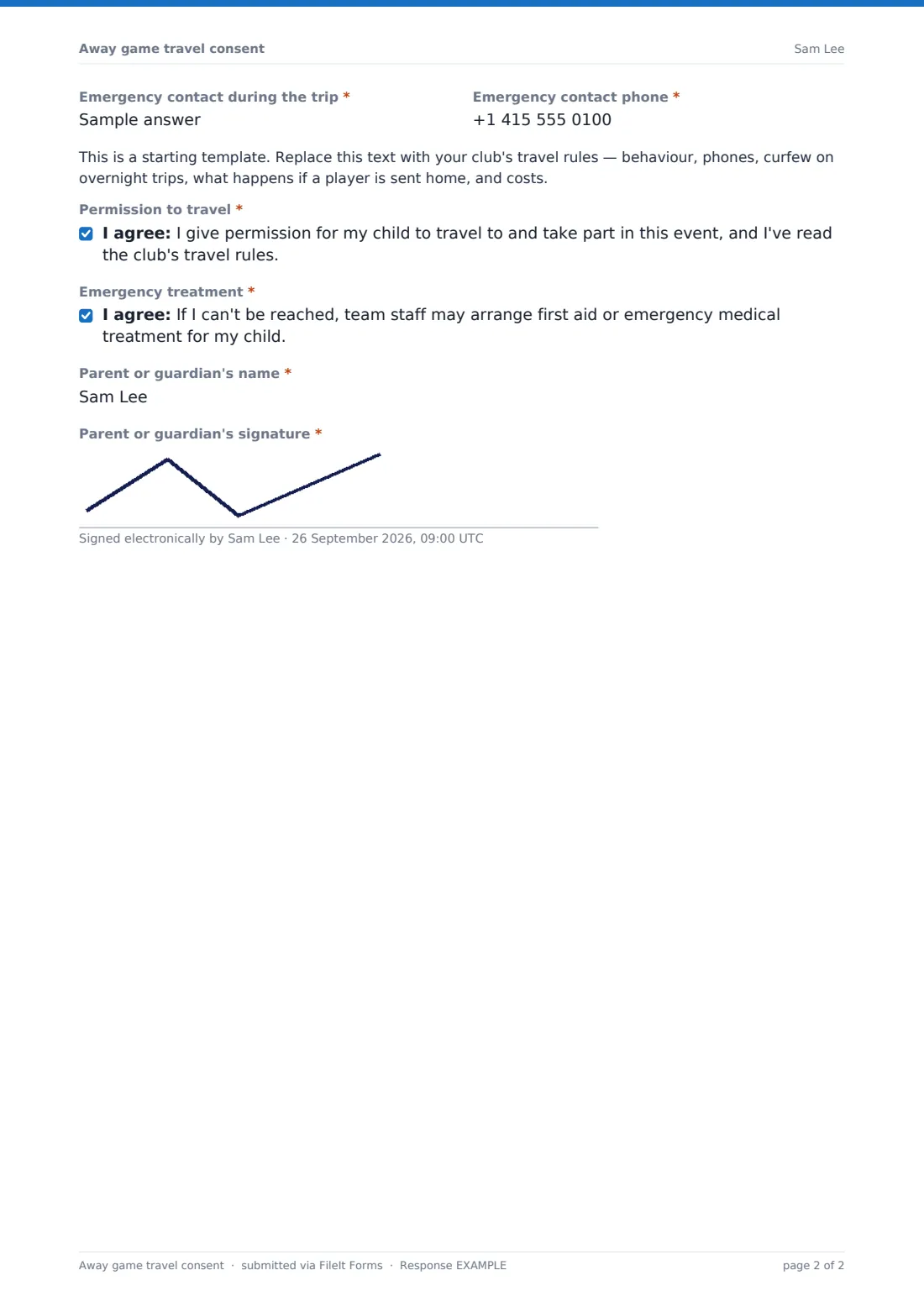
Overnight trips add a question about sharing a room with teammates, rooming requests and spending money. Every form then checks for medical changes since registration, medication, diet and an emergency contact for the trip, before your travel rules, two consents and the parent's signature. The signed PDF goes into your FileIt vault.
- Best for
- Youth football, basketball, hockey and netball teams, school sports trips
- Filled in by
- A parent or guardian, once per player per trip
- Time to complete
- About 3 minutes
- Includes
- Transport choice, release from team transport, overnight stay, medical update, signature
Who uses a away game travel consent form?
- A U12 football coach collects consent for a Saturday away fixture
- A basketball club takes a squad to a two-night tournament
- A family drives their child to a game and signs the transport release
- A school netball team travels by minibus to a county final
- A hockey manager checks every player's medication before an overnight trip
- A club keeps signed consents for each trip in one vault folder
Questions on this away game travel consent form
26 questions · includes signature, conditional questions, consent checkbox.
1 Trip consent
- Player's full name*
- Player's date of birth*
- Team or age group*
- Match or tournament*
- Departure date*
- Return date*
- How will the player travel?* With the team on the coach or minibus · In a volunteer parent's car arranged by the team · Travelling with own family
- Adult responsible for the player while travelling* asked only when it applies
- Their mobile* asked only when it applies
- Where and when will you hand the player over to the team?* asked only when it applies
- Will the player also travel home with you?* asked only when it applies
- Release from team transport* asked only when it applies
- Does this trip include an overnight stay?*
- May the player share a room with teammates of the same age group?* asked only when it applies
- Rooming requests or concerns asked only when it applies
- Spending money the player will bring asked only when it applies
- Has anything changed in the player's medical information since registration?*
- What's changed?* asked only when it applies
- Medication the player is bringing, and when they take it
- Allergies or dietary needs for team meals
- Emergency contact during the trip*
- Emergency contact phone*
- Permission to travel*
- Emergency treatment*
- Parent or guardian's name*
- Parent or guardian's signature*
The away game travel consent form, page by page
1 Trip consent
Required 'Player's full name', date of birth, team, 'Match or tournament', departure and return dates. 'How will the player travel?' is required. Choosing 'Travelling with own family' adds the responsible adult and their mobile, the hand-over point and time, whether they'll also travel home with the family, and a required release statement. 'Does this trip include an overnight stay?' adds rooming permission, requests and spending money. Then a required medical-change question with details, medication, diet and an emergency contact, a placeholder for your travel rules, consents for travel and emergency treatment, the parent's name and signature.
Make the template yours
- Replace the rules placeholder with your club's behaviour and curfew policy
- Pre-fill the event name in the form's description when you share it for a particular trip
- Remove the overnight questions for clubs that only play day fixtures
- Change the spending-money currency to your own
- Add a kit or packing list as a paragraph
- Set a close date of the day before departure
Tips for a better away game travel consent form
- Duplicate the form for each trip so every trip's consents are kept separately
- Use Send to email parents a personal link and see who still needs a reminder
- Print the medical and emergency answers for the trip leader's folder
- Agree hand-over times with families who drive so nobody waits at the venue
- Have your travel rules checked against your sport's safeguarding guidance
Every response becomes a PDF in your vault
Each consent is saved as a signed PDF in your vault and the coach is emailed. The parent receives a copy when they give an email.
The Responses table shows at a glance who is on team transport, who is travelling with family and who has a medical change to note.
- Start from this template. It opens in the FileIt Forms designer — change any question, add pages, set the rules for when questions appear.
- Share it. Turn on a public link, or send it to people by email, each with their own link. They don’t need a FileIt account.
- Get the answers as PDFs. Each response is saved as a PDF in the vault folder you choose, with uploaded files attached — and listed in a Responses table you can export to CSV.
Away game travel consent form: frequently asked questions
Is this away game travel consent template free?
Yes. It's one of the Forms app's starter templates, available on every FileIt account, including the free plan.
What if a family wants to drive their own child?
They choose 'Travelling with own family'. The form then asks who is responsible while travelling, where the hand-over happens, and for a release from team transport.
Does the form cover overnight tournaments?
Yes. Answering yes to the overnight question asks about rooming with teammates, rooming requests and spending money.
Do I need a new form for every trip?
We suggest it. Duplicate the form for each trip so each trip's consents and medical updates stay together.
Is the consent wording legally sufficient?
FileIt doesn't give legal advice. Replace the placeholder with your club's own rules and wording.
Do parents need a FileIt account?
No. They fill in and sign the form from a link on their phone.