What is the after-school programme form template?
After-school clubs juggle a lot of small but important details for every child: which days they're booked in, who's allowed to collect them, what they can't eat, and whether a parent has actually agreed to the activities on offer. A paper sign-up sheet or a string of emails makes all of that hard to check quickly when a parent is standing at the door at pickup time.
This form gathers everything in one place, in an order that matches how a club actually runs — the child's details, the sessions being booked, who collects them, health and food needs, then parent contact details and consent. Conditional questions mean a parent booking occasional days doesn't have to answer questions meant for weekly bookings, and a family without allergies isn't asked to describe one.
Once a parent submits the form, FileIt turns it into a PDF and files it in the vault folder you choose — so a completed booking, complete with signature, is ready to print or check at a glance without digging through emails.
- Best for
- After-school clubs, wraparound care providers and school-based programs
- Filled in by
- A parent or guardian booking a place for their child
- Time to complete
- About 5–7 minutes
- Includes
- Conditional questions, signature capture, consent statements
Who uses a after-school programme form?
- A school-run after-school club taking weekly bookings for the term
- A community center offering occasional, ad-hoc after-school sessions around events or holidays
- A club that needs allergy and medical information on file before a child's first session
- Recording who is authorized to collect each child, beyond the usual parent
- Getting signed consent for supervised activities and photo use before a child attends
- Collecting fee and cancellation agreement alongside the booking itself
- Building a dated record of each family's booking preferences for the term
Questions on this after-school programme form
25 questions over 5 pages · includes signature, conditional questions, multiple pages, consent checkbox.
1 Your child
- Child's name*
- Class / year / grade*
- School
2 Sessions
- Booking type* Regular weekly place · Occasional / ad-hoc days
- Days* asked only when it applies Monday · Tuesday · Wednesday · Thursday · Friday
- Which dates?* asked only when it applies
- Session length* Short session (until about 4:30pm) · Full session (until about 6pm)
- Start date*
- Should staff set aside time for homework?
3 Collection
- Who will usually collect your child?*
- Their phone*
- Usual collection time
- Anyone else allowed to collect?
4 Snacks & health
- Any food allergies or intolerances?*
- Allergies and what to do if exposed* asked only when it applies
- Does your child carry an adrenaline auto-injector? asked only when it applies
- Dietary requirements Vegetarian · Vegan · Halal · Kosher · No pork
- Medical or additional needs staff should know about
5 You & consent
- Parent or guardian's name*
- Email*
- Mobile phone*
- Activities*
- May we take photos of club activities that include your child?
- Fees*
- Signature*
The after-school programme form, page by page
1 Your child
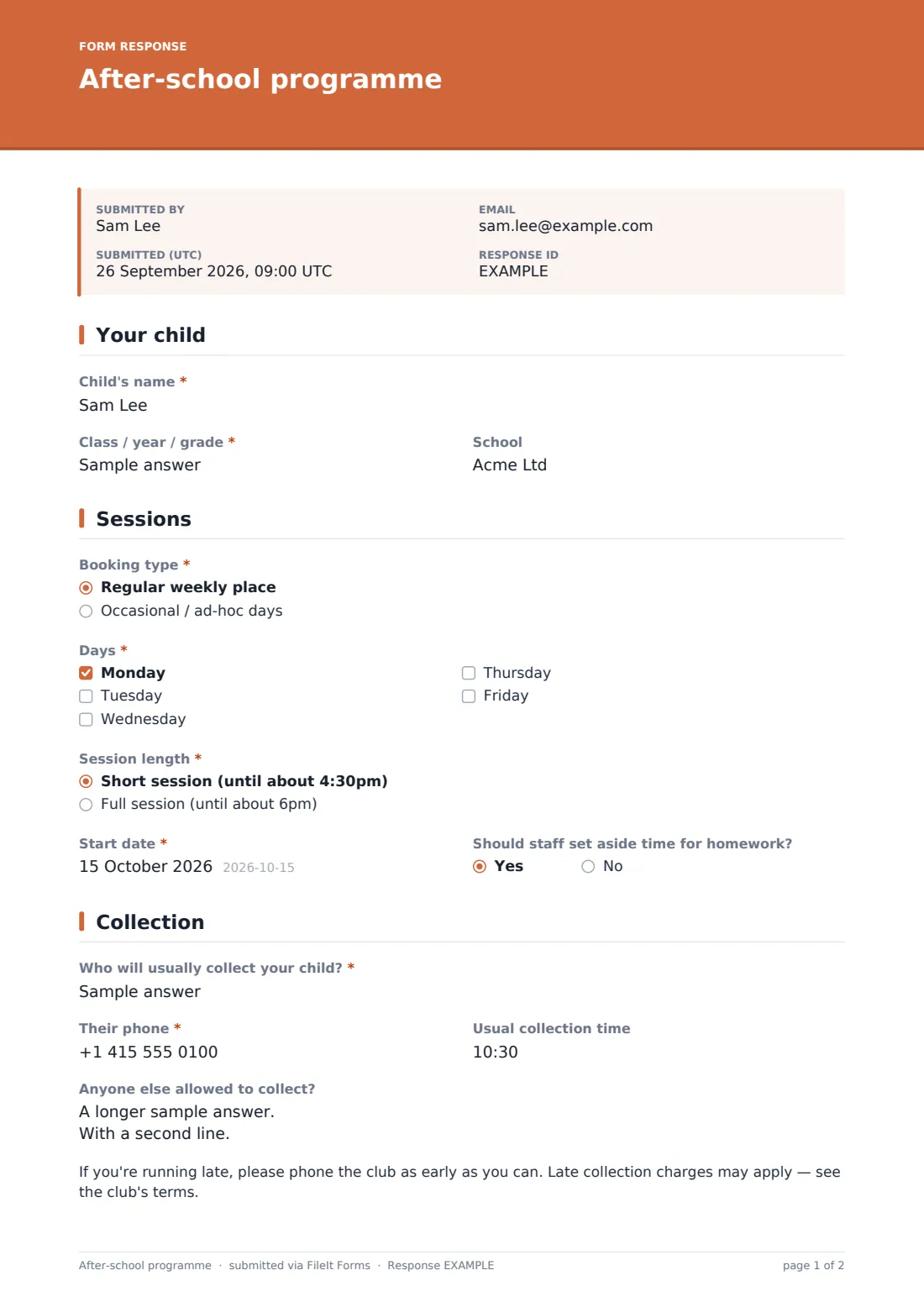
The form starts with the basics: the child's name, their class, year or grade (the form leaves this open so it fits whatever your school calls it), and the school they attend. Nothing here is more than a parent would type on any registration form, and it takes a moment to complete.
2 Sessions
Parents choose a booking type — a regular weekly place or occasional, ad-hoc days. Picking regular reveals a checklist of weekdays; picking ad-hoc instead asks for the specific dates in a free-text field, so the form doesn't force a weekly pattern on a family that only needs the odd Tuesday.
From there, every parent picks a session length (a short session until around 4:30pm, or a full session until around 6pm), a start date, and answers a yes/no question about whether staff should set aside dedicated homework time — a small detail that saves a follow-up phone call later.
3 Collection
This page asks who will usually collect the child, including their relationship and phone number, plus a usual collection time. A long-text field lets parents list anyone else allowed to collect the child, with a note that staff will check photo ID the first time an unfamiliar adult arrives — a practical safeguard rather than a promise the club can't keep on paper. A short reminder about phoning ahead if running late, and that late collection charges may apply, sits at the end of the page.
4 Snacks & health
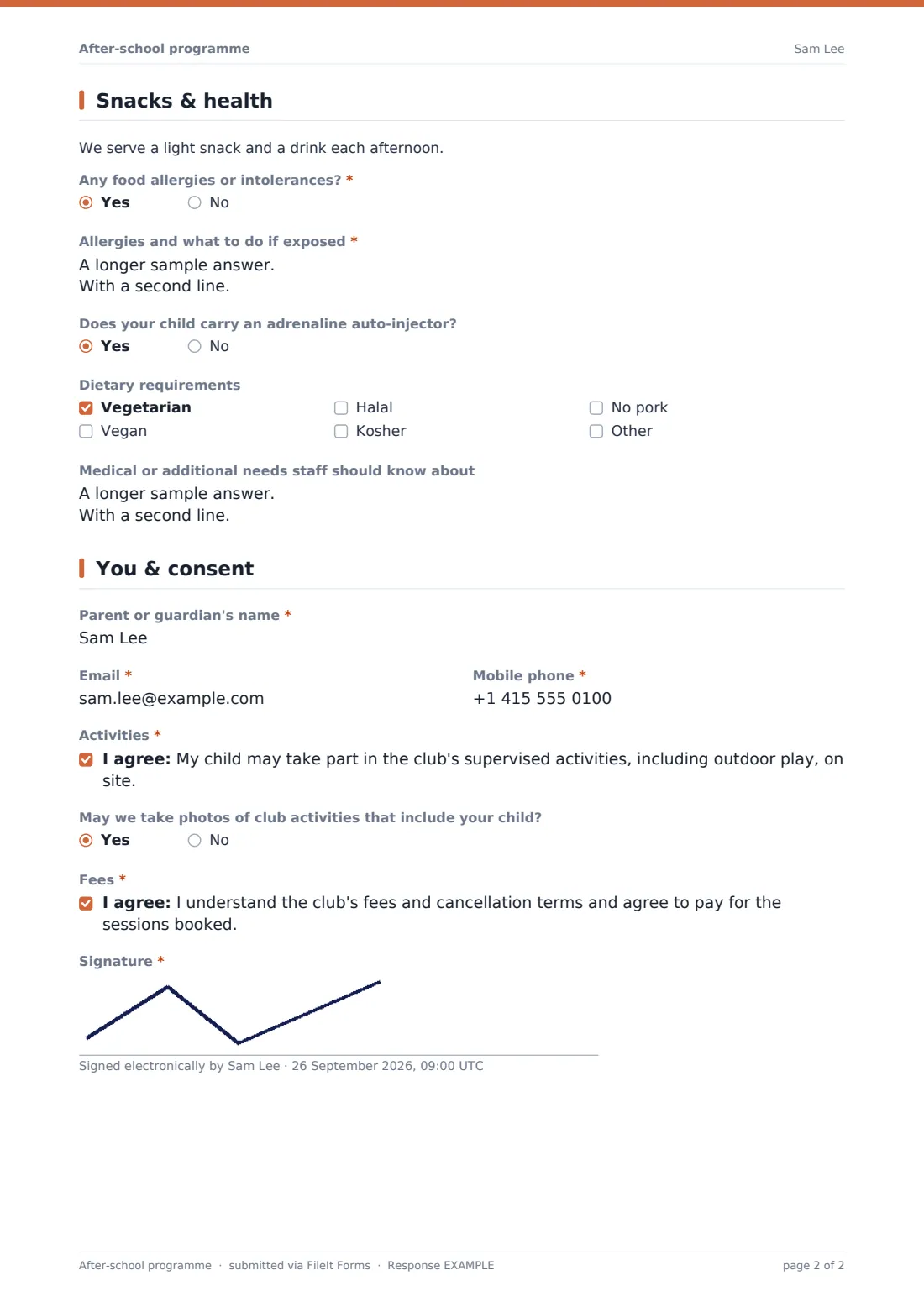
A note tells parents the club serves a light snack and drink each afternoon, then asks a required yes/no question about food allergies or intolerances. Answering yes opens a required field asking for details and what to do if the child is exposed, plus a question about whether the child carries an adrenaline auto-injector.
A checkbox list covers common dietary requirements — vegetarian, vegan, halal, kosher, no pork — with room to add others, and a final open field lets parents flag any other medical or additional needs staff should know about.
5 You & consent
The last page collects the parent or guardian's name, email and mobile number, then two consent statements: one covering participation in the club's supervised activities including outdoor play, and one confirming the parent understands the club's fees and cancellation terms and agrees to pay for the sessions booked. An optional yes/no question asks permission to take photos of club activities that include the child. The form ends with a signature captured on screen.
This template's plain wording is a starting point for your own club's consent and fee terms — check it matches your actual policies and any local rules that apply to childcare providers before relying on it.
Make the template yours
- Swap the weekday checklist for your club's actual operating days if you don't run Monday to Friday
- Add a question for a second collection contact if your club regularly deals with shared custody arrangements
- Set a maximum number of responses per session if a room or ratio limits how many children you can take
- Add a closing date ahead of each term so late bookings don't slip through after staffing is set
- File completed PDFs under each child's name or family in your vault so records build up over the year
- Turn on an emailed PDF copy to the parent so they have their own record of what they booked and agreed to
- Add a question about siblings attending together if that affects your fees or grouping
Tips for a better after-school programme form
- Ask for allergy and medical details every term, since they can change even for a returning child
- Keep the collection-authorization list current — ask parents to update it rather than assuming it's still accurate
- Only collect the photo consent question if you actually use photos, and be clear about where they'd be used
- Make the fee and cancellation consent statement match your club's actual written terms, not a generic version
- Set a sensible closing date before each new term so staffing and snack ordering can be planned in advance
- Keep completed bookings organized by term in your vault so past records don't clutter this term's list
Every response becomes a PDF in your vault
As soon as a parent submits the booking, FileIt saves it as a signed PDF in the vault folder you've set up, and you get an email notification so you know a new booking has come in. If you've turned on a PDF copy for respondents, the parent receives their own copy by email for their records.
From there, most clubs check the Responses table to build the term's attendance list, cross-reference allergy and medical information before the child's first session, and confirm the booking back to the parent using the confirmation message shown on the form. The CSV export is useful for pulling a full roster into a spreadsheet for staff rotas or snack planning.
- Start from this template. It opens in the FileIt Forms designer — change any question, add pages, set the rules for when questions appear.
- Share it. Turn on a public link, or send it to people by email, each with their own link. They don’t need a FileIt account.
- Get the answers as PDFs. Each response is saved as a PDF in the vault folder you choose, with uploaded files attached — and listed in a Responses table you can export to CSV.
After-school programme form: frequently asked questions
Is this after-school program form template free?
Yes. It's included with the Forms app on every FileIt account, including the free plan, and every question in it can be edited to match your club.
Do parents need a FileIt account to book a place?
No. Parents fill in the form from a public link or an emailed request without creating any account, and their child's booking is submitted directly.
How do I get each booking as a PDF?
Every submission automatically becomes a PDF, filed in the vault folder you choose in the form's settings, complete with the parent's signature and all their answers.
Can the form ask different questions for weekly bookings versus occasional days?
Yes — this template already does that. Choosing a regular weekly place shows a day-of-week checklist, while choosing occasional days asks for specific dates instead.
Can I limit how many children can book a session?
Yes, set a maximum number of responses in the form's settings and it will stop accepting new bookings once that number is reached.
How do I create an after-school club sign-up form like this from scratch?
Use the FileIt Forms designer to build one from a blank form with drag-and-drop questions, or start from this template and adjust it to your own sessions and policies.
Is the consent wording in this template legally binding?
No — it's plain, practical wording as a starting point. Check it fits your club's actual policies and any local childcare rules before you rely on it.
Can parents update allergy or medical information later in the term?
You can allow multiple responses in the form settings so a parent can submit an updated sheet, or contact them directly to note changes in your records.