What is the childcare enrolment form template?
Enrolling a child at a nursery or daycare usually means asking for a lot of information at once — a weekly schedule, sleep and feeding routines, allergies, emergency contacts, and several separate consents — often spread across two or three different paper forms that all need re-entering into a computer later. This childcare enrollment form template brings all of that into a single online form with five clear pages, so families give you everything in one sitting and nothing gets left on a form still sitting in a bag at home.
An online enrolment form also makes it much easier to keep information current: if a family's schedule, allergy details or emergency contact changes, they can simply fill in the form again rather than you tracking down and replacing a paper original. Families don't need a FileIt account — they open the link you send and complete it from any device.
Every submission, including the parent's signature, becomes a PDF that FileIt automatically files in the vault folder you choose — ideally the child's own folder — so their enrolment record, schedule and health information are all in one place from day one.
- Best for
- Nurseries, daycares, preschools and childminders enrolling a new child
- Filled in by
- A parent or legal guardian
- Time to complete
- About 10 to 15 minutes, covering schedule, routines, health and consent
- Includes
- A weekly schedule matrix, conditional health and funding questions, multiple consent statements, and a signature
Who uses a childcare enrolment form?
- A nursery or daycare enrolling a new family and wanting a consistent record for every child
- A preschool collecting government-funded hours or voucher details alongside the standard enrolment information
- A childminder who wants one clear form covering schedule, routines and emergency health consent
- A setting re-collecting updated details each year rather than relying on an original paper form from enrolment day
- An early-years centre that needs allergy and medical information clearly separated and easy to find before a child's first day
- A daycare offering settling-in sessions that wants to flag which families would like them before the child officially starts
Questions on this childcare enrolment form
32 questions over 5 pages · includes signature, conditional questions, multiple pages, consent checkbox, ratings.
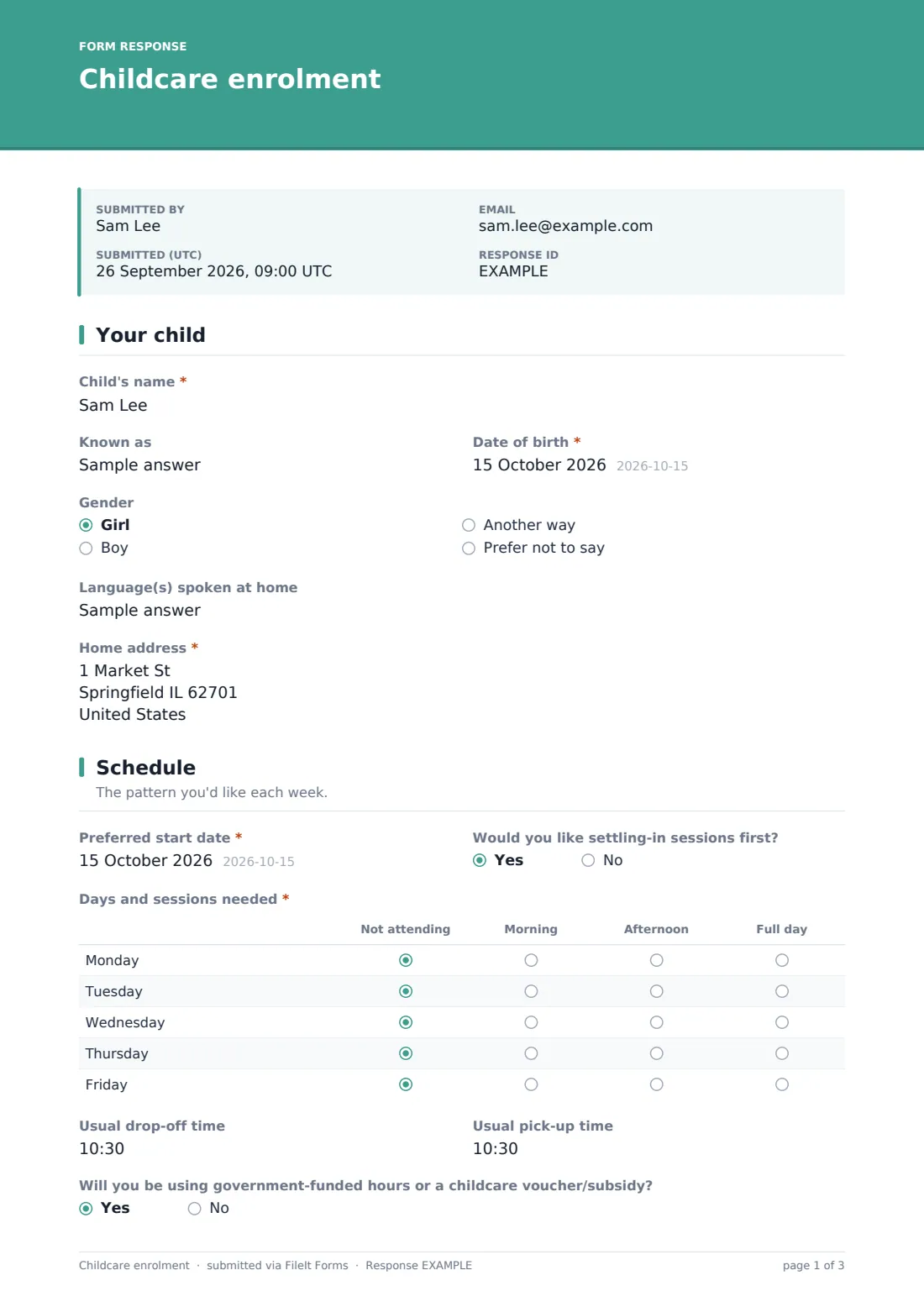
1 Your child
- Child's name*
- Known as
- Date of birth*
- Gender Girl · Boy · Another way · Prefer not to say
- Language(s) spoken at home
- Home address*
2 Schedule
- Preferred start date*
- Would you like settling-in sessions first?
- Days and sessions needed* Not attending · Morning · Afternoon · Full day
- Usual drop-off time
- Usual pick-up time
- Will you be using government-funded hours or a childcare voucher/subsidy?
- Which scheme?* asked only when it applies
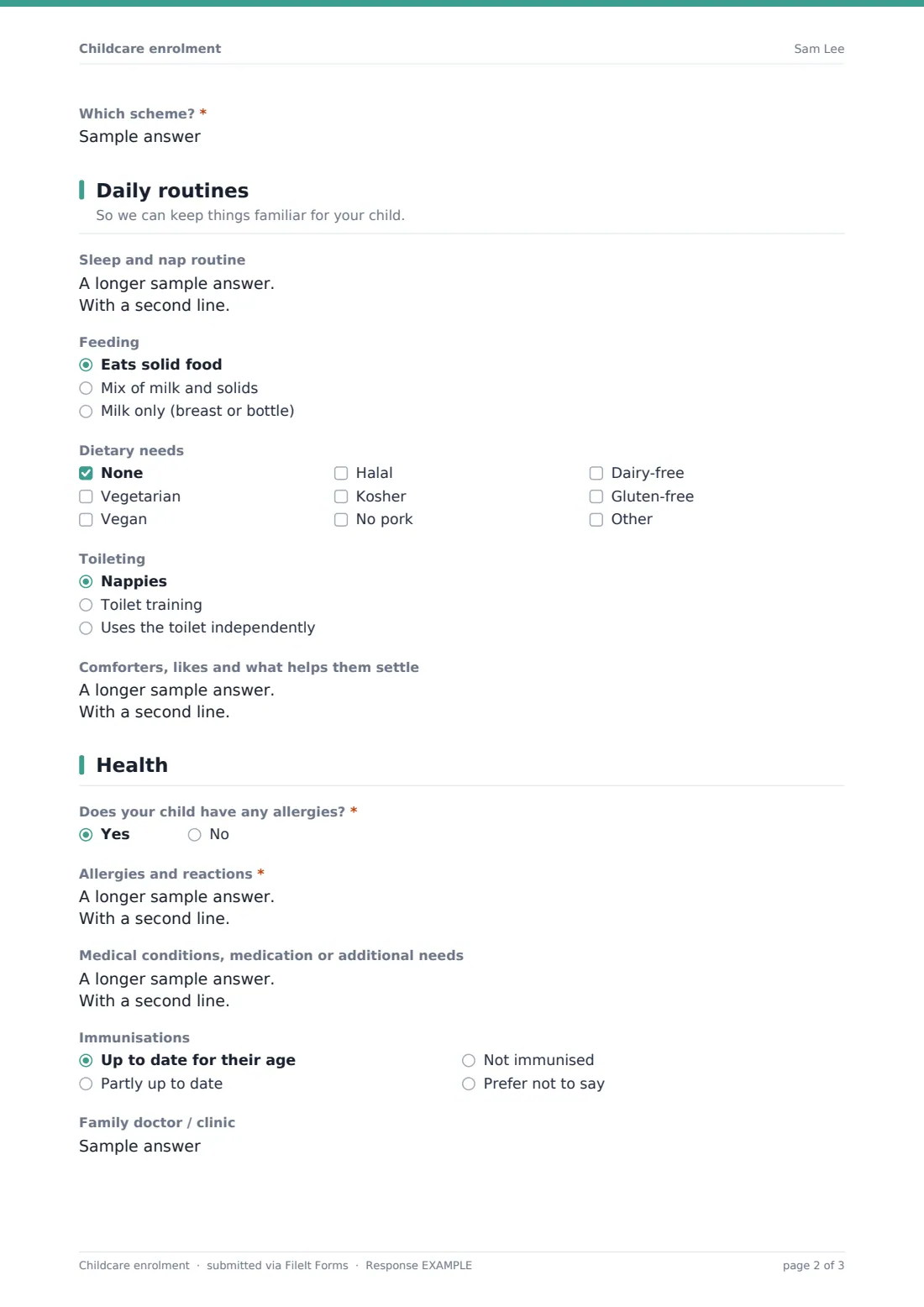
3 Daily routines
- Sleep and nap routine
- Feeding Eats solid food · Mix of milk and solids · Milk only (breast or bottle)
- Dietary needs None · Vegetarian · Vegan · Halal · Kosher · No pork · Dairy-free · Gluten-free
- Toileting Nappies · Toilet training · Uses the toilet independently
- Comforters, likes and what helps them settle
4 Health
- Does your child have any allergies?*
- Allergies and reactions* asked only when it applies
- Medical conditions, medication or additional needs
- Immunisations Up to date for their age · Partly up to date · Not immunised · Prefer not to say
- Family doctor / clinic
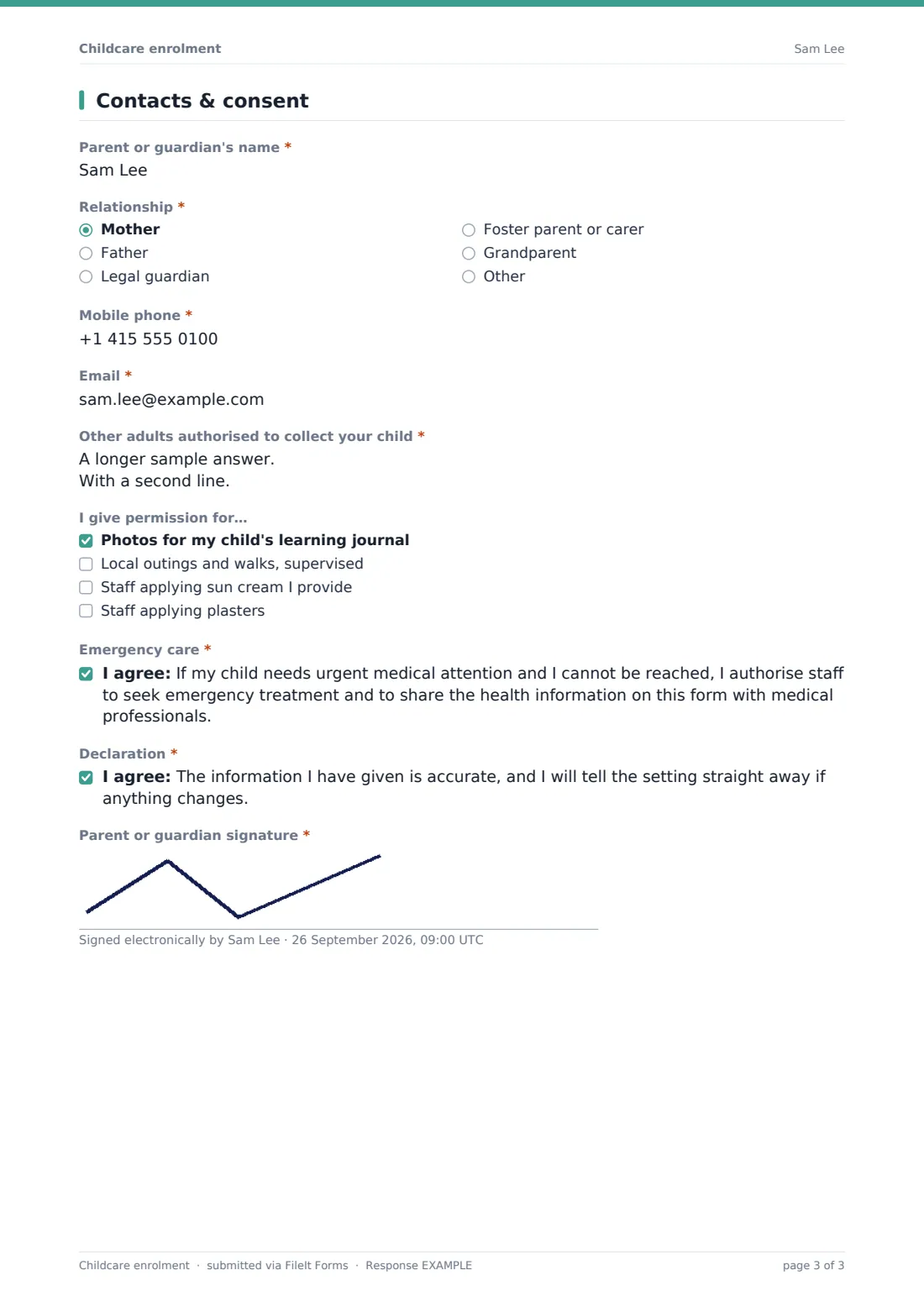
5 Contacts & consent
- Parent or guardian's name*
- Relationship* Mother · Father · Legal guardian · Foster parent or carer · Grandparent · Other
- Mobile phone*
- Email*
- Other adults authorised to collect your child*
- I give permission for… Photos for my child's learning journal · Local outings and walks, supervised · Staff applying sun cream I provide · Staff applying plasters
- Emergency care*
- Declaration*
- Parent or guardian signature*
The childcare enrolment form, page by page
1 Your child
This page collects the basics: the child's name, what they're known as day to day, date of birth, gender, language or languages spoken at home, and their home address. Asking for the language spoken at home separately from the child's name is a small but useful detail — it flags early on whether a key worker might need to adjust how they communicate with the child.
2 Schedule
Parents choose a preferred start date and say whether they'd like settling-in sessions first. The core of this page is a matrix question — "Days and sessions needed" — where the family picks a session for each weekday: not attending, morning, afternoon or full day, giving you a complete weekly pattern in one grid rather than five separate questions. Usual drop-off and pick-up times follow, along with a yes/no question about government-funded hours or a childcare voucher or subsidy; answering yes reveals a field asking which scheme applies, so you know which paperwork to prepare without guessing.
3 Daily routines
With a note that this helps keep things familiar for the child, this page asks about sleep and nap routine, feeding (solids, a mix of milk and solids, or milk only), any dietary needs from a checklist covering vegetarian, vegan, halal, kosher, no pork, dairy-free and gluten-free (with room to add others), toileting stage, and a free-text field for comforters, likes and what helps the child settle. Together these give a new key worker a working picture of the child's day before they've even met them.
4 Health
This page asks directly whether the child has any allergies; answering yes requires details of what they're allergic to, the reaction, and what to do about it. A separate optional field covers other medical conditions, medication or additional needs, followed by an immunisation status question (some settings are required to ask this) and space for the family doctor or clinic's details.
5 Contacts & consent
The final page gathers the primary parent or guardian's name, relationship to the child, phone and email, then a free-text list of other adults authorised to collect the child, with a reminder that staff will check photo ID the first time. A checklist covers everyday permissions — photos for a learning journal, local supervised outings, staff applying sun cream the parent provides, and staff applying plasters. Two required consent statements follow: one authorising emergency medical treatment and sharing this form's health information with medical professionals if the family can't be reached, and one confirming the information given is accurate and will be updated if anything changes. The form ends with a signature drawn on screen.
Make the template yours
- Swap the weekly schedule matrix for a simpler question if you only offer full-day places, or extend it to include weekends
- Add your own dietary or allergy checklist options to match dishes or ingredients specific to your kitchen
- Make the emergency medical consent and accuracy declaration the only required fields on the last page if you want a faster form for returning families
- File each enrolment directly into that child's own vault folder, so it sits alongside their pickup authorisation and any other paperwork
- Add a question about starting nappy brand or specific formula if your setting asks families to supply their own
- Turn on an emailed PDF copy to parents so they keep a record of exactly what they enrolled with
Tips for a better childcare enrolment form
- Read allergy and medical answers before a child's first day, not after — build in time to review new enrolments rather than filing them straight away
- Ask for authorised pickup adults clearly and keep that list current — a separate, dedicated pickup authorisation form works well alongside this one if your setting updates pickups more often than full re-enrolment
- Only ask for information you'll genuinely use day to day; a long form that asks unnecessary questions is more likely to be filled in carelessly
- Confirm funding or voucher scheme details directly with the family before assuming eligibility, since schemes and rules vary and this form is only collecting what the parent believes applies
- Keep health information visibly separate from general enrolment details when you share records with staff, so key workers can find allergy information quickly in an emergency
- Encourage families to resubmit the form whenever routines, contacts or health details change, rather than relying on a verbal update at drop-off
Every response becomes a PDF in your vault
Once a parent submits the enrolment form, FileIt saves their full answers, including the signature, as a PDF, names it using the document title pattern you've set (by default including the child's name), and files it in your chosen vault folder. Turning on owner notifications means your team is alerted as soon as a new enrolment comes in, and an optional PDF copy can be sent straight back to the parent for their own records.
From there, most settings review the schedule and health information before the child's first day, brief the relevant key worker on anything important, and confirm the start date and any settling-in sessions directly with the family. The Responses table makes it easy to open any child's enrolment PDF again later, and CSV export is useful if you need to build a combined register — for example, a list of every child's weekly schedule across your rooms.
- Start from this template. It opens in the FileIt Forms designer — change any question, add pages, set the rules for when questions appear.
- Share it. Turn on a public link, or send it to people by email, each with their own link. They don’t need a FileIt account.
- Get the answers as PDFs. Each response is saved as a PDF in the vault folder you choose, with uploaded files attached — and listed in a Responses table you can export to CSV.
Childcare enrolment form: frequently asked questions
Is this childcare enrollment form template free?
Yes. It's included in the Forms app on every FileIt account, including the free plan, and every question can be edited to fit your setting.
Do parents need a FileIt account to enrol their child?
No. You share a link by email or publicly, and parents complete the form without signing up for anything.
Is the enrolment saved as a PDF?
Yes — every submission, including the parent's signature, is automatically converted to a PDF and filed in the vault folder you choose.
Does this form confirm a place at the nursery?
No. It collects the information needed to enrol a child, but confirming an actual place, start date and fees is something your setting handles directly with the family.
Is the consent in this form legally binding?
No. The consent statements are a plain-English starting point for emergency medical treatment and accuracy of information, not a legal document — settings should check the wording fits their own policies and local requirements.
Can I collect immunisation records as a file rather than a status question?
Not with this template's built-in immunisation field, which is a simple status question, but you can add a file upload field in the designer if you need parents to attach a document.
Can this form handle multiple children from the same family?
Each submission covers one child, so families with more than one child enrolling would fill in the form once per child — this keeps each child's schedule and health details clearly separate.
How to create a childcare enrolment form for a nursery or daycare?
Start from this ready-made template in the FileIt Forms designer, adjust the pages and questions to match your setting's own process, and share the link with new families — no separate paperwork needed.