What is a riding lessons agreement?
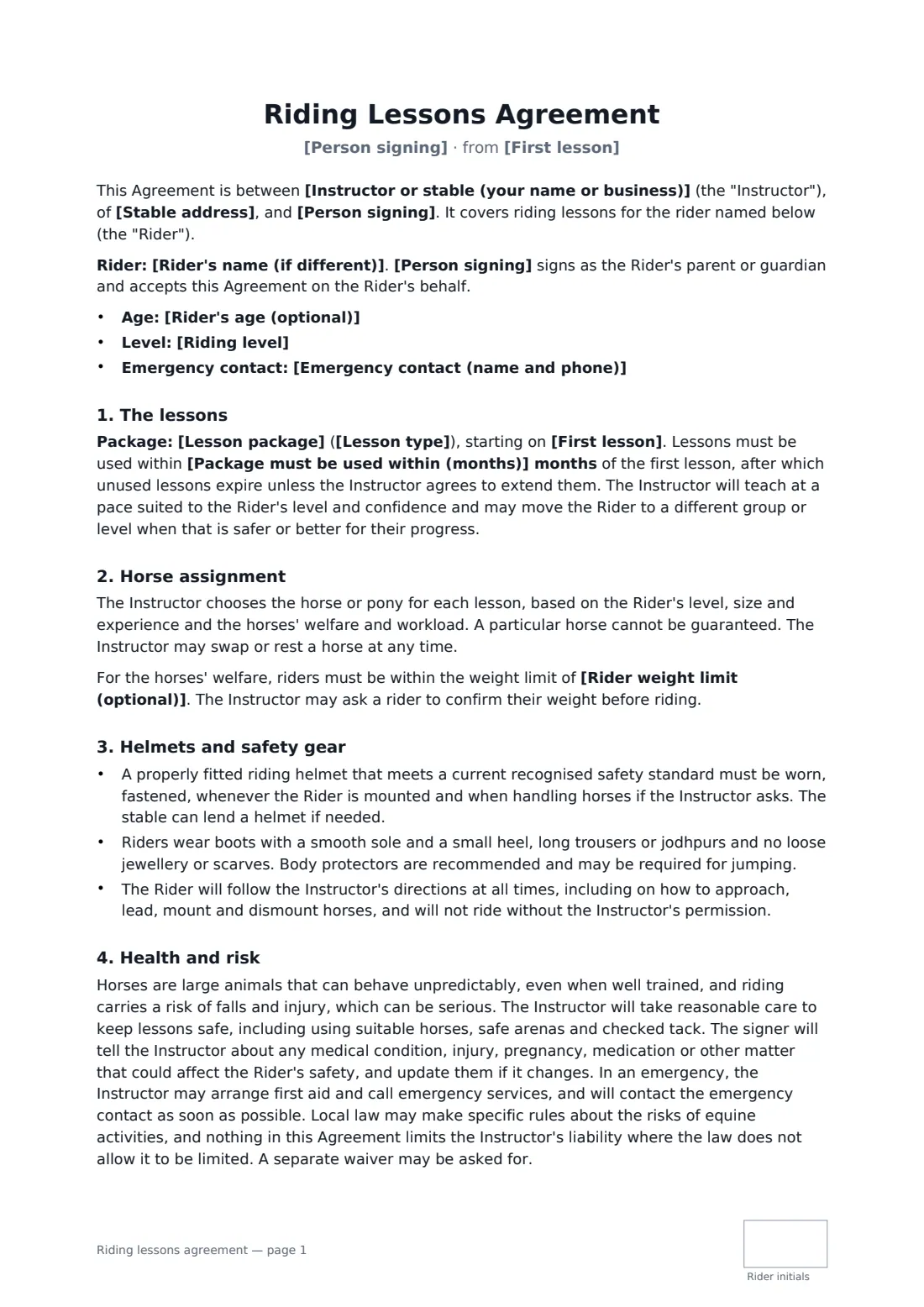
A riding lessons agreement sets expectations for riders and parents before the first lesson: what the package includes and when it expires, who chooses the horse, what safety gear is required, and what happens when weather or the rider cancels.
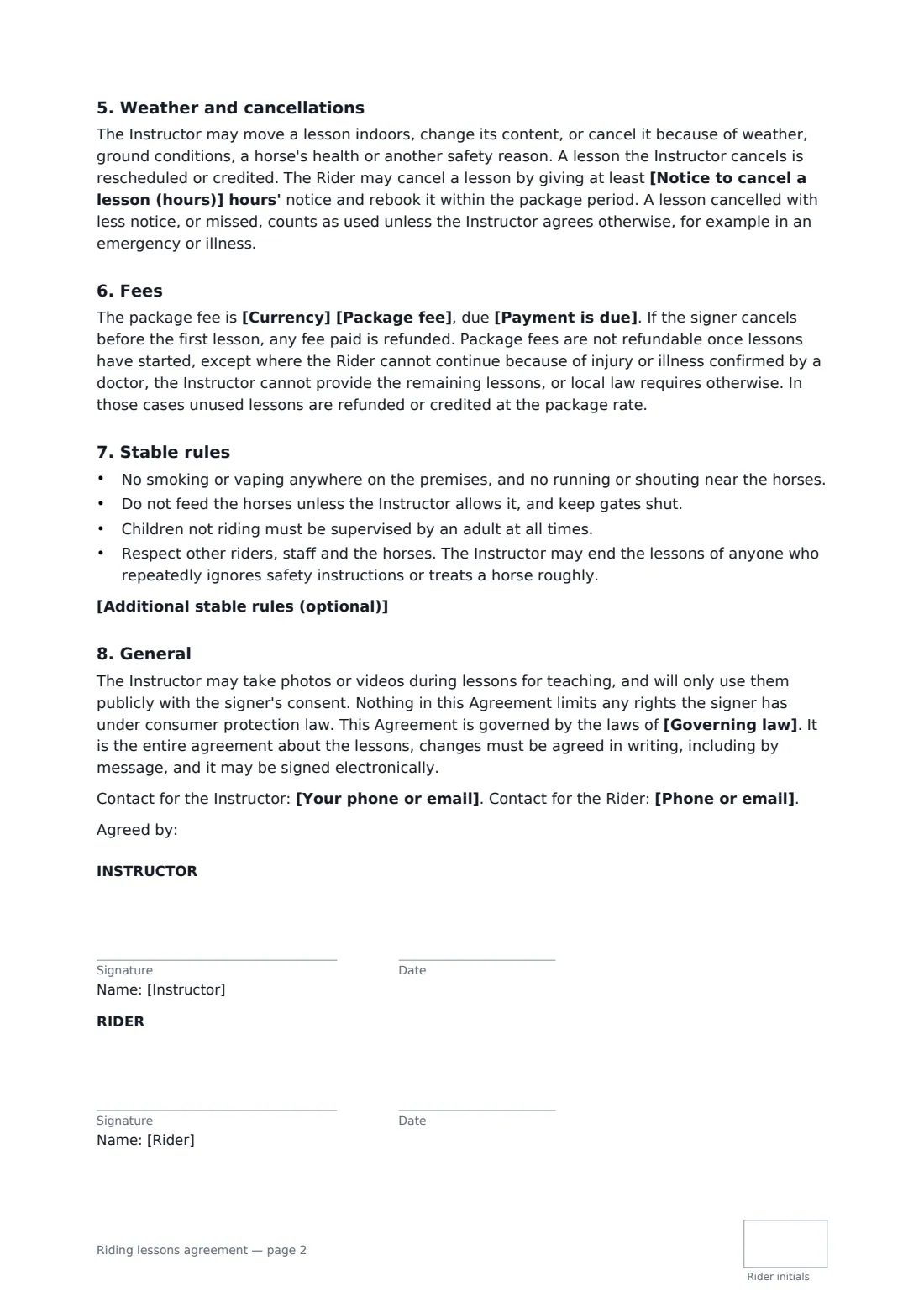
This template covers the rider's details and level, a parent or guardian signing for a child, the lesson package and type, an expiry period, horse assignment for the horses' welfare, an optional weight limit, helmets meeting a current safety standard, boots and body protectors, health disclosures and emergency contacts, the risks of riding, weather and instructor cancellations, the rider's notice to cancel, package fees and refunds for injury, and stable rules. FileIt places the signature and date boxes for both parties, with initials for the rider.
- Best for
- Riding schools, equestrian centres and freelance riding instructors
- Signed by
- The instructor and the rider, or a parent or guardian
- Lessons
- Private, semi-private or group, sold as a package
- Length
- About 2 pages
When to use a riding lessons agreement
- A beginner's 10-lesson group package
- Private lessons for an intermediate rider working toward jumping
- Weekly pony lessons for a child, signed by a parent
- Semi-private lessons for two friends
- Holiday lesson blocks at an equestrian centre
What you fill in
20 blanks, then the name and email of each person who signs: instructor, rider.
1 The parties
- Instructor or stable (your name or business)*
- Your phone or email*
- Stable address*
2 The rider
- Person signing*
- Rider's name (if different)
- Rider's age (optional)
- Phone or email*
- Emergency contact (name and phone)*
- Riding level* beginner · novice · intermediate · advanced
3 Lessons
- Lesson package*
- Lesson type* private lessons · semi-private lessons · group lessons
- First lesson*
- Package must be used within (months)*
- Rider weight limit (optional)
4 Fees
- Currency*
- Package fee*
- Payment is due* in full before the first lesson · in two equal parts, before the first lesson and halfway through the package · before each lesson
5 Cancellations
- Notice to cancel a lesson (hours)*
6 Other terms
- Additional stable rules (optional)
- Governing law*
7 Who signs
- Instructor signature and date, initials on every page · The instructor or riding stable giving the lessons.
- Rider signature and date, initials on every page · The rider, or a parent or guardian signing for a rider under 18.
What the riding lessons agreement covers
- The lessons
- Horse assignment
- Helmets and safety gear
- Health and risk
- Weather and cancellations
- Fees
- Stable rules
- General
Using the riding lessons agreement, step by step
1 Enter the rider
Add the person signing and, for a child, the rider's name and age, plus a phone or email, an emergency contact and the riding level.
2 Describe the package
Enter the package and lesson type, the first lesson date, how many months it must be used within and any rider weight limit.
3 Fees and cancellations
Enter the package fee, when it's due and the notice needed to cancel a lesson. Add any extra stable rules.
4 Send for signature
Add the rider or parent as a signer. They sign, date and initial each page.
Tips before you send it
- Local law may set rules about the risks of equine activities, including signs or notices. Check what applies where you teach.
- Use FileIt's horseback riding waiver alongside this agreement if you want a separate release.
- Always ask about medical conditions and update them; the template requires the signer to keep you informed.
- A weight limit protects the horses; explain it kindly and apply it consistently.
Sign it online in minutes
- Fill in the blanks. Names, dates and amounts go straight into the agreement — the preview shows exactly where.
- Name who signs. Tick “This is me” for your own part. FileIt builds the PDF with every signature, date and initials box on the right line, and you can check or move anything before sending.
- Send it. Each signer gets a secure link and signs from any device — no account needed. The signed PDF, with an audit trail and a Certificate of Completion, is filed in your vault and emailed to everyone.
Riding lessons agreement: frequently asked questions
Can a parent sign for a child?
Yes. Fill in the rider's name when a parent or guardian is signing; the agreement then says they accept it on the rider's behalf.
What happens to lessons cancelled for bad weather?
A lesson the instructor cancels for weather, ground conditions, a horse's health or another safety reason is rescheduled or credited.
Are package fees refundable?
If the signer cancels before the first lesson, any fee paid is refunded. Once lessons have started, fees aren't refundable except where the rider can't continue because of injury or illness confirmed by a doctor, the instructor can't provide the lessons, or local law requires otherwise. Then unused lessons are refunded or credited.
Is it valid if signed online?
In most countries, including the US (ESIGN Act and UETA), the UK, the EU (eIDAS) and Canada, an electronic signature is generally valid for an ordinary services contract like this one. FileIt keeps an audit trail and a Certificate of Completion with the signed PDF as evidence of who signed and when.
Can I change the wording?
You fill in the blanks and choose the options on the setup page; optional clauses appear only when you fill them in. If you need different clauses, draft your own document and upload it to FileIt eSignature instead — you can still place the signature boxes in the editor.
Is this template free?
Yes. The template is free to use with the eSignature app in FileIt. The person you send it to doesn't need a FileIt account to sign.