What is a new patient registration form?
A new patient registration form collects the details a clinic needs before a first appointment: who the patient is, how to reach them, who to call in an emergency, how their care will be paid for and who else is involved in it. Sending it to sign online means fewer clipboards in the waiting room and fewer typing errors at the front desk.
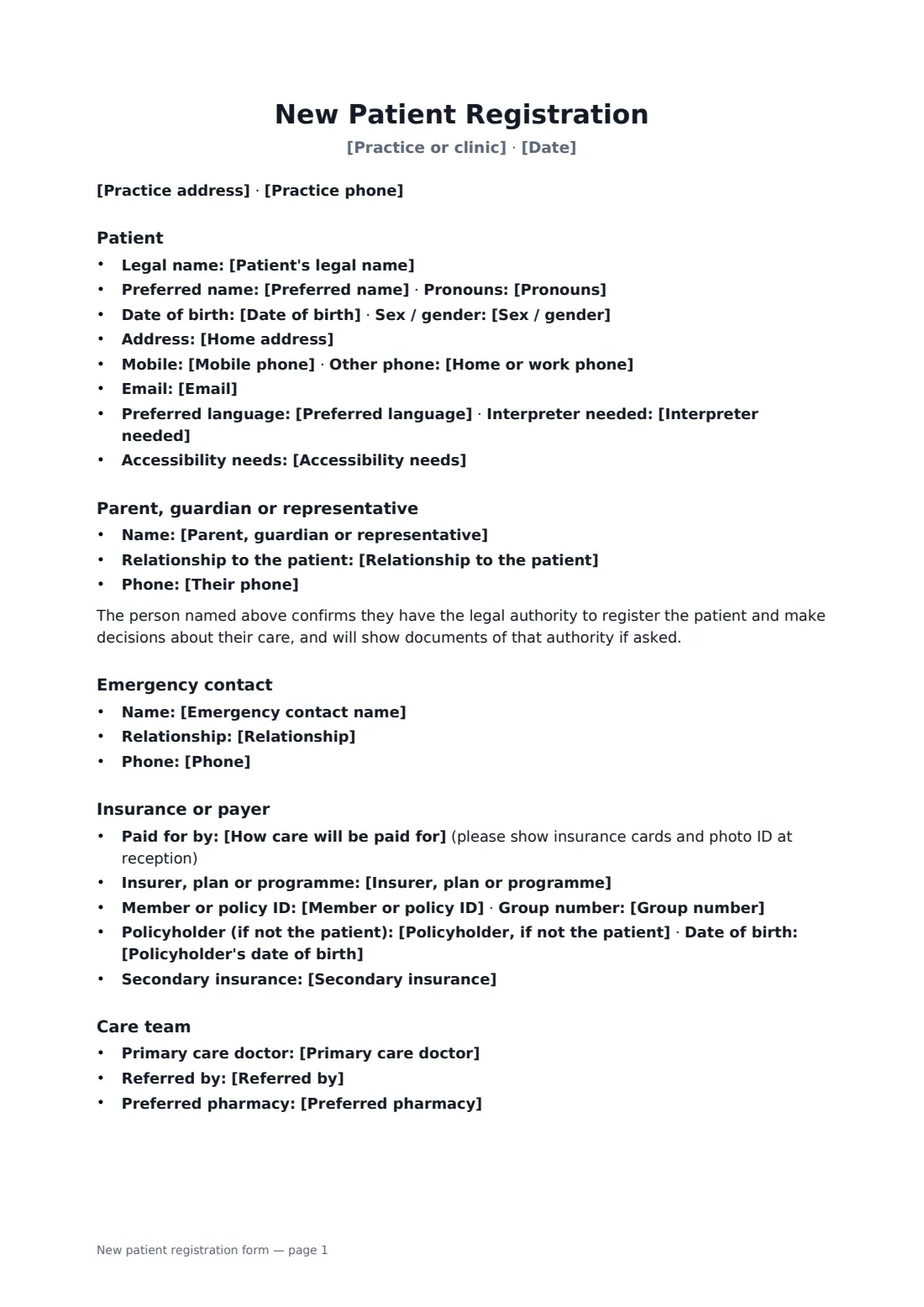
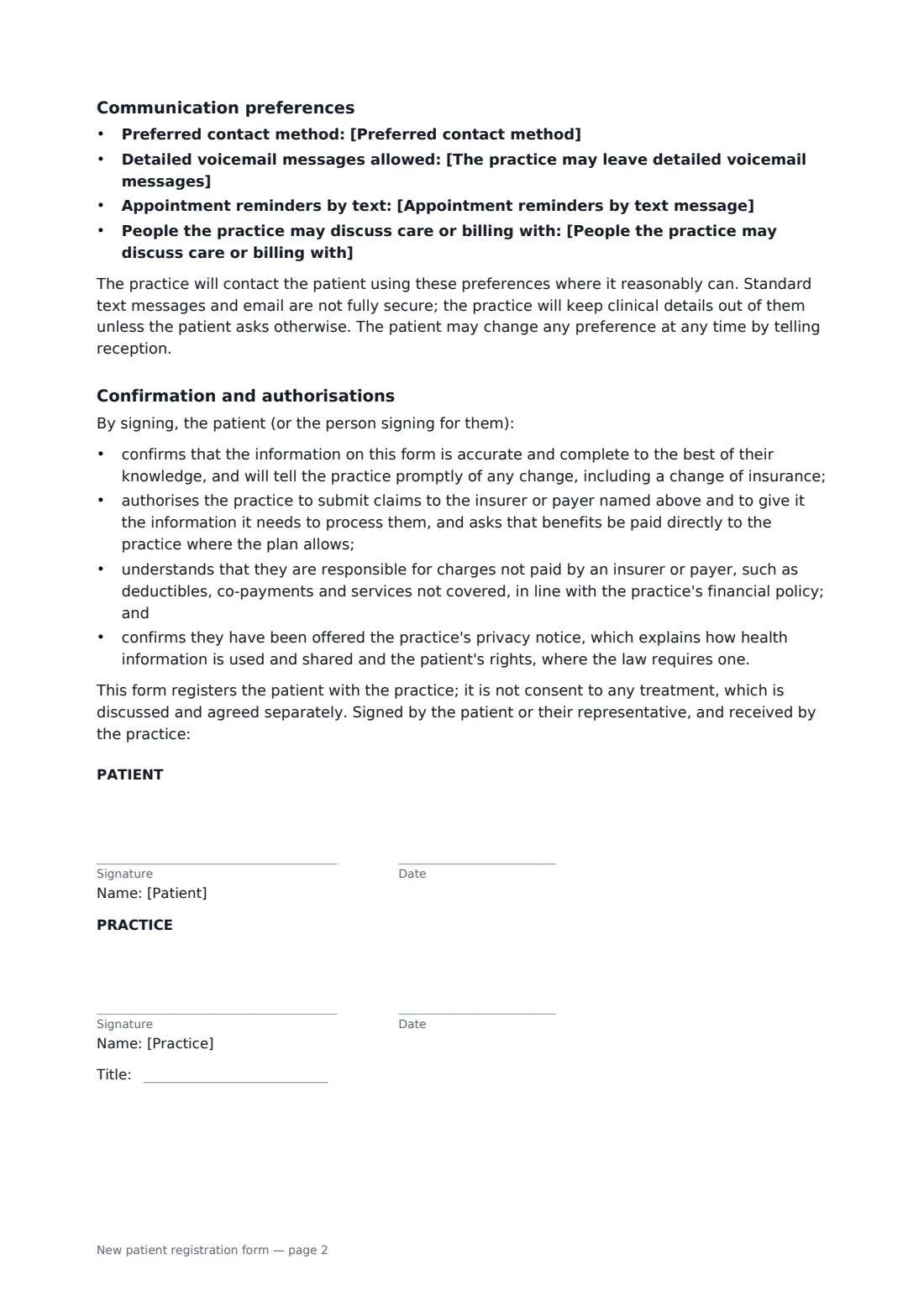
This template covers the patient's legal and preferred name, pronouns, date of birth, address, phones, email, language, interpreter and accessibility needs; an optional parent, guardian or representative; an emergency contact; the payer type with insurer, member and group numbers, policyholder and secondary insurance; primary doctor, referrer and pharmacy; and communication preferences including voicemail, text reminders and people the practice may speak to. The patient confirms the information is accurate, authorises claims to the payer, accepts responsibility for uncovered charges and acknowledges the privacy notice where required.
- Best for
- Medical, dental, therapy and specialist clinics
- Signed by
- The patient or their representative, and the front desk (with job title)
- Not included
- Medical history and treatment consent, which are handled separately
- Length
- About 2 pages
When to use a new patient registration form
- A family practice sends registration forms before new patients' first visits
- A dental clinic registers a child with a parent signing
- A physiotherapy clinic records workers' compensation as the payer
- A specialist collects referral and insurance details ahead of a consultation
- A clinic updates details for an existing patient who has changed insurer
What you fill in
36 blanks, then the name and email of each person who signs: patient, practice.
1 The practice
- Practice or clinic*
- Practice address
- Practice phone
- Date*
2 Patient
- Patient's legal name*
- Preferred name
- Date of birth*
- Sex / gender
- Pronouns
- Home address
- Mobile phone
- Home or work phone
- Preferred language
- Interpreter needed* No · Yes
- Accessibility needs
3 Parent or guardian
- Parent, guardian or representative
- Relationship to the patient
- Their phone
4 Emergency contact
- Emergency contact name
- Relationship
- Phone
5 Insurance or payer
- How care will be paid for* Health insurance · Government health programme · Self-pay · Workers' compensation or other third party
- Insurer, plan or programme
- Member or policy ID
- Group number
- Policyholder, if not the patient
- Policyholder's date of birth
- Secondary insurance
6 Care team
- Primary care doctor
- Referred by
- Preferred pharmacy
7 Communication
- Preferred contact method* Mobile phone · Home or work phone · Email · Patient portal · Post
- The practice may leave detailed voicemail messages* No — call-back request only · Yes
- Appointment reminders by text message* Yes · No
- People the practice may discuss care or billing with
8 Who signs
- Patient signature and date · The patient, or a parent, guardian or legal representative signing for them.
- Practice signature and date, job title · The reception or front-office staff member who receives the form.
What the new patient registration form covers
- Patient
- Parent, guardian or representative
- Emergency contact
- Insurance or payer
- Care team
- Communication preferences
- Confirmation and authorisations
Using the new patient registration form, step by step
1 Add the practice
Your practice name, address and phone fill in at the top. The date defaults to today.
2 Fill or leave blanks
Enter what you already know about the patient. Leave the rest empty — it prints as lines the patient can fill in, or place text boxes over them in the editor.
3 Insurance and preferences
Choose the payer type and add insurer details if you have them, along with contact preferences.
4 Send to the patient
Add the patient (or parent) as a signer and send. The front desk countersigns to show it was received.
Tips before you send it
- Pair this with your financial policy so patients see what they owe for uncovered care.
- Ask to see insurance cards and photo ID at the first visit, as the form requests.
- Respect the voicemail and text preferences — they are recorded on the form.
- Keep medical history and treatment consent on separate forms; this one only registers the patient.
Sign it online in minutes
- Fill in the blanks. Names, dates and amounts go straight into the agreement — the preview shows exactly where.
- Name who signs. Tick “This is me” for your own part. FileIt builds the PDF with every signature, date box on the right line, and you can check or move anything before sending.
- Send it. Each signer gets a secure link and signs from any device — no account needed. The signed PDF, with an audit trail and a Certificate of Completion, is filed in your vault and emailed to everyone.
New patient registration form: frequently asked questions
Is this a consent to treatment?
No. It registers the patient with the practice. Consent to any treatment is discussed and agreed separately.
Can a parent register a child?
Yes. Fill in the parent, guardian or representative section; the person signing confirms they have authority to register the patient and make decisions about their care.
Does it include a privacy notice?
It records that the patient was offered the practice's privacy notice where the law requires one. Use your own notice — the form refers to it rather than replacing it.
Is a document signed electronically legally binding?
In most countries, including the US (ESIGN Act and UETA), the UK, the EU (eIDAS) and Canada, an electronic signature is generally valid for an ordinary agreement like this one. FileIt keeps an audit trail and a Certificate of Completion with the signed PDF as evidence of who signed and when.
Is this template free?
Yes. The template is free to use with the eSignature app in FileIt. The patient doesn't need a FileIt account to sign.