What is a go-kart waiver?
Arrive-and-drive karting puts people with no racing experience into fast machines, side by side. The track's job is to make sure drivers are big enough to drive safely, wear the right kit, understand the flags and know what to do after a spin. Most karting injuries come from collisions, loose hair or clothing, and drivers climbing out on track.
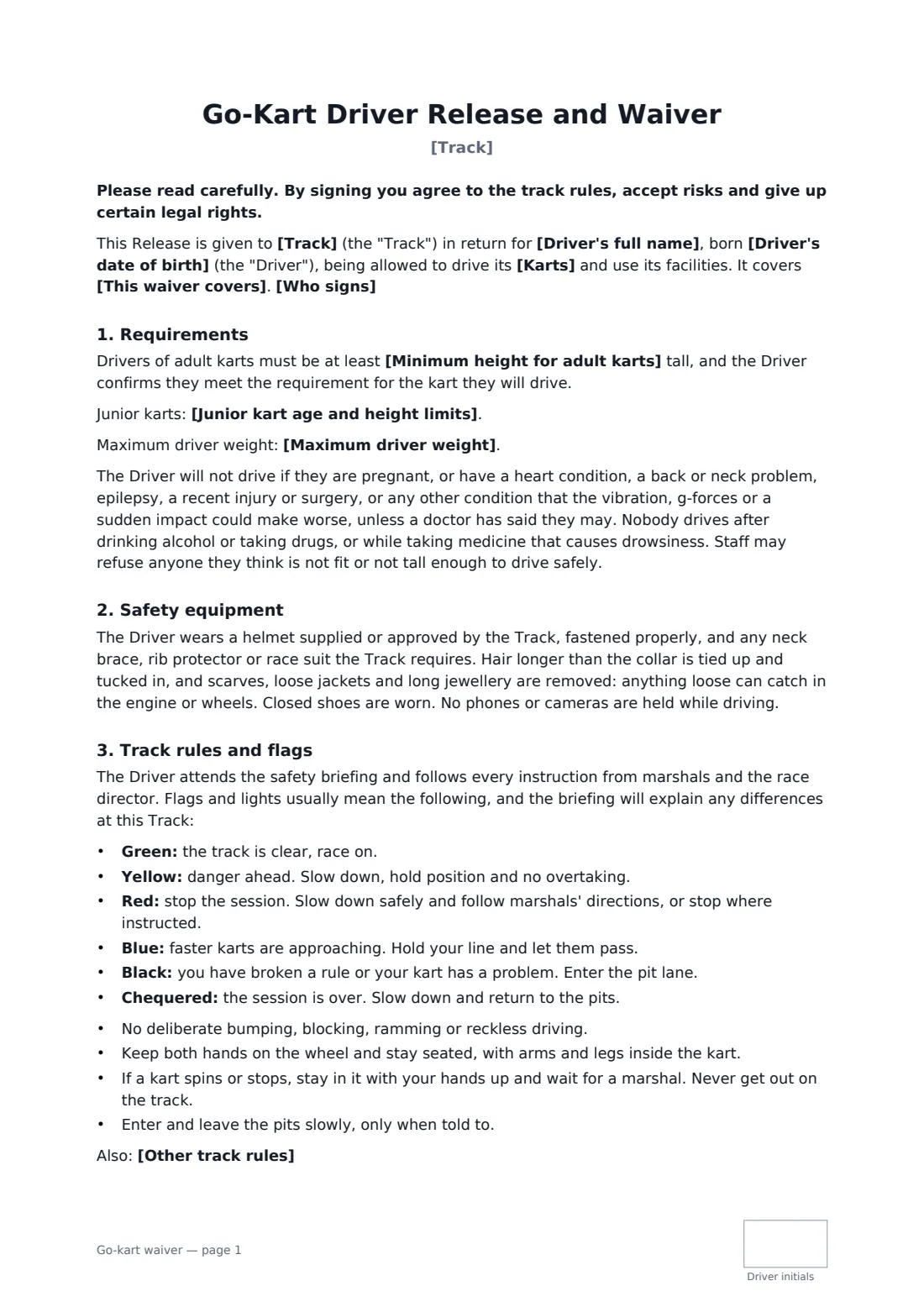
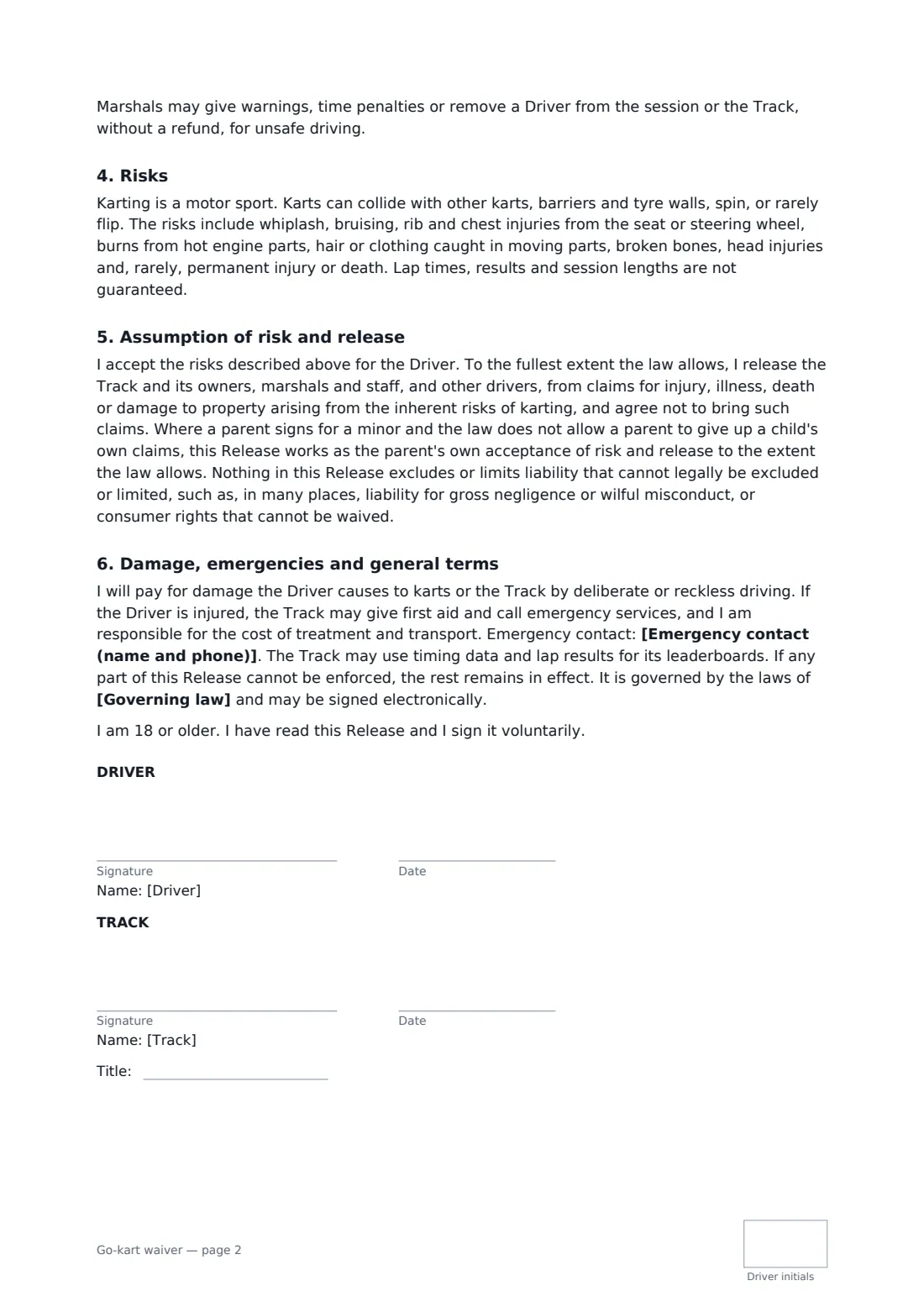
This template records the driver's name and date of birth, and whether they sign for themselves or a parent signs for a minor. You set the minimum height for adult karts, junior kart limits and any weight limit. It lists health conditions that need a doctor's go-ahead before driving, bans alcohol and drowsy medicine, and requires helmets and other kit, with hair and loose clothing tucked away. It explains each flag in plain words, sets driving rules (no ramming, stay in the kart after a spin), allows warnings and removal, and releases the track to the extent the law allows.
- Best for
- Indoor and outdoor karting tracks, electric karting venues
- Signed by
- The driver (or a parent for under-18s) and the track
- Flags
- Green, yellow, red, blue, black and chequered, explained
- Length
- 2 pages, initialled by the driver
When to use a go-kart waiver
- Walk-in arrive-and-drive sessions
- Kids' birthday parties on junior karts
- Corporate Grand Prix events
- League racers and members on a 12-month waiver
- Electric karting sessions at indoor venues
What you fill in
13 blanks, then the name and email of each person who signs: driver, track.
1 The track
- Track*
- This waiver covers* the visit on the date signed · all visits for 12 months from signing
- Karts* petrol karts · electric karts · petrol and electric karts · junior karts and two-seater karts
2 Requirements
- Minimum height for adult karts*
- Junior kart age and height limits
- Maximum driver weight
3 The driver
- Driver's full name*
- Driver's date of birth*
- Who signs* The driver is 18 or older and signs for themselves. · The driver is under 18, and their parent or legal guardian signs on their behalf.
- Parent or guardian's name
- Emergency contact (name and phone)*
4 Rules
- Governing law*
- Other track rules
5 Who signs
- Driver signature and date, initials on every page · The adult driver, or the parent or legal guardian of a driver under 18.
- Track signature and date, job title, initials on every page · The track owner, manager or race director.
What the go-kart waiver covers
- Requirements
- Safety equipment
- Track rules and flags
- Risks
- Assumption of risk and release
- Damage, emergencies and general terms
Using the go-kart waiver, step by step
1 Set your limits
Your track name fills in. Choose the kart type, add your adult height limit, junior limits and weight limit, and whether the waiver covers one visit or 12 months.
2 Send with bookings
Drivers sign at home from the booking link, so check-in is quick.
3 Driver or parent signs
The driver enters their date of birth. For under-18s, the parent chooses that option, adds their name and signs.
4 Countersign and keep
You countersign and every waiver is stored in your FileIt vault, searchable at the desk.
Tips before you send it
- Measure height at the desk anyway. A waiver doesn't replace a physical check.
- Show the flags in your briefing video and post them on the pit wall.
- Check helmets, neck braces and hair nets before each session.
- Ask your insurer and any karting association you belong to whether they require specific wording.
Sign it online in minutes
- Fill in the blanks. Names, dates and amounts go straight into the agreement — the preview shows exactly where.
- Name who signs. Tick “This is me” for your own part. FileIt builds the PDF with every signature, date and initials box on the right line, and you can check or move anything before sending.
- Send it. Each signer gets a secure link and signs from any device — no account needed. The signed PDF, with an audit trail and a Certificate of Completion, is filed in your vault and emailed to everyone.
Go-kart waiver: frequently asked questions
Can a parent sign for a child driver?
Yes. Choose the under-18 option and add the parent's name. The form then speaks for the parent.
Do I have to set height limits?
The adult height is required. Junior limits and a weight limit are optional and are left out of the waiver if you leave them empty.
Does it explain the flags?
Yes: green, yellow, red, blue, black and chequered, each in one plain sentence.
Can I use lap times on a leaderboard?
The form says the track may use timing data and lap results for its leaderboards.