What is a trampoline park waiver?
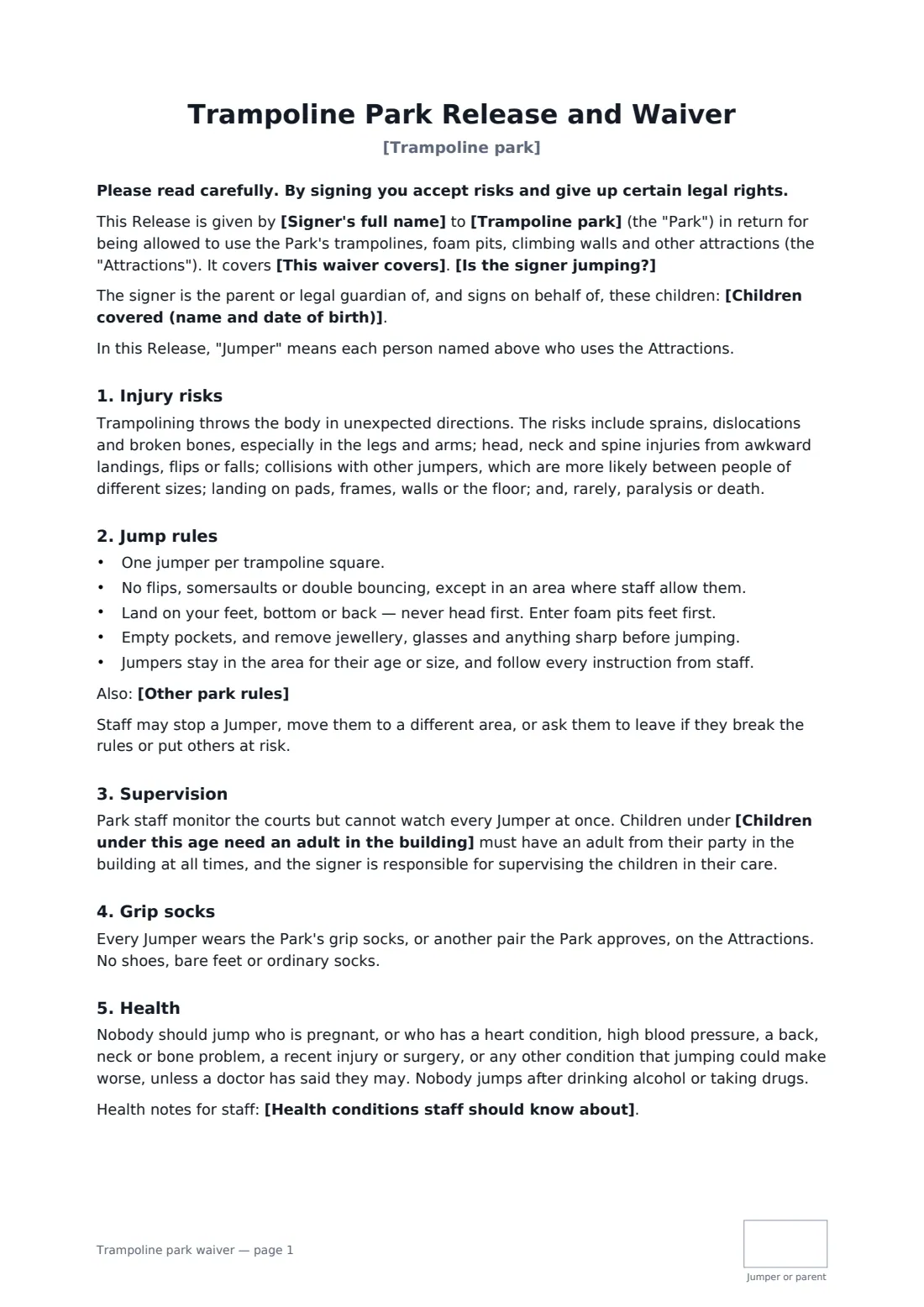
Trampoline parks see the same injuries again and again: collisions between a big jumper and a small one, flips that go wrong, and landings on frames or the floor. A waiver for a trampoline park should say that plainly and back it with clear rules — one jumper per square, feet-first into the foam pit, no flips outside the area where staff allow them.
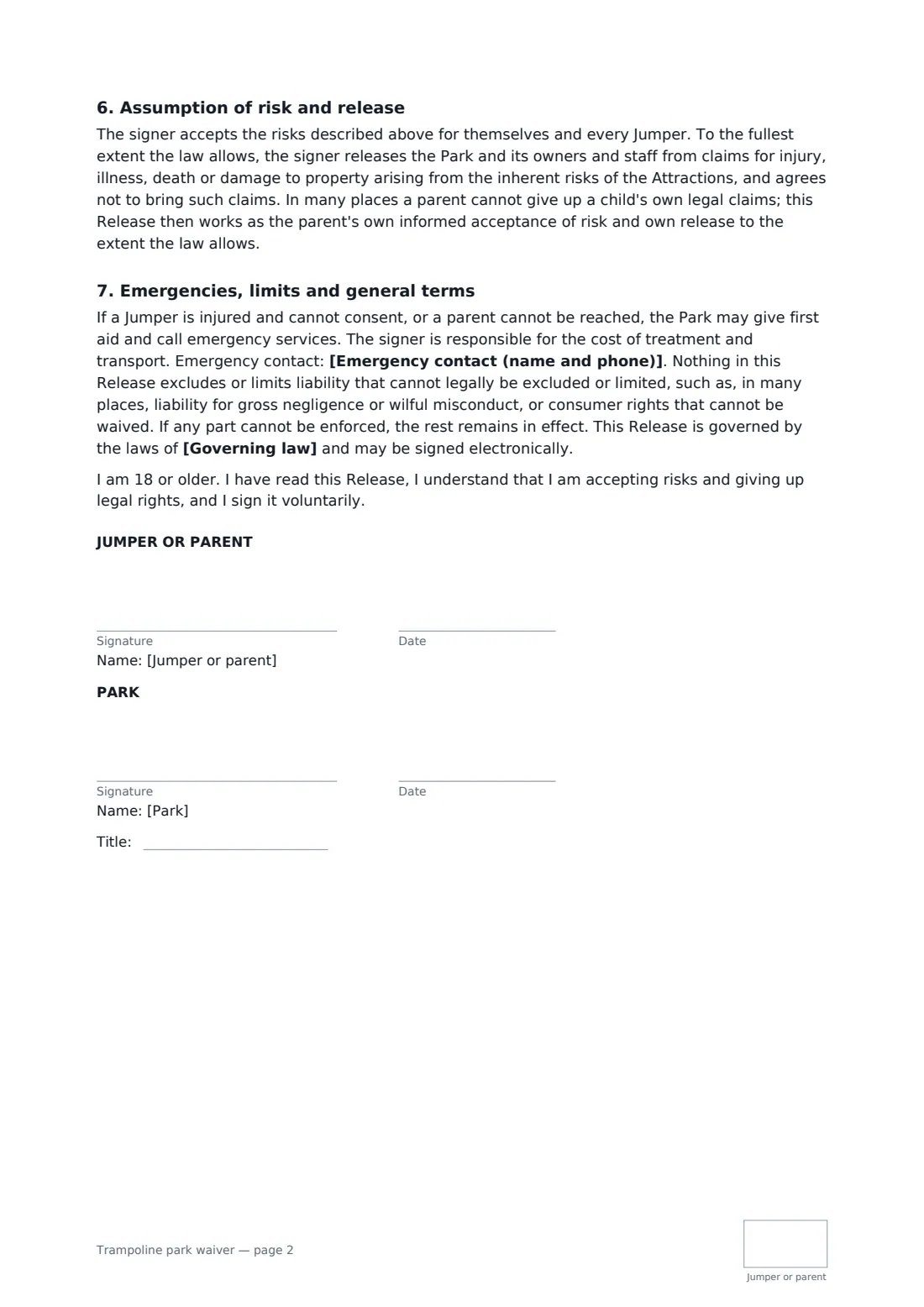
This template is built for busy front desks. A parent signs once and lists every child they're responsible for, with dates of birth, and says whether they're jumping too. You set the age under which children need an adult in the building and any extra rules, such as a weight limit or a toddler zone. The form covers grip socks, health conditions that make jumping unwise, no alcohol or drugs, and your staff's right to move or remove jumpers. The release goes as far as the law allows, with the usual explanation of how parent-signed waivers work, and every page is initialled. Choose a single visit or 12 months, so regulars don't sign every time.
- Best for
- Trampoline parks, jump centres, indoor play centres with trampolines
- Signed by
- The adult jumper or parent, and the park
- Covers
- The signer and all children listed, for one visit or 12 months
- Length
- 2 pages, initialled on every page
When to use a trampoline park waiver
- Families arriving for open jump sessions
- Birthday parties where each child's parent signs ahead
- Toddler sessions with a parent on the courts
- Teen nights and fitness classes for adults
- School or club group bookings
What you fill in
10 blanks, then the name and email of each person who signs: jumper or parent, park.
1 The park
- Trampoline park*
- This waiver covers* the visit on the date signed · all visits for 12 months from signing
- Children under this age need an adult in the building*
2 Who is jumping
- Signer's full name*
- Is the signer jumping?* The signer will jump. · The signer will not jump, and signs only for the children listed.
- Children covered (name and date of birth)
- Health conditions staff should know about
- Emergency contact (name and phone)*
3 Rules
- Other park rules
- Governing law*
4 Who signs
- Jumper or parent signature and date, initials on every page · The adult jumper, or a parent or legal guardian signing for themselves and the children listed.
- Park signature and date, job title, initials on every page
What the trampoline park waiver covers
- Injury risks
- Jump rules
- Supervision
- Grip socks
- Health
- Assumption of risk and release
- Emergencies, limits and general terms
Using the trampoline park waiver, step by step
1 Set your park rules
Your park name fills in. Set the supervision age, the period the waiver covers and any extra rules.
2 Send the link before the visit
Add the link to booking confirmations or party invitations so parents sign at home, not in the queue.
3 Parents list their children
The parent enters each child's name and date of birth, says whether they're jumping too, adds health notes and an emergency contact, and signs.
4 Countersign and look it up
You countersign, and every waiver is filed in your FileIt vault, searchable by the parent's name at the desk.
Tips before you send it
- Group jumpers by size where you can; collisions between people of very different sizes cause many injuries.
- Put the jump rules on court-side signs and in your safety video too.
- Keep the waiver period short enough that contact numbers stay up to date.
- Check whether your insurer or local regulations expect specific wording or age limits.
Sign it online in minutes
- Fill in the blanks. Names, dates and amounts go straight into the agreement — the preview shows exactly where.
- Name who signs. Tick “This is me” for your own part. FileIt builds the PDF with every signature, date and initials box on the right line, and you can check or move anything before sending.
- Send it. Each signer gets a secure link and signs from any device — no account needed. The signed PDF, with an audit trail and a Certificate of Completion, is filed in your vault and emailed to everyone.
Trampoline park waiver: frequently asked questions
Can one parent sign for several children?
Yes. List every child with their date of birth. The parent signs once for all of them.
What if the parent isn't jumping?
Choose "The signer will not jump". The waiver then covers only the children listed.
Is a parent's signature binding on the child?
In many places a parent can't give up a child's own claims. The form says so, and then works as the parent's own acceptance of risk and release to the extent the law allows.
Can parents sign on their phones in the lobby?
Yes. They don't need a FileIt account. Each signed PDF has an audit trail and a Certificate of Completion.