What is a birthday party booking agreement?
Children's parties run on tight schedules and high expectations. A play centre might host six parties on a Saturday; an entertainer might drive between three. The things that go wrong are predictable: twenty-five children turn up for a twelve-child package, nobody mentioned the peanut allergy, parents assume the staff are watching every child, or a family cancels the night before and expects the deposit back.
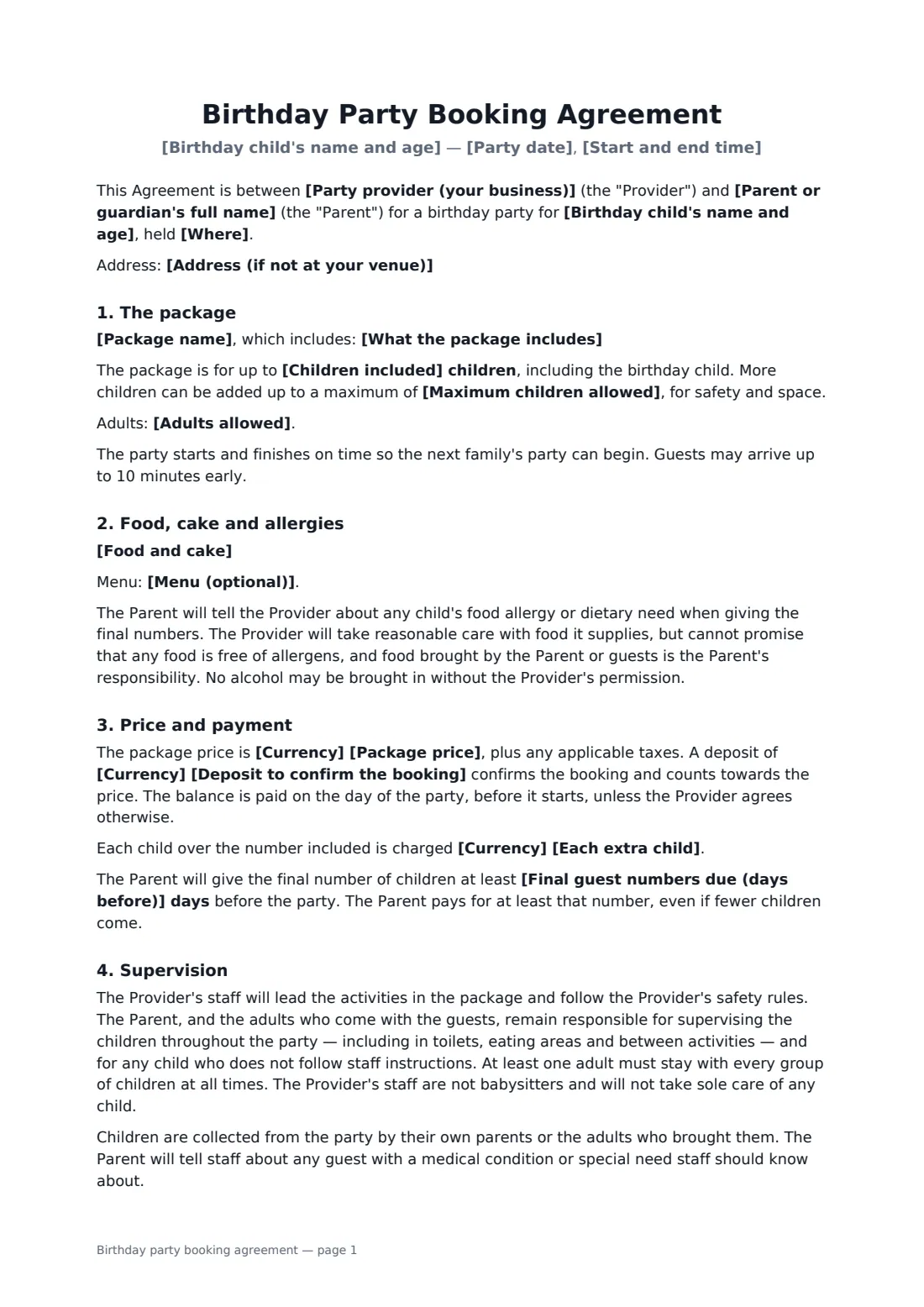
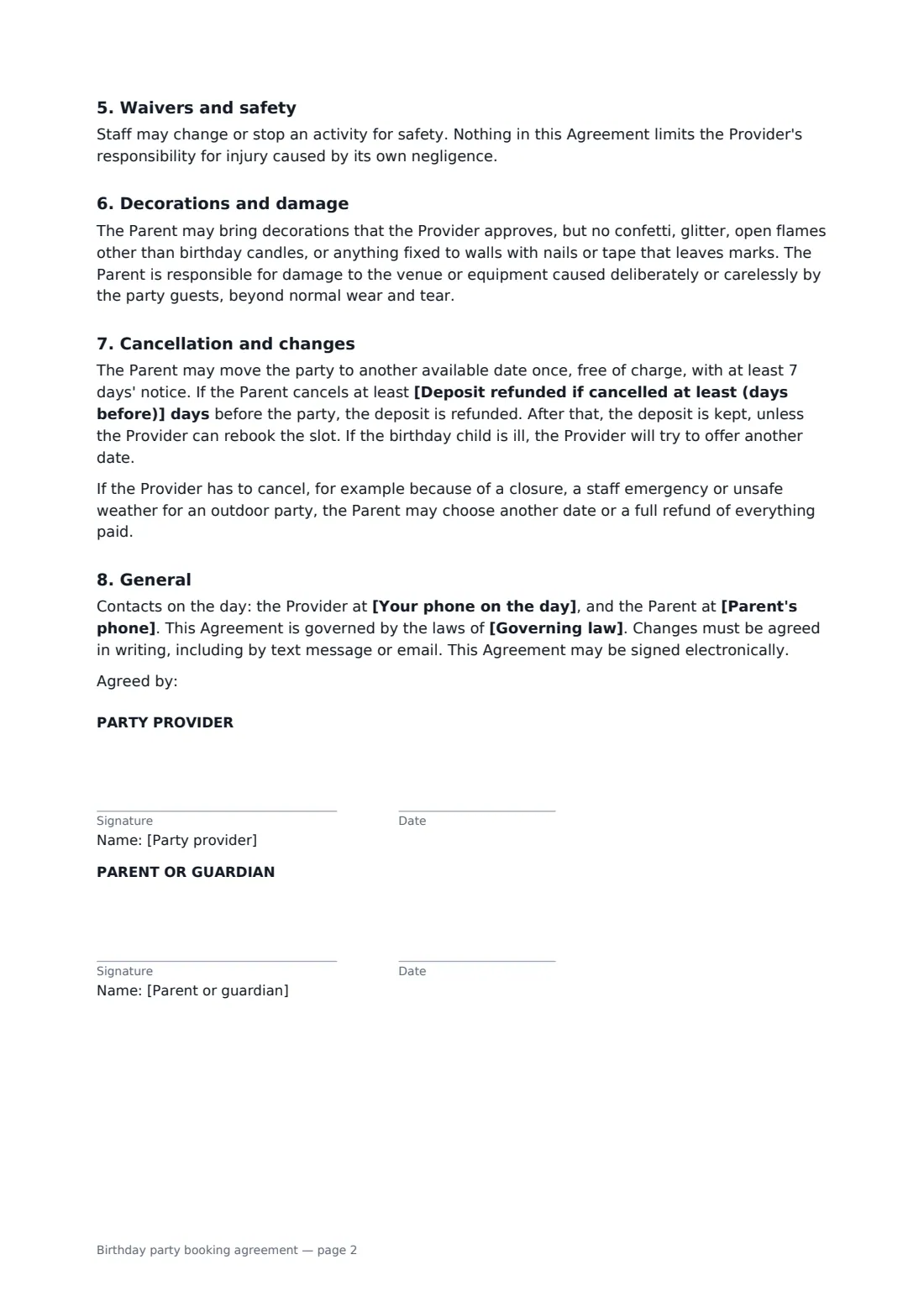
This booking agreement covers each of those. It records the birthday child, date and time, venue or home address, the named package and what it includes, the number of children included and the safety maximum, and whether you or the parent supplies the food and cake. The parent gives final numbers a few days ahead and tells you about allergies. It is clear that party staff lead activities while the parent and accompanying adults supervise the children. You choose whether each child needs a signed activity waiver, and it covers decorations, damage, a one-time free date change, the deposit refund window and what happens if you have to cancel.
- Best for
- Play centres, trampoline parks, pools, studios and party entertainers
- Signed by
- The party provider and the parent or guardian
- Deposit
- Confirms the booking; refunded if cancelled early enough
- Length
- 2 to 3 pages
When to use a birthday party booking agreement
- A trampoline park or climbing centre booking a weekend party slot
- A swim school hosting a pool party package
- A magician, face painter or character entertainer booked for a party at home
- An art or pottery studio running a craft birthday party
- A farm or petting zoo hosting a party with animal encounters
What you fill in
24 blanks, then the name and email of each person who signs: party provider, parent or guardian.
1 The parties
- Party provider (your business)*
- Your phone on the day*
- Parent or guardian's full name*
- Parent's phone*
2 The party
- Birthday child's name and age*
- Party date*
- Start and end time*
- Where* at the Provider's venue · at the Parent's home or chosen location
- Address (if not at your venue)
3 The package
- Package name*
- What the package includes*
- Children included*
- Maximum children allowed*
- Adults allowed
- Food and cake* The Provider supplies the food in the package; the Parent may bring a birthday cake. · The Provider supplies all food and the cake. · The Parent brings all food and the cake. · No food is served.
- Menu (optional)
4 Price
- Currency*
- Package price*
- Each extra child
- Deposit to confirm the booking*
- Final guest numbers due (days before)*
5 Safety
- Activity waiver needed for each child?* Yes · No
6 Cancellation
- Deposit refunded if cancelled at least (days before)*
- Governing law*
7 Who signs
- Party provider signature and date · The venue, play centre or entertainer hosting the party.
- Parent or guardian signature and date · The parent or guardian booking the party and responsible for the guests.
What the birthday party booking agreement covers
- The package
- Food, cake and allergies
- Price and payment
- Supervision
- Waivers and safety
- Decorations and damage
- Cancellation and changes
- General
Using the birthday party booking agreement, step by step
1 The party
Enter the birthday child's name and age, the date and time, and whether it's at your venue or at the family's home or chosen place.
2 The package
Name the package and list what it includes, the number of children included and the maximum, any adults allowed, and the food arrangement and menu.
3 Price and numbers
Enter the package price, the cost of each extra child and the deposit, and how many days before the party you need the final guest count.
4 Safety and send
Choose whether each child needs a signed activity waiver, set the deposit refund window and send it. The parent signs from their phone in a minute.
Tips before you send it
- If each child needs a waiver, send the link with the invitations so forms are signed before the day, not at the front desk.
- Ask for allergies with the final numbers, and repeat them to staff on the morning of the party.
- Say the 'adults supervise' rule out loud at the start of the party too — it's the clause families most often skim.
- Keep a list of families who'd like a short-notice slot. It makes it easier to rebook a cancelled party and be generous with the deposit.
Sign it online in minutes
- Fill in the blanks. Names, dates and amounts go straight into the agreement — the preview shows exactly where.
- Name who signs. Tick “This is me” for your own part. FileIt builds the PDF with every signature, date box on the right line, and you can check or move anything before sending.
- Send it. Each signer gets a secure link and signs from any device — no account needed. The signed PDF, with an audit trail and a Certificate of Completion, is filed in your vault and emailed to everyone.
Birthday party booking agreement: frequently asked questions
Who supervises the children at the party?
The provider's staff lead the activities and follow safety rules, but the parent and the adults who come with the guests stay responsible for supervising the children throughout. At least one adult stays with each group, and staff don't take sole care of any child.
Do guests need a waiver?
You choose. For active parties — trampolines, climbing, swimming, skating, animals — select yes, and every child needs a form signed by their own parent or guardian before joining in. Send your waiver separately; FileIt also has a parental consent template you can use.
Is the deposit refundable?
Yes, if the parent cancels at least the number of days you set before the party. After that it's kept unless you rebook the slot. The parent can also move the date once for free with a week's notice.
Can a party booking be signed online?
Yes. A booking like this is an ordinary consumer contract, and electronic signatures are generally valid for it in the US (ESIGN Act and UETA), the UK, the EU (eIDAS) and Canada. FileIt saves the signed PDF with an audit trail and a Certificate of Completion.
Is this template free?
Yes. It's free in FileIt's eSignature app, and parents sign from a link — no account needed.