What is Form CT-W4P?
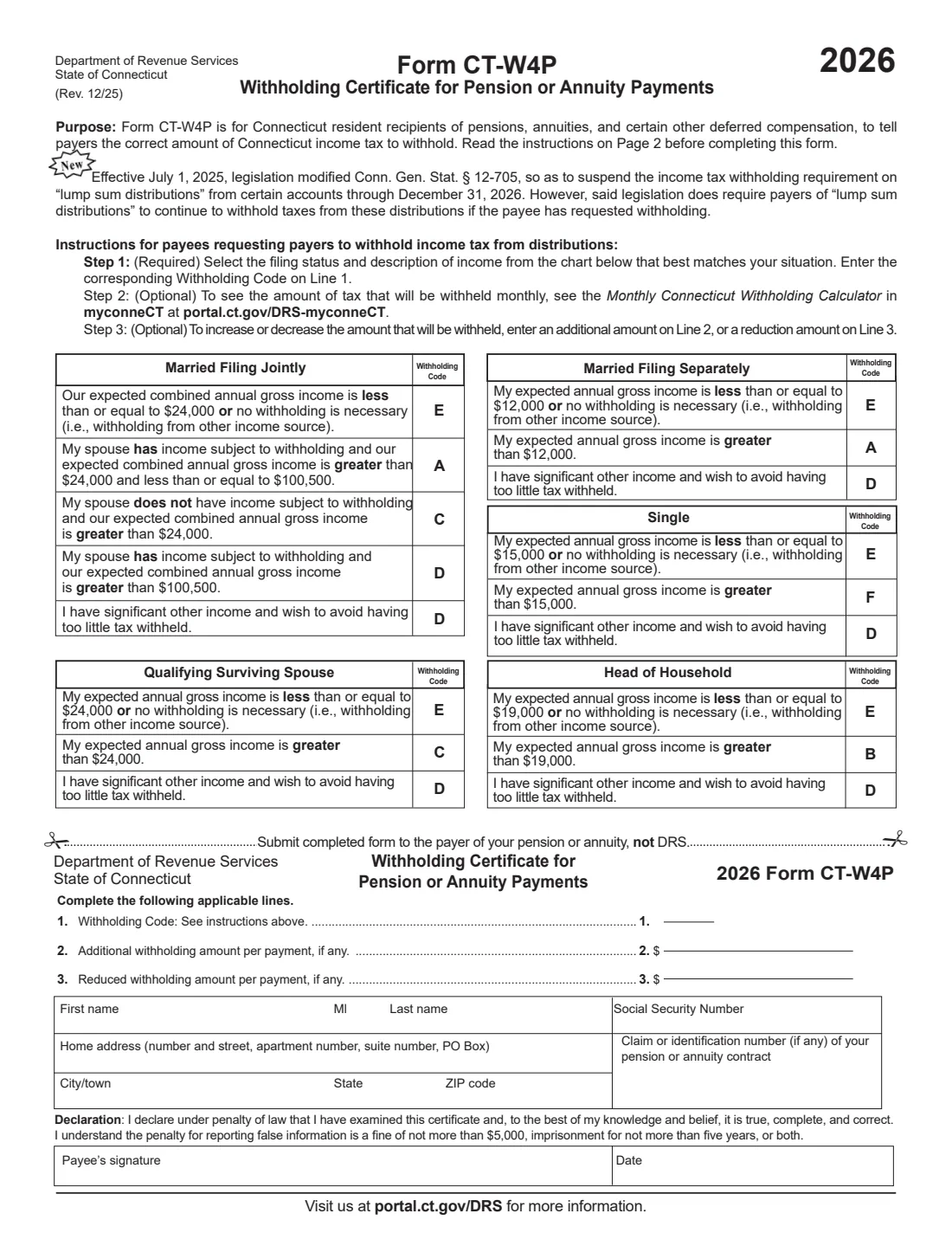
Form CT-W4P is for Connecticut residents who receive pensions, annuities and certain other deferred compensation, such as employer pensions, profit-sharing plans, deferred compensation plans and traditional IRAs. Payers don't have to withhold Connecticut income tax from these payments, so the form is how you ask for it, which can keep you from owing a lump of tax when you file.
Like Form CT-W4 for wages, it works with a single Withholding Code letter (A, B, C, D, E or F) chosen from a table by the filing status you expect to use and your expected annual gross income, plus an optional extra or reduced amount per payment. The current edition is Rev. 12/25, for 2026, from the Connecticut Department of Revenue Services (DRS).
FileIt asks for your filing status and which statement fits you, works out the code letter from the form's tables, and prints your answers on the DRS PDF, ready to sign by hand or with FileIt eSignature. The finished form is saved in the person's vault folder. FileIt never files it: you give it to the payer of your pension or annuity, not to DRS.
- Who fills it
- Connecticut residents receiving taxable pension, annuity or other deferred compensation payments.
- Given to
- The payer of your pension or annuity, not DRS.
- Withholding Codes
- A, B, C, D, E or F, chosen from the tables by filing status and expected annual gross income.
- If you don't file one
- The payer instructions say no Connecticut tax is withheld.
- How long it lasts
- Until you give the payer a new one.
- Edition
- CT-W4P (Rev. 12/25), 2026
Who needs to fill out Form CT-W4P?
- Connecticut retirees receiving a pension who want Connecticut income tax taken out of each payment.
- People taking taxable distributions from a 401(k), 403(b), deferred compensation plan or traditional IRA.
- Retirees who owed Connecticut tax last year because nothing was withheld from their pension.
- Anyone who wants to change the amount already being withheld from their pension or annuity.
When to use Form CT-W4P
- When you start receiving a pension or annuity and want Connecticut tax withheld.
- When your filing status or income changes, or you want a different amount withheld.
- When you take a lump-sum distribution and want tax withheld: the form says the withholding requirement on lump-sum distributions from certain accounts is suspended through December 31, 2026, but payers must still withhold if you ask on Form CT-W4P.
What you need before you start
- Your name, Social Security number and Connecticut home address.
- The filing status you expect to use on your Connecticut income tax return.
- An estimate of your annual gross income (and your spouse's, if you file jointly), after the pension and annuity deductions the instructions describe.
- The claim or identification number of your pension or annuity contract, if you have one.
- Any extra or reduced amount per payment you want.
What’s on Form CT-W4P
The 2025 edition has 2 pages. FileIt asks for it in 3 parts, and it is signed by Payee (pension or annuity recipient):
- Line 1: Your Withholding CodePayee (pension or annuity recipient)
- Lines 2 and 3: Adjust the amount per paymentPayee (pension or annuity recipient)
- Your name, SSN and home addressPayee (pension or annuity recipient)
How to fill out Form CT-W4P, step by step
1 Pick your filing status and statement
The form has five tables: Married Filing Jointly, Qualifying Surviving Spouse, Married Filing Separately, Single and Head of Household. In yours, pick the statement about your expected annual gross income. For example, a single filer expecting more than $15,000 uses code F, and a head of household expecting more than $19,000 uses code B. Code E means no withholding is necessary, and code D gives the highest withholding if you have significant other income. FileIt enters the letter on line 1.
2 Work out your gross income
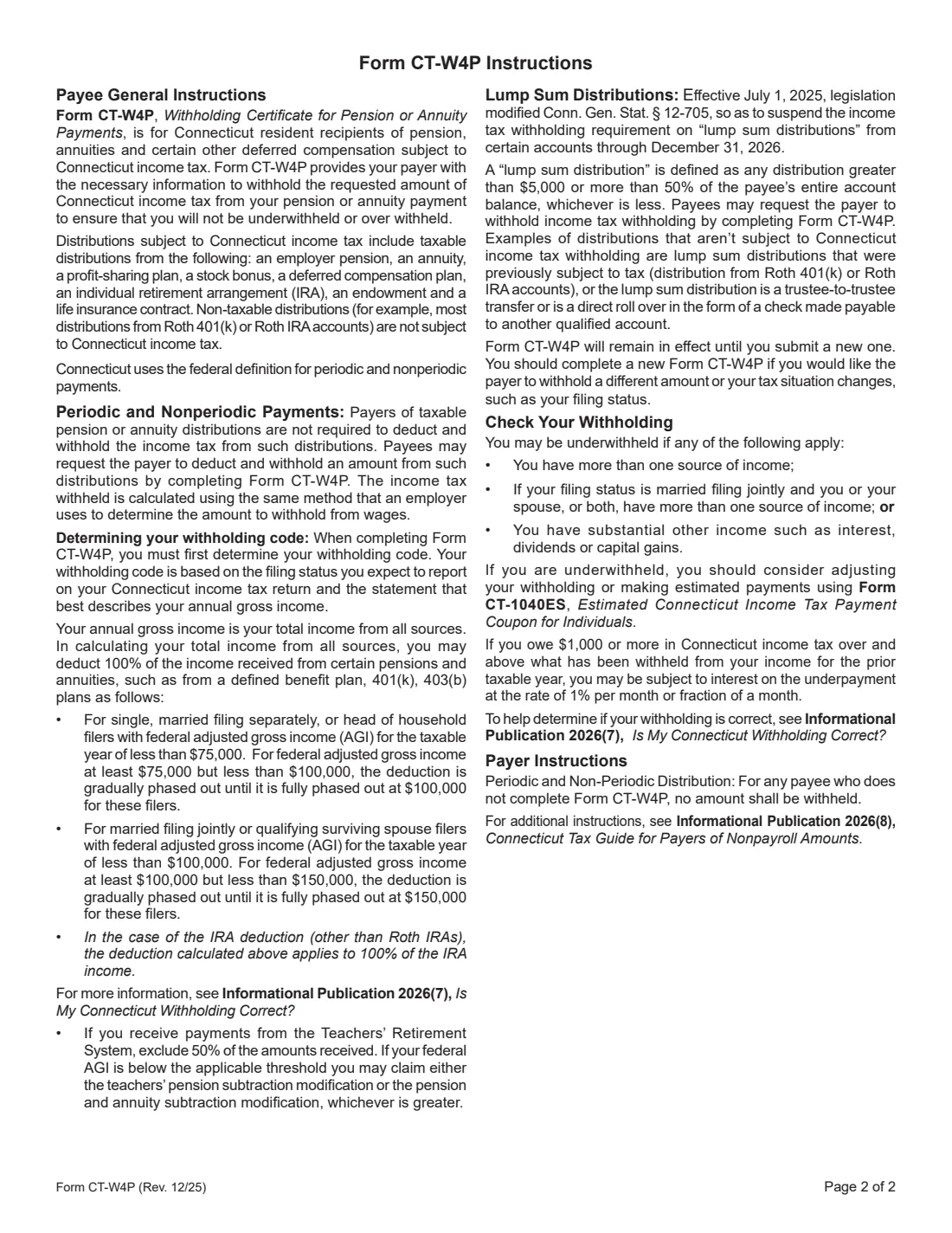
Page 2 explains that gross income is your total income from all sources, but you may deduct qualifying pension and annuity income (fully below the federal AGI limits, phased out above them) and half of Teachers' Retirement System payments.
3 Lines 2 and 3: adjust per payment
Line 2 adds an amount to each payment's withholding; line 3 reduces it. The Monthly Connecticut Withholding Calculator in myconneCT shows what will be withheld each month.
4 Your details and signature
Enter your name, SSN, home address and any claim or contract number, then sign and date the declaration.
Common mistakes to avoid
- Sending the form to DRS instead of the payer of your pension or annuity.
- Counting pension income you're allowed to deduct, which can push you into a higher code than you need.
- Forgetting other sources of income, such as a second pension, interest, dividends or capital gains, which can leave you underwithheld.
- Filling in both line 2 and line 3.
After you fill it out
Sign it and give it to the payer of your pension or annuity. Keep a copy; FileIt saves the PDF in the person's vault folder.
It stays in effect until you give the payer a new one.
If you may still be underwithheld, the form suggests estimated payments with Form CT-1040ES, and Informational Publication 2026(7), Is My Connecticut Withholding Correct?, helps you check.
Fill out Form CT-W4P online with FileIt
- Pick the person. Choose someone from People and FileIt fills in their name, date of birth, address and other details it already knows.
- Answer plain-language questions. One part of the form at a time, with the official help text beside each question — 19 fields in all. Your answers save as you go.
- Check the live preview. Watch your answers land on the real Connecticut Department of Revenue Services (DRS) form, and let FileIt do any worksheet arithmetic.
- Generate the official PDF. FileIt prints your answers into the agency’s own PDF and files it in that person’s folder in your vault. Sign it, or send it for e-signature.
FileIt fills the form — it never files or submits anything for you. Deliver the finished form to whoever asked for it, the way the form’s instructions say.
Start Form CT-W4P now — it’s freeForm CT-W4P: frequently asked questions
Does my pension payer have to withhold Connecticut tax?
No. The form says payers aren't required to withhold from pension or annuity distributions; you ask them to by completing Form CT-W4P. Without one, no amount is withheld.
Is CT-W4P the same as the federal W-4P?
No. Form W-4P covers federal withholding from pensions and annuities; CT-W4P covers Connecticut income tax only.
Are Roth IRA distributions covered?
The instructions say non-taxable distributions, such as most from Roth 401(k) or Roth IRA accounts, aren't subject to Connecticut income tax.
What happens if too little is withheld?
The form says that if you owe $1,000 or more over what was withheld for the prior year, you may be charged interest on the underpayment at 1% per month or fraction of a month.
Can I sign it electronically?
FileIt places a signature box for its eSignature, or you can print it and sign by hand. Check that your payer accepts an electronically signed form.
Official sources
- Blank form (PDF), published by Connecticut Department of Revenue Services (DRS): https://portal.ct.gov/-/media/drs/forms/2025/wth/ct-w4p_1225.pdf?rev=16342cafe65b4561a9f95e09088e37a8
- Official instructions and guidance: https://portal.ct.gov/drs/withholding-tax/withholding-tax
- Edition shown on this page: CT-W4P (Rev. 12/25), for 2026 (checked 2026-10-25).
FileIt is not affiliated with or endorsed by Connecticut Department of Revenue Services (DRS) or any government. This page explains the form in general terms and is not legal, tax or immigration advice. Always read the official instructions, and check that you are using the edition the recipient accepts. Page last reviewed 2026-10-25.