What is Form MI W-4P (4924)?
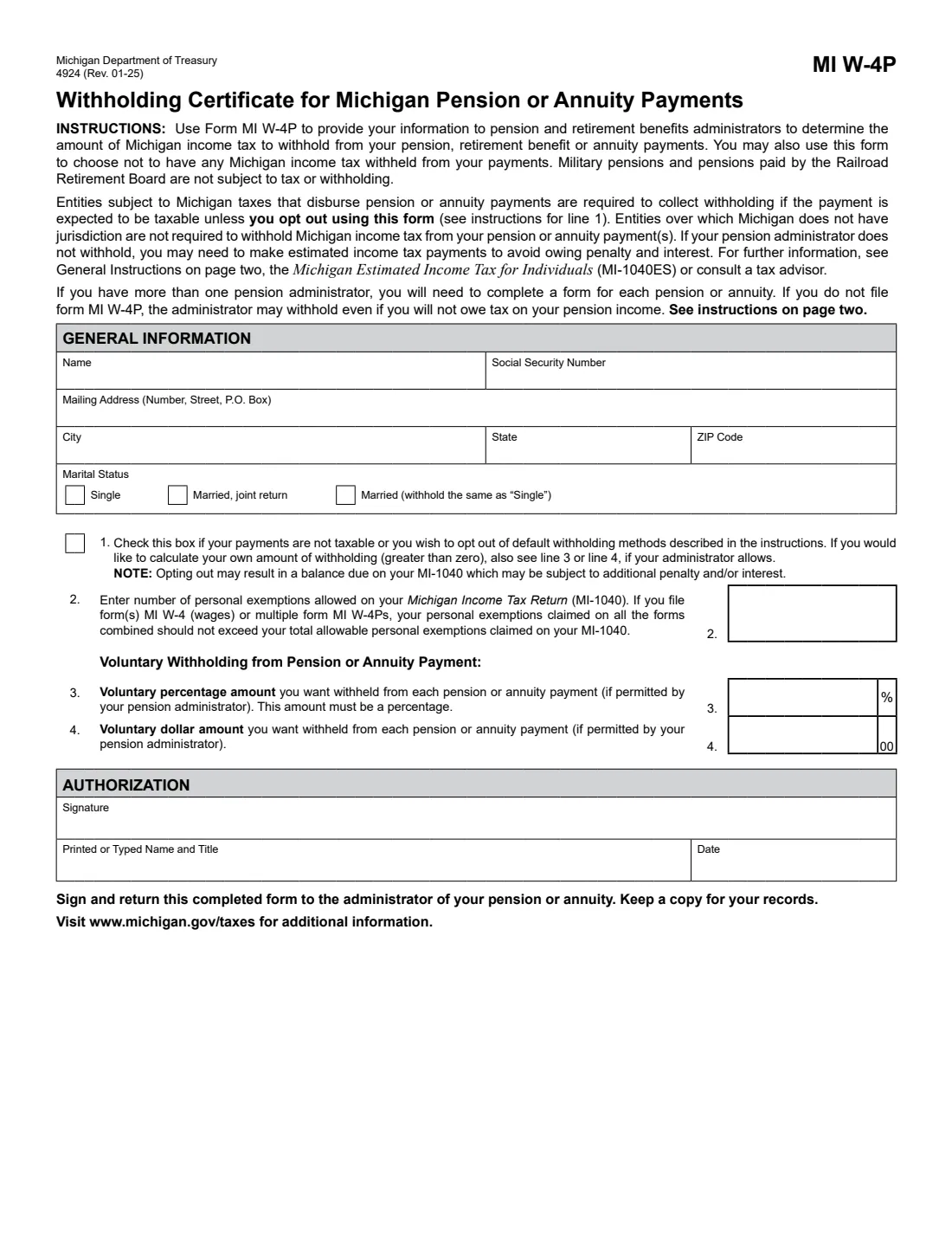
Form MI W-4P (Form 4924), the Withholding Certificate for Michigan Pension or Annuity Payments, is how retirees tell a pension, retirement benefit or annuity administrator how much Michigan income tax to withhold. It's issued by the Michigan Department of Treasury; the edition line reads Rev. 01-25, and the instructions in the current file carry the 2026 figures.
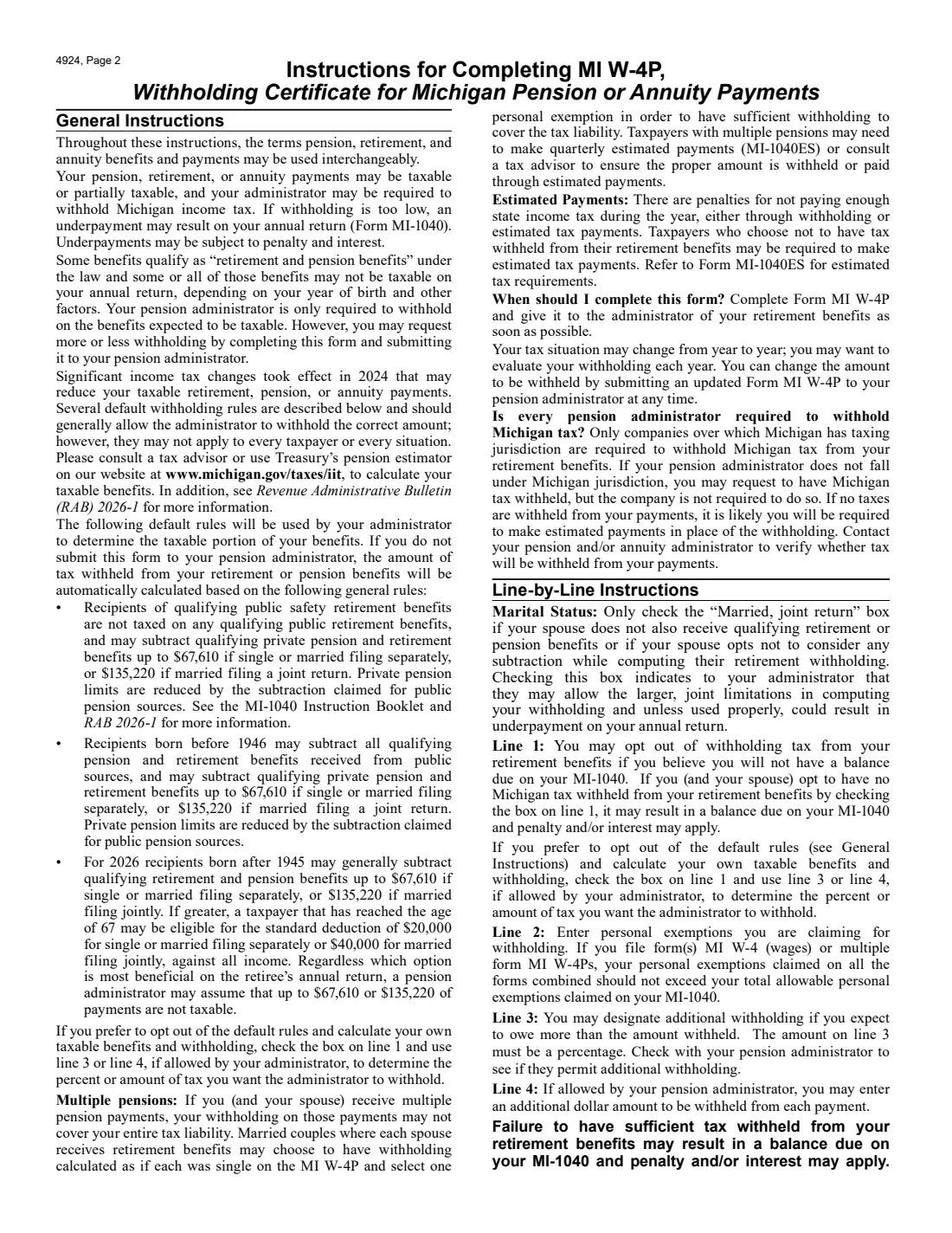
Michigan's tax on retirement income depends on your year of birth and other factors, and significant changes took effect in 2024. Without this form, the administrator applies default rules, and for 2026 may assume that up to $67,610 (single or married filing separately) or $135,220 (married filing jointly) of qualifying benefits isn't taxable. With the form you give your marital status and personal exemptions, can add a voluntary percentage or dollar amount, or opt out of the default withholding. Military pensions and Railroad Retirement Board pensions aren't subject to Michigan tax or withholding.
FileIt lets you fill out the MI W-4P online in a guided form. It pre-fills your name from the People records in your vault and prints your answers into Treasury's official PDF. The finished form is saved in your vault and can be sent for e-signature. FileIt never submits anything to Treasury or your administrator: you return the form to your administrator yourself.
- Who fills it
- The person receiving the pension, retirement benefits or annuity.
- Given to
- The administrator of your pension or annuity, one form for each.
- When
- As soon as possible, and whenever you want to change your withholding.
- Signatures
- You sign the Authorization section.
- Edition
- 4924 (Rev. 01-25), with 2026 instructions.
- Cost
- Free to fill out on any FileIt account.
Who needs to fill out Form MI W-4P (4924)?
- Michigan residents receiving taxable or partly taxable pension, retirement or annuity payments.
- Retirees who want more or less withheld than the administrator's default rules give.
- Retirees whose payments aren't taxable, or who want to opt out of the default withholding.
- Married couples who both receive retirement benefits and want each to be withheld as if single.
- Anyone with more than one pension or annuity, since you need a form for each administrator.
When to use Form MI W-4P (4924)
- When you start receiving a pension, retirement benefit or annuity.
- Each year, as the instructions suggest, since your tax situation may change.
- When you want a voluntary percentage (line 3) or dollar amount (line 4) withheld, if your administrator allows it.
- When you expect not to owe Michigan tax and want no withholding (line 1).
What you need before you start
- Your name, Social Security number and mailing address.
- Your marital status for withholding.
- The number of personal exemptions you can claim on your MI-1040, less any you claim on an MI-W4 or another MI W-4P.
- The percentage or dollar amount you want withheld, if any.
What’s on Form MI W-4P (4924)
The 2025 edition has 2 pages. FileIt asks for it in 3 parts, and it is signed by Payee (the person receiving the pension or annuity):
- General informationPayee (the person receiving the pension or annuity)
- Lines 1–4: WithholdingPayee (the person receiving the pension or annuity)
- AuthorizationPayee (the person receiving the pension or annuity)
How to fill out Form MI W-4P (4924), step by step
1 General information
Enter your name, Social Security number, mailing address, city, state and ZIP code. FileIt pre-fills your name from the person's record in your vault.
2 Marital status
Check Single, Married (joint return) or Married (withhold the same as "Single"). The instructions say to check "Married, joint return" only if your spouse doesn't also receive qualifying retirement or pension benefits, or opts not to consider any subtraction, because it lets the administrator use the larger joint limits.
3 Line 1: Opt out
Check line 1 if your payments aren't taxable or you want to opt out of the default withholding methods. Opting out may leave a balance due on your MI-1040, with penalty and/or interest. To set your own withholding instead, also use line 3 or line 4.
4 Line 2: Personal exemptions
Enter the number of personal exemptions allowed on your MI-1040. If you also file an MI-W4 for wages or several MI W-4Ps, the exemptions on all of them combined should not exceed those on your MI-1040.
5 Lines 3 and 4: Voluntary withholding
If your administrator permits it, enter a percentage to withhold from each payment on line 3, or a dollar amount on line 4. Line 4 is whole dollars, as the form prints 00 after the box.
6 Authorization
FileIt prints your name (and a title, if you give one) and the date. You sign by hand or by e-signature, return the form to your administrator and keep a copy.
Common mistakes to avoid
- Checking "Married, joint return" when your spouse also receives qualifying retirement benefits: the instructions warn it could result in underpayment.
- Claiming the same personal exemptions on more than one MI W-4P or MI-W4.
- Opting out on line 1 and then owing at filing time: estimated payments (MI-1040ES) may be needed.
- Using one form for several pensions: complete a form for each administrator.
- Entering cents on line 4.
After you fill it out
Sign the MI W-4P and return it to the administrator of your pension or annuity. Keep a copy for your records.
Check with your administrator that Michigan tax will be withheld: only companies under Michigan's taxing jurisdiction are required to withhold. If nothing is withheld, you may need to make estimated payments.
FileIt saves the finished PDF in the person's folder in your vault. Submit an updated MI W-4P whenever you want to change the amount.
Fill out Form MI W-4P (4924) online with FileIt
- Pick the person. Choose someone from People and FileIt fills in their name, date of birth, address and other details it already knows.
- Answer plain-language questions. One part of the form at a time, with the official help text beside each question — 13 fields in all. Your answers save as you go.
- Check the live preview. Watch your answers land on the real Michigan Department of Treasury form, and let FileIt do any worksheet arithmetic.
- Generate the official PDF. FileIt prints your answers into the agency’s own PDF and files it in that person’s folder in your vault. Sign it, or send it for e-signature.
FileIt fills the form — it never files or submits anything for you. Deliver the finished form to whoever asked for it, the way the form’s instructions say.
Start Form MI W-4P (4924) now — it’s freeForm MI W-4P (4924): frequently asked questions
What is Form MI W-4P?
It's Michigan Form 4924, the Withholding Certificate for Michigan Pension or Annuity Payments. You give it to your pension, retirement benefit or annuity administrator to set how much Michigan income tax is withheld, or to opt out.
What happens if I don't file an MI W-4P?
The form says the administrator may withhold even if you won't owe tax on your pension income, using the default rules described in the instructions.
How much of my pension is exempt from Michigan tax in 2026?
It depends on your year of birth and the type of pension. The instructions say that for 2026 an administrator may assume up to $67,610 (single or married filing separately) or $135,220 (married filing jointly) isn't taxable, and describe other rules for public safety retirees and those born before 1946. Treasury's pension estimator can help.
Is my military pension taxed in Michigan?
The form says military pensions and pensions paid by the Railroad Retirement Board are not subject to Michigan tax or withholding.
Where do I send the MI W-4P?
To the administrator of your pension or annuity, not to Treasury. FileIt doesn't submit it for you.
Can I fill out the MI W-4P online?
Yes. FileIt lets you fill it out online free and prints your answers into Treasury's official PDF. You can download, print or e-sign it before returning it to your administrator.
Official sources
- Blank form (PDF), published by Michigan Department of Treasury: https://www.michigan.gov/taxes/-/media/Project/Websites/taxes/Forms/All-Years/MI-W4P_4924.pdf?rev=f3e9cefd09ab4a3391687bf0bb61e94e
- Official instructions and guidance: https://www.michigan.gov/taxes/biz-forms/withholding/2026-withholding-tax-forms
- Edition shown on this page: 4924 (Rev. 01-25) (checked 2026-10-25).
FileIt is not affiliated with or endorsed by Michigan Department of Treasury or any government. This page explains the form in general terms and is not legal, tax or immigration advice. Always read the official instructions, and check that you are using the edition the recipient accepts. Page last reviewed 2026-10-25.