What is Michigan Form 151?
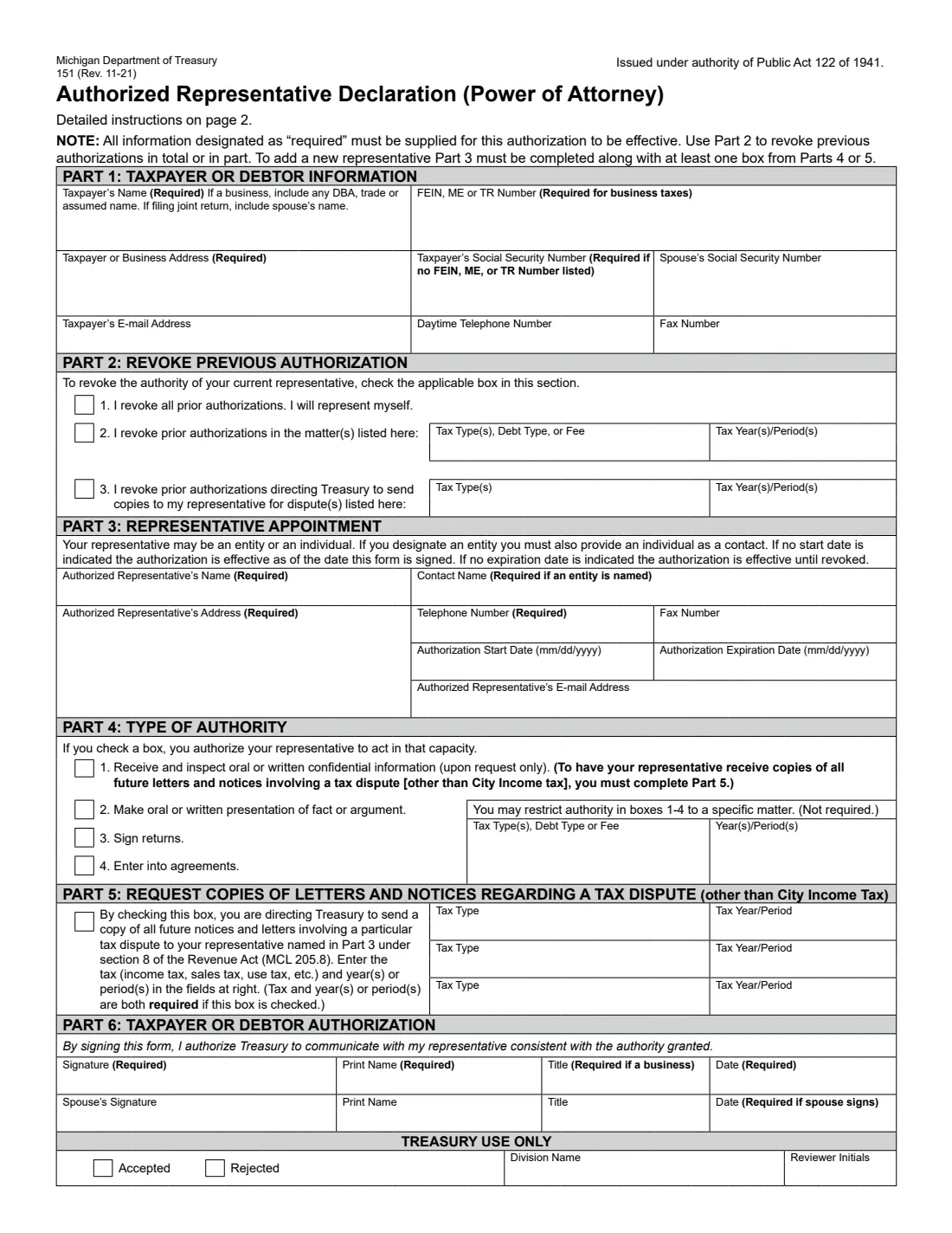
Form 151 is the Michigan Department of Treasury's Authorized Representative Declaration, its power of attorney for tax, debt and fee matters. State law strictly limits who Treasury may discuss your confidential tax information with, so if you want a tax preparer, attorney, family member or firm to deal with Treasury for you, you name them on Form 151. The current edition is 151 (Rev. 11-21).
The form has six parts: your details (Part 1), revoking earlier authorizations (Part 2), the representative you appoint (Part 3), what they may do (Part 4: inspect confidential information, make presentations of fact or argument, sign returns, enter into agreements), a request that Treasury send them copies of notices in a particular tax dispute (Part 5), and your signature (Part 6). Every box marked 'Required' must be filled in or the form is invalid.
FileIt lets you fill out Form 151 online. It pre-fills your name from the People records in your vault, shows only the parts you need for appointing or revoking, checks the form's own rules (such as naming specific taxes and periods in Part 5), and prints your answers on Treasury's own PDF. The filled form is saved in your vault, and you can send it for e-signature. FileIt never submits anything: you send it to Treasury yourself, as page 2 directs.
- Who fills it
- The taxpayer or debtor, an individual or a business. A spouse on a joint return can sign too.
- Representative
- An individual, or an entity such as a law firm (then give a contact name).
- Duration
- From the start date (or the signing date) until the expiration date, or until revoked if none is given.
- Not for
- A deceased taxpayer, or City Income Tax disputes in Part 5.
- Signatures
- The taxpayer signs and dates Part 6; the spouse signs too on a joint return.
- Edition
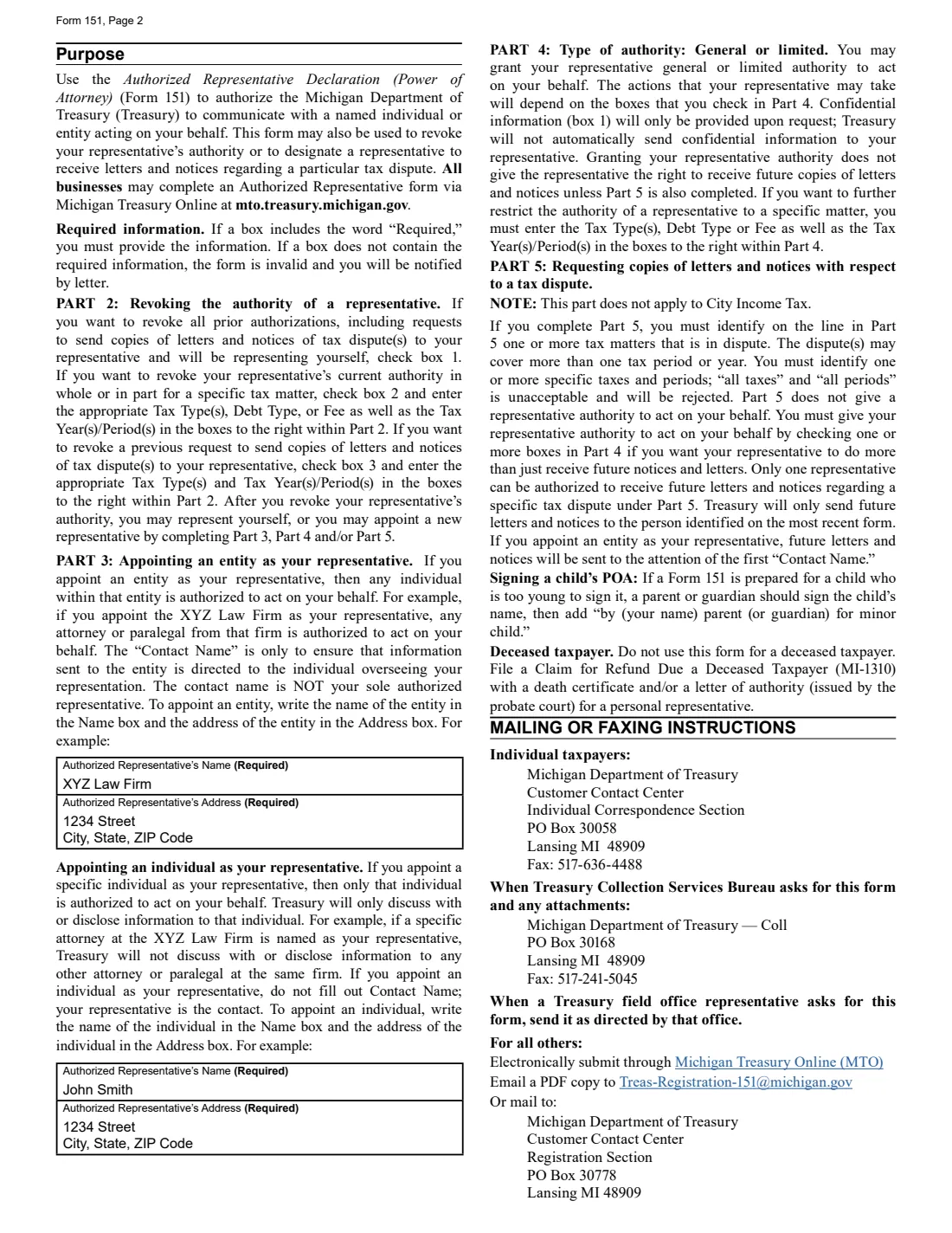
- 151 (Rev. 11-21): the form on page 1, instructions on page 2.
Who needs to fill out Michigan Form 151?
- Michigan taxpayers who want a tax preparer, attorney or family member to talk to Treasury for them.
- Businesses appointing an accounting or law firm as their representative.
- Parents or guardians acting for a child too young to sign.
- Anyone who wants to revoke a representative's authority, in full or for specific matters.
- Taxpayers in a tax dispute who want their representative to receive copies of Treasury's letters and notices.
When to use Michigan Form 151
- When you hire someone to handle a Michigan tax audit, assessment, debt or dispute.
- When you want your representative to receive copies of future notices about a specific dispute.
- When you change representatives or want to represent yourself again.
- When Treasury's Collection Services Bureau or a field office asks you for the form.
What you need before you start
- Your name (including your spouse's if you file jointly, or any DBA for a business), address, and your SSN or FEIN, ME or TR number.
- Your representative's name, address and telephone number, plus a contact name if the representative is an entity.
- The start and expiration dates, if you want to limit the authorization in time.
- The tax types and years or periods, if you restrict the authority, revoke for specific matters, or ask for copies in a dispute.
- A title for the signer, if the taxpayer is a business.
What’s on Michigan Form 151
The 2021 edition has 2 pages. FileIt asks for it in 8 parts, and it is signed by Taxpayer and Spouse:
- Part 1: Taxpayer or debtor informationTaxpayer
- What do you want to do?Taxpayer
- Part 2: Revoke previous authorizationTaxpayer
- Part 3: Representative appointmentTaxpayer
- Part 4: Type of authorityTaxpayer
- Part 5: Copies of letters and notices in a tax disputeTaxpayer
- Part 6: Taxpayer or debtor authorizationTaxpayer
- Part 6: Spouse's signatureSpouse
How to fill out Michigan Form 151, step by step
1 Part 1: Taxpayer or debtor information
Enter the taxpayer's name (with any DBA, trade or assumed name for a business, and the spouse's name for a joint return) and address. A business gives its FEIN, ME or TR number; otherwise give the Social Security number. Email, daytime phone and fax are optional.
2 Part 2: Revoke previous authorization
Box 1 revokes all prior authorizations, and you represent yourself. Box 2 revokes authority for the tax types and years you list. Box 3 revokes an earlier request to send copies of dispute letters for the taxes and periods you list. FileIt shows this part only if you are revoking.
3 Part 3: Representative appointment
Name your representative. If you name an entity, anyone within it may act for you, and you must give an individual as the contact. If you name an individual, only that person may act. Add the address and telephone number (required), and optional fax, email, and start and expiration dates.
4 Part 4: Type of authority
Tick what your representative may do: receive and inspect confidential information (on request only), make oral or written presentations of fact or argument, sign returns, and enter into agreements. You may restrict these to a tax type and years. FileIt checks that you tick at least one box in Part 4 or Part 5.
5 Part 5: Copies of letters and notices
Tick the box to have Treasury send your representative copies of all future letters and notices about a particular tax dispute, and list the specific taxes and years or periods. 'All taxes' or 'all periods' is rejected, Part 5 doesn't apply to City Income Tax, and only one representative can receive copies for a dispute.
6 Part 6: Sign
Sign, print your name and date the form; a business signer adds a title. A spouse signs on the second line for a joint return. FileIt prints the names and dates; sign on paper or through FileIt's e-signature.
Common mistakes to avoid
- Leaving a 'Required' box empty, which makes the form invalid.
- Naming a representative without ticking any box in Part 4 or Part 5.
- Writing 'all taxes' or 'all periods' in Part 5.
- Naming an entity without a contact name, or giving a contact name for an individual representative.
- Using it for a deceased taxpayer.
- Expecting Part 4 alone to send your representative copies of notices. That needs Part 5.
After you fill it out
Sign and date the form, and have your spouse sign on a joint return.
Send it as page 2 directs: individual taxpayers to the Customer Contact Center's Individual Correspondence Section; when Collection Services or a field office asked for it, as they direct; all others through Michigan Treasury Online, by email as a PDF, or by mail to the Registration Section.
FileIt keeps the filled PDF in your vault. To end the authorization early, file a new Form 151 using Part 2.
Fill out Michigan Form 151 online with FileIt
- Pick the person. Choose someone from People and FileIt fills in their name, date of birth, address and other details it already knows.
- Answer plain-language questions. One part of the form at a time, with the official help text beside each question — 49 fields in all. Your answers save as you go.
- Check the live preview. Watch your answers land on the real Michigan Department of Treasury form, and let FileIt do any worksheet arithmetic.
- Generate the official PDF. FileIt prints your answers into the agency’s own PDF and files it in that person’s folder in your vault. Sign it, or send it for e-signature.
FileIt fills the form — it never files or submits anything for you. Deliver the finished form to whoever asked for it, the way the form’s instructions say.
Start Michigan Form 151 now — it’s freeMichigan Form 151: frequently asked questions
What is Michigan Form 151 used for?
It authorizes the Michigan Department of Treasury to communicate with a representative you name, sets the authority they have, can ask for copies of notices in a tax dispute to go to them, and can revoke earlier authorizations.
Can I appoint a firm instead of a person?
Yes. If you name an entity, any individual within it may act for you. You must also give a contact name, the person overseeing your representation.
How long does the authorization last?
From the start date you give, or the date you sign if none, until the expiration date you give, or until revoked if you leave it empty.
Will my representative get copies of my notices?
Only if you complete Part 5 for a specific tax dispute. Authority under Part 4 alone doesn't send them copies, and confidential information under Part 4 is given only on request.
Can I use it for someone who has died?
No. The form says not to use it for a deceased taxpayer; Treasury points to Form MI-1310 with a death certificate and/or a letter of authority instead.
Can I fill out Form 151 online?
Yes. FileIt fills it out online and prints your answers on the official PDF. You sign it and send it to Treasury yourself; FileIt does not submit it anywhere.
Official sources
- Blank form (PDF), published by Michigan Department of Treasury: https://www.michigan.gov/taxes/-/media/Project/Websites/taxes/Forms/All-Years/151_11-21.pdf
- Official instructions and guidance: https://www.michigan.gov/taxes/professionals/authorized-representative-declaration-power-of-attorney-form
- Edition shown on this page: 151 (Rev. 11-21) (checked 2026-10-01).
FileIt is not affiliated with or endorsed by Michigan Department of Treasury or any government. This page explains the form in general terms and is not legal, tax or immigration advice. Always read the official instructions, and check that you are using the edition the recipient accepts. Page last reviewed 2026-10-01.