What is Form CT-W4NA?
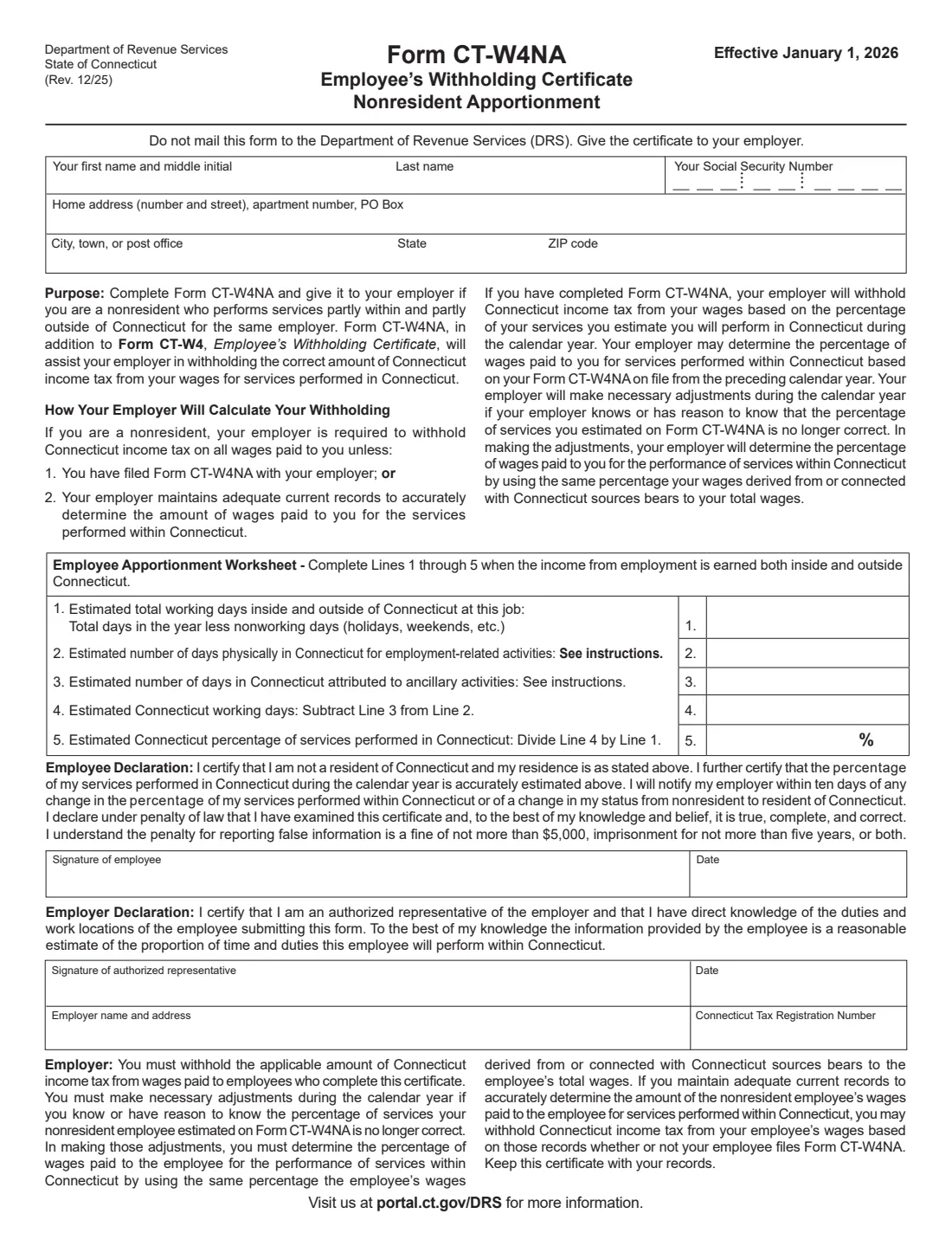
If you live outside Connecticut but work for an employer partly inside and partly outside the state, your employer must withhold Connecticut income tax on all your wages unless you give it Form CT-W4NA, or it keeps records good enough to work out your Connecticut wages itself. On CT-W4NA you estimate your working days for the calendar year and the days you'll spend working in Connecticut, which gives the percentage of your services performed there.
The form goes with Form CT-W4, not instead of it: the instructions say to review your CT-W4 first and give your employer one if you haven't. The current edition is Rev. 12/25, effective January 1, 2026, from the Connecticut Department of Revenue Services (DRS).
FileIt does the worksheet arithmetic (line 2 minus line 3, then line 4 divided by line 1), prints your answers on the DRS PDF and places signature boxes for you and, optionally, your employer's representative. The finished form is saved in the person's vault folder. FileIt never files it: you give it to your employer.
- Who fills it
- Nonresidents who work partly inside and partly outside Connecticut for the same employer; the employer's authorized representative signs the employer declaration.
- Given to
- Your employer. Do not mail it to DRS.
- Goes with
- Form CT-W4, Employee's Withholding Certificate.
- Worksheet
- Total working days, days in Connecticut, ancillary days, Connecticut working days and the Connecticut percentage.
- Edition
- CT-W4NA (Rev. 12/25), effective January 1, 2026
Who needs to fill out Form CT-W4NA?
- Nonresidents of Connecticut who work for the same employer partly in Connecticut and partly elsewhere, for example commuters from New York, Massachusetts or Rhode Island with some days at home or on the road.
- Employees whose percentage of work in Connecticut has changed from the last CT-W4NA they gave their employer.
- People who have moved out of Connecticut and become nonresidents.
When to use Form CT-W4NA
- For each calendar year in which you work partly inside and partly outside Connecticut for the same employer.
- Whenever your estimated percentage of Connecticut work changes: the declaration says you'll tell your employer within ten days.
- When your residency changes from resident to nonresident.
What you need before you start
- Your name, Social Security number and home address outside Connecticut.
- An estimate of your total working days for the year at this job (the year less weekends, holidays, sick days, vacation and leave).
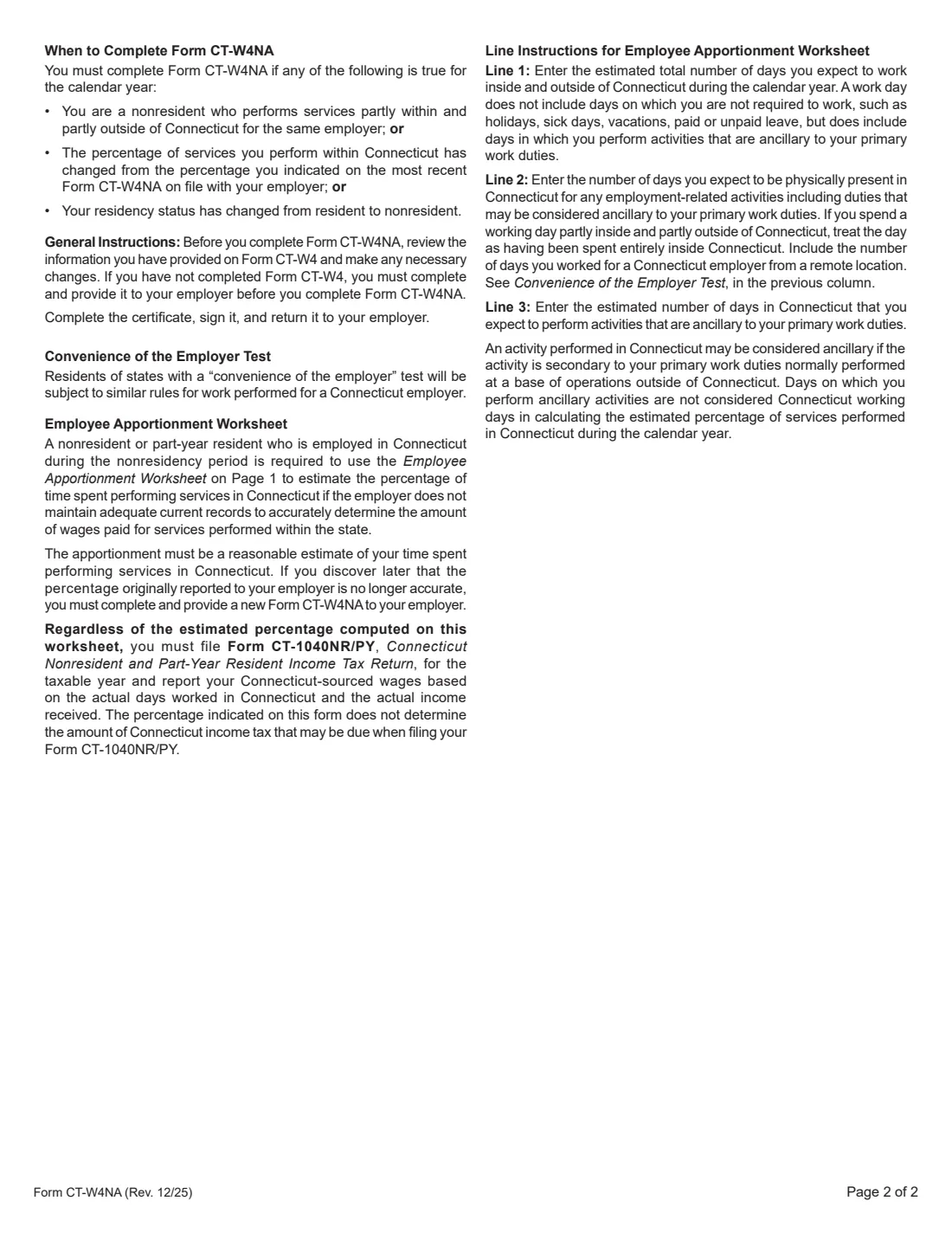
- The days you expect to be physically present in Connecticut for work, counting a day partly in Connecticut as a Connecticut day, and remote days for a Connecticut employer where the convenience of the employer test applies.
- The Connecticut days spent only on activities ancillary to your primary duties.
- For the employer part: the employer's name and address and its Connecticut Tax Registration Number.
What’s on Form CT-W4NA
The 2025 edition has 2 pages. FileIt asks for it in 3 parts, and it is signed by Employee and Employer:
- Your name, SSN and home addressEmployee
- Employee Apportionment WorksheetEmployee
- Employer declarationEmployer
How to fill out Form CT-W4NA, step by step
1 Your details
Enter your first name and middle initial, last name, Social Security number and home address.
2 Line 1: total working days
Estimate the days you expect to work, inside and outside Connecticut, at this job during the year.
3 Lines 2 and 3: Connecticut days
Line 2 is the days you expect to be physically in Connecticut for employment-related activities. Line 3 is the Connecticut days spent on ancillary activities, which aren't counted as Connecticut working days.
4 Lines 4 and 5: the percentage
Line 4 is line 2 minus line 3; line 5 is line 4 divided by line 1, the estimated percentage of your services performed in Connecticut. FileIt works out both.
5 Declarations
You certify that you are not a Connecticut resident and that the percentage is accurately estimated, then sign and date. The employer's authorized representative certifies the estimate is reasonable, signs, and adds the employer's name, address and Connecticut Tax Registration Number.
Common mistakes to avoid
- Using CT-W4NA instead of CT-W4: you need both.
- Counting a day spent partly in Connecticut as an outside day; the instructions say to treat it as a Connecticut day.
- Leaving out remote days for a Connecticut employer when the convenience of the employer test applies.
- Not updating it when your percentage of Connecticut work changes.
- Treating the percentage as your final tax: you still file Form CT-1040NR/PY based on the days you actually worked in Connecticut.
After you fill it out
Sign it and give it to your employer, who keeps it with its records. Keep a copy; FileIt saves the PDF in the person's vault folder.
If the percentage stops being accurate, give your employer a new CT-W4NA.
At year end, file Form CT-1040NR/PY and report your Connecticut-source wages from the days you actually worked in Connecticut.
Fill out Form CT-W4NA online with FileIt
- Pick the person. Choose someone from People and FileIt fills in their name, date of birth, address and other details it already knows.
- Answer plain-language questions. One part of the form at a time, with the official help text beside each question — 18 fields in all. Your answers save as you go.
- Check the live preview. Watch your answers land on the real Connecticut Department of Revenue Services (DRS) form, and let FileIt do any worksheet arithmetic.
- Generate the official PDF. FileIt prints your answers into the agency’s own PDF and files it in that person’s folder in your vault. Sign it, or send it for e-signature.
FileIt fills the form — it never files or submits anything for you. Deliver the finished form to whoever asked for it, the way the form’s instructions say.
Start Form CT-W4NA now — it’s freeForm CT-W4NA: frequently asked questions
Do I still need Form CT-W4?
Yes. The instructions say to review your CT-W4 before completing CT-W4NA, and if you haven't completed a CT-W4 you must give one to your employer first.
What happens if I don't file CT-W4NA?
As a nonresident, your employer must withhold Connecticut income tax on all your wages unless it keeps adequate records of the wages paid for services in Connecticut.
Does the percentage decide how much tax I owe?
No. The form says the percentage doesn't determine the Connecticut tax due on your Form CT-1040NR/PY, which uses your actual days and income.
What is an ancillary activity?
An activity in Connecticut that is secondary to primary duties you normally perform at a base outside Connecticut. Those days aren't counted as Connecticut working days for the percentage.
Do I mail it to DRS?
No. The form says not to mail it to the Department of Revenue Services: give it to your employer.
Official sources
- Blank form (PDF), published by Connecticut Department of Revenue Services (DRS): https://portal.ct.gov/-/media/drs/forms/2025/wth/ct-w4na_1225.pdf
- Official instructions and guidance: https://portal.ct.gov/drs/withholding-tax/withholding-tax
- Edition shown on this page: CT-W4NA (Rev. 12/25), effective January 1, 2026 (checked 2026-10-25).
FileIt is not affiliated with or endorsed by Connecticut Department of Revenue Services (DRS) or any government. This page explains the form in general terms and is not legal, tax or immigration advice. Always read the official instructions, and check that you are using the edition the recipient accepts. Page last reviewed 2026-10-25.