What is Form TD1 employee's declaration?
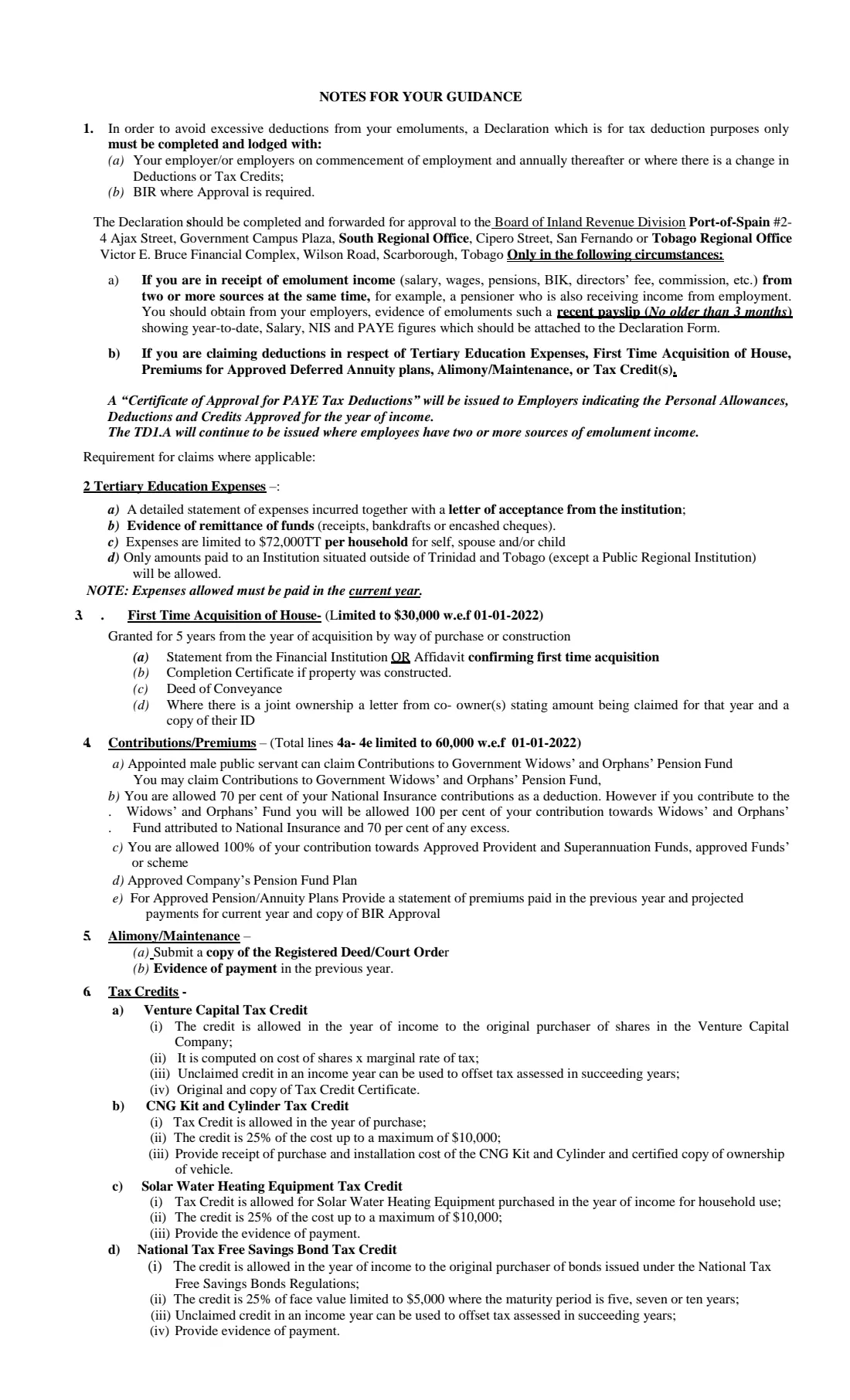
Form T.D.-1 (usually just called the TD1) is the Employee's Declaration of Emoluments, Deductions and Tax Credits issued by the Inland Revenue Division of Trinidad and Tobago's Ministry of Finance. You give it to your employer so that the PAYE income tax taken from your salary, wages or pension reflects your personal allowance and any deductions and tax credits you are entitled to. The form's own notes explain that it exists to avoid excessive deductions from your emoluments.
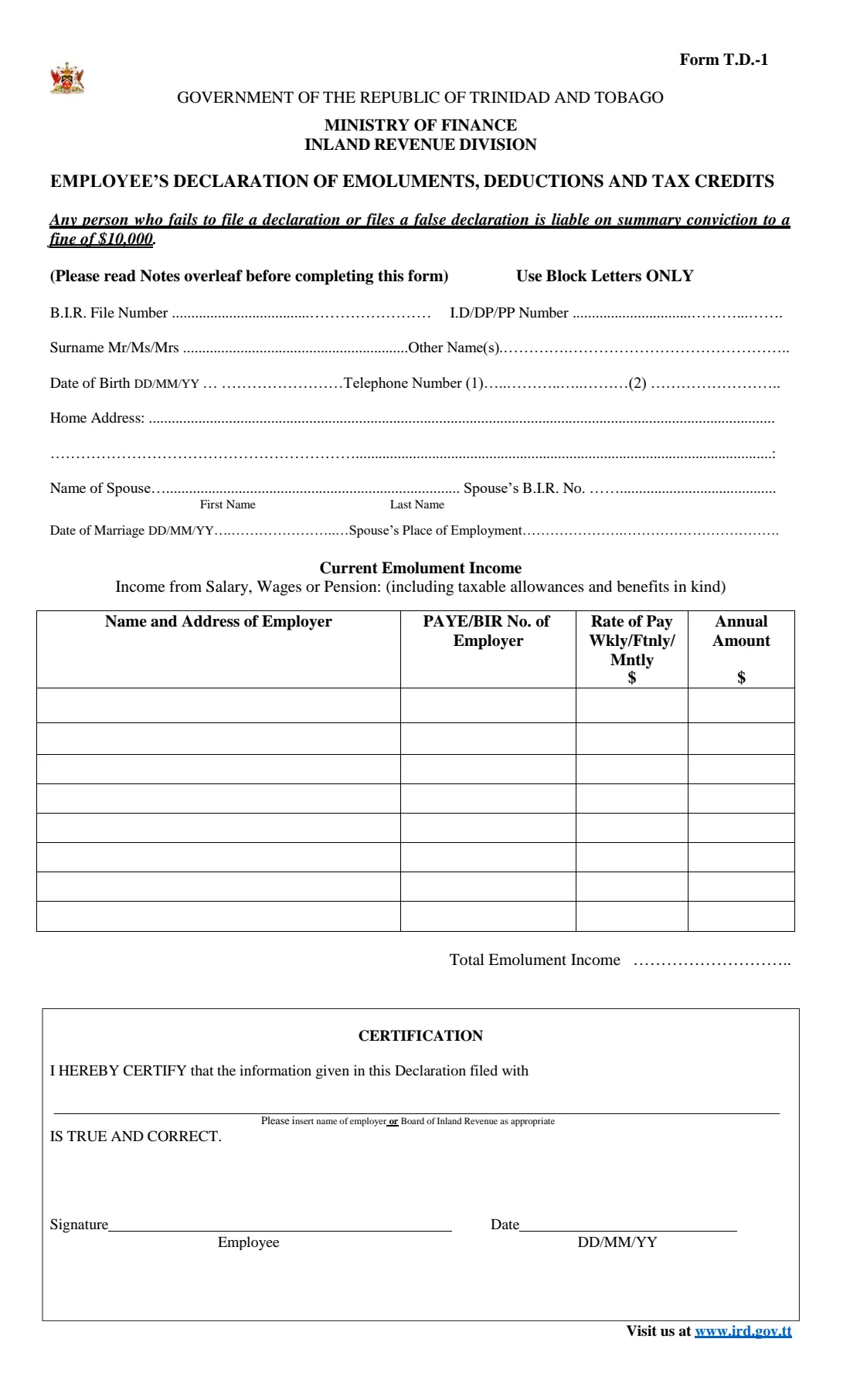
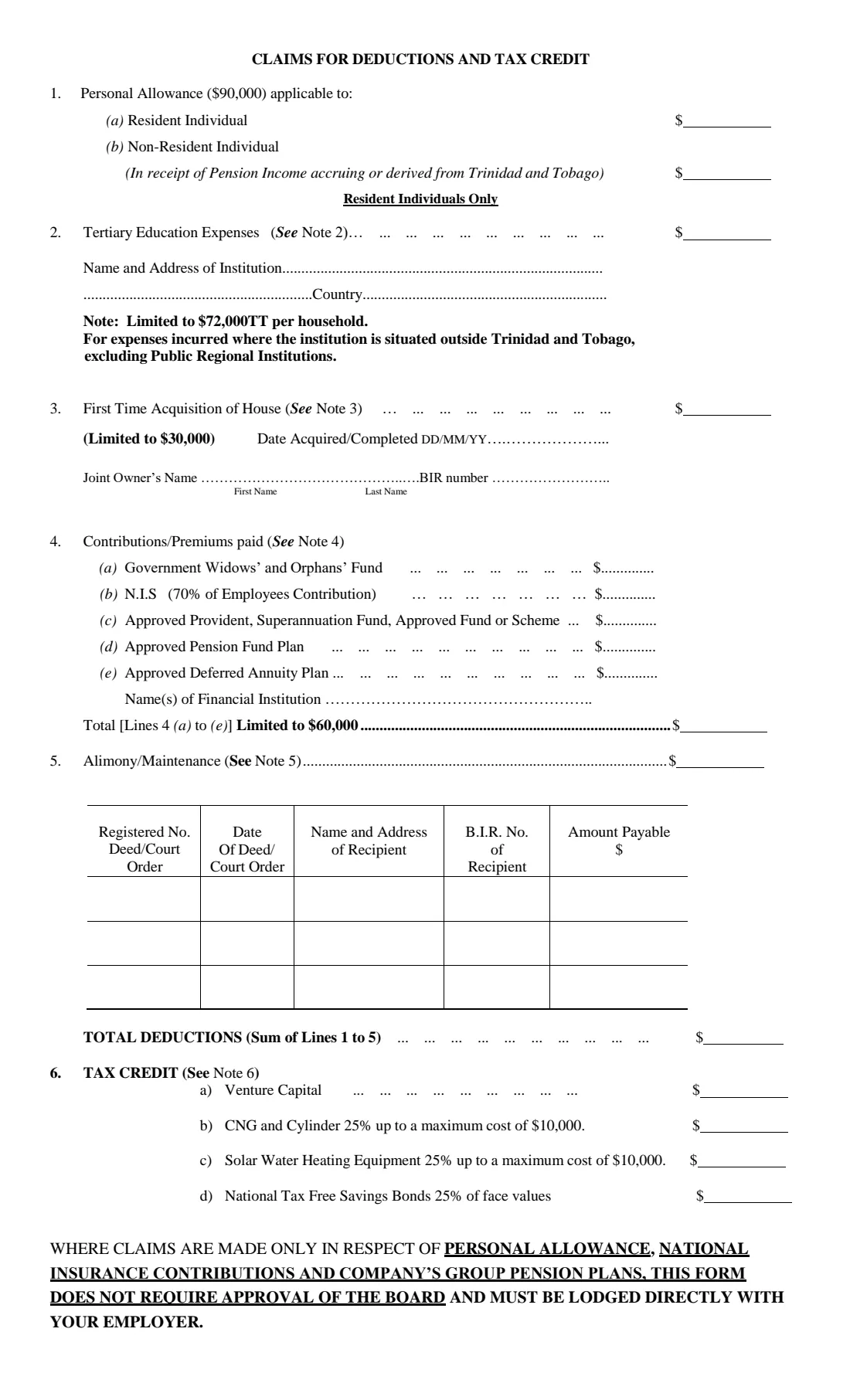
Page 1 records who you are, your spouse's details and your current emolument income from each employer or payer. Page 2 lists the claims: the personal allowance, tertiary education expenses, first-time acquisition of a house, pension and other contributions, alimony or maintenance, and tax credits. Simple claims go straight to your employer; others need approval from the Board of Inland Revenue first, which then issues a Certificate of Approval for PAYE Tax Deductions to your employer.
FileIt asks the questions in plain language and prints your answers in block capitals into the IRD's own PDF. Your name and date of birth can be pre-filled from the People records in your vault, and FileIt adds up your emolument income, works out 70% of your NIS contributions, applies the $60,000 cap on contributions, totals your deductions and warns you when the form needs Board approval. The finished PDF is saved in your vault, and you can sign it with FileIt's optional e-signature or print and sign it. FileIt never lodges the form — you hand it to your employer or the IRD yourself.
- Who fills it
- Employees and pensioners in Trinidad and Tobago who have PAYE deducted
- Given to
- Your employer — or first the Board of Inland Revenue when approval is needed
- When
- When you start a job, every year after, and whenever your deductions or tax credits change
- Signatures
- You sign and date the certification on page 1
- Personal allowance
- $90,000 on this edition of the form
- Edition
- The IRD's current file, F-TD1--2023 (no edition date printed)
Who needs to fill out Form TD1 employee's declaration?
- Anyone starting a new job in Trinidad and Tobago who will have PAYE deducted from their pay.
- Employees filing their annual declaration with their employer.
- Pensioners receiving a pension from which tax is deducted, including non-resident individuals receiving pension income from Trinidad and Tobago.
- People with income from two or more employers or payers at the same time, such as a pensioner who also works.
- Residents who want relief for tertiary education fees paid abroad, a first home, a deferred annuity plan, alimony or maintenance, or a tax credit.
- Anyone whose deductions or tax credits have changed during the year.
When to use Form TD1 employee's declaration
- On commencement of employment, so your first pay reflects your personal allowance.
- Annually after that, as the form's notes require.
- Whenever there is a change in your deductions or tax credits — for example you buy your first house, start paying into an approved annuity plan, or begin paying maintenance under a court order.
- When you begin receiving a second emolument, which means the declaration must go to the Board of Inland Revenue for approval.
- In the year you pay tertiary fees, buy CNG or solar water heating equipment, or buy National Tax Free Savings Bonds, since those claims relate to the year of payment or purchase.
What you need before you start
- Your B.I.R. file number and the number of your national ID card, driving permit or passport.
- Your full name, date of birth, telephone number and home address.
- If married: your spouse's name, B.I.R. number, date of marriage and place of employment.
- Each employer's or payer's name, address and PAYE/BIR number, with your rate of pay and annual amount.
- For two or more payers: a recent payslip (no older than three months) showing year-to-date salary, NIS and PAYE.
- Your yearly National Insurance employee contributions and any pension, provident or annuity contributions.
- For tertiary education: a detailed statement of expenses, the letter of acceptance and evidence of remittance.
- For a first house: a statement from the financial institution or an affidavit, the deed of conveyance, and the completion certificate if you built it.
- For alimony or maintenance: the registered deed or court order and evidence of payment in the previous year.
- For tax credits: the Tax Credit Certificate, receipts or evidence of payment, as the notes list.
What’s on Form TD1 employee's declaration
The 2026 edition has 3 pages. FileIt asks for it in 12 parts, and it is signed by Employee:
- Your detailsEmployee
- SpouseEmployee
- Current emolument incomeEmployee
- Claims for deductions and tax creditEmployee
- 2 Tertiary education expensesEmployee
- 3 First time acquisition of houseEmployee
- 4 Contributions / premiums paidEmployee
- 5 Alimony / maintenanceEmployee
- 5 Alimony / maintenance — second deed or orderEmployee
- 5 Alimony / maintenance — third deed or orderEmployee
- 6 Tax creditEmployee
- CertificationEmployee
How to fill out Form TD1 employee's declaration, step by step
1 Personal details
Your B.I.R. file number, your ID, driving permit or passport number, your surname with Mr, Ms or Mrs, your other names, date of birth (DD/MM/YY), up to two telephone numbers and your home address. The form asks for block letters only, so FileIt prints these in capitals.
2 Spouse
If you are married, give your spouse's first and last names, their B.I.R. number, the date of marriage and your spouse's place of employment. Leave it blank if you are not married.
3 Current Emolument Income
Income from salary, wages or pension, including taxable allowances and benefits in kind. For each employer or payer give the name and address, their PAYE/BIR number, your rate of pay per week, fortnight or month, and the annual amount. FileIt adds the annual amounts to give the Total Emolument Income.
If you list two or more payers, the declaration can't go straight to an employer: it must be sent to the Board of Inland Revenue for approval with evidence of your emoluments.
4 1. Personal Allowance
The personal allowance is $90,000 on this edition. Resident individuals claim it on line (a); non-resident individuals receiving pension income accruing in or derived from Trinidad and Tobago claim it on line (b). If you are already claiming it with another payer, don't claim it twice.
5 2. Tertiary Education Expenses
For residents only. Expenses paid this year to an institution situated outside Trinidad and Tobago, excluding public regional institutions, are limited to $72,000 TT per household. Give the institution's name, address and country.
6 3. First Time Acquisition of House
For residents only, limited to $30,000 and granted for five years from the year you acquired the house by purchase or construction. Give the date acquired or completed and, for joint ownership, the joint owner's name and BIR number.
7 4. Contributions/Premiums paid
Contributions to the Government Widows' and Orphans' Fund, 70% of your National Insurance employee contributions, approved provident and superannuation funds, approved pension fund plans and approved deferred annuity plans (with the financial institution's name). Lines (a) to (e) together are limited to $60,000; FileIt works out line (b) and the capped total for you.
8 5. Alimony/Maintenance
Payments under a registered deed or court order, with the registered number, date, the recipient's name, address and B.I.R. number, and the amount payable. The form has room for three.
9 Total deductions and 6. Tax Credit
TOTAL DEDUCTIONS is the sum of lines 1 to 5. Tax credits are listed separately: venture capital, CNG kit and cylinder, solar water heating equipment and National Tax Free Savings Bonds. Enter each credit as worked out under the notes on page 3.
10 Certification
Write the name of the employer or the Board of Inland Revenue you are filing the declaration with, then sign and date it. FileIt prints your employer's name, or 'Board of Inland Revenue' when approval is needed.
Common mistakes to avoid
- Handing the form straight to your employer when it includes claims that need Board of Inland Revenue approval.
- Claiming the personal allowance with two employers or payers at the same time.
- Entering your full NIS contributions on line 4(b) instead of 70% of them.
- Going over the printed limits: $72,000 for tertiary education, $30,000 for a first house and $60,000 for contributions.
- Claiming tertiary fees paid to an institution in Trinidad and Tobago or a public regional institution, which the form excludes.
- Forgetting the supporting documents listed in the notes, such as the deed of conveyance or the court order.
- Not filing a new declaration after your deductions or tax credits change.
After you fill it out
Sign and date the certification. If your only claims are the personal allowance, National Insurance contributions and a company group pension plan, the form says to lodge it directly with your employer — you can sign with FileIt's optional e-signature if your employer accepts that, or print and sign it.
If you have two or more sources of emolument income, or claim tertiary education expenses, a first house, deferred annuity premiums, alimony or maintenance, or a tax credit, the form's notes say to send it with your supporting documents to the Board of Inland Revenue for approval, at one of the offices named on page 3 (Port of Spain, the South Regional Office in San Fernando, or the Tobago Regional Office in Scarborough). The Board then issues a Certificate of Approval for PAYE Tax Deductions to your employer.
A copy stays in your FileIt vault, so next year's declaration is quicker and you have a record of what you claimed.
Fill out Form TD1 employee's declaration online with FileIt
- Pick the person. Choose someone from People and FileIt fills in their name, date of birth, address and other details it already knows.
- Answer plain-language questions. One part of the form at a time, with the official help text beside each question — 83 fields in all. Your answers save as you go.
- Check the live preview. Watch your answers land on the real Inland Revenue Division, Ministry of Finance, Trinidad and Tobago (IRD / Board of Inland Revenue) form, and let FileIt do any worksheet arithmetic.
- Generate the official PDF. FileIt prints your answers into the agency’s own PDF and files it in that person’s folder in your vault. Sign it, or send it for e-signature.
FileIt fills the form — it never files or submits anything for you. Deliver the finished form to whoever asked for it, the way the form’s instructions say.
Start Form TD1 employee's declaration now — it’s freeForm TD1 employee's declaration: frequently asked questions
What is a TD1 form in Trinidad and Tobago?
It is the Employee's Declaration of Emoluments, Deductions and Tax Credits (Form T.D.-1) from the Inland Revenue Division. It tells your employer your income and the personal allowance, deductions and tax credits to take into account when deducting PAYE.
Can I fill out the TD1 online?
Yes. FileIt lets you answer the questions online, works out the totals and prints everything into the IRD's official PDF, saved in your vault. You then sign it and hand it in yourself.
Where do I submit the TD1?
To your employer, if you only claim the personal allowance, NIS contributions and a company group pension plan. Otherwise it goes to the Board of Inland Revenue for approval first, at one of the offices listed in the form's notes. FileIt doesn't submit it for you.
How much is the personal allowance on the TD1?
This edition of the form prints a personal allowance of $90,000. Check the IRD's forms page for the current edition if the allowance changes.
Do I need to fill out a new TD1 every year?
Yes. The form's notes say to lodge it with your employer on starting employment and annually thereafter, or whenever your deductions or tax credits change.
I have two jobs. What do I do?
With emolument income from two or more sources at the same time, the declaration must go to the Board of Inland Revenue for approval. Attach evidence of your emoluments, such as a recent payslip no older than three months showing year-to-date salary, NIS and PAYE.
Why does IRD have two versions of the TD1?
The IRD's website also hosts an older fillable TD1 with lower figures (a personal allowance of $84,000). The forms page links the newer F-TD1--2023 file, which is the one FileIt uses.
Can I sign the TD1 electronically?
When the form goes to your employer, FileIt can send it for e-signature, but check that your employer accepts that. When it goes to the Board of Inland Revenue with original documents, print and sign it.
Official sources
- Blank form (PDF), published by Inland Revenue Division, Ministry of Finance, Trinidad and Tobago (IRD / Board of Inland Revenue): https://www.ird.gov.tt/Media/Default/IRDForms/F-TD1--2023.pdf
- Official instructions and guidance: https://www.ird.gov.tt/forms
- Edition shown on this page: F-TD1--2023 (no edition date printed; personal allowance $90,000) (checked 2026-09-26).
FileIt is not affiliated with or endorsed by Inland Revenue Division, Ministry of Finance, Trinidad and Tobago (IRD / Board of Inland Revenue) or any government. This page explains the form in general terms and is not legal, tax or immigration advice. Always read the official instructions, and check that you are using the edition the recipient accepts. Page last reviewed 2026-09-26.