What is Landlord surcharge registration?
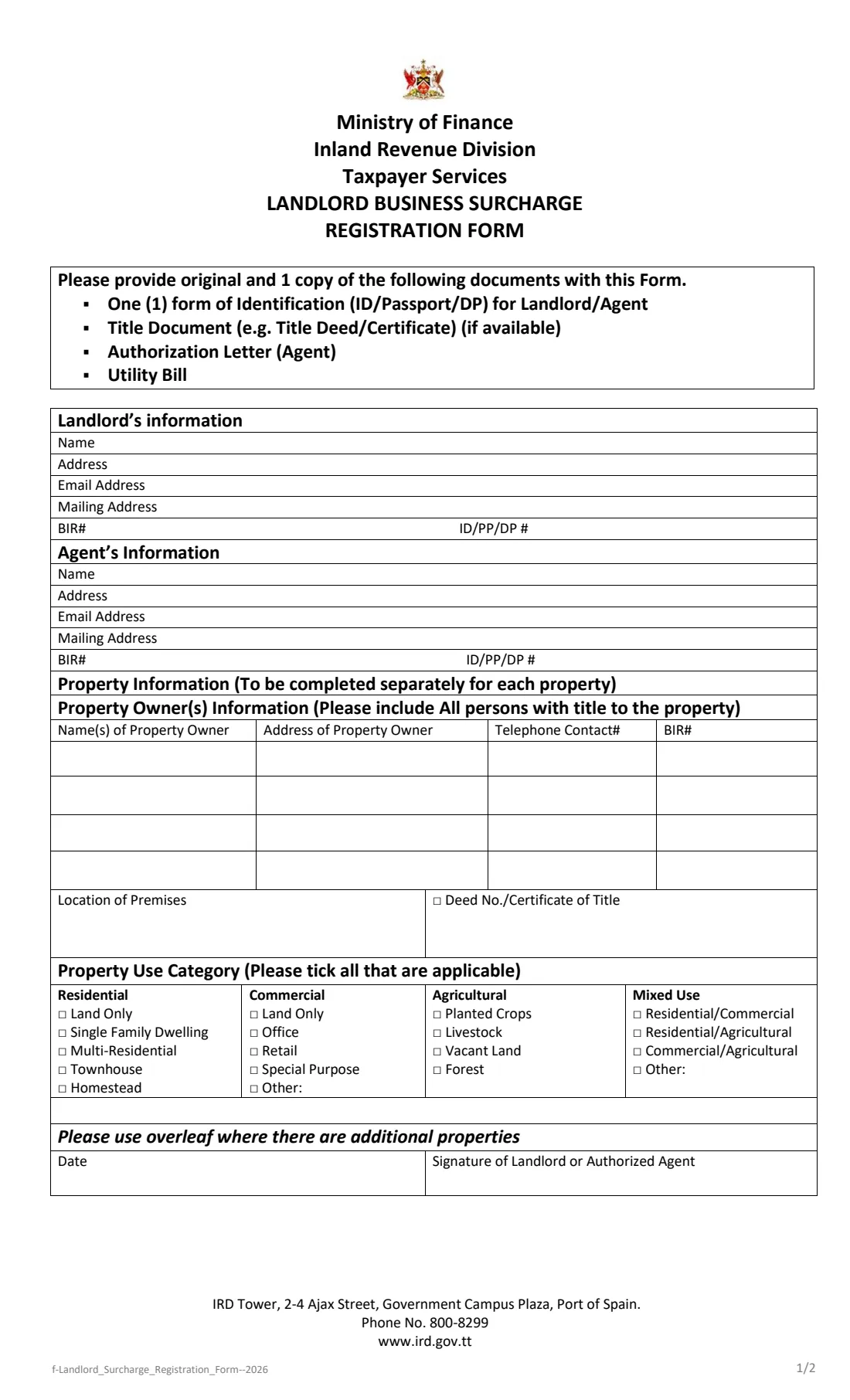
The Landlord Business Surcharge Registration Form is the Inland Revenue Division's 2026 form for registering landlords in Trinidad and Tobago. A landlord, or an authorised agent, fills it in once and lists every rented property on it.
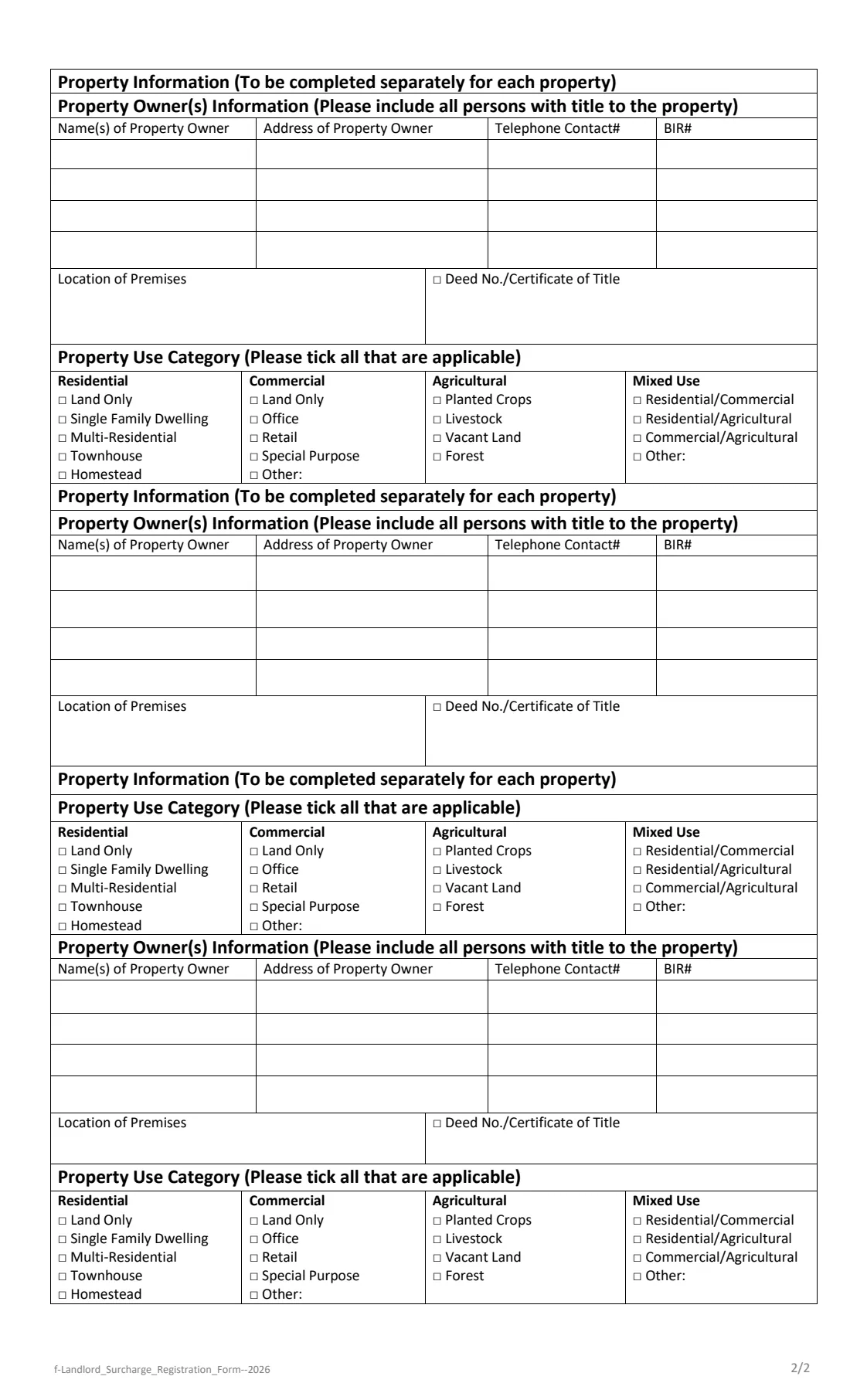
Page 1 records the landlord's name, address, email, mailing address, BIR number and ID, passport or driver's permit number, then the agent's details if an agent is involved, and the first property. For each property you list everyone with title to it (name, address, telephone and BIR number), where the premises are, the deed number or certificate of title, and how the property is used: residential, commercial, agricultural or mixed use. Page 2 holds three more property blocks.
FileIt lets you add up to four properties, opens extra owner rows as you need them, and prints everything into the IRD's own PDF, ticking the form's boxes for the uses you choose.
- Who fills it
- A landlord, or an authorised agent acting for the landlord
- Given to
- Inland Revenue Division, Taxpayer Services
- Bring
- Original and one copy of: ID/passport/driver's permit, title document (if available), agent's authorization letter, utility bill
- Properties
- Four on the form (one on page 1, three overleaf)
- Pages
- 2 (legal size)
- Edition
- 2026
Who needs to fill out Landlord surcharge registration?
- Individuals who rent out houses, apartments, townhouses or land in Trinidad and Tobago.
- Landlords of commercial premises such as offices, shops and special-purpose buildings.
- Owners of agricultural land that is rented out, and of mixed-use properties.
- Property agents and managers registering on a landlord's behalf with an authorization letter.
When to use Landlord surcharge registration
- When the IRD asks landlords to register for the landlord business surcharge.
- When you start renting out a property that is not yet registered.
- When you appoint an agent to deal with the registration for you.
What you need before you start
- The landlord's name, address, email address and mailing address.
- The landlord's BIR number and ID card, passport or driver's permit number.
- The agent's details and an authorization letter from the landlord, if an agent is registering.
- For each property: the names, addresses, telephone numbers and BIR numbers of everyone on the title.
- The location of each property and its deed number or certificate of title, if available.
- How each property is used (for example single family dwelling, office, retail, planted crops or mixed use).
- A utility bill, and the original and one copy of each document the form lists.
What’s on Landlord surcharge registration
The 2026 edition has 2 pages. FileIt asks for it in 7 parts, and it is signed by Landlord or agent:
- Landlord's informationLandlord or agent
- Agent's informationLandlord or agent
- Property 1 (page 1)Landlord or agent
- Property 2 (page 2)Landlord or agent
- Property 3 (page 2)Landlord or agent
- Property 4 (page 2)Landlord or agent
- Date and signatureLandlord or agent
How to fill out Landlord surcharge registration, step by step
1 Landlord's information
Give the landlord's name, address, email address, mailing address (if different), BIR number and the number of the ID, passport or driver's permit you will show. FileIt can pre-fill the name and email from the person you picked.
2 Agent's information
Only if an agent is registering or managing the property: the agent's name, address, email, mailing address, BIR number and ID number. The agent brings an authorization letter from the landlord.
3 Property owners
For each property, the form asks you to include all persons with title. Up to four owners fit in the table, each with name, address, telephone contact and BIR number. FileIt opens the next row when you fill in the one before.
4 Location, title and use
Describe where the premises are and give the deed number or certificate of title. Then tick every use that applies: residential (land only, single family dwelling, multi-residential, townhouse, homestead), commercial (land only, office, retail, special purpose, other), agricultural (planted crops, livestock, vacant land, forest) or mixed use. For 'Other', FileIt prints a short description after the label.
5 More properties, date and signature
The form says to use the overleaf for additional properties; page 2 has room for three more. Finally the landlord or authorised agent dates and signs page 1.
Common mistakes to avoid
- Listing only one owner when several people are on the title — the form asks for all of them.
- Forgetting to tick at least one property use for each property.
- Leaving out the agent's authorization letter when an agent signs.
- Arriving without the original and a copy of each listed document.
- Putting more than four properties on one form; use another copy for the rest.
After you fill it out
Print both pages from your FileIt vault, check each property block, and sign page 1 as the landlord or authorised agent.
Take the form to the Inland Revenue Division with the original and one copy of your ID, title document, utility bill and any authorization letter. FileIt does not submit it for you.
Keep the PDF with your property records in your vault, next to the title deeds.
Fill out Landlord surcharge registration online with FileIt
- Pick the person. Choose someone from People and FileIt fills in their name, date of birth, address and other details it already knows.
- Answer plain-language questions. One part of the form at a time, with the official help text beside each question — 169 fields in all. Your answers save as you go.
- Check the live preview. Watch your answers land on the real Inland Revenue Division, Ministry of Finance form, and let FileIt do any worksheet arithmetic.
- Generate the official PDF. FileIt prints your answers into the agency’s own PDF and files it in that person’s folder in your vault. Sign it, or send it for e-signature.
FileIt fills the form — it never files or submits anything for you. Deliver the finished form to whoever asked for it, the way the form’s instructions say.
Start Landlord surcharge registration now — it’s freeLandlord surcharge registration: frequently asked questions
Who signs the landlord surcharge registration form?
The landlord or the authorized agent, in the box marked 'Signature of Landlord or Authorized Agent' on page 1.
What documents do I bring?
The form asks for the original and one copy of: an ID, passport or driver's permit for the landlord or agent, the title document if available, the agent's authorization letter, and a utility bill.
How many properties fit on the form?
Four: one on page 1 and three on page 2. FileIt lets you add each one as an optional part.
Can I tick more than one use for a property?
Yes. The form says to tick all that are applicable.
Can I fill in this form online?
Yes. FileIt prints your answers into the IRD's 2026 PDF and saves it in your vault. You then sign it and hand it in.
Official sources
- Blank form (PDF), published by Inland Revenue Division, Ministry of Finance: https://www.ird.gov.tt/Media/Default/IRDForms/f-Landlord_Surcharge_Registration_Form--2026.pdf
- Official instructions and guidance: https://www.ird.gov.tt/forms
- Edition shown on this page: 2026 (f-Landlord_Surcharge_Registration_Form--2026, PDF dated May 2026) (checked 2026-10-19).
FileIt is not affiliated with or endorsed by Inland Revenue Division, Ministry of Finance or any government. This page explains the form in general terms and is not legal, tax or immigration advice. Always read the official instructions, and check that you are using the edition the recipient accepts. Page last reviewed 2026-10-19.