What is I.T. Form 76 employer benefits statement?
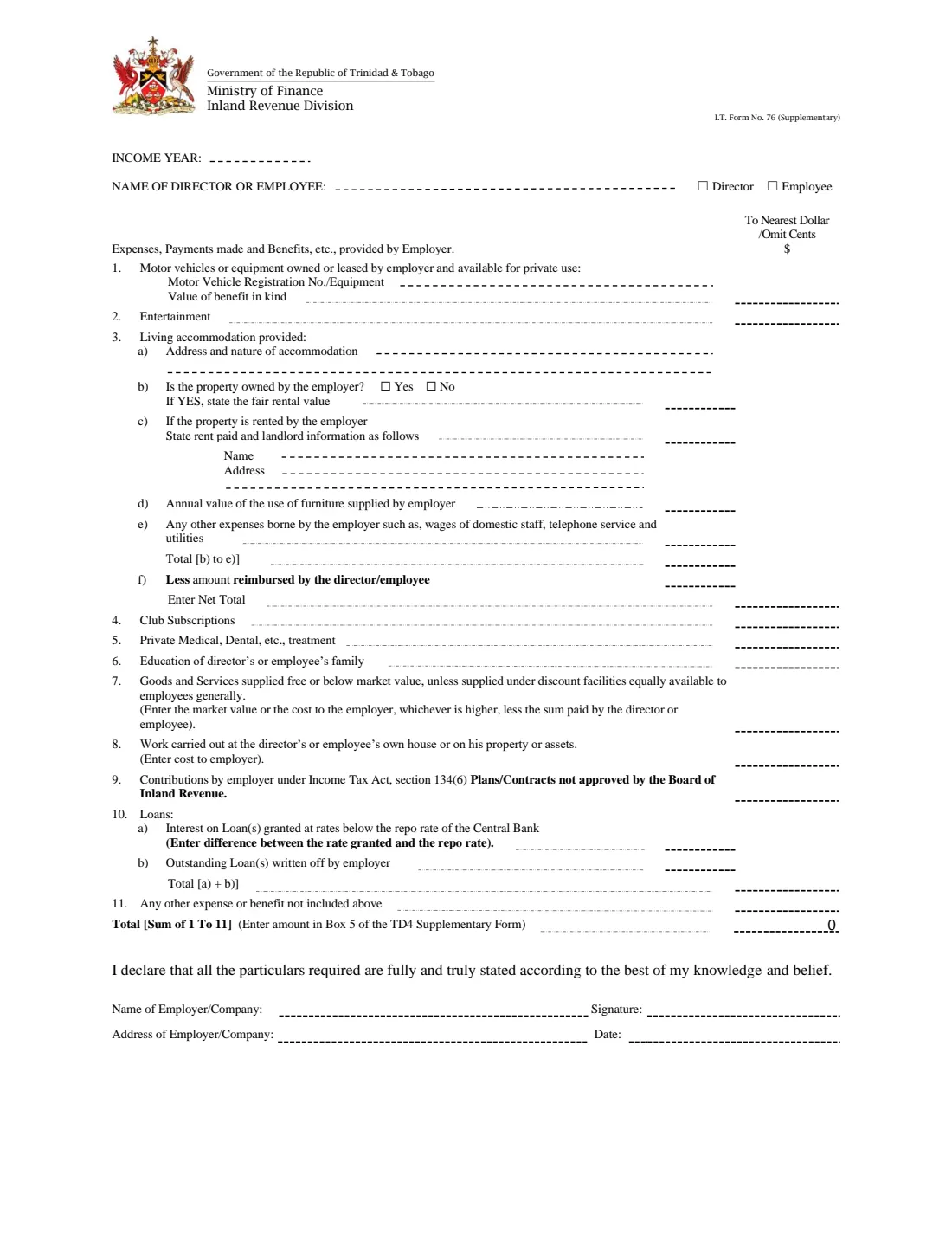
I.T. Form No. 76 (Supplementary) is the Inland Revenue Division's statement of the expenses, payments and benefits an employer provided to one director or employee for an income year. It sits beside the TD4 Supplementary form: the total at the bottom of Form 76 is the amount the form tells you to enter in Box 5 of the TD4 Supplementary.
The form lists eleven kinds of benefit: motor vehicles or equipment available for private use, entertainment, living accommodation (with the fair rental value or the rent paid, furniture and other costs, less anything the person reimbursed), club subscriptions, private medical and dental treatment, education of the person's family, goods and services supplied free or below market value, work done at the person's own house, employer contributions to plans or contracts not approved by the Board of Inland Revenue, loans at below the Central Bank repo rate or written off, and any other benefit.
FileIt walks the employer through each line, works out the four totals the form asks for, and prints everything on the Division's own fillable PDF, in whole dollars as the form asks. The completed form is filed in your FileIt vault. FileIt never submits anything: you print it, sign the declaration by hand and use it with the TD4 Supplementary.
- Who fills it
- The employer, for one director or employee
- Covers
- One income year
- Goes with
- The TD4 Supplementary form (the total goes in its Box 5)
- Amounts
- To the nearest dollar, omitting cents
- Signatures
- The employer signs the declaration by hand
- Edition
- I.T. Form No. 76 (Supplementary), no date printed
Who needs to fill out I.T. Form 76 employer benefits statement?
- Employers in Trinidad and Tobago that provide a director or employee with a company car, accommodation, club memberships, medical cover or other benefits in kind.
- Small companies and family businesses whose directors receive benefits on top of their pay.
- Payroll staff preparing the TD4 Supplementary for a director or employee who received benefits.
When to use I.T. Form 76 employer benefits statement
- For each income year in which the employer gave the director or employee any of the benefits listed on the form.
- When preparing the TD4 Supplementary for that person, since the Form 76 total goes in its Box 5.
What you need before you start
- The income year and the director's or employee's name.
- The value of each benefit for the year: vehicle, entertainment, club subscriptions, medical, education, goods and services, work done at the person's home and unapproved contributions.
- For living accommodation: its address and nature, whether the employer owns or rents it, the fair rental value or the rent paid and the landlord's name and address, the value of furniture, other costs and any amount the person reimbursed.
- For loans: the interest difference against the Central Bank repo rate and any amounts written off.
- The employer's name and address.
What’s on I.T. Form 76 employer benefits statement
The 2026 edition has 1 page. FileIt asks for it in 6 parts:
- Income year and director or employeeEmployer
- 1 and 2 Motor vehicles and entertainmentEmployer
- 3 Living accommodation providedEmployer
- 4 to 9 Other expenses and benefitsEmployer
- 10 and 11 Loans and other benefitsEmployer
- DeclarationEmployer
How to fill out I.T. Form 76 employer benefits statement, step by step
1 Income year and the person
Enter the income year, the name of the director or employee, and tick whether the person is a director or an employee.
2 1 and 2 Vehicles and entertainment
For a motor vehicle or equipment the employer owns or leases and that is available for private use, give the registration number or describe the equipment and the value of the benefit in kind. Line 2 is entertainment.
3 3 Living accommodation
Give the address and nature of the accommodation and say whether the employer owns it. If it does, give the fair rental value; if it rents the property, give the rent paid and the landlord's name and address. Add the annual value of furniture supplied and other costs the employer bears, such as domestic staff wages, telephone and utilities. FileIt totals b) to e), takes off what the person reimbursed at f), and prints the net total.
4 4 to 9 Other benefits
Club subscriptions, private medical and dental treatment, education of the person's family, goods and services supplied free or below market value (the market value or the cost to the employer, whichever is higher, less what the person paid), the cost of work done at the person's own house, and employer contributions under section 134(6) of the Income Tax Act to plans or contracts not approved by the Board of Inland Revenue.
5 10 and 11 Loans and anything else
Line 10 a) is the interest on loans granted below the Central Bank repo rate, entered as the difference between the rate granted and the repo rate; 10 b) is outstanding loans written off. FileIt adds them. Line 11 is any other expense or benefit not listed above.
6 Total and declaration
FileIt adds lines 1 to 11 for the total, which the form says to enter in Box 5 of the TD4 Supplementary form. The employer gives its name and address, dates the form and signs the declaration by hand.
Common mistakes to avoid
- Entering cents: the form's amount column says to the nearest dollar, omitting cents.
- Giving both a fair rental value and a rent paid for the same accommodation; use b) if the employer owns the property and c) if it rents it.
- Forgetting to subtract what the director or employee reimbursed for the accommodation.
- Leaving the total off the TD4 Supplementary, or putting it in a box other than Box 5.
- Not signing the declaration.
After you fill it out
Print the filled form from your FileIt vault and sign the declaration by hand.
Enter the total in Box 5 of the TD4 Supplementary form for the same person and year.
Keep the signed copy with your payroll records; FileIt keeps the filled PDF in your vault. FileIt does not submit anything to the Inland Revenue Division.
Fill out I.T. Form 76 employer benefits statement online with FileIt
- Pick the person. Choose someone from People and FileIt fills in their name, date of birth, address and other details it already knows.
- Answer plain-language questions. One part of the form at a time, with the official help text beside each question — 34 fields in all. Your answers save as you go.
- Check the live preview. Watch your answers land on the real Inland Revenue Division, Ministry of Finance, Trinidad and Tobago form, and let FileIt do any worksheet arithmetic.
- Generate the official PDF. FileIt prints your answers into the agency’s own PDF and files it in that person’s folder in your vault.
FileIt fills the form — it never files or submits anything for you. Deliver the finished form to whoever asked for it, the way the form’s instructions say.
Start I.T. Form 76 employer benefits statement now — it’s freeI.T. Form 76 employer benefits statement: frequently asked questions
What is I.T. Form No. 76 (Supplementary)?
It is the Inland Revenue Division's statement of expenses, payments and benefits an employer provided to a director or employee during an income year.
Where does the total go?
The form says to enter the total of lines 1 to 11 in Box 5 of the TD4 Supplementary form.
Do I include cents?
No. The amount column is headed 'To Nearest Dollar / Omit Cents', so FileIt asks for whole dollars.
How does FileIt work out the totals?
Total b) to e) is the fair rental value or rent paid plus furniture and other costs; the net total takes off the amount reimbursed; total 10 is a) plus b); and the grand total adds lines 1 to 11, using the net total for line 3.
Can the employer sign it electronically in FileIt?
No. FileIt prints the answers on the official form, and the employer signs the declaration by hand.
Official sources
- Blank form (PDF), published by Inland Revenue Division, Ministry of Finance, Trinidad and Tobago: https://www.ird.gov.tt/Media/Default/IRDForms/PAYE/F-IT76--.pdf
- Official instructions and guidance: https://www.ird.gov.tt/forms
- Edition shown on this page: I.T. Form No. 76 (Supplementary) (no edition date printed; file F-IT76--.pdf) (checked 2026-10-01).
FileIt is not affiliated with or endorsed by Inland Revenue Division, Ministry of Finance, Trinidad and Tobago or any government. This page explains the form in general terms and is not legal, tax or immigration advice. Always read the official instructions, and check that you are using the edition the recipient accepts. Page last reviewed 2026-10-01.