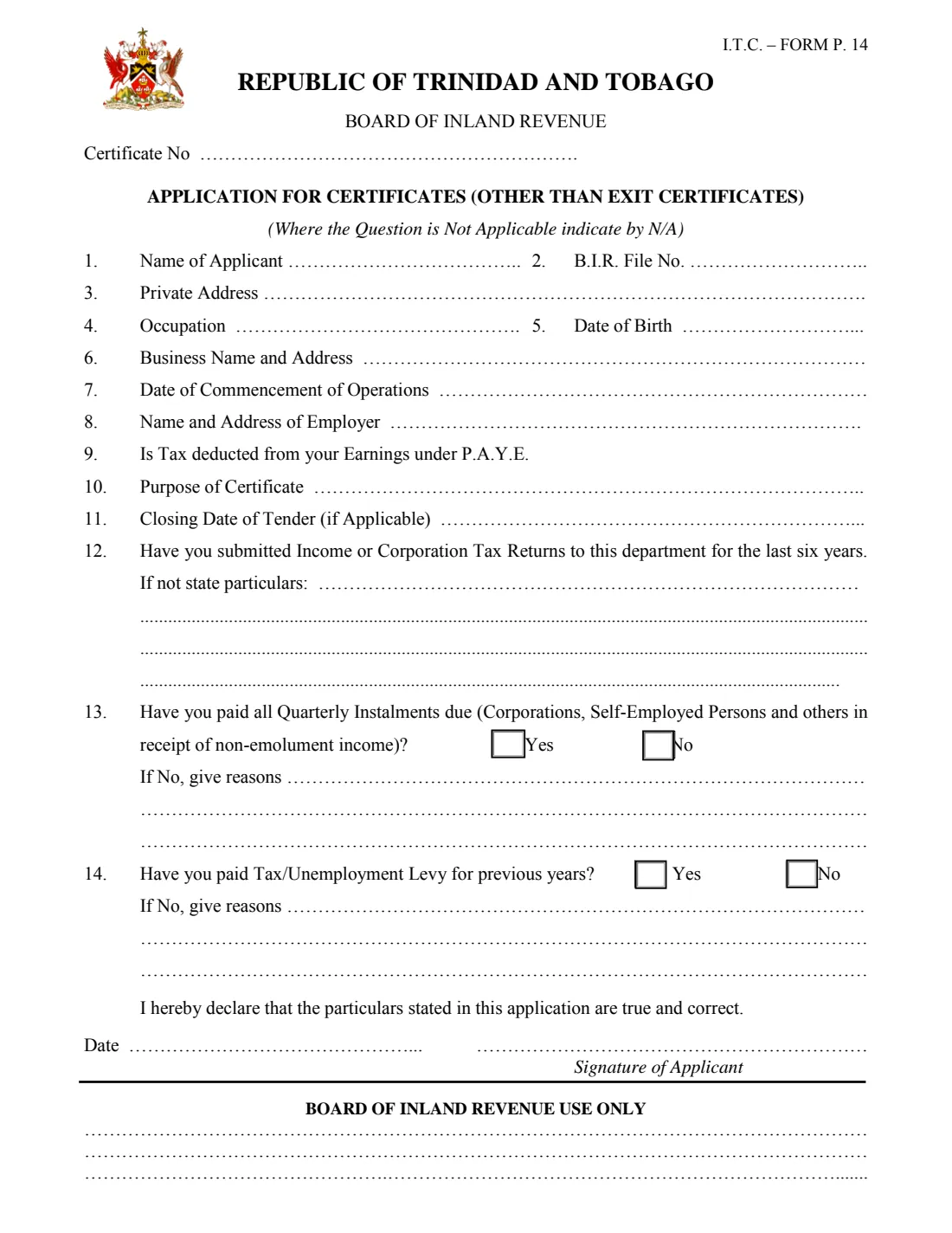
What is Form P.14 certificate application?
I.T.C. Form P.14 is the application Trinidad and Tobago's Board of Inland Revenue uses for certificates about a taxpayer's position — for example the tax clearance a business needs for a government tender, a licence or a permit. Exit certificates have their own form; this one covers the others.
The form asks fourteen short questions: who you are and your B.I.R. file number, your address, occupation and date of birth, your business and employer, whether tax is deducted from your pay under P.A.Y.E., what the certificate is for, any tender closing date, and whether your returns, quarterly instalments and tax or unemployment levy are up to date.
FileIt asks each question, opens the follow-up lines only when you answer No, and prints your answers into the Inland Revenue Division's own P.14 PDF. You sign it and hand it in.
- Who fills it
- An individual or business asking the Board of Inland Revenue for a certificate
- Given to
- The Inland Revenue Division (Board of Inland Revenue)
- Typical use
- Tax clearance for a tender, licence, permit or other purpose
- Signatures
- The applicant signs and dates the declaration
- Pages
- 1
- Not for
- Exit certificates, which have a separate form
Who needs to fill out Form P.14 certificate application?
- Businesses bidding for a government or state-agency tender that asks for a tax clearance certificate.
- Self-employed people and companies renewing a licence or permit that needs proof their taxes are in order.
- Individuals asked by a bank, employer or agency for a certificate from the Board of Inland Revenue.
When to use Form P.14 certificate application
- Before a tender closes, leaving time for the Board to check your record (the form asks for the closing date).
- When a licence, permit or contract renewal asks for a current certificate.
- Whenever an organisation asks for evidence of your tax position from the Board of Inland Revenue.
What you need before you start
- Your name (or the business's name) and B.I.R. file number.
- Your private address, occupation and date of birth.
- Your business name and address and the date it started operating, if you run one.
- Your employer's name and address, if you are employed.
- The purpose of the certificate and, for a tender, the closing date.
- Details of any years for which returns were not filed, and any quarterly instalments or levy not paid, with the reasons.
What’s on Form P.14 certificate application
The 2015 edition has 1 page. FileIt asks for it in 4 parts, and it is signed by Applicant:
- 1–8. About youApplicant
- 10–11. The certificateApplicant
- 12–14. Your tax recordApplicant
- DeclarationApplicant
How to fill out Form P.14 certificate application, step by step
1 Questions 1–8: about you
Give your name, B.I.R. file number, private address, occupation and date of birth, then your business name and address, the date the business began operating and your employer's name and address. The form says to write N/A where a question does not apply; FileIt leaves those lines blank so you can add N/A by hand if the office asks.
2 Question 9: P.A.Y.E.
Say whether tax is deducted from your earnings under Pay As You Earn. FileIt prints Yes or No on the line, and nothing if you leave it unanswered.
3 Questions 10–11: the certificate
Describe what the certificate is for, such as a tender, and give the tender's closing date if there is one.
4 Questions 12–14: your tax record
Question 12 asks whether you have submitted income or corporation tax returns for the last six years; if not, you state particulars on up to four lines. Questions 13 and 14 ask whether all quarterly instalments are paid and whether tax or unemployment levy for previous years is paid, with reasons if not.
FileIt ticks the form's own Yes/No boxes for 13 and 14.
5 Declaration
You declare that the particulars are true and correct, then date the form and sign above 'Signature of Applicant'. FileIt prints the date as dd/mm/yyyy.
Common mistakes to avoid
- Using Form P.14 for an exit certificate, which has its own form.
- Leaving the reasons lines empty after answering No to questions 12, 13 or 14.
- Applying close to a tender's closing date without giving the date on the form.
- Leaving out the B.I.R. file number when you have one, which makes your record harder to find.
- Forgetting to sign the declaration.
After you fill it out
Print the filled form from your FileIt vault, check it and sign above 'Signature of Applicant'.
Hand it in to the Inland Revenue Division with anything the office asks for. FileIt does not submit forms on your behalf.
Keep the PDF in your vault, so next time you need a certificate most of the answers are already there.
Fill out Form P.14 certificate application online with FileIt
- Pick the person. Choose someone from People and FileIt fills in their name, date of birth, address and other details it already knows.
- Answer plain-language questions. One part of the form at a time, with the official help text beside each question — 25 fields in all. Your answers save as you go.
- Check the live preview. Watch your answers land on the real Board of Inland Revenue (Inland Revenue Division, Ministry of Finance) form, and let FileIt do any worksheet arithmetic.
- Generate the official PDF. FileIt prints your answers into the agency’s own PDF and files it in that person’s folder in your vault. Sign it, or send it for e-signature.
FileIt fills the form — it never files or submits anything for you. Deliver the finished form to whoever asked for it, the way the form’s instructions say.
Start Form P.14 certificate application now — it’s freeForm P.14 certificate application: frequently asked questions
What is Form P.14 for?
It is the Board of Inland Revenue's application for certificates other than exit certificates, such as a tax clearance certificate for a tender or licence.
What should I write if a question doesn't apply?
The form asks for N/A. FileIt leaves unanswered lines blank, so write N/A by hand if the office asks you to.
Can I fill in Form P.14 online?
Yes. FileIt prints your answers into the official PDF and saves it in your vault. You sign it and hand it in yourself.
What if I haven't filed every return for the last six years?
Answer No to question 12 and give the particulars — which years and why — on the lines provided.
Does the form cover the unemployment levy?
Yes. Question 14 asks whether you have paid tax or unemployment levy for previous years, with reasons if not.
Official sources
- Blank form (PDF), published by Board of Inland Revenue (Inland Revenue Division, Ministry of Finance): https://www.ird.gov.tt/Media/Default/IRDForms/F-P14--.pdf
- Official instructions and guidance: https://www.ird.gov.tt/forms
- Edition shown on this page: I.T.C. Form P. 14 (no date printed; PDF dated April 2015) (checked 2026-10-19).
FileIt is not affiliated with or endorsed by Board of Inland Revenue (Inland Revenue Division, Ministry of Finance) or any government. This page explains the form in general terms and is not legal, tax or immigration advice. Always read the official instructions, and check that you are using the edition the recipient accepts. Page last reviewed 2026-10-19.