What is Form S (birth abroad)?
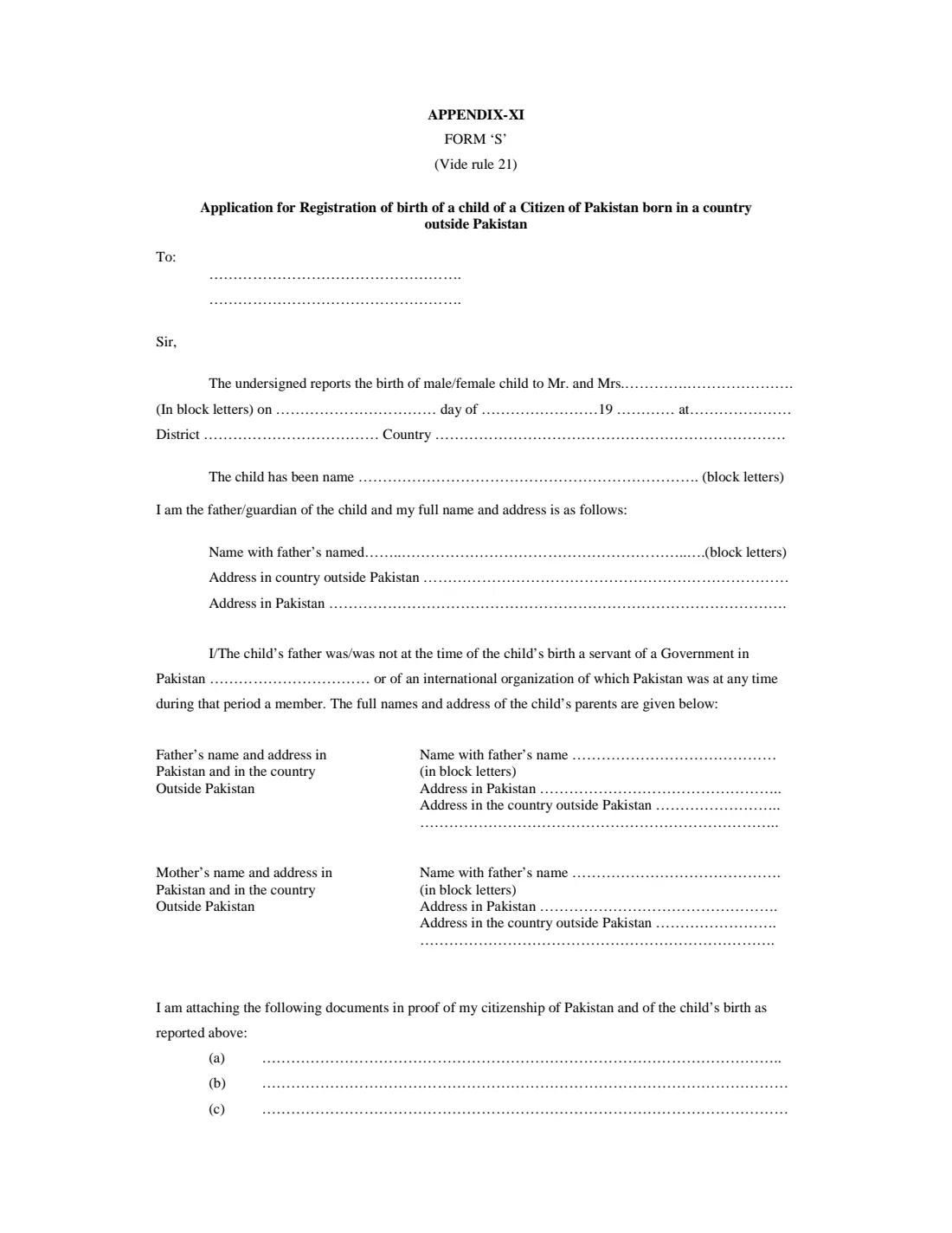
Form 'S' is Appendix XI to the Pakistan Citizenship Rules, 1952, made under rule 21. It is the application for registration of the birth of a child of a citizen of Pakistan born in a country outside Pakistan, and the Directorate General of Immigration & Passports (DGIP) publishes it on its downloads page. The father or guardian reports the birth to the Pakistan mission for the country where the child was born: the embassy, high commission or consulate.
The form is short but written as a formal letter. You fill in the blanks on dotted lines, write names in block letters, and cross out the words that don't apply: male/female, father/guardian, I/the child's father, and was/was not. It also still carries a pre-printed "19" for the year of birth, which needs crossing out for a child born in 2000 or later.
FileIt asks you plain questions and prints the answers onto the dotted lines of DGIP's own PDF. It writes the date the way the form words it ("on 5th day of March 2026"), builds each parent's "name with father's name" (S/O, D/O) and draws the strike-throughs for you. The child's name and date of birth can be pre-filled from the People records in your FileIt vault, and the finished PDF is saved in your vault. FileIt doesn't submit anything: you sign the form by hand and take it to the mission, which attests it.
- Who fills it
- The father, or a guardian, of a child born outside Pakistan to a Pakistani citizen
- Given to
- The Pakistan embassy, high commission or consulate for the country of birth
- When
- After the child's birth abroad, to have it registered
- Signatures
- Signed by hand by the father or guardian; attested by the mission's officer
- Legal basis
- Rule 21 and Appendix XI of the Pakistan Citizenship Rules, 1952
- Language
- English, names in block letters
Who needs to fill out Form S (birth abroad)?
- Pakistani fathers whose child was born outside Pakistan and who want the birth registered with the Pakistan mission.
- A guardian reporting the birth where the father can't (the form allows father or guardian).
- Families living abroad who need the child's birth on record with Pakistan, for example before applying for the child's Pakistani documents.
- Parents who hold another nationality too. The form has a paragraph for the other country's nationality certificate and passport.
When to use Form S (birth abroad)
- After a child is born abroad to a Pakistani citizen, once you have the local birth certificate.
- When the Pakistan mission asks for Form S as part of registering the birth. Check its own checklist, as missions set their procedures.
- Before applying for Pakistani documents for the child, if the mission needs the birth registered first.
What you need before you start
- The name and address of the mission you're writing to (for example, the consular officer at the Pakistan consulate in your city).
- The child's full name, sex, date of birth, and town, district and country of birth, from the local birth certificate.
- Both parents' names and their fathers' names, and their addresses in Pakistan and in the country where you live.
- Whether the child's father was working for a Government in Pakistan, or for an international organisation of which Pakistan was a member, at the time of the birth.
- Proof of your Pakistani citizenship and of the birth, for example the father's Pakistani passport or identity card and the child's birth certificate, to list under (a) to (c).
- If you are also a national of another country: its nationality certificate number and date, and your passport's number, date and place of issue.
What’s on Form S (birth abroad)
The 2026 edition has 2 pages. FileIt asks for it in 7 parts:
- Addressed to (the Pakistan mission)Father / guardian
- The child's birthFather / guardian
- The child's parentsFather / guardian
- The person reporting the birthFather / guardian
- Documents attachedFather / guardian
- Other nationality (if any)Father / guardian
- Affirmation and signatureFather / guardian
How to fill out Form S (birth abroad), step by step
1 To
Two lines for the officer and mission you're writing to, such as "The Consular Officer" and "Pakistan Consulate General, Manchester".
2 Report of the birth
The first paragraph reports the birth of a male or female child to "Mr. and Mrs." (the father's name), the date written as day, month and year, and the place, district and country of birth. The other of male/female is crossed out.
The form still shows "19" for the year. For a child born from 2000 onwards FileIt strikes through the 19 and writes the full year after it. The child's name follows, in block letters.
3 The person reporting the birth
You say whether you are the father or the guardian (the other word is crossed out), and give your name with your father's name and your addresses outside Pakistan and in Pakistan. When the father reports, FileIt repeats his details from the parents' section.
4 Government or international-organisation service
The form asks whether the child's father was, at the time of the birth, a servant of a Government in Pakistan or of an international organisation of which Pakistan was a member. The wrong option of "was/was not" is crossed out, as is "I" or "The child's father" depending on who is signing. If he was, name the government office or organisation on the dotted line.
5 The child's parents
For the father and the mother: the name with father's name (in block letters) and the addresses in Pakistan and in the country outside Pakistan. FileIt prints these as "NAME S/O FATHER'S NAME" for the father and "NAME D/O FATHER'S NAME" for the mother, and runs long entries onto the next line.
6 Documents attached
Three lines, (a) to (c), to list the documents that prove your Pakistani citizenship and the child's birth, such as the father's passport or identity card and the child's birth certificate. The mission's own checklist decides which documents it needs.
7 Other nationality
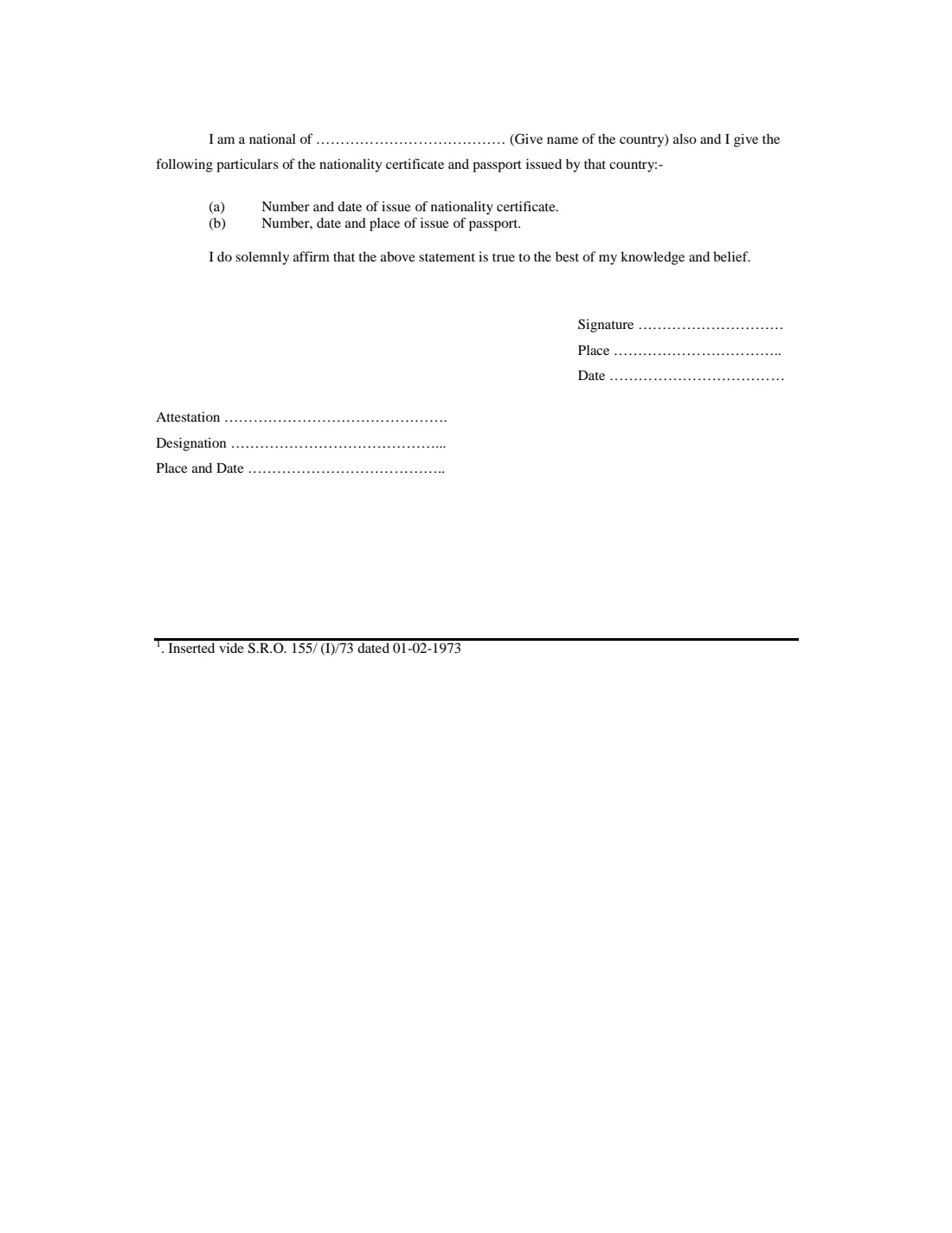
Only if you are also a national of another country. Give that country, then (a) the number and date of issue of the nationality certificate and (b) the number, date and place of issue of that country's passport. The form has no dotted line for these, so FileIt prints them after the printed words.
8 Affirmation, signature and attestation
You solemnly affirm that the statement is true, then sign by hand and give the place and date. The attestation, designation and place and date lines below are for the mission's officer, so leave them blank.
Common mistakes to avoid
- Forgetting to cross out the words that don't apply (male/female, father/guardian, was/was not). An unclear statement can hold up the registration.
- Writing "192026" by adding the full year after the printed 19. Strike through the 19 for births from 2000 on.
- Names in mixed case or different from the documents. The form asks for block letters, and the names should match the birth certificate and the parents' passports.
- Leaving out the mother's or father's address in the country where you live.
- Using Form S for a child born in Pakistan. It is only for a birth outside Pakistan.
- Signing before you reach the mission if it wants to see you sign. Check how the mission handles the attestation.
After you fill it out
Print the form, check the names and the crossed-out words, and sign by hand at "Signature". The place and date are already filled in by FileIt.
Take or send the form, with the documents listed under (a) to (c), to the Pakistan embassy, high commission or consulate for the country where the child was born, following that mission's instructions. Its officer completes the attestation. FileIt does not submit the form for you.
Keep the filled PDF in your FileIt vault in the child's folder, next to the birth certificate, so it's easy to find when you apply for the child's Pakistani documents.
Fill out Form S (birth abroad) online with FileIt
- Pick the person. Choose someone from People and FileIt fills in their name, date of birth, address and other details it already knows.
- Answer plain-language questions. One part of the form at a time, with the official help text beside each question — 56 fields in all. Your answers save as you go.
- Check the live preview. Watch your answers land on the real Directorate General of Immigration & Passports, Pakistan (DGIP), under the Pakistan Citizenship Rules, 1952 form, and let FileIt do any worksheet arithmetic.
- Generate the official PDF. FileIt prints your answers into the agency’s own PDF and files it in that person’s folder in your vault.
FileIt fills the form — it never files or submits anything for you. Deliver the finished form to whoever asked for it, the way the form’s instructions say.
Start Form S (birth abroad) now — it’s freeForm S (birth abroad): frequently asked questions
What is Form S for Pakistan?
Form 'S' (Appendix XI, rule 21 of the Pakistan Citizenship Rules, 1952) is the application for registration of the birth of a child of a Pakistani citizen born outside Pakistan. The father or guardian gives it to the Pakistan mission, which attests it.
Where do I submit Form S?
To the Pakistan embassy, high commission or consulate for the country where the child was born. Follow that mission's own instructions on documents and appointments. FileIt only prepares the form.
Who can sign Form S?
The child's father or guardian, as the form says ("I am the father/guardian of the child"). The mission's officer then attests the signature in the attestation block.
What do I do about the "19" in the year of birth?
The form was written when every year began with 19. For a child born in 2000 or later, strike through the 19 and write the full year. FileIt does this for you.
What documents do I attach?
The form asks for documents proving your Pakistani citizenship and the child's birth, listed under (a) to (c). Usually that means the parent's Pakistani passport or identity card and the child's local birth certificate, but the mission decides what it needs.
Can I fill out Form S online with FileIt?
Yes. FileIt asks plain questions, writes the answers onto the dotted lines of DGIP's PDF, builds the S/O and D/O names, and crosses out the words that don't apply. You then print it, sign by hand and take it to the mission.
Can I write the form in Urdu?
The form is in English, and FileIt prints answers in English (Latin letters) only. Write names in block capitals as they appear on your passports.
Can I e-sign Form S?
No. The signature is attested by the mission's officer, so the form is signed by hand, and FileIt doesn't offer e-signature for it.
Official sources
- Blank form (PDF), published by Directorate General of Immigration & Passports, Pakistan (DGIP), under the Pakistan Citizenship Rules, 1952: https://www.dgip.gov.pk/downloads/form_s.pdf
- Official instructions and guidance: https://www.dgip.gov.pk/immigration/downloads.php
- Edition shown on this page: Appendix-XI, Form 'S' (vide rule 21); no revision date printed (checked 2026-09-26).
FileIt is not affiliated with or endorsed by Directorate General of Immigration & Passports, Pakistan (DGIP), under the Pakistan Citizenship Rules, 1952 or any government. This page explains the form in general terms and is not legal, tax or immigration advice. Always read the official instructions, and check that you are using the edition the recipient accepts. Page last reviewed 2026-09-26.