What is TRN application (Form 1)?
Form 1, the Application for Taxpayer Registration (Individuals), is the Tax Administration Jamaica (TAJ) form for getting a Taxpayer Registration Number, or TRN. TAJ describes it as the form for any individual who needs to transact business with a Revenue Department, other government entities or financial institutions — in practice, the TRN is the number you're asked for when you start a job, open a bank account, register a vehicle, pay property tax or deal with most government services in Jamaica.
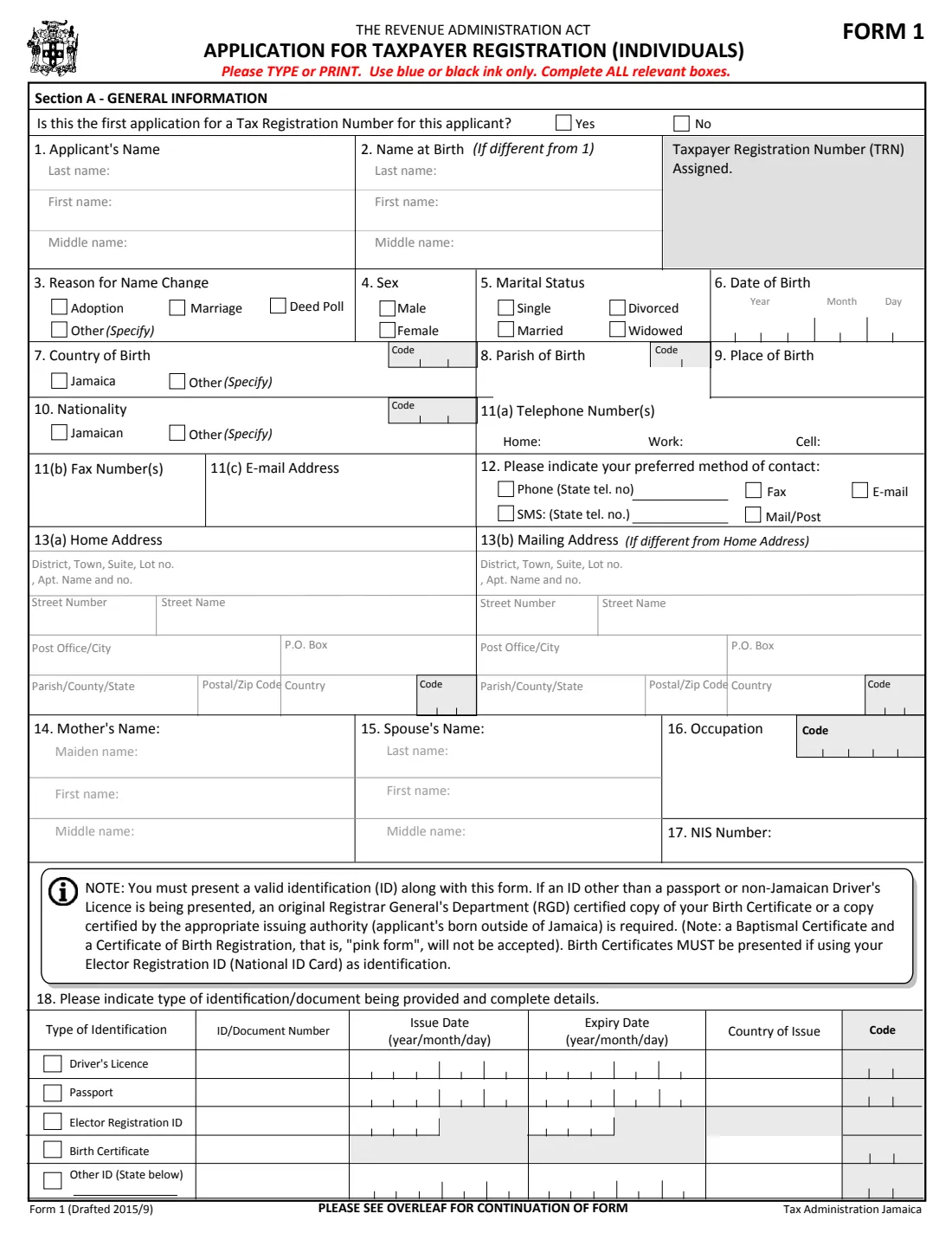
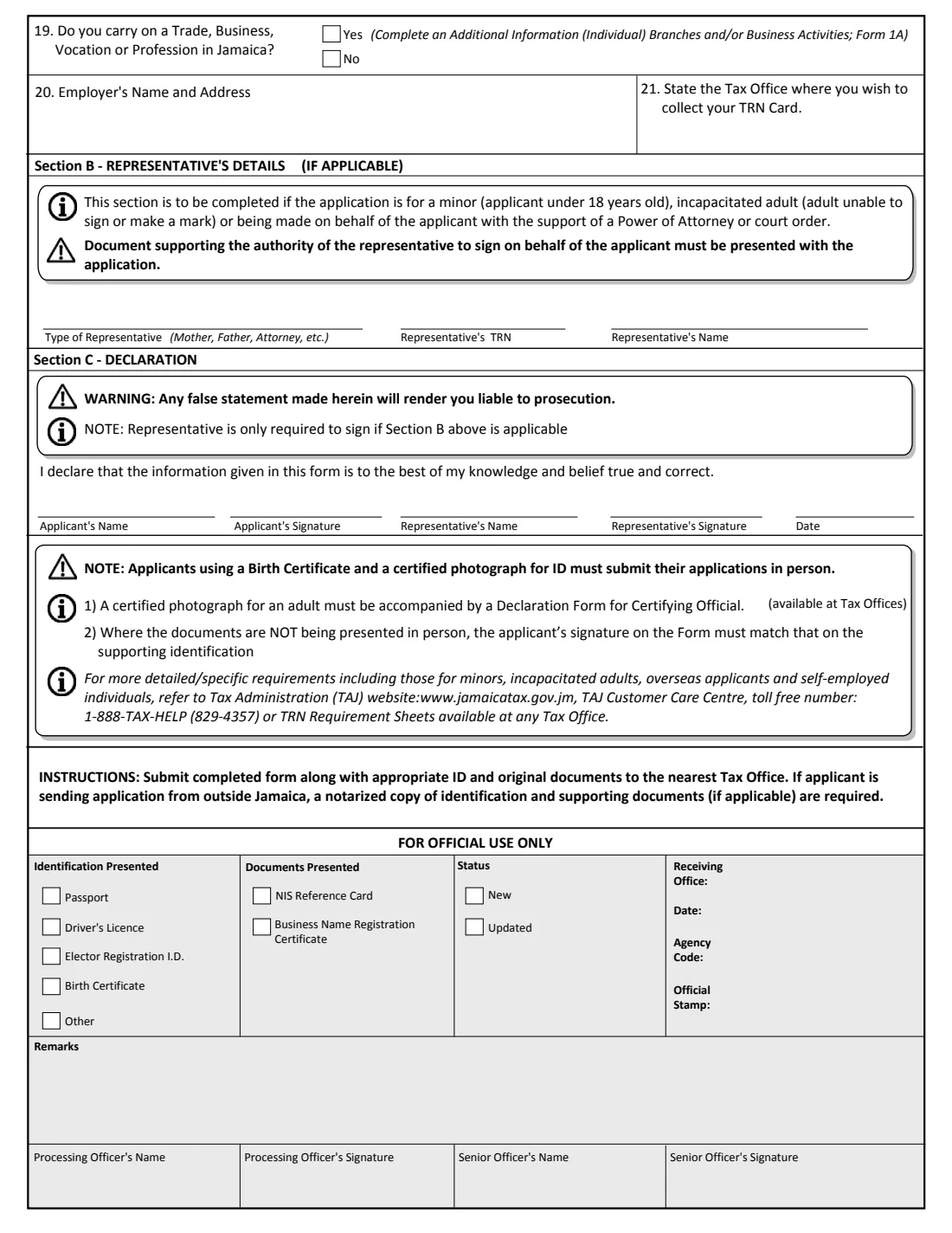
The form is two pages. Section A collects your name, name at birth, sex, marital status, date and place of birth, nationality, contact details, home and mailing addresses, your mother's and spouse's names, occupation, NIS number and the identification you'll present. It also asks whether you run a trade or business, who your employer is and which Tax Office you want to collect your TRN card from. Section B is for a representative applying on someone else's behalf, and Section C is the signed declaration.
FileIt turns Form 1 into plain-language questions and prints your answers into TAJ's own PDF (the edition marked 'Form 1 (Drafted 2015/9)'). Names and the date of birth can be pre-filled from the People records in your vault, dates go into the year-month-day boxes the form uses, and FileIt checks the form's own identification rules — for example that a birth certificate goes with an Elector Registration ID. The finished PDF is saved in that person's vault folder. FileIt never submits anything to TAJ: you print it, sign it by hand and take it to a Tax Office with your documents.
- Who fills it
- Any individual who needs a Jamaican TRN, or a parent, guardian or attorney on their behalf
- Given to
- Tax Administration Jamaica, at a Tax Office
- When
- Before you need a TRN — for a job, a bank account, a licence or other government business
- Signatures
- The applicant signs by hand in Section C; a representative signs too if Section B applies
- Edition
- Form 1 (Drafted 2015/9)
- Pages
- 2
Who needs to fill out TRN application (Form 1)?
- Jamaicans who have never had a TRN, such as young people starting their first job or opening their first bank account.
- Parents or guardians applying for a TRN for a child under 18, who complete Section B as the representative.
- An attorney or other representative applying for an adult under a power of attorney or court order, or for an incapacitated adult who can't sign or make a mark.
- Foreign nationals who will work, invest, bank or own property in Jamaica and need a TRN to do so.
- Jamaicans living overseas who need a TRN, for example to deal with property or accounts back home.
- Self-employed people and anyone who carries on a trade, business, vocation or profession in Jamaica (they also complete TAJ's Form 1A).
When to use TRN application (Form 1)
- As soon as an employer, bank, school, licensing office or government agency asks for your TRN and you don't have one.
- When a child needs a TRN of their own — the parent fills in the form as representative.
- Before starting a business or self-employment in Jamaica, together with the Form 1A business details.
- Only for a first TRN: the form asks whether this is the first application for this applicant. To change the details on an existing TRN, TAJ has a separate supplemental information form.
What you need before you start
- A valid identification document: a passport, driver's licence, Elector Registration ID (National ID card) or another official ID.
- An original Registrar General's Department (RGD) certified copy of your birth certificate if your ID is anything other than a passport or a non-Jamaican driver's licence — and always with an Elector Registration ID.
- The numbers, issue dates, expiry dates and country of issue of each ID you'll present.
- Your full name, any different name at birth, and the reason for the change (marriage, adoption, deed poll or other).
- Your date, parish and place of birth, and your nationality.
- Your home address and, if different, your mailing address (a P.O. Box, for example).
- Your mother's maiden, first and middle names, and your spouse's names if you're married.
- Your occupation, your NIS number if you have one, and your employer's name and address if employed.
- For a representative: their relationship to the applicant, their own TRN and the document that gives them authority to sign (such as a power of attorney or court order).
What’s on TRN application (Form 1)
The 2015 edition has 2 pages. FileIt asks for it in 10 parts:
- Section A — 1–3 Applicant's nameApplicant
- 4–10 Sex, marital status, birth and nationalityApplicant
- 11–12 Telephone, fax, e-mail and preferred contactApplicant
- 13(a) Home addressApplicant
- 13(b) Mailing address (if different from home address)Applicant
- 14–17 Mother, spouse, occupation and NIS numberApplicant
- 18 Identification being providedApplicant
- 19–21 Business, employer and TRN card collectionApplicant
- Section B — Representative's details (if applicable)Representative
- Section C — DeclarationApplicant
How to fill out TRN application (Form 1), step by step
1 First application question
The first line asks whether this is the first application for a Tax Registration Number for this applicant. Form 1 is meant for new registrations, so for most people the answer is Yes.
If you've had a TRN before and just need to update your name, address or other details, don't apply for a second number — ask TAJ about its supplemental information form instead.
2 1–3 Applicant's name, name at birth and reason for name change
Give your last, first and middle names exactly as they appear on your identification. Question 2 is only for people whose name at birth was different — most often a married woman giving her maiden name — and question 3 records why the name changed: adoption, marriage, deed poll or another reason you specify.
FileIt checks that a name at birth and a reason for the change go together, so the form doesn't reach the counter half-answered.
3 4–10 Sex, marital status, date, country, parish and place of birth, nationality
Tick your sex and marital status, then give your date of birth. The form prints dates as year, month and day in separate boxes; FileIt fills them in that order for you.
For question 7, tick Jamaica or name another country. If you were born in Jamaica, choose your parish of birth from the 14 parishes; question 9 is the town or district, as shown on your birth certificate. Question 10 is your nationality — Jamaican, or another you specify.
4 11–12 Telephone, fax, e-mail and preferred method of contact
List home, work and cell numbers, any fax numbers and your e-mail address. Question 12 asks how TAJ should contact you: phone, SMS, fax, e-mail or post. If you choose phone or SMS, give the number to use; if you choose e-mail or fax, make sure you've entered that address or number above.
5 13(a) Home address and 13(b) Mailing address
The home address is split into district/town/lot or apartment, street number, street name, post office or city, P.O. Box, parish (or county or state), postal or ZIP code and country. Many Jamaican addresses have no street number or postal code — leave those boxes empty rather than guessing.
Fill in the mailing address only if your post goes somewhere else, such as a P.O. Box.
6 14–17 Mother's name, spouse's name, occupation and NIS number
Question 14 wants your mother's maiden name with her first and middle names. Question 15 is your spouse's name, if you're married. Question 16 is your occupation — 'Student' or 'Retired' is fine — and question 17 is your National Insurance Scheme number if you have one, as printed on your NIS reference card.
7 18 Identification being provided
Tick each document you'll present — driver's licence, passport, Elector Registration ID, birth certificate or another ID — and give its number, issue date, expiry date and country of issue. The Elector Registration ID row only has room for the years.
The form's own note sets the rules: you must present a valid ID; with anything other than a passport or a non-Jamaican driver's licence you also need an RGD certified copy of your birth certificate (or one certified by the issuing authority if you were born abroad); and a birth certificate must always accompany an Elector Registration ID. A baptismal certificate or a Certificate of Birth Registration (the 'pink form') is not accepted.
8 19–21 Business activities, employer and TRN card collection
Question 19 asks whether you carry on a trade, business, vocation or profession in Jamaica. If you answer Yes, you also complete TAJ's Additional Information form for branches and business activities (Form 1A), which is a separate document.
Question 20 is your employer's name and address, if you're employed. Question 21 asks which Tax Office you'd like to collect your TRN card from — pick one from the list of revenue centres and tax offices printed in the form.
9 Section B — Representative's details (if applicable)
This section is only for an application made for a minor (under 18), for an incapacitated adult who can't sign or make a mark, or on someone's behalf under a power of attorney or court order. Give the type of representative (mother, father, attorney and so on), the representative's TRN and name.
The document that gives the representative authority to sign must be presented with the application.
10 Section C — Declaration
The applicant declares that the information is true and correct to the best of their knowledge and belief, and signs. The representative signs as well if Section B applies. FileIt prints the names and the date in the form's 'Month day, year' style; the signatures themselves are handwritten.
The form warns that any false statement makes you liable to prosecution, and that when documents are not presented in person, the signature on the form must match the one on your identification.
Common mistakes to avoid
- Bringing an Elector Registration ID without an RGD certified copy of your birth certificate — the form says a birth certificate must be presented with it.
- Bringing a baptismal certificate or a 'pink form' Certificate of Birth Registration; neither is accepted as a birth certificate.
- Presenting an expired ID. The form asks for a valid one, so check the expiry dates before you go.
- Writing dates day-first. The form's boxes run year, month, day.
- Leaving question 2 blank when your name has changed since birth, or filling it in without giving the reason in question 3.
- Applying for a new TRN when you already have one — Form 1 asks if this is the first application, and existing numbers are updated with a different form.
- For a child's application, forgetting Section B or the parent's own TRN.
- Signing a form you'll send from abroad with a signature that doesn't match your ID.
After you fill it out
Print the completed form, check every page, and sign Section C by hand. If a representative is applying, they sign in their space too. FileIt keeps a copy of the filled PDF in the applicant's vault folder so you have a record of exactly what you gave TAJ.
The form's instructions are to submit it with the appropriate ID and original documents at the nearest Tax Office. If you're applying from outside Jamaica, notarised copies of your identification and supporting documents are required. The form also notes that applicants using a birth certificate and a certified photograph as ID must apply in person, and that a certified photograph for an adult must come with a Declaration Form for Certifying Official, available at Tax Offices.
Your TRN card is collected from the Tax Office you chose in question 21. Store the TRN card, or a scan of it, in FileIt alongside the application so the number is easy to find the next time an employer or bank asks for it.
Fill out TRN application (Form 1) online with FileIt
- Pick the person. Choose someone from People and FileIt fills in their name, date of birth, address and other details it already knows.
- Answer plain-language questions. One part of the form at a time, with the official help text beside each question — 82 fields in all. Your answers save as you go.
- Check the live preview. Watch your answers land on the real Tax Administration Jamaica (TAJ) form, and let FileIt do any worksheet arithmetic.
- Generate the official PDF. FileIt prints your answers into the agency’s own PDF and files it in that person’s folder in your vault.
FileIt fills the form — it never files or submits anything for you. Deliver the finished form to whoever asked for it, the way the form’s instructions say.
Start TRN application (Form 1) now — it’s freeTRN application (Form 1): frequently asked questions
What is a TRN in Jamaica?
A Taxpayer Registration Number is the identification number Tax Administration Jamaica gives each taxpayer. TAJ's Form 1 page says it's needed by individuals who transact business with any Revenue Department, other government entities or financial institutions. Employers, banks and many government offices will ask for it.
Can I fill out the TRN application form online?
Yes, with FileIt you can answer the Form 1 questions online and get TAJ's official PDF back with your answers printed in. The form still has to be printed, signed by hand and handed in with your ID and documents — FileIt doesn't submit it to TAJ for you.
Where do I submit Form 1?
The form's instructions say to submit it, with the appropriate ID and original documents, to the nearest Tax Office. From outside Jamaica, notarised copies of the identification and supporting documents are required. Check TAJ's TRN page for the current requirements before you go.
What ID do I need to apply for a TRN?
You need a valid ID such as a passport, driver's licence or Elector Registration ID. If the ID is not a passport or a non-Jamaican driver's licence, you also need an RGD certified copy of your birth certificate, and a birth certificate is always required with the Elector Registration ID.
How do I get a TRN for my child?
Fill in Form 1 with the child's details, and complete Section B as the representative (for example, mother or father) with your own TRN and name. TAJ also publishes a voluntary declaration for minors and detailed requirement sheets, so check what else your Tax Office needs.
I changed my name after getting married. What do I put?
Put your current name in question 1, your name at birth (your maiden name) in question 2, and tick Marriage as the reason in question 3. Bring the documents that link the two names, such as your marriage certificate, if your ID and birth certificate show different names.
Do I need Form 1A as well?
Only if you answer Yes to question 19 — that you carry on a trade, business, vocation or profession in Jamaica. Form 1A collects your branches and business activities and is a separate TAJ form.
Can I sign Form 1 electronically?
No. The declaration in Section C is signed by hand, and the form is presented at a Tax Office with your original documents. If the documents aren't presented in person, the form says your signature must match the one on your ID.
Which Tax Office do I collect my TRN card from?
The one you choose in question 21. The form lists the revenue centres and tax offices you can pick, such as Constant Spring, Kings Street, Mandeville and Montego Bay.
Official sources
- Blank form (PDF), published by Tax Administration Jamaica (TAJ): https://www.jamaicatax.gov.jm/documents/10194/19475/trn_form1_01082016.pdf/a5a056c4-cc4b-4f51-83e2-2a4ee7faec1a
- Official instructions and guidance: https://www.jamaicatax.gov.jm/trn
- Edition shown on this page: Form 1 (Drafted 2015/9) (checked 2026-09-26).
FileIt is not affiliated with or endorsed by Tax Administration Jamaica (TAJ) or any government. This page explains the form in general terms and is not legal, tax or immigration advice. Always read the official instructions, and check that you are using the edition the recipient accepts. Page last reviewed 2026-09-26.