What is Personal allowance declaration for severe disability (személyi kedvezmény)?
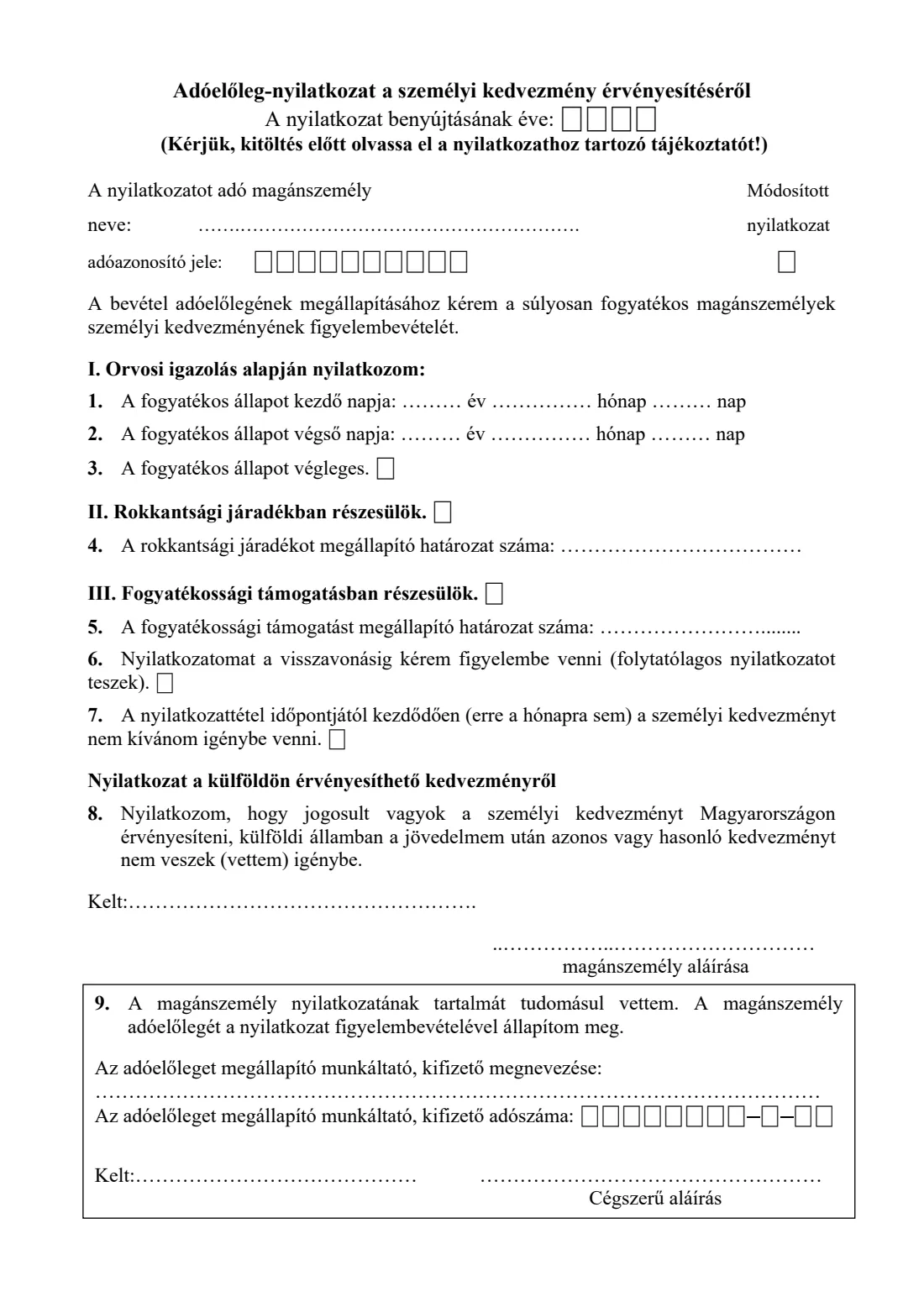
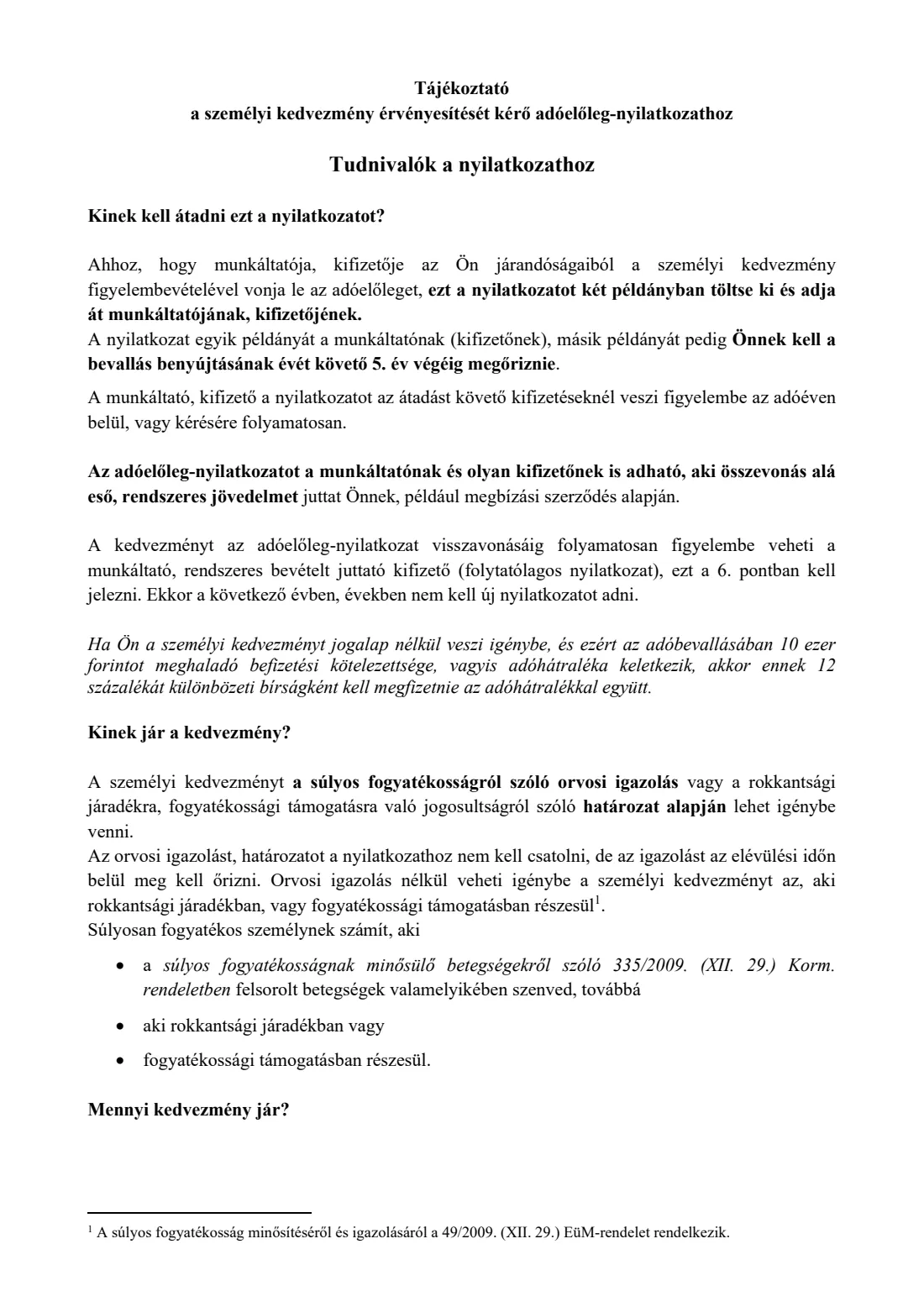
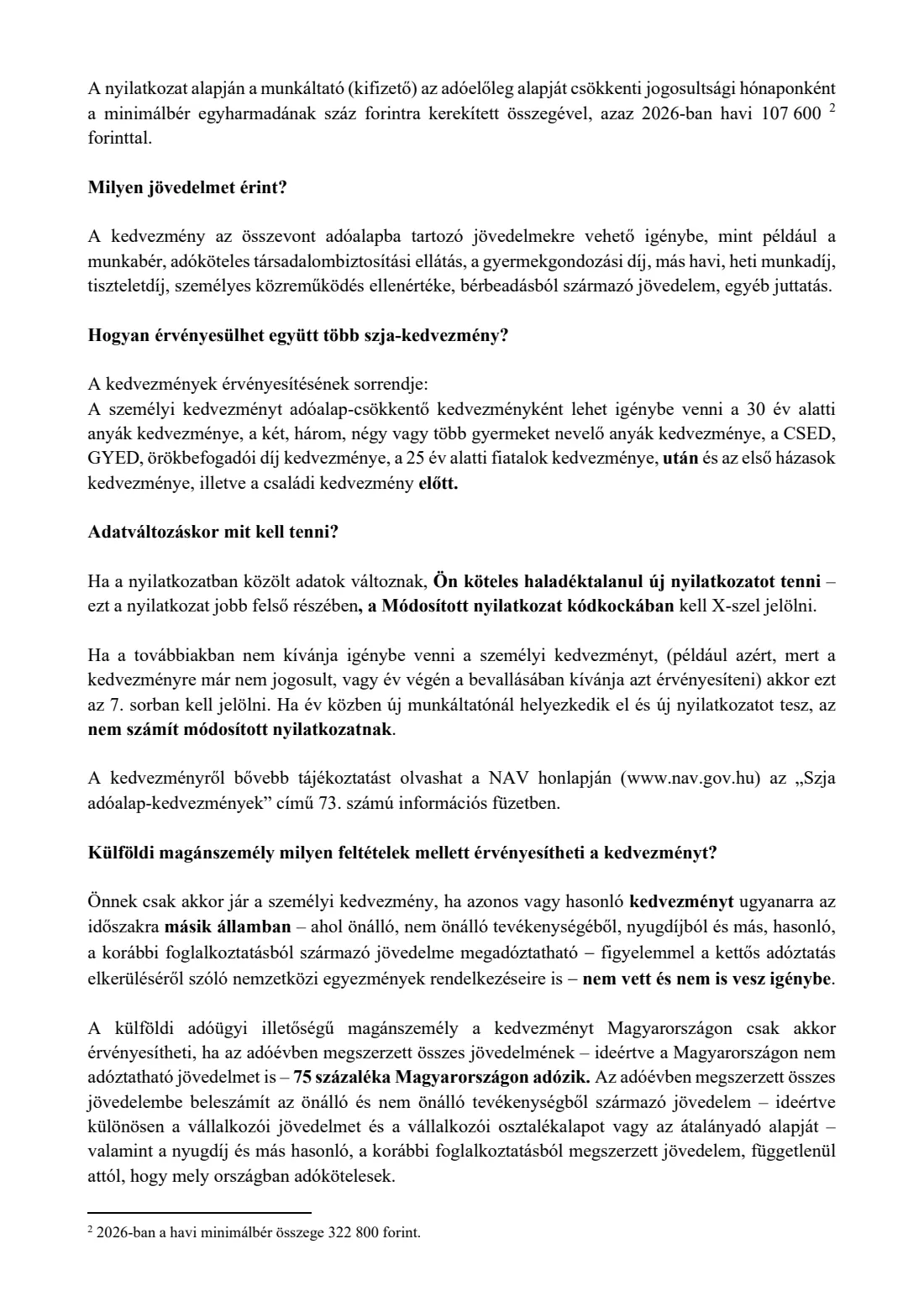
The Adóelőleg-nyilatkozat a személyi kedvezmény érvényesítéséről is a one-page declaration published by Hungary's National Tax and Customs Administration (Nemzeti Adó- és Vámhivatal, NAV). A person who counts as severely disabled hands it to their employer, or to a payer who pays them regular income such as under an agency contract, so that the personal allowance (személyi kedvezmény) is applied when the monthly personal income tax advance is worked out. According to NAV's 2026 guidance printed with the form, the allowance reduces the tax base by a third of the minimum wage for each month of entitlement: 107,600 forints a month in 2026.
The form asks for your name and tax identification number (adóazonosító jel), then the ground you claim on: a doctor's certificate with the first (and, if temporary, last) day of the disabled state, disability annuity (rokkantsági járadék), or disability support (fogyatékossági támogatás) with the number of the decision that granted it. You can ask for the declaration to stay in force until you withdraw it, or say that you no longer want the allowance. A short statement confirms you don't claim a similar allowance in another country, and your employer acknowledges the declaration at the bottom. It is a different form from the family allowance declaration (családi kedvezmény), which is about dependants rather than your own disability.
FileIt explains every point in English with the Hungarian terms alongside and prints your answers into NAV's own PDF: the tax number digit by digit in its boxes, your name family name first, and the dates on the printed year, month and day lines. Your name and date of birth can be pre-filled from the People records in your FileIt vault, and FileIt checks that your tax identification number's check digit and date-of-birth part are right. The finished PDF is saved in your vault and can be sent for e-signature. FileIt doesn't submit anything: you give the declaration to your employer yourself.
- Who fills it
- An employee (or someone paid regular income) who counts as severely disabled, receives disability annuity or receives disability support
- Given to
- Your employer or payer, in two copies. It does not go to NAV
- When
- When you want the allowance applied in payroll, and again whenever your declared details change
- Signatures
- You sign it; your employer or payer acknowledges it with the company's authorised signature
- Allowance in 2026
- 107,600 forints off the tax base for each month of entitlement (NAV's 2026 guidance)
- Pages
- 1 page of declaration plus 3 pages of NAV guidance
Who needs to fill out Personal allowance declaration for severe disability (személyi kedvezmény)?
- Employees in Hungary who suffer from one of the illnesses listed in Government Decree 335/2009 (XII. 29.) on severe disability and have a doctor's certificate to show it.
- People who receive disability annuity (rokkantsági járadék) — they can claim without a doctor's certificate.
- People who receive disability support (fogyatékossági támogatás) — they can also claim without a doctor's certificate.
- People paid regular income under an agency or similar contract, who can give the declaration to that payer instead of an employer.
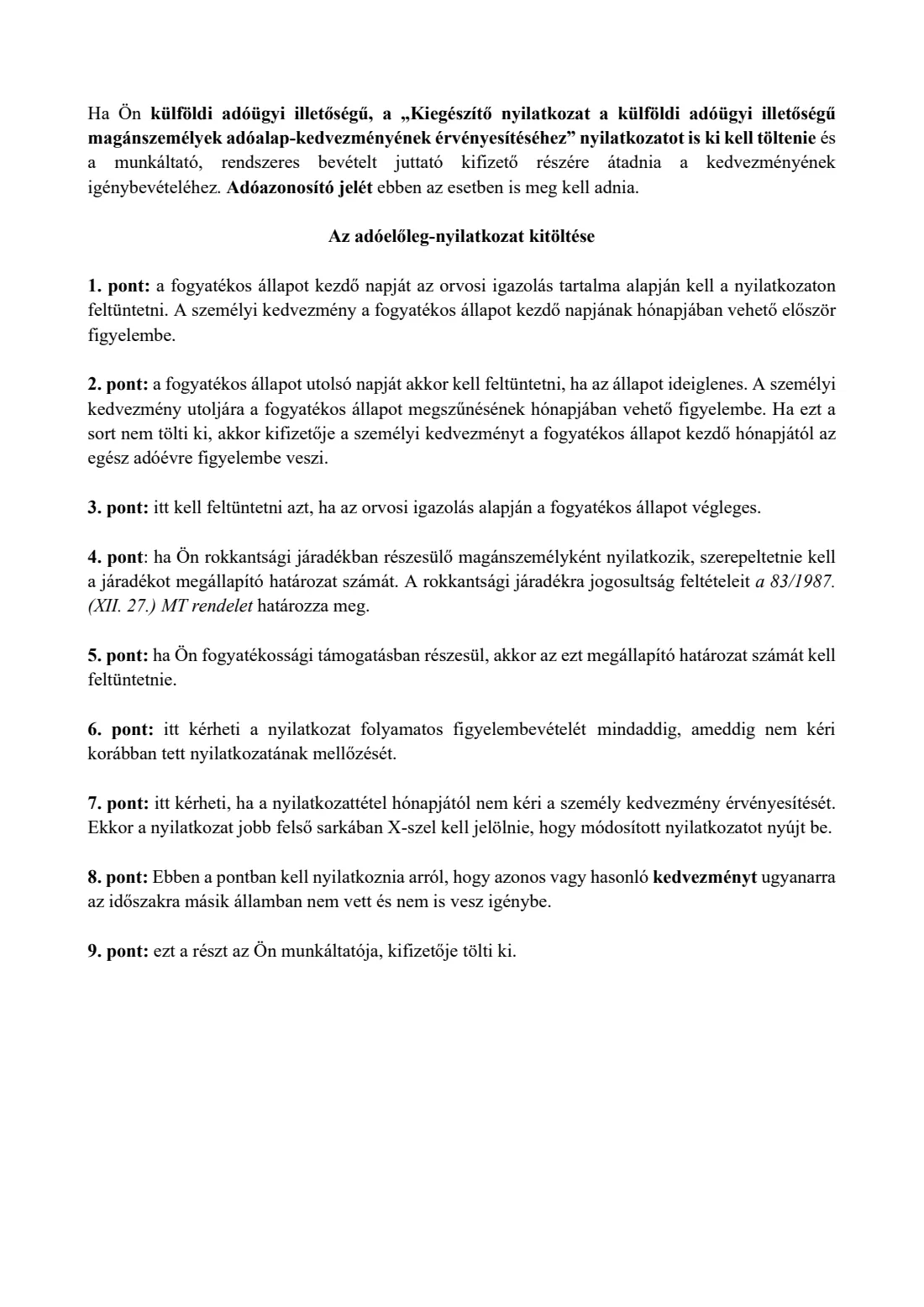
- Foreign tax residents working in Hungary, but only if at least 75 % of their total income for the year is taxed in Hungary; they also give NAV's supplementary declaration for foreign tax residents.
- Anyone who already gave this declaration and whose details have changed, or who wants to stop the allowance being applied.
When to use Personal allowance declaration for severe disability (személyi kedvezmény)
- When you start a job or a new payer relationship and want the personal allowance applied from your next payroll.
- When you first become entitled — the allowance can first be taken into account in the month the disabled state begins, according to the certificate.
- At the start of each tax year, unless you asked in point 6 for the declaration to stay in force until you withdraw it.
- Straight away when anything you declared changes: you then make an amending declaration (módosított nyilatkozat).
- When you no longer want the allowance in payroll — for example because you're no longer entitled, or you'd rather claim it in your annual tax return — using point 7.
What you need before you start
- Your 10-digit Hungarian tax identification number (adóazonosító jel), from your tax card.
- The doctor's certificate of severe disability, showing the first day and, if the state is temporary, the last day — you don't attach it, but you must keep it.
- Or the decision granting disability annuity, with its reference number.
- Or the decision granting disability support, with its reference number.
- The tax year the declaration is for.
- Your employer's or payer's name and 11-digit tax number (adószám), if they complete their part in FileIt.
- For a foreign tax resident: the information for NAV's supplementary declaration on the 75 % income condition.
What’s on Personal allowance declaration for severe disability (személyi kedvezmény)
The 2026 edition has 4 pages. FileIt asks for it in 5 parts, and it is signed by Employee and Employer:
- Your details (a nyilatkozatot adó magánszemély)Employee
- I.–III. Grounds for the allowanceEmployee
- 6.–8. Continuing, stopping and the foreign-allowance statementEmployee
- Signature (Kelt, aláírás)Employee
- 9. Employer's acknowledgement (munkáltató, kifizető)Employer
How to fill out Personal allowance declaration for severe disability (személyi kedvezmény), step by step
1 Heading: year and your details
Write the year the declaration is for in the four boxes at the top, then your name and your 10-digit tax identification number. The tax number always starts with 8 and encodes your date of birth, so FileIt asks for your date of birth only to check the two agree; it isn't printed.
Tick the 'Módosított nyilatkozat' box on the right when this declaration replaces one you already gave the same employer because something changed. A declaration to a new employer during the year is not an amending one.
2 I. On a doctor's certificate (Orvosi igazolás alapján)
Points 1 to 3 are for claims based on a doctor's certificate. Point 1 is the first day of the disabled state, taken from the certificate; the allowance can first be applied in that month. Point 2 is the last day, only if the state is temporary; the allowance is applied for the last time in the month it ends. If you leave point 2 blank, your payer applies the allowance from the starting month for the whole tax year.
Tick point 3 if the certificate says the disabled state is permanent. You don't attach the certificate, but you must keep it for as long as the tax authority can check the year.
3 II. Disability annuity (Rokkantsági járadék) — point 4
Tick part II if you receive disability annuity, and write the reference number of the decision that granted it in point 4. No doctor's certificate is needed in this case.
4 III. Disability support (Fogyatékossági támogatás) — point 5
Tick part III if you receive disability support, and write the reference number of the decision that granted it in point 5. Again, no doctor's certificate is needed. Choose the one ground that applies to you; FileIt asks you to pick between I, II and III.
5 6. Continuing declaration (folytatólagos nyilatkozat)
Tick point 6 if you want your payer to keep applying the allowance until you withdraw the declaration. You then don't need to give a new declaration next year or in later years, as long as nothing changes.
6 7. Stopping the allowance
Tick point 7 if, from the date of the declaration (not even for the current month), you no longer want the personal allowance applied. When you use point 7, also tick the amending declaration box at the top. FileIt won't let you tick both 6 and 7.
7 8. Statement on allowances abroad
Point 8 has no box: by signing, you state that you are entitled to the personal allowance in Hungary and that you don't (and didn't) claim the same or a similar allowance on your income in another country. A foreign tax resident can claim only if at least 75 % of all their income for the year is taxed in Hungary, and must also give the payer NAV's supplementary declaration for foreign tax residents.
8 Kelt and signature
Write the place and date after 'Kelt' and sign on the 'magánszemély aláírása' line. FileIt prints the date the Hungarian way, as year, month and day.
9 9. Employer's acknowledgement (munkáltató, kifizető)
The boxed part at the bottom is completed by your employer or payer: their name, their 11-digit tax number in the boxes, the place and date, and the company's authorised signature (cégszerű aláírás). By signing they confirm they have noted the declaration and will work out your tax advance with it.
Common mistakes to avoid
- Using this form for children or other dependants — that is the family allowance declaration (családi kedvezmény), a different NAV form.
- Writing a tax identification number with a typo: it has 10 digits and starts with 8, and FileIt checks its check digit and date of birth.
- Filling in point 2 when the certificate says the disabled state is permanent — tick point 3 instead.
- Forgetting the decision number when claiming on disability annuity or disability support.
- Not ticking the amending declaration box when using point 7 to stop the allowance.
- Not giving a new declaration straight away when your details change.
- Claiming the allowance as a foreign tax resident without meeting the 75 % condition or without the supplementary declaration.
- Throwing away the doctor's certificate — it isn't attached, but you must keep it.
After you fill it out
Print two copies, sign them (or send the PDF for e-signature if your employer accepts that) and give them to your employer or payer. They complete part 9, keep one copy and give the other back to you. The allowance is applied from the payments made after you hand the declaration over, within the tax year or continuously if you ticked point 6. FileIt does not send the declaration anywhere.
NAV's guidance says to keep your copy until the end of the fifth year after the year in which the tax return is filed. The signed PDF is stored in the person's folder in your FileIt vault. Keep the doctor's certificate or the decision alongside it.
If you claim the allowance without being entitled and this leads to more than 10,000 forints of tax to pay in your annual return, NAV's guidance says a 12 % penalty is due on that shortfall. Give a new declaration as soon as anything changes.
Fill out Personal allowance declaration for severe disability (személyi kedvezmény) online with FileIt
- Pick the person. Choose someone from People and FileIt fills in their name, date of birth, address and other details it already knows.
- Answer plain-language questions. One part of the form at a time, with the official help text beside each question — 23 fields in all. Your answers save as you go.
- Check the live preview. Watch your answers land on the real Nemzeti Adó- és Vámhivatal (NAV), Hungary's National Tax and Customs Administration form, and let FileIt do any worksheet arithmetic.
- Generate the official PDF. FileIt prints your answers into the agency’s own PDF and files it in that person’s folder in your vault. Sign it, or send it for e-signature.
FileIt fills the form — it never files or submits anything for you. Deliver the finished form to whoever asked for it, the way the form’s instructions say.
Start Personal allowance declaration for severe disability (személyi kedvezmény) now — it’s freePersonal allowance declaration for severe disability (személyi kedvezmény): frequently asked questions
What is the személyi kedvezmény?
It is Hungary's personal allowance for people who count as severely disabled. It reduces the tax base of income such as wages, and according to NAV's 2026 guidance it is 107,600 forints for each month of entitlement in 2026 (a third of the minimum wage, rounded to hundreds).
Who counts as severely disabled for this allowance?
Someone with one of the illnesses listed in Government Decree 335/2009 (XII. 29.), shown by a doctor's certificate, or someone who receives disability annuity or disability support. With the annuity or the support, no doctor's certificate is needed.
Do I have to attach the doctor's certificate?
No. You don't attach the certificate or the decision to the declaration, but you must keep the certificate so it can be checked later.
Where do I send the declaration?
To your employer or to the payer who pays you regular income, in two copies. It does not go to NAV. Your employer uses it for the monthly tax advance.
Do I need a new declaration every year?
Not if you tick point 6, which asks your payer to apply it until you withdraw it. Otherwise give a new one for each tax year, and always give an amending declaration when your details change.
Can I fill in the személyi kedvezmény form online in English?
Yes. FileIt explains each point in English, checks your tax number and dates, and prints your answers into NAV's official Hungarian PDF. It's free, and the finished form is saved in your vault. You still give the form to your employer yourself.
Can I claim the allowance in my tax return instead?
NAV's guidance mentions that you may prefer to claim it in your annual return; in that case you can use point 7 to stop your employer applying it during the year.
How is this different from the családi kedvezmény declaration?
The családi kedvezmény (family allowance) declaration is about your dependants. The személyi kedvezmény is about your own severe disability. You can give both to your employer if both apply; the personal allowance is applied before the family allowance.
Official sources
- Blank form (PDF), published by Nemzeti Adó- és Vámhivatal (NAV), Hungary's National Tax and Customs Administration: https://nav.gov.hu/pfile/file?path=%2Fado%2Fszja%2Fadoeloleg-nyilatkozatok%2F2026%2FSzemelyi_kedvezmeny.pdf1
- Official instructions and guidance: https://nav.gov.hu/ado/szja/adoeloleg-nyilatkozatok/2026
- Edition shown on this page: NAV 2026 (Személyi kedvezmény_2026.01.01) (checked 2026-09-26).
FileIt is not affiliated with or endorsed by Nemzeti Adó- és Vámhivatal (NAV), Hungary's National Tax and Customs Administration or any government. This page explains the form in general terms and is not legal, tax or immigration advice. Always read the official instructions, and check that you are using the edition the recipient accepts. Page last reviewed 2026-09-26.